I know this is probably not a Terminix issue per se, but I'm trying to have a nice powerline prompt (like the screenshots here for instance), and it's driving me crazy.
I use Debian Stretch, with Gnome 3.22. Adding:
if [ -f `which powerline-daemon` ]; then
  powerline-daemon -q
  POWERLINE_BASH_CONTINUATION=1
  POWERLINE_BASH_SELECT=1
  . /usr/share/powerline/bindings/bash/powerline.sh
fi
in /etc/bash.bashrc gives me the powerline as expected for Gnome Terminal, but I just can't make it work for Terminix. I tried to follow the instructions about the VTE Configuration Issue, with no success... What am I missing?
Any help would be greatly appreciated! :)
 basille
All 8 comments
This is what I have in my .bashrc to use powerline on Arch with terminix which is pretty much identical to yours. What happens if you comment out the if statement?
#Powerline
powerline-daemon -q
POWERLINE_BASH_CONTINUATION=1
POWERLINE_BASH_SELECT=1
. /usr/lib/python3.5/site-packages/powerline/bindings/bash/powerline.sh
Also, to fix the VTE configuration I source vte.sh in .bashrc rather then use a login shell and I have this before the powerline lines above:
# Fix VTE Configuration Issue
. /etc/profile.d/vte.sh
 gnunn1
on 23 Dec 2016
gnunn1
on 23 Dec 2016
Thanks for your answer! No luck with that... I tried most combinations with or without ifs, with or without the VTE fix (including the custom_prompt function), and in /etc/bash.bashrc or ~/.bashrc.
While it works beautifully in Gnome Terminal, I can't have it to work for Terminix.
And the problem is really that I don't even know where to start to debug it! I feel completely in the dark...
basille
on 23 Dec 2016
Ooooh, problem fixed! The VTE config is either sourcing VTE or using a login shell! Not both at the same time! So to conclude on it, I have it working (for both Terminix and Gnome Terminal actually) with just that in my /etc/bash.bashrc (or ~/.bashrc):
# For Terminix and Powerline
if [[ $TERMINIX_ID ]]; then
        . /etc/profile.d/vte.sh
fi
if [ -f `which powerline-daemon` ]; then
        powerline-daemon -q
        POWERLINE_BASH_CONTINUATION=1
        POWERLINE_BASH_SELECT=1
        . /usr/share/powerline/bindings/bash/powerline.sh
fi
And NOT use a login shell in the Profile options... Maybe this could be clarified in the VTE Config page.
Thanks a lot, I now have a beautiful Terminix, which makes me very happy :)
basille
on 23 Dec 2016
Glad you got it fixed, I've updated the pages to better show that there is one of two options.
gnunn1
on 23 Dec 2016
I'm reopening this issue as I can't get it right with the update to Debian Buster (testing). Things are working fine with Gnome-Terminal, but not quite for Tilix:
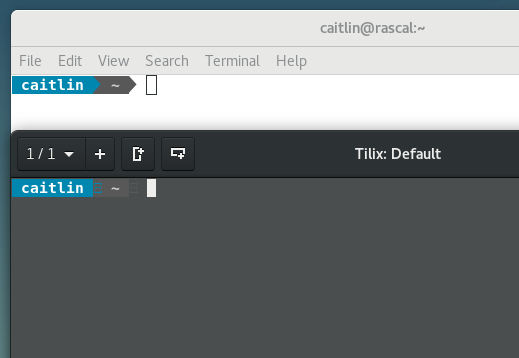
Additional information:
- Tilix version:
$ apt policy tilix
tilix:
  Installed: 1.6.4-2
  Candidate: 1.6.4-2
  Version table:
 *** 1.6.4-2 http://ftp.us.debian.org/debian buster/main amd64 Packages
~/.bashrcconfiguration
if [ $TILIX_ID ] || [ $VTE_VERSION ]; then
        source /etc/profile.d/vte.sh
fi
if [ -f `which powerline-daemon` ]; then
        powerline-daemon -q
        POWERLINE_BASH_CONTINUATION=1
        POWERLINE_BASH_SELECT=1
        . /usr/share/powerline/bindings/bash/powerline.sh
fi
- Powerline and associated packages:
$ apt search powerline
fonts-powerline/testing,now 2.6-1 all [installed,automatic]
  powerline symbols font

powerline/testing,now 2.6-1 amd64 [installed]
  prompt and statusline utility

python-powerline/testing,now 2.6-1 all [installed,automatic]
  powerline python2 library

python3-powerline/testing,now 2.6-1 all [installed,automatic]
  powerline python3 library
Any idea?
basille
on 20 Oct 2017
Does it make any difference if you disable the overlay scrollbar in Preferences | Appearance?
gnunn1
on 20 Oct 2017
It actually does! Thanks for the super fast answer, problem solved.
Weird though, I can revert to using (enabling) the overlay scrollbars, and it still works… Not sure what's happening here.
basille
on 21 Oct 2017
Closing issue as some improvements to overlay scrollbar handling were done. While that doesn't mean this is fixed, I'm going to chalk this up as one of those things. Feel free to re-open if problem happens again.
gnunn1
on 30 Oct 2017
Related issues
 roadhoghook
·
4Comments
roadhoghook
·
4Comments
 gregflynn
·
4Comments
gregflynn
·
4Comments
 milisarge
·
3Comments
milisarge
·
3Comments
 huti26
·
3Comments
huti26
·
3Comments
 iax7
·
4Comments
iax7
·
4Comments
Most helpful comment
Ooooh, problem fixed! The VTE config is either sourcing VTE or using a login shell! Not both at the same time! So to conclude on it, I have it working (for both Terminix and Gnome Terminal actually) with just that in my
/etc/bash.bashrc(or~/.bashrc):And NOT use a login shell in the Profile options... Maybe this could be clarified in the VTE Config page.
Thanks a lot, I now have a beautiful Terminix, which makes me very happy :)