Three.js: GLTFLoader onProgress total is always 0
When I load a model using the GLTFLoader, when I try to calculate the progress % in the onProgress function, the "total" value of the ProgressEvent is always 0. I tried with different models and I always get the same result.
Here my onProgress function:
function (xhr) {
        console.log((xhr.loaded / xhr.total * 100) + '% loaded');
      }
xhr.total is always 0 so the result is always "Infinity% loaded". I saw the same thing on many examples online.
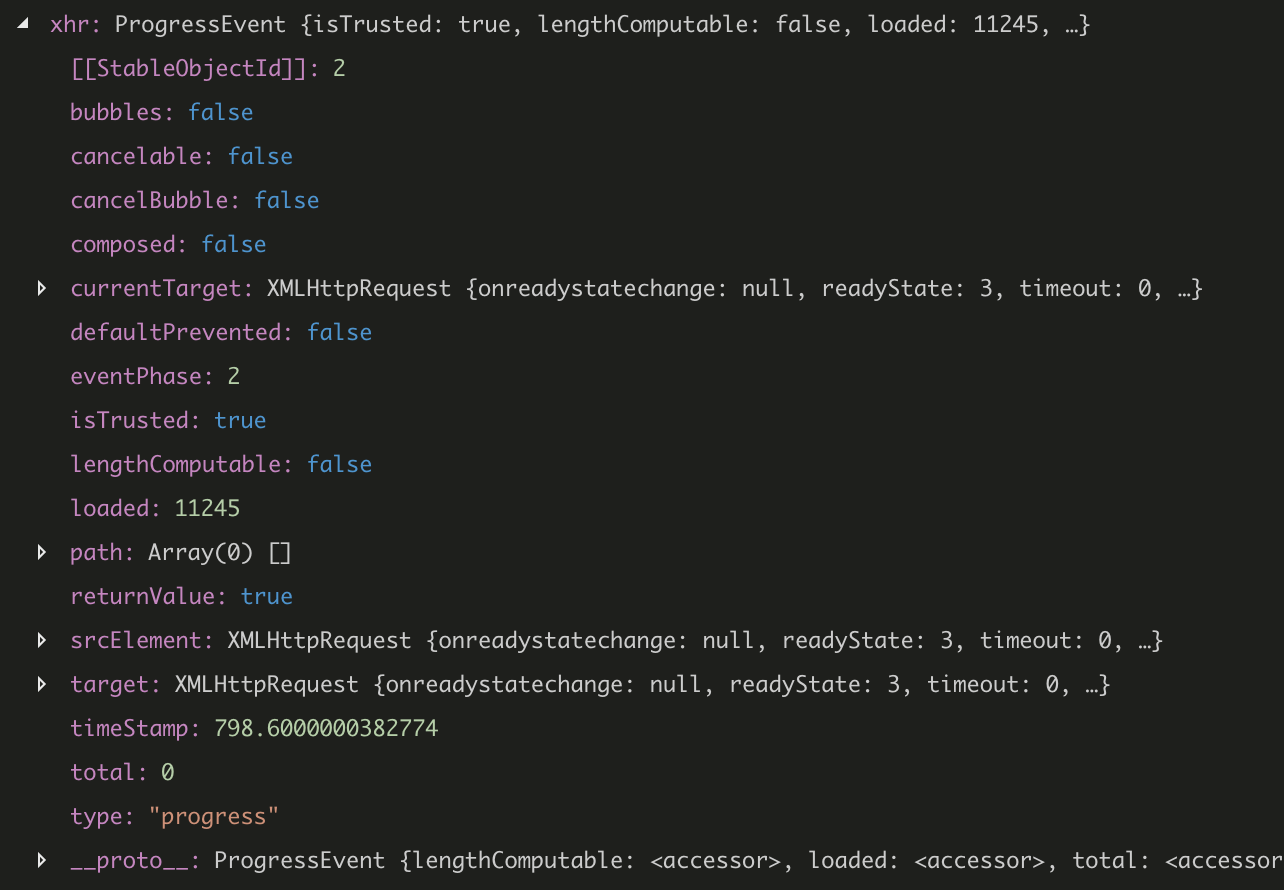
Attached you can also find a screen of the ProgressEvent debugged.
Three.js version
- [ ] Dev
- [X] r100
- [ ] ...
Browser
- [x] All of them
- [ ] Chrome
- [ ] Firefox
- [ ] Internet Explorer
OS
- [ ] All of them
- [ ] Windows
- [X] macOS
- [ ] Linux
- [ ] Android
- [ ] iOS
Hardware Requirements (graphics card, VR Device, ...)
 santacrab
All 11 comments
In general, using the onProgress callback of THREE.LoadingManager makes more sense when loading a .gltf file, see #13895
xhr.total is always 0
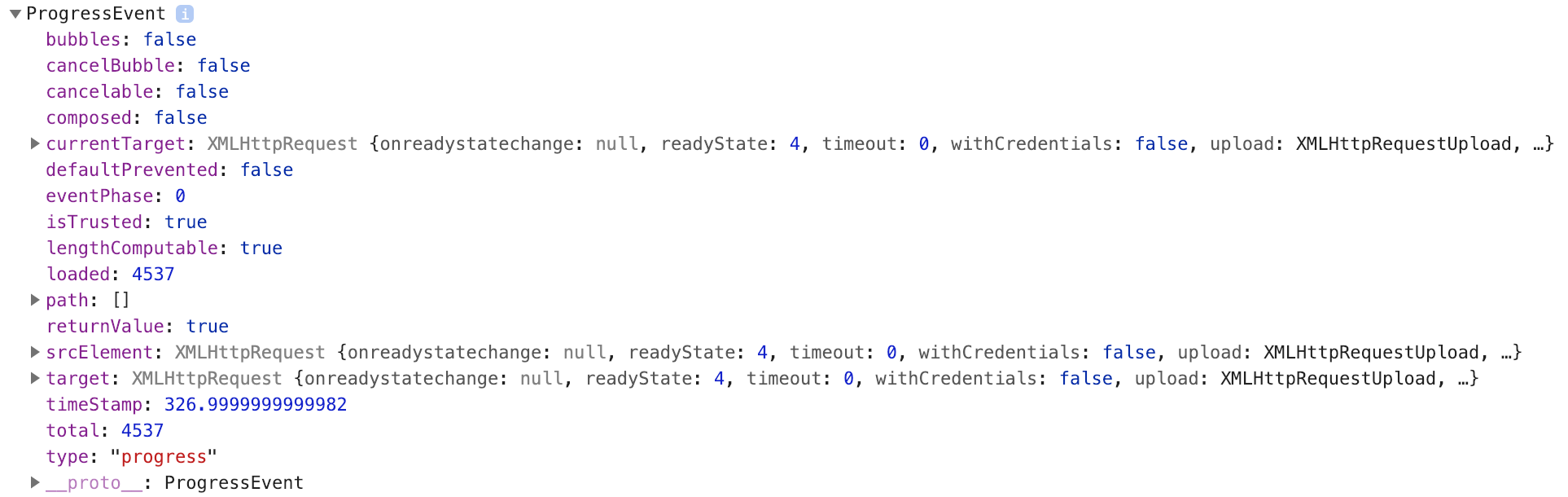
I can't reproduce this. It's always the size of the JSON manifest file when testing locally (via npm start inside the three.js repo):
 Mugen87
on 15 Jan 2019
Mugen87
on 15 Jan 2019
From the issue, I can't tell if the OP is loading multiple files. If there's only one file, progress events aren't much help...
@santacrab note that onProgress callbacks for all loaders track the number of network requests completed vs the number of network requests made. They don't provide smooth incremental progress while a single file is parsed, for example. Are you loading multiple files?
However, I don't know why .total should ever be less than .loaded ... could you share a demo?
 donmccurdy
on 15 Jan 2019
donmccurdy
on 15 Jan 2019
note that onProgress callbacks for all loaders track the number of network requests completed vs the number of network requests made.
I don't think this is true. In the following example onProgress() actually tracks how much of the OBJ file is already downloaded.
https://threejs.org/examples/webgl_loader_obj
LoadingManager.onProgress() tracks the number of files.
Mugen87
on 15 Jan 2019
Oh good point. GLTFLoader just passes the onProgress event into its FileLoader for the initial request, and not for additional resources... I can't think of a better way to handle that at the moment, but open to ideas. In general LoadingManager is probably more helpful, yes.
donmccurdy
on 15 Jan 2019
Come on Don ...
In the GLTF loader "onProgress" tracks how much of the GLB/GLTF file is already downloaded.
Example: http://necromanthus.com/Test/html5/Lara_gltf_envMap.html
 RemusMar
on 15 Jan 2019
RemusMar
on 15 Jan 2019
I can't think of a better way to handle that at the moment, but open to ideas. In general LoadingManager is probably more helpful, yes.
I think we already talked about this and agreed to refer to LoadingManager if users want to track the progress for a .glTF asset (sry, can't find the issue^^).
Mugen87
on 15 Jan 2019
@RemusMar my mistake in confusing the loading manager onprogress with the .load onProgress parameter.
If GLTFLoader is working inconsistently with other loaders that depend on external files, I'm fine with changing it, but I think the previous discussion had been resolved as @Mugen87 mentions.
donmccurdy
on 15 Jan 2019
The LoadingManager onProgress works as expected and I can track the total number of files loaded.
Still, I don't get how I always get that 0 value as total, in the onProgress of the GLTFLoader.load().
I'm loading different gltf files and for all of them, when I inspect the xhr ProgressEvent with the debugger, the total is always 0. I attach one of the models I try to load, if you want to try it out (zipped it to upload).
Sinius_Helfer.gltf.zip
santacrab
on 16 Jan 2019
I've tested with your file and this is my result:

I think the problem is that for some reasons, ProgressEvent.lengthComputable is false in your case. You can actually see this on your screenshot. Ensure your web server actually sets the Content-Length header. More information right here: https://stackoverflow.com/questions/11127654/why-is-progressevent-lengthcomputable-false
Closing since this is not a three.js issue.
Mugen87
on 16 Jan 2019
Thank you. I'll take a look at the web server configuration!
santacrab
on 16 Jan 2019
I made an attempt at implementing a proper onProgress with xhr (as number of files really isn't very helpful in most glTF cases, as file size can vary hugely between meshes and textures...) which might be of interest to some people.
See https://github.com/mrdoob/three.js/pull/16485#issuecomment-514977371
 silvainSayduck
on 25 Jul 2019
silvainSayduck
on 25 Jul 2019
Related issues
 clawconduce
·
3Comments
clawconduce
·
3Comments
 jlaquinte
·
3Comments
jlaquinte
·
3Comments
 akshaysrin
·
3Comments
akshaysrin
·
3Comments
 ghost
·
3Comments
ghost
·
3Comments
 jens-duttke
·
3Comments
jens-duttke
·
3Comments
Most helpful comment
I've tested with your file and this is my result:

I think the problem is that for some reasons, ProgressEvent.lengthComputable is
falsein your case. You can actually see this on your screenshot. Ensure your web server actually sets theContent-Lengthheader. More information right here: https://stackoverflow.com/questions/11127654/why-is-progressevent-lengthcomputable-falseClosing since this is not a
three.jsissue.