Thingsboard: How to find (widget) variable names?
Is there somewhere in the documentation, or at least a way I can grep the source code to find out which variables are available for widgets?
Example:
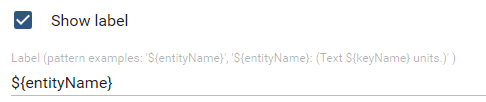
Here I can use _entityName_, but I tried others like _entityDescription_, _entityId_ and _entityType_ but these always resolve to empty string.
I found _aliasName_ at https://thingsboard.io/docs/user-guide/contribution/widgets-development/ which works, but _entityId_ which is listed in the same place resolves to empty string.
_latitude_ and _longitude_ also work, but no other telemetry values (I tried _Temp_, _snr_ and _rssi_, which all exist on my devices but they all return empty string)
Sorry if this is well documented already. I have searched the online documentation but I might be using the wrong keywords.
 mfalkvidd
All 16 comments
Those variables names are available only when they are configured in the widget data source. So if a device has an attribute 'customName' and it is NOT added in widget data source, then it will not be available in variable names.
 vparomskiy
on 6 Aug 2018
vparomskiy
on 6 Aug 2018
I see. Thanks for explaining! Just added the Temp telemetry value and it works.
How do I add the Device description as datasource? Is it an attribute? I tried adding _Description_ in the attribute field in the datasource settings, but it still returns empty string.
mfalkvidd
on 6 Aug 2018
@vparomskiy Is there an answer to mfalkvidd's last question? How do you call the $entityId from within the widget?
 sfergusonpoc
on 6 Nov 2018
sfergusonpoc
on 6 Nov 2018
There is no default description field in the Thignsboard. This field will have some value only in case when device or user create attribute or telemetry with this name (description). So I do not know the answer to mfalkvidd's last question
@sfergusonpoc please describe what you want to implement and I'll try to help.
vparomskiy
on 7 Nov 2018
@vparomskiy this is the description field I am trying to access:

mfalkvidd
on 7 Nov 2018
Sorry, forgot about this field.
It is only allowed to insert entityName, aliasName and dsName (datasource name) into widget title. Other references will not work by default.
You will need to create a custom widget for showing this info.
vparomskiy
on 7 Nov 2018
ok, thanks for explaining.
My use case: I want to display an user-friendly name for my device. The current device name is given by the Sigfox integration and is always the Sigfox id, which isn't very user friendly.
If the device name is edited, a new device with the "old" name will be auto-created next time the Thingsboard Gateway submits new data, which also ruins all telemetry history.
I thought the description field would be perfect since it is editable when editing the device.
mfalkvidd
on 7 Nov 2018
I can reccomend to create device attribute name and use it in widgets.
vparomskiy
on 7 Nov 2018
Thanks. Closing.
mfalkvidd
on 7 Nov 2018
The root cause of this problem might be https://github.com/thingsboard/thingsboard/issues/467 - adding reference.
mfalkvidd
on 14 Nov 2018
Hi @mfalkvidd,
I am having a similar issue #1737. I'm wondering whether you know how to use attributes in a timeseries widget?
 alexsmartens
on 22 May 2019
alexsmartens
on 22 May 2019
@alexsmartens sorry, I don't know. But I'll subscribe to your issue, I might need the same feature in the future.
mfalkvidd
on 22 May 2019
@mfalkvidd, as the next step to my issue
I'm looking how to subscribe to the telemetry data with the keys defined in my attribute (#1743). Have you had any experience with something like that by any chance?
alexsmartens
on 23 May 2019
Is there somewhere in the documentation, or at least a way I can grep the source code to find out which variables are available for widgets?
Example:
Here I can use _entityName_, but I tried others like _entityDescription_, _entityId_ and _entityType_ but these always resolve to empty string.
I found _aliasName_ at https://thingsboard.io/docs/user-guide/contribution/widgets-development/ which works, but _entityId_ which is listed in the same place resolves to empty string._latitude_ and _longitude_ also work, but no other telemetry values (I tried _Temp_, _snr_ and _rssi_, which all exist on my devices but they all return empty string)
Sorry if this is well documented already. I have searched the online documentation but I might be using the wrong keywords.
@mfalkvidd I can't find the "Show Label" in widgets. Where did you take that screenshot?
 rcalderon04
on 8 Apr 2020
rcalderon04
on 8 Apr 2020
@mfalkvidd I can't find the "Show Label" in widgets. Where did you take that screenshot?
Took me a while to find it, since it was more than 1.5 years ago, but I can see it on the _Advanced_ tab for the _Route Map - OpenStreetMap_ widget. Not sure if other widgets have the same setting.
mfalkvidd
on 9 Apr 2020
I don't know if this answer your question but you may use this to put a more dynamic label for example on map widget that has a function for label, using ${} and ``:
var deviceType = dsData[dsIndex]['$datasource'].entity.type;
var deviceName = dsData[dsIndex]['$datasource'].entity.name;
return <span style="font-size:16px;">${deviceName} ${deviceType}</span>;
 pmmarquez
on 20 May 2020
pmmarquez
on 20 May 2020
Related issues
 MarsWarrior
·
13Comments
MarsWarrior
·
13Comments
 openedhardware
·
14Comments
openedhardware
·
14Comments
 fotis400
·
14Comments
fotis400
·
14Comments
 qwyinxiang
·
14Comments
qwyinxiang
·
14Comments
 gopirathnamt
·
21Comments
gopirathnamt
·
21Comments