Describe the bug
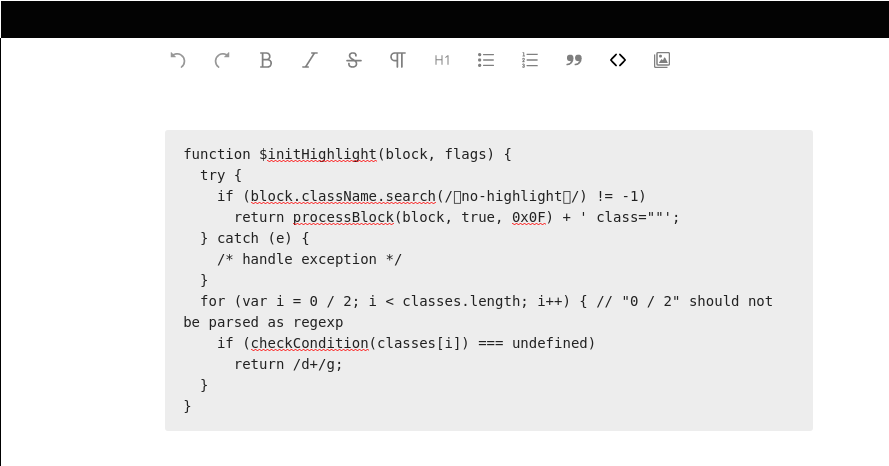
When pasting / writing code and applying the code style either via the code-button there is no syntax-highlighting of the code. Since highlight.js is included in tiptap, this should work.
To Reproduce
Steps to reproduce the behavior:
- Go to text editor
- write any code
- select code
- Click on "format as code" button
Expected behavior
code shoud be syntax-highlighted
Text app version: (see Nextcloud apps page)
1.0.2
Nextcloud version: (see Nextcloud admin page)
16.0.4 Using the official nextcloud docker
 Gmentsik
All 7 comments
This is currently not implemented because we need to have a way to load syntax highlighting rules dynamically. tiptap currently requires them to be loaded when setting up the editor: https://github.com/scrumpy/tiptap/blob/master/examples/Components/Routes/CodeHighlighting/index.vue#L18-L19
 juliushaertl
on 4 Oct 2019
juliushaertl
on 4 Oct 2019
I see, so this is not bug. Importing a lot of language would be a performance loss I guess? What about having a settings page where users may configure the languages they want to import?
I'm not sure if this belongs to the same topic but as you can see in the screenshot, there are line-breaks in the code-section. I'd prefer horizontal scrollbars instead because that's what most IDEs have as default setting and most devs are used to I guess.
I'm sure there are a lot of non-devs using this app, but having an option to switch between floating and fixed width (like eg. gitlab) would make working with code or tables also lot easier.
Gmentsik
on 4 Oct 2019
I see, so this is not bug. Importing a lot of language would be a performance loss I guess? What about having a settings page where users may configure the languages they want to import?
I don't think a setting for that should be needed. But I need to dig into the tiptap code first before I can tell if the automated loading I have in mind will be suitable.
I'm not sure if this belongs to the same topic but as you can see in the screenshot, there are line-breaks in the code-section. I'd prefer horizontal scrollbars instead because that's what most IDEs have as default setting and most devs are used to I guess.
Yes, I agree that a scrollbar would be nicer there. Could you open a separate issue for that?
juliushaertl
on 4 Oct 2019
I don't think a setting for that should be needed. But I need to dig into the tiptap code first before I can tell if the automated loading I have in mind will be suitable.
I just hope the rules won't be loaded from the internet (e.g. some CDN), so that code highlighting feature could still be used in Nextcloud deployments with limited access to the internet.
 ovk
on 21 Oct 2019
ovk
on 21 Oct 2019
No they are shipped with the release ;)
juliushaertl
on 22 Oct 2019
@juliushaertl anything news?
 niklasgrewe
on 9 Apr 2020
niklasgrewe
on 9 Apr 2020
fixes in #775
juliushaertl
on 24 Apr 2020
Related issues
 palantus
·
4Comments
palantus
·
4Comments
 jancborchardt
·
4Comments
jancborchardt
·
3Comments
juliushaertl
·
5Comments
jancborchardt
·
6Comments
jancborchardt
·
4Comments
jancborchardt
·
3Comments
juliushaertl
·
5Comments
jancborchardt
·
6Comments
Most helpful comment
I see, so this is not bug. Importing a lot of language would be a performance loss I guess? What about having a settings page where users may configure the languages they want to import?
I'm not sure if this belongs to the same topic but as you can see in the screenshot, there are line-breaks in the code-section. I'd prefer horizontal scrollbars instead because that's what most IDEs have as default setting and most devs are used to I guess.
I'm sure there are a lot of non-devs using this app, but having an option to switch between floating and fixed width (like eg. gitlab) would make working with code or tables also lot easier.