Texstudio: Please test 3.0.0alpha1
Since there have been some fundamental changes on spell checking and syntax highlighting, please test this version.
In case of crashes , backtraces or a description what has been done, would be helpful.
 sunderme
All 60 comments
Any chance to get an up-to-date changelog?
Currently, 2.12.20 is missing... and 3.00.00 has no entries at all. Thanks!
 foreachthing
on 17 Jan 2020
foreachthing
on 17 Jan 2020
For 3.0.0alpha1 I found a bugs:
- Comments inside tikzpicture environment highligted as tikz code (need to be a common comment)
- tikz-keyword "node" spellchecked.
 sergiokapone
on 20 Jan 2020
sergiokapone
on 20 Jan 2020
In Linux Mint 18.
TeXstudio 3.00.00 (git n/a)
Using Qt Version 5.7.0, compiled with Qt 5.7.0 D
Open Terminal does not work. Nothing happens.
 tmelorc
on 20 Jan 2020
tmelorc
on 20 Jan 2020
Creating a new tex file inside a document, using input{xyz} and right clicking with: xyz does not exist, should it be created leads to a crash
Edit: Just found out, that even clicking on new document / creating a new one ctrl+n leads to a crash
 paulinsmaier
on 23 Jan 2020
paulinsmaier
on 23 Jan 2020
@paulinsmaier Which platform/OS did you try TXS on?
 MeanSquaredError
on 23 Jan 2020
MeanSquaredError
on 23 Jan 2020
@paulinsmaier Which platform/OS did you try TXS on?
windows 10, version 1909, Build 18363.535
paulinsmaier
on 23 Jan 2020
@paulinsmaier
Does TXS create any kind of backtrace or crash dump file?
MeanSquaredError
on 23 Jan 2020
@paulinsmaier
Does TXS create any kind of backtrace or crash dump file?
It should be called: texstudio_backtrace*.txt, right? Where should it be located? I did a search on all files, but did not find any
paulinsmaier
on 23 Jan 2020
@paulinsmaier
Yes, the backtrace file is called texstudio_backtrace*.txt
TXS uses the "temporary path" for that file for which the programming documentation says "On Windows this is usually the path in the TEMP or TMP environment variable".
So I would check :
- The
c:\temporc:\tmpdirectory if your system has one. - Your home directory
c:\users\your_login_name - The TXS appdata directory (same directory where
texstudio.iniis located)
On a side note, yesterday sunderme committed a bugfix for a somewhat related issue, so maybe you could try the latest windows build and see if it fixes the crash that you observed:
https://bintray.com/sunderme/texstudio/texstudio-win#files
(the latest builds are at the bottom of the page)
MeanSquaredError
on 24 Jan 2020
On a side note, yesterday sunderme committed a bugfix for a somewhat related issue, so maybe you could try the latest windows build and see if it fixes the crash that you observed:
https://bintray.com/sunderme/texstudio/texstudio-win#files
(the latest builds are at the bottom of the page)
Seems fixed in the latest build. Thanks
paulinsmaier
on 24 Jan 2020
Just tested the actual build (texstudio-win-3.00.00-202001272055-git_e3a4e40(zip-Version)) and here are some points I observed:
- I like the progress I see in structure view. It does much better with multi file documets.
I would even like it more :
- when it will get more like tree showing clearly which file is the root of the actual file and
- has a head with summary of labels, TODOs, ... (maybe citations and references) with jumping to the file and position method (Related : Issue #231)
Without loading the glossaries.cwl permanently the new defined (loadglsentries{}) file wasn't shown in the structural view As well the entry to open the file in the context menu is missing. Having permanently loaded the glossaries.cwl everything was as expected. (didn't test yet for different packages) (The option "load included files" is activated) .
For References everything is fine.When a file is modified and closed without saving, after opening it again (either via structural view or File-open) the changes are still existing and the file is still marked as modified. After a restart of TXS the saved, unmodified state is loaded.
Is there a change in the handling of LT to enable the online (pro) version ? I could test the online version. Actually, the settings' dialog looks not changed. (Related : issue #408)
 tsfg
on 28 Jan 2020
tsfg
on 28 Jan 2020
In a dark mode the button "close" is invisible. Detais on video
Ignore most system colors -- is checked!
If I uncheck this option, I loose the dark mode. Details on video
Win 10 (1803) TeXstudio 3.00.00 (git 3.0.0alpha1-47-g2b95588) portable (from .zip)
sergiokapone
on 10 Feb 2020
dark mode works best with modern style.
Probably we need to connect both ...
sunderme
on 10 Feb 2020
How do I get the Dark Mode option to show up in the configure menu? I downloaded the portable git 3.0.0alpha1 from the Releases tab, but I do not have any Dark Mode option to tick under general>Appearance even with Show Advanced Options enabled.
My OS is Win10.
 bjtho08
on 12 Feb 2020
bjtho08
on 12 Feb 2020
Latest changes are visible in the development version only, see webpage
sunderme
on 12 Feb 2020
I think, the highlighting scheme should be different for the dark and light modes.
Also, in Dark mode cut (scissors) menu icon as well as Add/Remove/Row/Column icons should be lighter, I think.
Divider line (between two panes) is missig (explanation in picture)
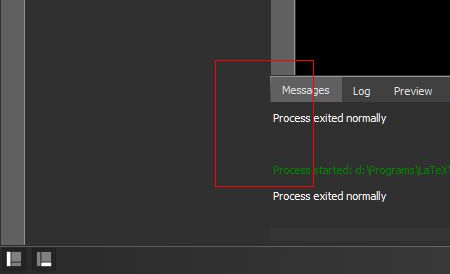
sergiokapone
on 12 Feb 2020
After returning to light mode, TXS still reads highlight scheme from [formatsDark]
sergiokapone
on 13 Feb 2020
Last update TeXstudio 3.00.00 (git 3.0.0alpha1-52-gb124ef0) completely erases both [formats] and
[formatsDark] after Modern-Dark<->Modern changing
Note on syntax highlighting: The label{reference} incide math environment hignlighted as math-keyword with "reference" as number. Should be as simple keyword with "reference" as reference

sergiokapone
on 14 Feb 2020
Big red button "CLOSE" in Find/Replace dialog is invisible in modern-dark theme.
Highlight bug: "line:error" text color does not work. Actual text color in paragraph with error remain unchanged (as set in "normal". The same problem with "line:warnig".

sergiokapone
on 14 Feb 2020
What happened with starting window size and position in the latest versions?

sergiokapone
on 28 Feb 2020
should not be changed
sunderme
on 28 Feb 2020
And yet something happened. I checked with previous versions. The state of the window is not saved after it is closed in maximized mode. (Win10, 1803)
sergiokapone
on 28 Feb 2020
@sergiokapone
Can you try the following:
- Before starting TXS save your texstudio.ini (should be in AppDataRoamingtexstudiotexstudio.ini )
- Start TXS, resize the main window, then exit TXS.
- Save a second copy of your texstudio.ini
- Then compare the two saved copies of texstudio.ini and see if they differ.
MeanSquaredError
on 29 Feb 2020
My .ini in config folder. I use the portable one of TXS.
Yes, TXS rewriting .ini after closing by it own free will.
The difference in
Orig .ini:
MainWindowState=@ByteArray(\0\0\0\xff\0\0\0\0\xfd\0\0\0\0\0\0\a\x80\0\0\x3\xb7\0\0\0\x1\0\0\0\x2\0\0\0\x1\0\0\0\x2\xfc\0\0\0\x1\0\0\0\x2\0\0\0\b\0\0\0\f\0\x43\0u\0s\0t\0o\0m\0\0\0\0\0\xff\xff\xff\xff\0\0\0\0\0\0\0\0\0\0\0\b\0\x46\0i\0l\0\x65\x1\0\0\0\0\xff\xff\xff\xff\0\0\0\0\0\0\0\0\0\0\0\b\0\x45\0\x64\0i\0t\x1\0\0\0\x83\xff\xff\xff\xff\0\0\0\0\0\0\0\0\0\0\0\n\0T\0o\0o\0l\0s\x1\0\0\x1$\xff\xff\xff\xff\0\0\0\0\0\0\0\0\0\0\0\b\0M\0\x61\0t\0h\x1\0\0\x1\xc5\xff\xff\xff\xff\0\0\0\0\0\0\0\0\0\0\0\f\0\x46\0o\0r\0m\0\x61\0t\x1\0\0\x2J\xff\xff\xff\xff\0\0\0\0\0\0\0\0\0\0\0\n\0T\0\x61\0\x62\0l\0\x65\x1\0\0\x3Y\xff\xff\xff\xff\0\0\0\0\0\0\0\0\0\0\0\b\0\x44\0i\0\x66\0\x66\0\0\0\x4'\xff\xff\xff\xff\0\0\0\0\0\0\0\0)
MainWindowFullssscreenState=@ByteArray(\0\0\0\xff\0\0\0\x1\xfd\0\0\0\0\0\0\a\x80\0\0\x3\xe4\0\0\0\x1\0\0\0\x2\0\0\0\x1\0\0\0\x2\xfc\0\0\0\x1\0\0\0\x2\0\0\0\b\0\0\0\f\0\x43\0u\0s\0t\0o\0m\0\0\0\0\0\xff\xff\xff\xff\0\0\0\0\0\0\0\0\0\0\0\b\0\x46\0i\0l\0\x65\x1\0\0\0\0\xff\xff\xff\xff\0\0\0\0\0\0\0\0\0\0\0\b\0\x45\0\x64\0i\0t\x1\0\0\0\x8c\xff\xff\xff\xff\0\0\0\0\0\0\0\0\0\0\0\n\0T\0o\0o\0l\0s\x1\0\0\x1\x37\xff\xff\xff\xff\0\0\0\0\0\0\0\0\0\0\0\b\0M\0\x61\0t\0h\x1\0\0\x1\xe2\xff\xff\xff\xff\0\0\0\0\0\0\0\0\0\0\0\f\0\x46\0o\0r\0m\0\x61\0t\x1\0\0\x2o\xff\xff\xff\xff\0\0\0\0\0\0\0\0\0\0\0\n\0T\0\x61\0\x62\0l\0\x65\x1\0\0\x3\x88\xff\xff\xff\xff\0\0\0\0\0\0\0\0\0\0\0\b\0\x44\0i\0\x66\0\x66\0\0\0\x4'\xff\xff\xff\xff\0\0\0\0\0\0\0\0)
MainWindow\Maximized=true
MainWindow\FullScreen=false
Geometries\MainwindowWidth=1920
Geometries\MainwindowHeight=1031
Geometries\MainwindowX=-1
Geometries\MainwindowY=22
.ini after closing
MainWindowState=@ByteArray(\0\0\0\xff\0\0\0\0\xfd\0\0\0\0\0\0\x5.\0\0\x2\xd0\0\0\0\x1\0\0\0\x2\0\0\0\x1\0\0\0\x2\xfc\0\0\0\x1\0\0\0\x2\0\0\0\b\0\0\0\f\0\x43\0u\0s\0t\0o\0m\0\0\0\0\0\xff\xff\xff\xff\0\0\0\0\0\0\0\0\0\0\0\b\0\x46\0i\0l\0\x65\x1\0\0\0\0\xff\xff\xff\xff\0\0\0\0\0\0\0\0\0\0\0\b\0\x45\0\x64\0i\0t\x1\0\0\0\x83\xff\xff\xff\xff\0\0\0\0\0\0\0\0\0\0\0\n\0T\0o\0o\0l\0s\x1\0\0\x1$\xff\xff\xff\xff\0\0\0\0\0\0\0\0\0\0\0\b\0M\0\x61\0t\0h\x1\0\0\x1\xc5\xff\xff\xff\xff\0\0\0\0\0\0\0\0\0\0\0\f\0\x46\0o\0r\0m\0\x61\0t\x1\0\0\x2J\xff\xff\xff\xff\0\0\0\0\0\0\0\0\0\0\0\n\0T\0\x61\0\x62\0l\0\x65\x1\0\0\x3Y\xff\xff\xff\xff\0\0\0\0\0\0\0\0\0\0\0\b\0\x44\0i\0\x66\0\x66\0\0\0\x4'\xff\xff\xff\xff\0\0\0\0\0\0\0\0)
MainWindowFullssscreenState=@ByteArray(\0\0\0\xff\0\0\0\x1\xfd\0\0\0\0\0\0\a\x80\0\0\x3\xe4\0\0\0\x1\0\0\0\x2\0\0\0\x1\0\0\0\x2\xfc\0\0\0\x1\0\0\0\x2\0\0\0\b\0\0\0\f\0\x43\0u\0s\0t\0o\0m\0\0\0\0\0\xff\xff\xff\xff\0\0\0\0\0\0\0\0\0\0\0\b\0\x46\0i\0l\0\x65\x1\0\0\0\0\xff\xff\xff\xff\0\0\0\0\0\0\0\0\0\0\0\b\0\x45\0\x64\0i\0t\x1\0\0\0\x8c\xff\xff\xff\xff\0\0\0\0\0\0\0\0\0\0\0\n\0T\0o\0o\0l\0s\x1\0\0\x1\x37\xff\xff\xff\xff\0\0\0\0\0\0\0\0\0\0\0\b\0M\0\x61\0t\0h\x1\0\0\x1\xe2\xff\xff\xff\xff\0\0\0\0\0\0\0\0\0\0\0\f\0\x46\0o\0r\0m\0\x61\0t\x1\0\0\x2o\xff\xff\xff\xff\0\0\0\0\0\0\0\0\0\0\0\n\0T\0\x61\0\x62\0l\0\x65\x1\0\0\x3\x88\xff\xff\xff\xff\0\0\0\0\0\0\0\0\0\0\0\b\0\x44\0i\0\x66\0\x66\0\0\0\x4'\xff\xff\xff\xff\0\0\0\0\0\0\0\0)
MainWindow\Maximized=false
MainWindow\FullScreen=false
Geometries\MainwindowWidth=1326
Geometries\MainwindowHeight=800
Geometries\MainwindowX=302
Geometries\MainwindowY=201

sergiokapone
on 29 Feb 2020
Besides, TXS rewrite .ini (Syntax Highlight ) also when I change Dark<->Light mode. But such a behavior has existed for a long time, starting with the first version of alpha (see my posts).
Video Destroying ini
As one can see on video, after restarting TXS, not only window state ini-keys are rewritten, but also my preferences for Syntax Highlighting. The ini file size decreased from 63 673 bytes to 33 345 bytes due to erasing [formatsDark] and [formats].
sergiokapone
on 29 Feb 2020
Old Environment
- TeXstudio: 2.12.6 (why are the new binaries so huge?! And well setting up dark theme is very time consuming :/)
- Qt: 5.6.2
- OS: Windows 10 Build 1903
- TeX distribution: miktex
Old Environment (texstudio-win-3.00.00-202003200521-git_ba5d5a7)
- TeXstudio: 3.00.00 (git 3.0.0alpha2-14-gba5d5a7)
- Qt: 5.12.1
- OS: Windows 10 Build 1903
- TeX distribution: miktex
just tried and it compiles latex a lot faster compared to 2.12.6, really good job. Also opening of texstudio is a lot faster.
Since i copied old settings file over from my old version, i assume stuff should work by default?
But i noticed, that texstudio is launching not in a maximized window, despite the option is set int he ini file. Old open files are not remembered to be opened again ...
wonderful, pdf scrolling is smooth now!!!
i will use this build for some time and if anything goes sideways, i will report it.
 ScyllaHide
on 22 Mar 2020
ScyllaHide
on 22 Mar 2020
Not sure whether I am doing something wrong (I am on archlinux)
% chmod +x texstudio-linux-3.00.00-202003280926-git_421482d-x86_64.AppImage
% ./texstudio-linux-3.00.00-202003280926-git_421482d-x86_64.AppImage
static QPlatformTheme* QKdeTheme::createKdeTheme(): Unable to determine KDE dirs
 bonanza123
on 28 Mar 2020
bonanza123
on 28 Mar 2020
should work
sunderme
on 28 Mar 2020
First of all: A very nice update. Thanks for the hard work and especially for the dark theme.
I found two points that might be addressed:
1) Spellchecking with languagetool seems to happen on files that are opened during TXS start only when certain paragraphs are changed. Adding a space to the paragraph is sufficient. I would expect that an initial spellcheck is started after opening the file.
2) When I understand it correctly, the ini-file saves different highlighting settings for the light and dark theme. It would be very nice if one could export and import these settings directly in TXS. This would also help to distribute different flavors of such themes. In the standard dark theme code in commands e.g. section{Headline} is highlighted with black. At least on my monitors this is almost invisible.
 dirkziegenbalg
on 3 Apr 2020
dirkziegenbalg
on 3 Apr 2020
use options/save profile, edit out any unwanted information and import on other machine with options/load profile.
sunderme
on 4 Apr 2020
I didn't know that the import can handle partial ini-files. Is this documented somewhere? Nevertheless, this manual way is a bit cumbersome. With respect to usability my first choice would be import and export buttons in the "highlighting-settings-tab" that only handle the editor or IDE style as I know it from various other IDEs.
dirkziegenbalg
on 4 Apr 2020
if someone wants to put effort into that ...
sunderme
on 4 Apr 2020
okay, I got your point. Maybe someone with more programming skills than me has some spare time 😊
dirkziegenbalg
on 4 Apr 2020
I hope that the Dark Design is similar to this one:
https://github.com/texstudio-org/texstudio/issues/45#issuecomment-368334650
 update-freak
on 12 Apr 2020
update-freak
on 12 Apr 2020
@sergiokapone is that dark highlighting theme built in or did you have to make it? I can't find a way to do that; dark mode is just changing my window controls in Alpha 4, not my editor area.
 jrmoserbaltimore
on 13 May 2020
jrmoserbaltimore
on 13 May 2020
I see an x86-64 build for OSX but none for Windows?
jrmoserbaltimore
on 13 May 2020
@jrmoserbaltimore The dark theme was buit in in a first alpha versions. The 2,3,4th alphas has there are many bugs (or features), comparing first alpha, as for me I no longer use it. So, may be absence of dark mode is a new feature( or bug) of current 4th alpha.
sergiokapone
on 13 May 2020
?
alpha4 has dark mode support which should be working fine.
The problem is rather what one expects should happen.
1) OS dark mode (e.g. OSX , also KDE): here txs is started with a darker windows colors coming from the OS, syntax highlighting and some icons are adapted by txs. Restart necessary. Unfortunately qt on OSX seems not to work reliable as I see different behavior from CI builds and local builds
2) app dark mode (everywhere): here txs is using a color scheme independent of OS settings. To activate: style = manhattan-dark and ignore most system colors. Restart necessary. Looks okay to me.
sunderme
on 13 May 2020
May be for GNU/Linux there are no problems, but for my Win10_1803 bugs (I mentioned above) do not allow to fully use txs
sergiokapone
on 13 May 2020
What are the changes in config aka Texstudio.ini ?
Is it possible to copy the Texstudio.ini of last version 2s TexStudio? Which parts will be not configured?
tsfg
on 26 May 2020
config is rarely changed. You can use the same config for 2.12.22 and 3.0.0*
sunderme
on 26 May 2020
I have added adwaita dark style on windows which seems to be fine.
Please test.
sunderme
on 1 Jun 2020
I tried compiling the RISC-V specification. It worked, but the inbuilt preview (from hitting F5 to compile and view) crashed the alpha-4 build.
jrmoserbaltimore
on 1 Jun 2020
Is there a way to load syntax highlighting profiles so we can get something like @sergiokapone has?
jrmoserbaltimore
on 1 Jun 2020
Is there a way to load syntax highlighting profiles so we can get something like @sergiokapone has?
you can use load profile with adapted profiles
sunderme
on 1 Jun 2020
I tried compiling the RISC-V specification. It worked, but the inbuilt preview (from hitting F5 to compile and view) crashed the alpha-4 build.
do you have poppler on your system ?
sunderme
on 1 Jun 2020
Will there ever be a fix of minimizing a window at startup?
sergiokapone
on 1 Jun 2020
do you have poppler on your system ?
No, it's Windows. The previewer works, but not for something that big I'm thinking.
jrmoserbaltimore
on 1 Jun 2020
@sergiokapone
I remember you mentioned that TXS erases parts of your settings. This has not been fixed I guess because the developers were not able to reproduce this problem (at least I was not able to reproduce it).
One thing that I notice in your description is that you use the portable version of TXS. Does the problem with the settings also happen with the non-portable version which is installed in Program Files through an installer ?
MeanSquaredError
on 1 Jun 2020
@MeanSquaredError I had tried. Behaviour is the same
sergiokapone
on 2 Jun 2020
@sergiokapone
I think I managed to reproduce the problem where TXS does not save/restore the maximized state properly under Windows. I will take a look in the next 2-3 days.
MeanSquaredError
on 3 Jun 2020
@MeanSquaredError It would be nice. Also, choosing of dark mode in same place would be nice too.
sergiokapone
on 3 Jun 2020
It gets in an annoying state where it keeps saying the file changed on disk and asking if you want to reload it or save over it (there are two different dialogues asking about this!), and then does this constantly until you close and relaunch TXS. This happens for no reason often.
jrmoserbaltimore
on 3 Jun 2020
@MeanSquaredError Good job. Thank you!
sergiokapone
on 3 Jun 2020
It gets in an annoying state where it keeps saying the file changed on disk and asking if you want to reload it or save over it (there are two different dialogues asking about this!), and then does this constantly until you close and relaunch TXS. This happens for no reason often.
saving on cloud drive (drop box, etc.) ?
sunderme
on 3 Jun 2020
saving on cloud drive (drop box, etc.) ?
Nope, local. It seems to happen constantly and continuously until I restart the program, and then it calms down.
jrmoserbaltimore
on 3 Jun 2020
saving on cloud drive (drop box, etc.) ?
Nope, local. It seems to happen constantly and continuously until I restart the program, and then it calms down.
Well, that is not normal behavior.
You can open a proper issue report to try to figure it out.
sunderme
on 3 Jun 2020
Why buttons in a search dialog of Adwaita theme abnormally huge?
sergiokapone
on 12 Jun 2020
the adwaita style increases the height of the text combobox (search text), the buttons adapt to that
sunderme
on 12 Jun 2020
the adwaita style increases the height of the text combobox (search text), the buttons adapt to that
Well, you can compare buttons of two comboboxes. The search cocmcobox has bigger buttons then other.

sergiokapone
on 14 Jun 2020
Related issues
 01000110
·
10Comments
01000110
·
10Comments
 erich666
·
7Comments
erich666
·
7Comments
 jeanlucthumm
·
3Comments
jeanlucthumm
·
3Comments
 sjx95
·
7Comments
sjx95
·
7Comments
 antmw1361
·
7Comments
antmw1361
·
7Comments