Texstudio: Font problem in embedded previewer
Environment
- TeXstudio: 2.12.8
- Qt: N/A
- OS: Mac
- TeX distribution: MacTeX Basic
Expected behavior
After necessary component, such as "Fandol", and "xeCJK" included, compile with XeTeX successful.
But the Chinese Character not display in Preview window. But if I open it external, these display normal.
So I think this is caused by font, I searched "Fandol" in Font Book but got nothing.
 sjx95
sjx95
All 7 comments
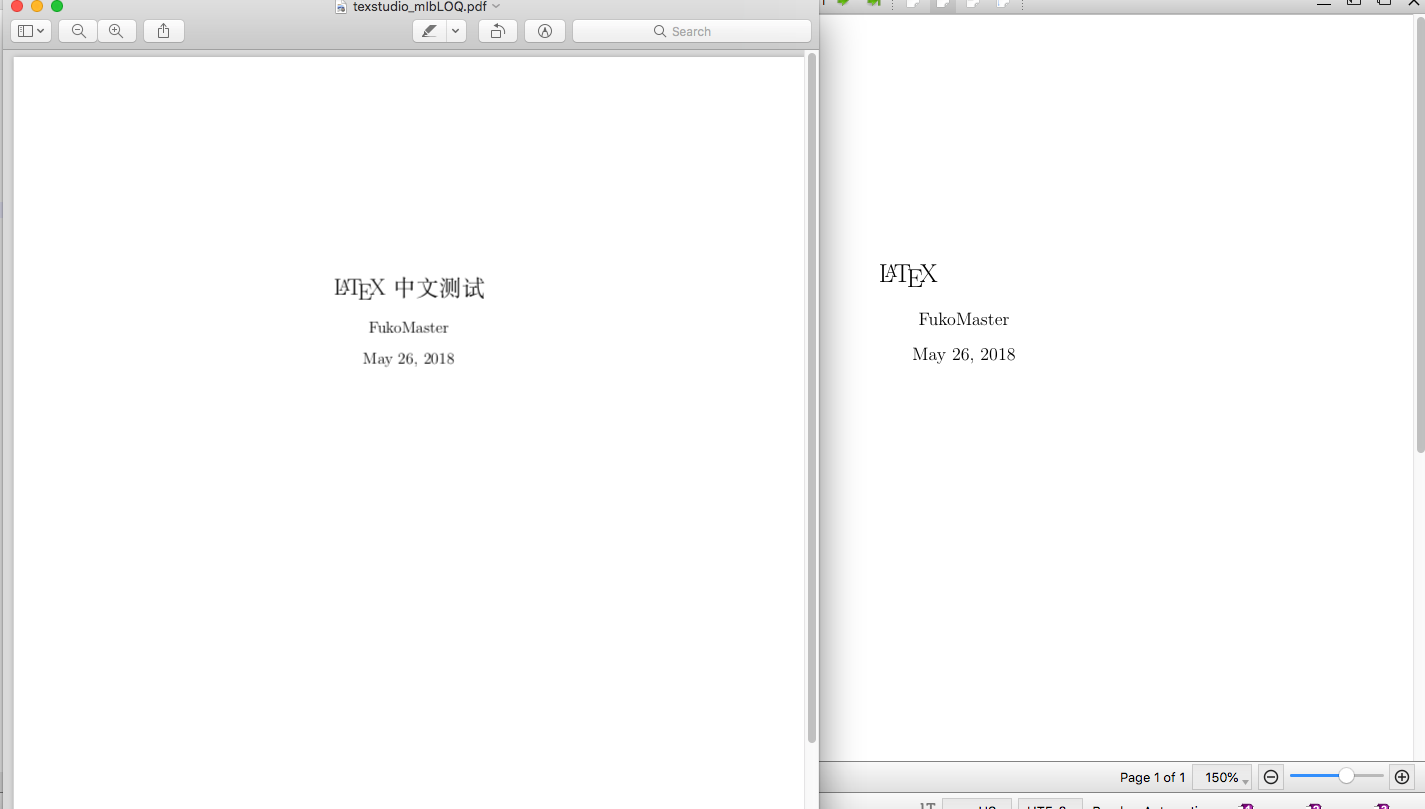
sjx95
on 26 May 2018
please provide the files (tex&pdf)
You might want to try a development build, see https://bintray.com/sunderme/texstudio/texstudio-osx#files
 sunderme
on 26 May 2018
sunderme
on 26 May 2018
\documentclass[a4paper]{article}
\usepackage{amsmath}
\usepackage{amsfonts}
\usepackage{amssymb}
\usepackage{graphicx}
\usepackage{xeCJK}
\title{\LaTeX 中文测试}
\author{FukoMaster}
\begin{document}
\maketitle
\end{document}
could you try https://github.com/texstudio-org/texstudio/releases/download/2.12.8/texstudio-2.12.8-osx-forOldCPUs.dmg
sunderme
on 27 May 2018
This doesn't work.
Besides, I'm using i7-7700K, is that an old CPU ..?
sjx95
on 28 May 2018
I also encountered the same problem in my environment, and I think the cause of this problem may be in /Applications/texstudio.app/Contents/Frameworks/libpoppler.68.dylib .
$ strings -a /Applications/texstudio.app/Contents/Frameworks/libpoppler.68.dylib | grep poppler
/usr/local/Cellar/poppler/0.57.0-texworks/share/poppler/ColorProfiles/
/usr/local/Cellar/poppler/0.57.0-texworks/share/poppler
%Produced by poppler pdftops version: {0:s} (http://poppler.freedesktop.org)
, but my poppler path is /usr/local/Cellar/poppler/0.65.0 .
I do not think it is the best way, but I solved this problem as follows.
brew install --upgrade poppler
mkdir -p /usr/local/Cellar/poppler/0.57.0-texworks/share
ln -s /usr/local/Cellar/poppler/0.65.0/share/poppler /usr/local/Cellar/poppler/0.57.0-texworks/share/poppler
My environment is as follows.
MacBook Pro (13-inch, 2017, Four Thunderbolt 3 Ports)
macOS High Sierra 10.13.4
I hope this will help!
 ken-nakanishi
on 1 Jun 2018
ken-nakanishi
on 1 Jun 2018
I also encountered the same problem in my environment, and I think the cause of this problem may be in
/Applications/texstudio.app/Contents/Frameworks/libpoppler.68.dylib.$ strings -a /Applications/texstudio.app/Contents/Frameworks/libpoppler.68.dylib | grep poppler /usr/local/Cellar/poppler/0.57.0-texworks/share/poppler/ColorProfiles/ /usr/local/Cellar/poppler/0.57.0-texworks/share/poppler %Produced by poppler pdftops version: {0:s} (http://poppler.freedesktop.org), but my poppler path is
/usr/local/Cellar/poppler/0.65.0.I do not think it is the best way, but I solved this problem as follows.
brew install --upgrade poppler
mkdir -p /usr/local/Cellar/poppler/0.57.0-texworks/share
ln -s /usr/local/Cellar/poppler/0.65.0/share/poppler /usr/local/Cellar/poppler/0.57.0-texworks/share/poppler
My environment is as follows.
MacBook Pro (13-inch, 2017, Four Thunderbolt 3 Ports)
macOS High Sierra 10.13.4
I hope this will help!
It works !!!
 manfeel
on 13 Nov 2018
manfeel
on 13 Nov 2018
Related issues
 jeanlucthumm
·
3Comments
jeanlucthumm
·
3Comments
 muzimuzhi
·
10Comments
muzimuzhi
·
10Comments
 melsophos
·
5Comments
melsophos
·
5Comments
 erich666
·
7Comments
erich666
·
7Comments
 kendonB
·
10Comments
kendonB
·
10Comments
Most helpful comment
I also encountered the same problem in my environment, and I think the cause of this problem may be in
/Applications/texstudio.app/Contents/Frameworks/libpoppler.68.dylib., but my poppler path is
/usr/local/Cellar/poppler/0.65.0.I do not think it is the best way, but I solved this problem as follows.
My environment is as follows.
I hope this will help!