Teslamate: Display Charged amount with kWh resolution in Top Charging Stations
Is your feature request related to a problem? Please describe.
I really like the Charging Stats Dashboard but as my home charging has reached over 1 MWh it is only displayed as 1 MWh which is a bit low resolution to be really useful compared to the other that has kWh displayed.
Describe the solution you'd like
Best case solution would be if it is possible to get MWh to display with 3 decimals while kWh still displays with 0 decimals
Describe alternatives you've considered
Is it possible to force Grafana to only display as kWh even when total charged amount passes 1 MWh?
Additional context
Current look:
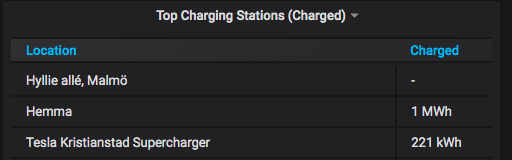
With 3 decimals. Good for MWh but looks bad for kWh

 SigLinJo
All 11 comments
In the mean time @SigLinJo, you can:
- Login to Grafana (admin:admin if you have not changed it)
- Click in the panel title and go to Edit
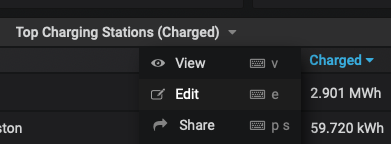
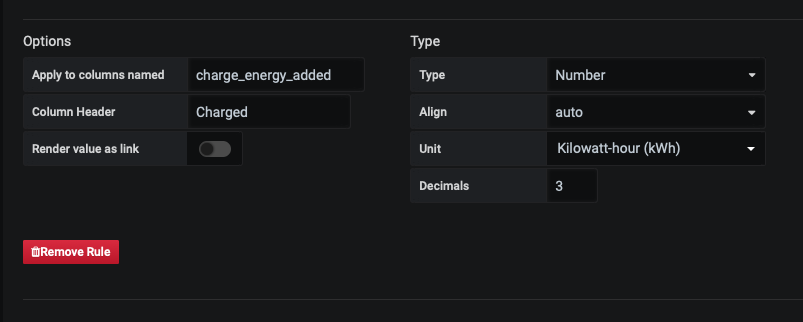
- In the Edit screen, go to the Visualizations icon (middle icon, left hand side) and change the decimals to the desired amount. You can see in the screenshot above and below, I adjust it to three.
@adriankumpf this is a basic change, but I could do a pull request if you want? Also never done one, so that would be exciting.
 cwanja
on 25 Mar 2020
cwanja
on 25 Mar 2020
As you can see in my original post I did change it to 3 decimals but I think it looks a bit strange to display the kWh that way, only MWh needs to be changed to 3 decimals and that is outside my ability. But it is a good interim fix to actually be able to read out the amount charged when it goes above 1000 kWh :)
SigLinJo
on 25 Mar 2020
Ah. I apologize, I missed that. Thought that second image is the _desired_ state. 🤦🏽♂️
cwanja
on 25 Mar 2020
Another solution would be to fix it to kWh with a custom unit...


 kongomongo
on 16 Apr 2020
kongomongo
on 16 Apr 2020
Another solution would be to fix it to kWh with a custom unit...
Could you build logic into the custom unit to convert it from kWh to MWh once it exceeds a value?
cwanja
on 17 Apr 2020
i don't think so
https://grafana.com/blog/2020/01/27/grafana-v6.6-released/#custom-data-units
kongomongo
on 22 Apr 2020
@cwanja
No but you could do it in the SQL.
@SigLinJo Does this work?

If this works, I can put in a PR.
 Dulanic
on 24 Apr 2020
Dulanic
on 24 Apr 2020
That looks very promising :) Thank you for looking into it! Just makes the M in MWh capital and it could be the solution we are looking for.
SigLinJo
on 24 Apr 2020
@SigLinJo good catch, I'll put in a PR, it's a simple change and I like it.
Dulanic
on 24 Apr 2020
As soon as you do the PR I will test it :)
SigLinJo
on 24 Apr 2020
Tested! I'm really happy about this! Makes this dashboard much more useful! Feel free to close this as soon as it's merged :)
SigLinJo
on 24 Apr 2020
Related issues
 jun3280net
·
4Comments
jun3280net
·
4Comments
 DrMichael
·
4Comments
DrMichael
·
4Comments
 bastrik
·
3Comments
bastrik
·
3Comments
 Try2Fly
·
5Comments
cwanja
·
3Comments
Try2Fly
·
5Comments
cwanja
·
3Comments
Most helpful comment
Another solution would be to fix it to kWh with a custom unit...