Terra-core: [terra-form-input] Required inputs do not announce correctly on VoiceOver Safari
Bug Report
Description
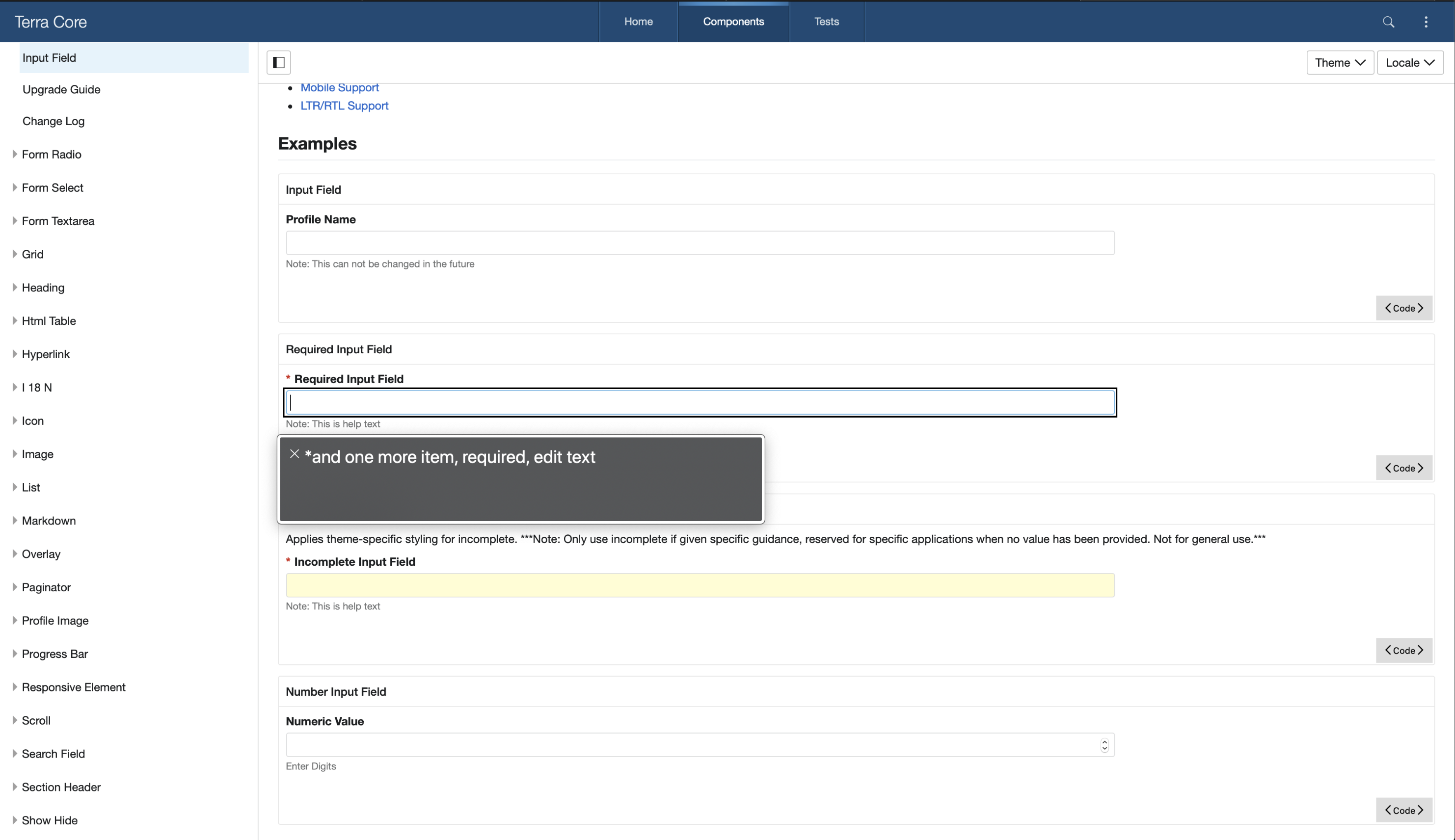
Input fields do not appropriately announce labels when set to required. The issues appears to be related to inserting the required asterisk in front of the label.
Steps to Reproduce
- (In Safari) Navigate to https://engineering.cerner.com/terra-ui/components/terra-form-input/form-input/input-field
- Activate VoiceOver
- Navigate to the required input field example
- Observe the label text is not announced. It announces "star and one more item", where the label is the "one more item"
Additional Context / Screenshots
Attaching the text output of VoiceOver Safari for one of the terra-ui examples. Notice that label is not announced. VoiceOver announces "star and one more item" instead of the label.
Expected Behavior
Required input fields should appropriately announce labels on mobile Safari when using VoiceOver
Possible Solution
The issue appears to happen because of the dom markup:
<label for="requiredField" class="Field-module__label___2QGDW">
  <div class="Field-module__required___3Csnx">*</div>
  Required Input Field
</label>
Potentially hiding the div containing the asterisk from screen readers would resolve the issue.
 StephenEsser
All 2 comments
The Field implementation here is what is causing the issue:
https://github.com/cerner/terra-core/blob/f03e926e522c5d7f9655f4f28bcee149fbbd1237/packages/terra-form-field/src/Field.jsx#L181-L191
As @StephenEsser reported, it creates a basic structure for visual users only:
<label class="Field-module__label___1234">
  <div class="Field-module__required___1234">*</div>
  Field Label
</label>
And needs to be updated to generate:
<label class="Field-module__label___1234">
   <div aria-hidden="true" class="Field-module__required___1234">*</div>
   <span class="VisuallyHiddenText-module__visually-hidden-text___1234">Required</span>
   Field Label
</div>
\
\
\
The changes will mimic the same as how the Fieldset Legends are created for 'RadioField', 'CheckboxField', and 'DateInputField', (which technically are fieldsets and legends, not true a label, but are displayed to users like they are a standard form input "_field_" question, so they will have very similar markup, though not exact).
 neilpfeiffer
on 16 Sep 2020
neilpfeiffer
on 16 Sep 2020
@pranav300 - upon looking at this further, I am thinking that we also need to update our approach with the Error-Icon to follow a similar approach as the changes for the asterisks.
Writing up details on how we should restructure to also be aria-hidden with Visually hidden text and will edit this comment.
neilpfeiffer
on 16 Sep 2020
Related issues
 bjankord
·
3Comments
bjankord
·
3Comments
 ryanthemanuel
·
4Comments
bjankord
·
3Comments
ryanthemanuel
·
4Comments
bjankord
·
3Comments
 kschuste
·
3Comments
kschuste
·
3Comments
 yuderekyu
·
3Comments
yuderekyu
·
3Comments
Most helpful comment
@pranav300 - upon looking at this further, I am thinking that we also need to update our approach with the Error-Icon to follow a similar approach as the changes for the asterisks.
Writing up details on how we should restructure to also be aria-hidden with Visually hidden text and will edit this comment.