Feature Request
Description
Create a first class number input form field.
 ryanthemanuel
All 6 comments
first class number input field can be created using HTML form input with having value number for type attribute. it will be like extension of terra-form-input along with additional props like
- max : The maximum value to accept for this input
- min : The minimum value to accept for this input
- step : specifies the number intervals between min and max
in addition to terra-form-input number field will have up and down arrows to adjust the value as shown below.
Before proceeding with Technical Design would like to clarify following things with respect to number field.
I found that terra-form-input can be used as number field by passing number as a value for type property as shown in this example of hookshoot : Window Bound Hookshot - Attachment Margin in Pxcode for input field with number type
The with HTML number input is not consistent across the browser as listed below :
up and down arrows displays differently in different browsers like shown below do we need to handle this to keep uniformity among the browsers or do we need to go with the default behaviors of browser.
Chrome : up and down arrows will appear when input receives focus
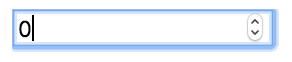
Mozila and Safari : up and down arrows will display always

IE 11 and Edge : up and down arrows will not be displayed for number inputs

up and down arrow keys changes the value between given min and max value when we press it but this doesn't seems to work in IE (tested with IE 11) we might need to handle up and down key press manually to enable number input functionality on IE.
Below are the Existing Issues of HTML number input :
Google Chrome :
1. Allows character ‘e’ in numeric text box
FireFox :
1. Allows non-numeric characters in numeric text box
2. Doesn’t re-initialize to numeric value on click of down arrow and up arrow / on keyboard
down and up key.
Safari :
1. Allows non-numeric characters in numeric text box
Internet Explorer 11 :
1. Allows non-numeric characters in numeric text box
2. Up arrow and down arrow is not displayed in numeric input
3. Min and max value is not honored
4. Value doesn’t changes on click of down arrow and up arrow / on keyboard down and up key
5. Doesn’t re-initialize to numeric value on click of down arrow and up arrow / on keyboard
down and up key
Edge :
1. Allows non-numeric characters in numeric text box
2. Up arrow and down arrow is not displayed in numeric input
issue reference for HTML number field : https://bugzilla.mozilla.org/show_bug.cgi?id=1398528
Since the native HTML number input have these issues listed above we would like to know if the requirement is to use the Native HTML number input or do we need to proceed by adding custom implementation to address the issues listed above.
 supreethmr
on 26 Mar 2019
supreethmr
on 26 Mar 2019
Nice work on the research for this. Let's make the type attribute a first class prop on Input/InputField. We'll use that to allow people to set type="number" in Input/InputField. We're fine with the cross-browser variances of input[type="number"].
 bjankord
on 29 Mar 2019
bjankord
on 29 Mar 2019
input (terra-form-input) has already got first class prop defined for it :code and here is an existing example for input with type as number : Window Bound Hookshot - Attachment Margin in Px in this example Terra-input field has been used with inputAttrs props like :
<InputField
      label="Attachment Margin in Px"
      inputId={getId('hookshotAttachmentMargin')}
      **inputAttrs={{ name: 'hookshotAttachmentMargin', type: 'number' }}**
      defaultValue={this.state.hookshotAttachmentMargin}
      style={{ width: '200px' }}
      onChange={this.handleInputChange}
 />
I think Along with Terra-form-input having documentation for number field input with examples of input type="number" would meet the requirement of input number field mentioned above.
supreethmr
on 1 Apr 2019
Do we require Type as first class prop in terra-input-field also..?
By doing this consumer can directly set value for Type prop in input-field instead of adding it through inputAttrs.
Got this thought while going through the issue #2283 where disabled is being added as first class prop for form-field components to resolve confusion among consumers.
supreethmr
on 2 Apr 2019
Yes let’s make type itself a first class prop.
ryanthemanuel
on 2 Apr 2019
@bjankord @ryanthemanuel Shouldn't we not handle the Min, Max and step values through separate props for these controls when the type="number" ?
And also why can't we have a separate new control for the number input built upon current form input field with form input field type hardcoded to 'number' always and along with above mentioned props ?.
 ShettyAkarsh
on 2 Apr 2019
ShettyAkarsh
on 2 Apr 2019
Related issues
 noahbenham
·
5Comments
noahbenham
·
5Comments
 SpartaSixZero
·
5Comments
SpartaSixZero
·
5Comments
 kschuste
·
3Comments
kschuste
·
3Comments
 FloraChenCerner
·
4Comments
bjankord
·
3Comments
FloraChenCerner
·
4Comments
bjankord
·
3Comments
Most helpful comment
Nice work on the research for this. Let's make the type attribute a first class prop on Input/InputField. We'll use that to allow people to set
type="number"in Input/InputField. We're fine with the cross-browser variances of input[type="number"].