Terminus: Home and End keys do not work
These do not seem to be configurable in settings either. Shift+Home and Shift+End do work, but it's counter intuitive to have to use this combo.
 ChipwizBen
All 20 comments
Oh god, please yes. I thought I was going insane.
 HotBlack77
on 12 Aug 2019
HotBlack77
on 12 Aug 2019
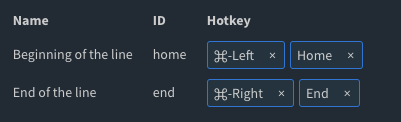
What about these?
 Eugeny
on 12 Aug 2019
Eugeny
on 12 Aug 2019
Those don't work. If you set Home and End correctly, it still requires that you press shift to operate them.
ChipwizBen
on 12 Aug 2019
Oh which OS / shell?
Eugeny
on 12 Aug 2019
Fedora 30, bash.
ChipwizBen
on 12 Aug 2019
Debain 9, bash 4.4
HotBlack77
on 13 Aug 2019
I have the same problem when I ssh from my Windows computer to Ubuntu 18.04 server (bash shell)
 jack1142
on 13 Aug 2019
jack1142
on 13 Aug 2019
Same here. ubuntu 18.04 server (zsh 5.4.2 - oh-my-zsh).
ps: @Eugeny thanks for your hard work on this project
 dogik
on 15 Aug 2019
dogik
on 15 Aug 2019
Same for me on Windows using powershell core.
 citycide
on 21 Aug 2019
citycide
on 21 Aug 2019
some here, with terminus @ win10 and some connections to bash-shells.
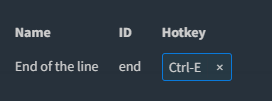
workaround (bash):
strg + e = end of line
strg + a = beginning of the line
 darkiop
on 28 Aug 2019
darkiop
on 28 Aug 2019
The begin & end buttons under Windows:
- WORK always on host
- WORK on the guest when ssh was entered in local terminal
- DO NOT WORK on the guest when connected through an ssh connection via "SSH Connections"
Typically what jack1142 is saying.
When doingcat <enter>, nothing is seen when enteringhomeorend
 jaques-sam
on 6 Sep 2019
jaques-sam
on 6 Sep 2019
Yeah, when ssh is entered in local terminal, you use something like OpenSSH or any other client you have in your PATH but if you use Terminus's ssh connection you use SSH2 client that is written in JavaScript (https://www.npmjs.com/package/ssh2)
npm
SSH2 client and server modules written in pure JavaScript for node.js
 jack1142
on 7 Sep 2019
jack1142
on 7 Sep 2019
On Windows 10, set hotkeys to Shift+right, Home and Shift+left, End, and now home and end are working but not shift+
 MortezaRamezani
on 4 Oct 2019
MortezaRamezani
on 4 Oct 2019
Same here, although removing the hotkeys (simply leaving those blank) work just fine for me in min-gw (git-bash), cmd (clink and legacy) and ssh connections.
 MichalCz
on 5 Oct 2019
MichalCz
on 5 Oct 2019
Waauw, thanks @MichalCz!! This works like a charm!
Of course this is a bug which can probably solved easily...
jaques-sam
on 7 Oct 2019
the bug is still exist, 'Home' , 'End' and 'Ctrl-F' are not working on SSH
 nipeone
on 21 Nov 2019
nipeone
on 21 Nov 2019
the bug is still exist, 'Home' , 'End' and 'Ctrl-F' are not working on SSH
Correct!
Btw, it's either: "still exists" or "is still exiting" 😉
jaques-sam
on 21 Nov 2019
the bug is still exist, 'Home' , 'End' and 'Ctrl-F' are not working on SSH
Correct!Btw, it's either: "still exists" or "is still exiting"
still exiting
https://en.wikipedia.org/wiki/Muphry%27s_law
:wink:
citycide
on 21 Nov 2019
It's just to help, not to criticize as one might think 😉
jaques-sam
on 21 Nov 2019
This is now working correctly.
ChipwizBen
on 9 Mar 2020
Related issues
 naeemrashid
·
27Comments
naeemrashid
·
27Comments
 tabarra
·
16Comments
tabarra
·
16Comments
 ponsfrilus
·
15Comments
ponsfrilus
·
15Comments
 rhamzeh
·
31Comments
rhamzeh
·
31Comments
 Calinou
·
15Comments
Calinou
·
15Comments
Most helpful comment
Same here, although removing the hotkeys (simply leaving those blank) work just fine for me in min-gw (git-bash), cmd (clink and legacy) and ssh connections.