Terminus: `clear` doesn't clear in Git Bash
clear command does not work properly in windows 8.1. instead of clearing the terminal only cursor goes at the start of the terminal.I am using git bash as terminal.
 naeemrashid
All 27 comments
same issue for me too. Neither Ctrl+L or clear works. The cursor just moves to the top of the page without clearing anything in the window.

- Terminus : 1.0.0-alpha.15
- Windows : 7
- Git Bash : 2.7.0
Neither does Alt+F8 works.
 dejames
on 4 Jul 2017
dejames
on 4 Jul 2017
It's just git bash. I checked on all others.
Edit:
It's a bug with git bash only.
 compliment
on 4 Jul 2017
compliment
on 4 Jul 2017
I confirm that this is indeed only git-bash related, but I haven't been able to find a solution yet.
 Eugeny
on 4 Jul 2017
Eugeny
on 4 Jul 2017
Same seems to happen if you run clear under ssh even if you start the console using cmd-clink
 PolCPP
on 4 Jul 2017
PolCPP
on 4 Jul 2017
The same for me.
I'm in a Windows 10 Pro, Terminus 1.0.0-alpha.14 using Git Bash.
 gigioSouza
on 4 Jul 2017
gigioSouza
on 4 Jul 2017
Hi, aren't we supposed to close an issue if its resolved or if its considered a non-issue(duplicate, irrelevant etc.)?
I went through all the issues that are closed but found no solution in any of them, can't we keep one open for people to provide a solution?
 kattheliving
on 13 Mar 2018
kattheliving
on 13 Mar 2018
@kattheliving this has been fixed in the aforementioned commit. If it still doesn't work for you with the latest version, please feel free to reopen!
Eugeny
on 13 Mar 2018
Hello
I Install Latest Version on terminus and I have same issue when using git command like git pull or others git command.
Windows 10
 oveysrostami
on 15 Jul 2018
oveysrostami
on 15 Jul 2018
@oveysrostami what's the issue with the git commands? They don't cause a screen clear AFAIK
Eugeny
on 22 Jul 2018
When I'm using PowerShell as the terminal, the clear command works.
 ecr23xx
on 23 Aug 2018
ecr23xx
on 23 Aug 2018
@oveysrostami what's the issue with the git commands? They don't cause a screen clear AFAIK
When I use git command ,I see just blink nothing else.
oveysrostami
on 23 Sep 2018
@oveysrostami what's the issue with the git commands? They don't cause a screen clear AFAIK
When I use git command ,I see just blink nothing else.
Hi, When I use ssh to connect to other machine, and the shell on remote is zsh (oh-my-zsh), I have the same issue, see just blink nothing else, and did not execute the command as well.
Git commands like git pull git push git fetch
I checked bash shell, no bugs on my machine.
I'm using the latest version, Windows 10
 firiceguo
on 29 Sep 2018
firiceguo
on 29 Sep 2018
This issue has been automatically marked as stale because it has not had recent activity. It will be closed in two weeks unless you comment.
Thank you for your contributions.
![stale[bot] picture](https://avatars3.githubusercontent.com/in/1724?v=4&s=40) stale[bot]
on 29 Nov 2018
stale[bot]
on 29 Nov 2018
Not sure if this issue is related. I could open a new one if need be. I am using PowerShell and clear works just fine. cls works just fine. ctrl+l on the other hand clears the screen but also makes the prompt invisible until you start typing again as shown in the picture. Does not happen in WSL.

 jjuel
on 7 Dec 2018
jjuel
on 7 Dec 2018
I also had the same problem with the 'clear' command with my Git bash after setting up the SSH keys. However, the CTRL + L works totally fine. Anyone facing the same issue should use the above. Regards
 winniebosy
on 9 Dec 2018
winniebosy
on 9 Dec 2018
This issue has been automatically marked as stale because it has not had recent activity. It will be closed in two weeks unless you comment.
Thank you for your contributions.
stale[bot]
on 7 Feb 2019
Any update there?
I have same use with git-bash on Windows, it look like something remain cached or something like that ...
But if a scroll 1 step it disappear.
 alindesign
on 19 Feb 2019
alindesign
on 19 Feb 2019
I'm on Windows 10, alpha 65 seemed to be working fine (clear command in _Git-Bash_ would clear the screen) but updating to alpha 71 seemed to break the functionality: clear returns the caret to the top of the screen, but doesn't clear out all the previous output, eg:

I have not been able to find the pattern - at times it _does_ clear the whole screen, but at other times it retains the past output 😕
 whyboris
on 24 Feb 2019
whyboris
on 24 Feb 2019
This also happens in WSL with Ubuntu. If you open and quit vim, the last line still appears on the screen. This only occurs if the backend is set to xterm. If you change it to hterm, clear works properly.

 jdlyga
on 6 May 2019
jdlyga
on 6 May 2019
I can confirm this still happens.
It clears the screen but jumps to the beginning then to the end of the screen while im typing. That doesn't now happen if i write clear but only when using Control+L
 mathiasgrimm
on 15 May 2019
mathiasgrimm
on 15 May 2019
I am still having this issue. Clear and CTRL+L both have the same effect. Cursor jumps to the top o the terminal view and overwrites an existing content.
 Dawid-Ohia
on 4 Jun 2019
Dawid-Ohia
on 4 Jun 2019
Try command reset . It works for me.
 dexter800
on 16 Jun 2019
dexter800
on 16 Jun 2019
"clear" only goes back to the top of the screen, but does not erase anything (Win7 + git bash).
"reset" command works perfectly, this is magic !
But why ???? "clear" should work as well.
Btw both "clear" and "reset" works in SSH remotely. So must come from git bash I believe. Very nice terminal btw.
 Pauldb8
on 20 Jun 2019
Pauldb8
on 20 Jun 2019
I have same issue. Was working fine just few hours ago. However it does get clear when i scroll through.
 kushal9291
on 23 Jun 2019
kushal9291
on 23 Jun 2019
I wonder if a possible solution is the same as in #729, namely:
Switching to hterm or xterm (WebGL) from xterm (Settings | Appearance | Frontend)
whyboris
on 10 Jul 2019
The same form me.
Win10, Terminus 1.0.108a - neither of terminal types are not cleared
 dmitriy-pritula
on 24 Apr 2020
dmitriy-pritula
on 24 Apr 2020
You can set a shortcut for Clear Terminal under Settings -> Hotkeys.
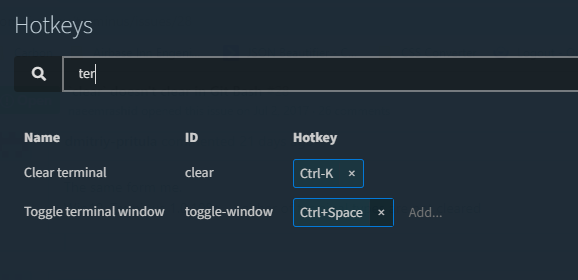
 hmistry-lz
on 15 May 2020
hmistry-lz
on 15 May 2020
Related issues
 ChipwizBen
·
20Comments
ChipwizBen
·
20Comments
 birdmanmandbir
·
14Comments
birdmanmandbir
·
14Comments
 drsm79
·
14Comments
drsm79
·
14Comments
 lonkaars
·
14Comments
lonkaars
·
14Comments
 abalter
·
18Comments
abalter
·
18Comments
Most helpful comment
I can confirm this still happens.
It clears the screen but jumps to the beginning then to the end of the screen while im typing. That doesn't now happen if i write
clearbut only when using Control+L