Terminus: Allow custom node and npm paths
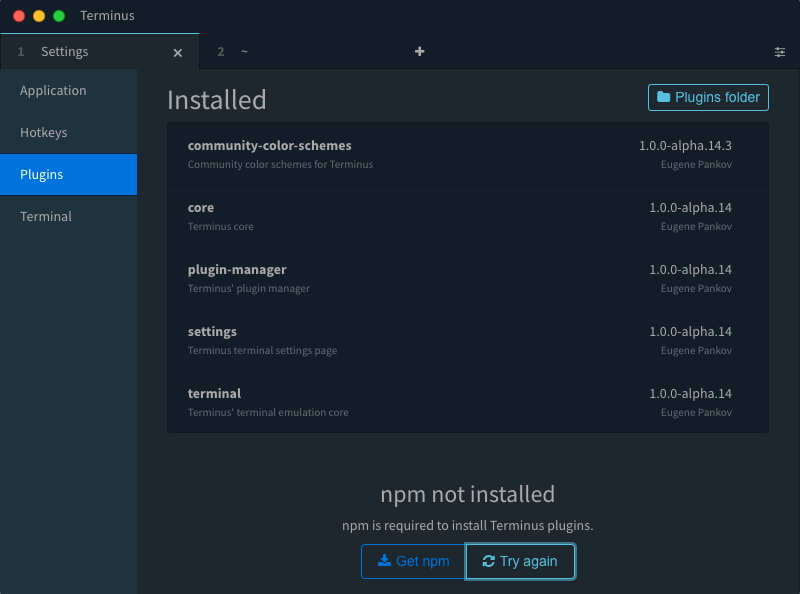
This would fix the issue of "NPM not installed" for users who install node to a custom folder, or install multiple versions of node using nvm.
 rhamzeh
All 31 comments
You can specify the path to npm through the npm option on the top level of config file
 Eugeny
on 5 Jul 2017
Eugeny
on 5 Jul 2017
Does not work for me.
❯ which npm
/Users/sergio/.nvm/versions/node/v6.9.1/bin/npm
terminal:
  font: Hack
  shell: /bin/zsh
  background: theme
hotkeys: {}
appearance:
  frame: full
  tabsLocation: top
npm: /Users/sergio/.nvm/versions/node/v6.9.1/bin/npm
 sergiopvilar
on 5 Jul 2017
sergiopvilar
on 5 Jul 2017
Could you please retry with Alpha 18?
Eugeny
on 5 Jul 2017
The same
sergiopvilar
on 6 Jul 2017
Does npm exit with code 0 if you run it as /Users/sergio/.nvm/versions/node/v6.9.1/bin/npm -v ?
Eugeny
on 6 Jul 2017
@Eugeny Yes it does:
❯ /Users/sergio/.nvm/versions/node/v6.9.1/bin/npm -v
3.10.8

rpm git/mr-2845-fix-serial-retrieval-url
❯ echo $?
0
Same issue here on Sierra with v1.0.0-alpha.18 (re-re-fixed custom npm path detection).
This definitely appears to be Mac specific. I have Terminus installed on 2 Linux boxes and they pick up npm and allow plugin installation correctly.
 mikesprague
on 8 Jul 2017
mikesprague
on 8 Jul 2017
Issue is still present on alpha 21, on OSX.
Same with alpha 22. Related to #4
 compuguy
on 17 Jul 2017
compuguy
on 17 Jul 2017
Issue is still present with the latest alpha (28).
compuguy
on 19 Aug 2017
I'm having the same issue on alpha 29 using NVM
 ClementParis016
on 29 Aug 2017
ClementParis016
on 29 Aug 2017
Alpha 30, 31 and 32 still have this issue (on macos).
compuguy
on 26 Sep 2017
@compuguy @ClementParis016 do you mean the automatic NPM detection or the npm config option?
Eugeny
on 7 Oct 2017
@Eugeny I was talking about the automatic detection. Though, auto-detection works well on my personal Windows machine with NVM for Windows but it doesn't on my Ubuntu work laptop having NVM. It's may be due to the way they differ on handling the linking of npm & Node executable for the active version.
ClementParis016
on 7 Oct 2017
Version: 1.0.0-alpha.27
Platform: win32 10.0.15063
In the plugin menu, I see the message 'NPM is not installed':

It is in fact installed in Ubuntu in Windows 10, as I use the bash terminal with Visual Studio Code. Due to other bugs, I had to chose between the Windows installation of NodeJS and NPM, or the Linux installation.
I also added "npm: /usr/bin/npm" in the config.yaml file located in %APPDATA%/Terminus. But it didn't have any effect.
If other people are in the same case, it would perhaps be interesting to address this also ?
Many thanks in advance.
Donatien
 dloret
on 17 Oct 2017
dloret
on 17 Oct 2017
@Eugeny Automatic npm detection is broken for me on my Mac. Using npm provided by homebrew. The manual npm config option wasn't working on that either. A Ubuntu machine I use has no problems with automatic npm detection, though.
compuguy
on 17 Oct 2017
Both automatic and manual detection are still broken on Alpha 35 (I'm using nvm)
However, it did work once I manually symlinked npm and node to /usr/bin/npm and /usr/bin/node
**
OS: Ubuntu 16.04
Node: 8.4.0
**
Current config:
    terminal:
      bell: 'off'
      shell: /bin/bash
    hotkeys: {}
    appearance:
      tabsLocation: top
      dock: 'off'
      frame: full
    npm: /home/raghd/programs/nvm/versions/node/v8.4.0/bin/npm
Same issue with npm installed with brew
 equinusocio
on 10 Apr 2018
equinusocio
on 10 Apr 2018
Could you guys please retest this with the latest alpha? I've added some improvements for the node & npm search paths there. Thanks!
Eugeny
on 15 May 2018
@Eugeny Just tried it, it is no longer showing npm not installed, but the app is hanging as soon as I click on plugins.
OS: Ubuntu Linux
OS Version: 18.04
Node Version: 8.11.1
Terminus Version: Alpha 46 (tar.gz file) retrieved from Github Downloads

rhamzeh
on 15 May 2018
@rhamzeh any idea why the terminal says Stopped?
Eugeny
on 15 May 2018
@Eugeny No sorry, it prints that as soon as I click on "Plugins" :/
rhamzeh
on 15 May 2018
I'm using Windows Subsystem for Linux, and I've used the following value
wsl /usr/bin/npm
which seems to work, plugins are listed, Terminus reports that npm is installed, except that when I attempt to install plugins, everything appears to work, no errors, yet after a restart, nothing was installed.
There are no error logs either.
I noticed when I clicked on the "Plugins Folder" button in the up right corner, that Windows explore said the folder did not exists, so I created, but still nothing is installed. I opened the DevTools, but nothing is logged to the console and no errors appear on the console.
using latest Alpha 62
 RobertDeRose
on 12 Nov 2018
RobertDeRose
on 12 Nov 2018
Robert, on Windows, Terminus requires a win32 NodeJS build with NPM to install plugins. The reason is that the plugin directory is outside of WSL rootfs and that windows-specific package versions should be installed (as opposed to Linux ones that WSL-based NPM would install).
Eugeny
on 12 Nov 2018
That makes sense. Was hoping to not need to install multiple nodejs on the machine.
RobertDeRose
on 12 Nov 2018
Retested with alpha 67, auto npm detection with homebrew installed npm (symlinked at /usr/local/bin/npm) doesn't work. EDIT: clarification, it's on my $PATH, and still not working.
 Spaxe
on 2 Jan 2019
Spaxe
on 2 Jan 2019
Not working for me on alpha 68.
 joshporter1
on 9 Jan 2019
joshporter1
on 9 Jan 2019
I have the same issue with macOS 10.14.2 and I installed both, Terminus and node with npm using homebrew. With the debugger, I found that the research in PATH is a little bit ambiguous. The PATH variable is not the same in these two points:
Probably when it asks for the PATH environment with the current user shell exec('$SHELL -i -c \'echo $PATH\'' something is going bad. But, with this tip I figure out that the script open the user shell and due to this it will expand all user environment. For this reason the PATH I added in my .zshrc config file are present.
So, to fix the problem I simply add the npm and node paths to my .zshrc file like that:
export PATH="/usr/local/bin:$PATH"
Hope this will be helpful.
PS: Of course, the configuration file depends on your shell.
 MircoT
on 15 Jan 2019
MircoT
on 15 Jan 2019
I'm using Alpha 69 asdf and npm is installed /Users/$USER/.asdf/shims; which is correctly set up in the $PATH...
$ echo $PATH
/Users/peter/.asdf/shims:/usr/local/opt/asdf/bin:/usr/local/sbin:/usr/local/bin:/usr/bin:/bin:/usr/sbin:/sbin:/usr/local/MacGPG2/bin
```bash
$ ls /Users/peter/.asdf/shims
node npm npx
```bash
$ npm

Usage: npm <command>

where <command> is one of:
    access, adduser, audit, bin, bugs, c, cache, ci, cit,
    completion, config, create, ddp, dedupe, deprecate,
    dist-tag, docs, doctor, edit, explore, get, help,
    help-search, hook, i, init, install, install-test, it, link,
    list, ln, login, logout, ls, outdated, owner, pack, ping,
    prefix, profile, prune, publish, rb, rebuild, repo, restart,
    root, run, run-script, s, se, search, set, shrinkwrap, star,
    stars, start, stop, t, team, test, token, tst, un,
    uninstall, unpublish, unstar, up, update, v, version, view,
    whoami

npm <command> -h  quick help on <command>
npm -l            display full usage info
npm help <term>   search for help on <term>
npm help npm      involved overview

Specify configs in the ini-formatted file:
    /Users/peter/.npmrc
or on the command line via: npm <command> --key value
Config info can be viewed via: npm help config

[email protected] /Users/peter/.asdf/installs/nodejs/10.15.0/lib/node_modules/npm
I've specficed the path in my config but still no cigar...
npm: /Users/peter/.asdf/installs/nodejs/10.15.0/lib/node_modules/npm/bin/npm
hotkeys:
  shell: {}
ssh: {}
terminal:
  colorScheme:
    name: Dracula
    foreground: '#f8f8f2'
    background: '#1e1f29'
    cursor: '#bbbbbb'
    colors:
      - '#000000'
      - '#ff5555'
      - '#50fa7b'
      - '#f1fa8c'
      - '#bd93f9'
      - '#ff79c6'
      - '#8be9fd'
      - '#bbbbbb'
      - '#555555'
      - '#ff5555'
      - '#50fa7b'
      - '#f1fa8c'
      - '#bd93f9'
      - '#ff79c6'
      - '#8be9fd'
      - '#ffffff'
  ligatures: true
  background: colorScheme
  environment: {}
  bell: audible
  autoOpen: false
  frontend: hterm
  profiles:
    - name: Headmaster (Lando) - Pantheon
      sessionOptions:
        command: /usr/local/bin/bash
        args:
          - '--login'
        env: {}
        cwd: /Volumes/Scratch/Code/*/website
appearance:
  theme: Standard
  vibrancy: true
  frame: thin
  dock: 'off'
  dockFill: 0.75
pluginBlacklist: []
tried this too...
npm: /Users/peter/.asdf/shims/npm
hotkeys:
  shell: {}
ssh: {}
terminal:
  colorScheme:
    name: Dracula
    foreground: '#f8f8f2'
    background: '#1e1f29'
    cursor: '#bbbbbb'
    colors:
      - '#000000'
      - '#ff5555'
      - '#50fa7b'
      - '#f1fa8c'
      - '#bd93f9'
      - '#ff79c6'
      - '#8be9fd'
      - '#bbbbbb'
      - '#555555'
      - '#ff5555'
      - '#50fa7b'
      - '#f1fa8c'
      - '#bd93f9'
      - '#ff79c6'
      - '#8be9fd'
      - '#ffffff'
  ligatures: true
  background: colorScheme
  environment: {}
  bell: audible
  autoOpen: false
  frontend: hterm
  profiles:
    - name: Headmaster (Lando) - Pantheon
      sessionOptions:
        command: /usr/local/bin/bash
        args:
          - '--login'
        env: {}
        cwd: /Volumes/Scratch/Code/*/website
appearance:
  theme: Standard
  vibrancy: true
  frame: thin
  dock: 'off'
  dockFill: 0.75
pluginBlacklist: []
$ ls .asdf/installs/nodejs/10.15.0/lib/node_modules/npm/bin/
node-gyp-bin npm          npm-cli.js   npm.cmd      npx          npx-cli.js   npx.cmd
I still get...


 peterlobster
on 28 Jan 2019
peterlobster
on 28 Jan 2019
Maybe this has something to do with it? @Eugeny


peterlobster
on 28 Jan 2019
@Eugeny I saw you closed this in 59d1a2f, but I'm still getting the error in 1.0.71. Is there something I'm (we're) supposed to be doing differently to make this work? Thanks for your great effort! 👍
peterlobster
on 18 Feb 2019
@peterlobster it's not a part of any release yet, but you can grab a nightly build
Eugeny
on 18 Feb 2019
Related issues
 smithomaster
·
19Comments
smithomaster
·
19Comments
 marcinbojko
·
51Comments
marcinbojko
·
51Comments
 helloxz
·
17Comments
helloxz
·
17Comments
 ChipwizBen
·
20Comments
ChipwizBen
·
20Comments
 ponsfrilus
·
15Comments
ponsfrilus
·
15Comments
Most helpful comment
Same issue with npm installed with brew