Terasology: Support for OpenJDK on Windows
What you were trying to do
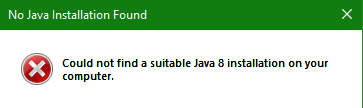
Trying to launch Terasology with OpenJDK 8 on Windows will result on the next message being displayed instead.
Launched directly from the exe, didn't use TerasologyLauncher.
No Java Installation Found
Could not find a suitable Java 8 installation on your computer.
OpenJDK binaries are jdk8u232-b09 got from https://adoptopenjdk.net/?variant=openjdk8&jvmVariant=hotspot
I develop with these, so I'm sure javapath is correctly set.
Game version
Tried TerasologyOmega Alpha 12 and Alpha 13 RC, and none of them work.
 AfterRebelion
All 10 comments
Thanks for reporting! I'm not absolutely sure, but the runtime detection is probably done in:
https://github.com/MovingBlocks/TerasologyJavaLauncher/blob/master/terasology.cpp#L43-L50
 if (jreHome.empty()) {
    // User installation error will be reported by detectJre
    if (config.jreDirectory().empty()) {
        Platform::showError("No Java Installation Found",
            "Could not find a suitable Java 8 installation on your computer.");
    }
    return -1;
 }
It migth be looking for JAVA_HOME or JavaHome in your environment.
Are there any other logging outputs when starting the game from the .exe?
 skaldarnar
on 5 Nov 2019
skaldarnar
on 5 Nov 2019
As I said, JAVA_HOME and Path are correctly set:

The installer for OpenJDK takes care of it during installation.
And from what I can tell, no log seems to be created.
Where the exe is located, no log can be found, and %AppData%/Terasology does not exist on my system.
AfterRebelion
on 5 Nov 2019
This definitely does not behave as it should... maybe we are checking against some Oracle-specific names which are not met by the AdoptOpenJDK distribution 🤔
I'm not sure how the lookup in CRegKey deals with case sensitivity and underscores, but this line defines a string constant to "JavaHome": https://github.com/MovingBlocks/TerasologyJavaLauncher/blob/master/jredetector_win.cpp#L14
I'll try to reproduce the issue locally... Maybe @jdrueckert could help, I think she also uses AdoptOpenJDK...
skaldarnar
on 5 Nov 2019
I can confirm (not with AdoptOpenJDK, though) that the exe is not working 😕 I used the Powershell to run it, not more luck with logging, either.
Starting the game from Powershell via java -jar ./libs/Terasology.jar works fine...
skaldarnar
on 5 Nov 2019
I can confirm that it works launching it directly, the exe is the thing that fails.
Running through PowerShell made me aware that it saves data to the saved games directory, so now I have a log to show:
Terasology-init.log
AfterRebelion
on 5 Nov 2019
Brief update on the way forward:
Whoever feels tempted to try their hands on fixing the
.exes have a look at this repository: https://github.com/MovingBlocks/TerasologyJavaLauncherMeanwhile, we want to bundle the JRE with the launcher and use that to run the game: https://github.com/MovingBlocks/TerasologyLauncher/issues/259
We should still provide a plain.batfile to run the game easily from command line without the launcher.
skaldarnar
on 6 Nov 2019
I think that I can add a bit of information here regarding why I think that this is happening.
The Java JDK, which is the default option for "AdoptOpenJDK" downloads, defines a different Windows registry path to the JRE.
The Terasology launcher used on Windows searches for the JRE by querying the registry key:
HKEY_LOCAL_MACHINE\SOFTWARE\JavaSoft\Java Runtime Environment\1.8\JavaHome
(as found in https://github.com/MovingBlocks/TerasologyJavaLauncher/blob/ed21d8ac0969af364ded8a8ab2fe53795b886789/jredetector_win.cpp#L13).
The JDK path is queried using a different, albeit similar, registry path, which is:
HKEY_LOCAL_MACHINE\SOFTWARE\JavaSoft\Java Development Kit\1.8\JavaHome
The launcher does not check for Java JDK installations, only for JRE installations. It will not run on systems where the JRE registry key is not defined, unless there is a pre-defined bundled jre dir present (located in the <installDir>/jre folder). Changing the searched registry path from the JRE key to the JDK key in the source code fixed the issue for me.
I have not installed the "AdoptOpenJDK" distribution to test this, however it would appear that their installer also writes to the registry keys mentioned above:
https://github.com/AdoptOpenJDK/openjdk-installer/blob/master/wix/Main.openj9.wxs#L134
So far as I can tell, the JAVA_HOME environment variable is not checked at all, although I have not searched the code in-depth enough to be certain of this.
I have made some changes to make this work on both JRE and JDK Java runtimes. They are located for now in my fork here, until I have time to ensure that the changes are still widely compatible with existing distributions.
 BenjaminAmos
on 5 Dec 2019
BenjaminAmos
on 5 Dec 2019
I have issued a pull request for the changes I mentioned before, located at https://github.com/MovingBlocks/TerasologyJavaLauncher/pull/1. The changes made should fix this issue, although it will need further testing to be certain.
BenjaminAmos
on 21 Dec 2019
why has it not been merged yet?
 HybridShivam
on 13 Mar 2020
HybridShivam
on 13 Mar 2020
@HybridShivam good question! Most likely because nobody got the time review and test it 🙈
We've spent some effort on improving the launcher for the regular players by including a JRE with it. Version 4.0.0 just got released.
skaldarnar
on 31 Mar 2020
Related issues
 jdrueckert
·
5Comments
jdrueckert
·
5Comments
 msteiger
·
7Comments
msteiger
·
7Comments
 pollend
·
7Comments
pollend
·
7Comments
 stefaniamak
·
5Comments
stefaniamak
·
5Comments
 Cervator
·
4Comments
Cervator
·
4Comments