Terasology: Seed value(s!) does not appear on Game Details Screen
What you were trying to do
See the seed of a saved world through the Game Details Screen.
What actually happened
The spot where the seed should be written was blank.
How to reproduce
- Go to Singleplayer
- Select one of the saved games _(if there aren't any, create a new one)_
- Click the details button to go at the game's Game details window
- Notice that the seed value does not appear
I only tested the issue through Single Player and with Core Gameplay template saves, but I believe the issue occurs under any circumstances.
Log details and game version
Game version: 78 - alpha
Related screenshots

_Admin edit_: note that there are actually _two_ seed values - one for the universe (able to set on the Advanced Game Setup screen) and one for the world (default to the universe seed value + world name). Ideally we'd point this out and show both values.
With both seed values visible you should be able to replicate the world-specific seed value easily. It normally should be enough to just enter the same universe seed value since the appended world name is going to default to the same every time, unless the player specifically changes the name of the world.
 stefaniamak
All 5 comments
Probably related to https://github.com/MovingBlocks/Terasology/issues/3883 - if it is not showing up in the game details and not being used in the advanced setup, there may be a connection 🕵️
 skaldarnar
on 29 Apr 2020
skaldarnar
on 29 Apr 2020
@skaldarnar I did realize this issue while working on the #3883 one! I believe they have a connection but are mostly unrelated. During some of my tests, when using the same seed it did provide me what seemed to be the same world, thought the seed value still did not appear at the Game Details window.
stefaniamak
on 29 Apr 2020
So I found out that the issue is not a UI one, but the seed's value does not get saved at the save file of the world in the first place.
Shall I make another issue and relate it to it? Or is it okay to leave it as is? @Cervator
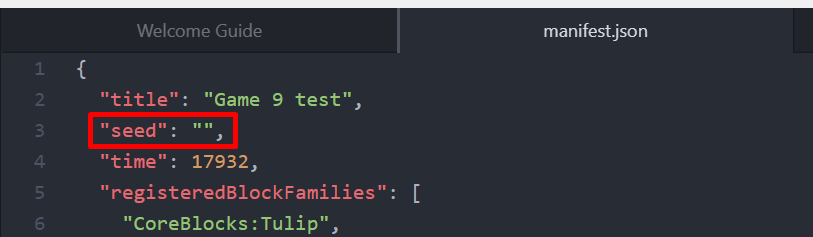
stefaniamak
on 2 May 2020
This still is an issue for games not created via advanced game setup, most likely due to https://github.com/MovingBlocks/Terasology/issues/3931
 jdrueckert
on 6 May 2020
jdrueckert
on 6 May 2020
Bump - just for visibility I edited the issue title ever so slightly and added an extra detail below the screenshot:
Admin edit: note that there are actually two seed values - one for the universe (able to set on the Advanced Game Setup screen) and one for the world (default to the universe seed value + world name). Ideally we'd point this out and show both values.
With both seed values visible you should be able to replicate the world-specific seed value easily. It normally should be enough to just enter the same universe seed value since the appended world name is going to default to the same every time, unless the player specifically changes the name of the world.
 Cervator
on 28 Jun 2020
Cervator
on 28 Jun 2020
Related issues
Cervator
·
4Comments
 Qwertygiy
·
6Comments
Qwertygiy
·
6Comments
 portokaliu
·
7Comments
portokaliu
·
7Comments
 rzats
·
6Comments
rzats
·
6Comments
 keturn
·
4Comments
keturn
·
4Comments