v6.7.0
current: in the spreadsheet interface of the enroll page, user can use Ctrl+V to paste data.
problem: a user reported looking for the Paste option for a long time in the context menu before realizing he can use Ctrl+V
suggestion: add a Paste (Ctrl + V) to the context menu of the spreadsheet UI
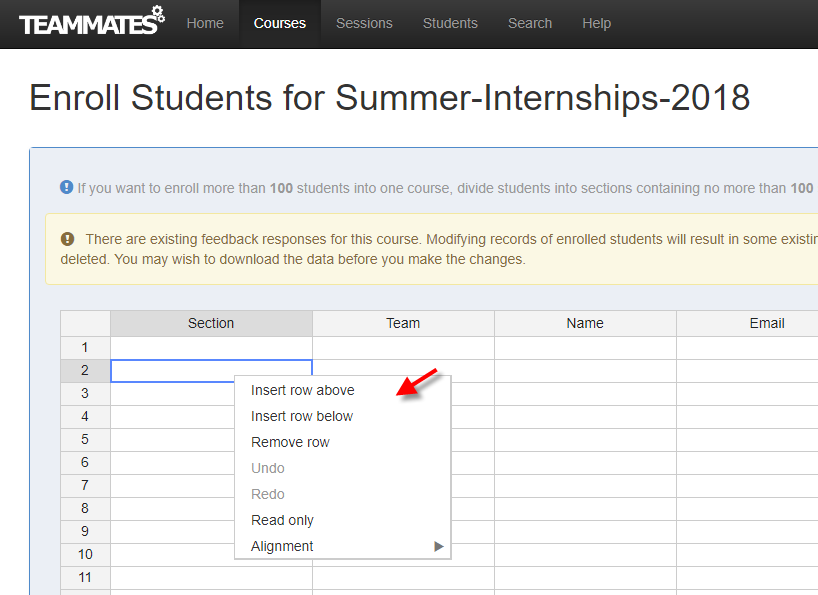
@tanhengyeow is this doable?
@damithc I looked at the Handsontable API briefly and it seems possible. I'll work on it first and note down any incompatibilities or issues faced.
@damithc I did a research on including a paste option and here are some findings.
This is an extract from the Handsontable website regarding the paste option in context menus:
Right-clicking in Handsontable to paste data is limited by browsers, for security reasons. Without these measures, different sites could use scripts to steal the data from users’ clipboards. Some companies, like Google, allow you to paste data between their applications, but it is a workaround, not a solution.
The recommended solution to copy paste in between applications as follows:
If you want to copy data from another page, web application (like Google Sheets) or MS Excel, use a keyboard shortcut instead.
Moreover, how Handsontable is currently handling copying and pasting of data through keyboard shortcuts is through a library named SheetClip. The library does not provide clipboard access through JavaScript (possibly due to security reasons mentioned above) and it mentioned how Handsontable is utilizing it:
This library was created with the intention to be used in Handsontable.
It does not provide you with clipboard access in JavaScript. That part still needs to be figured out by you. There are various ways to achieve it but none of them is perfect. Probably the most compatible with all the browsers is to keep a hidden
At least this is the way how Handsontable does it.
Given the potential security complications, would instructing the users to use keyboard shortcuts to facilitate copying and pasting data in spreadsheet interfaces be better?
UPDATE: Would propose a paste option in context menu and show a modal box to tell the users to use the Paste (Ctrl + V) keyboard shortcut instead upon click.
We can say something like... 'Your Browser does not allow ... Please use Ctrl + V to paste ..'
@damithc Require your input on this behavior:


@damithc Require your input on this behavior:
Looks good!
@tanhengyeow I don't think it is true that browsers have no access to clipboard. See: https://developers.google.com/web/updates/2018/03/clipboardapi
@LiHaoTan Thanks for sharing the article, it was a good read :) Yup you're right on that.
To summarize what I mentioned in https://github.com/TEAMMATES/teammates/issues/8972#issuecomment-406481827, Handsontable doesn't handle pasting through the paste option in its current context menu feature.
This means that we have to implement the pasting workflow ourselves and one possible way is through what you linked. Also, we need to keep in mind that the implementation has to support different browsers (not just Chrome).
Given that Handsontable already handles pasting through keyboard shortcuts Ctrl + V, thus I'm wondering if it is worth the effort implementing the pasting workflow ourselves on top of any potential security complications.
Probably no need. IIRC, even big guys (Google? I remember seeing it in several notable Web apps) simply ask the user to use keyboard shortcut instead. Still, it's good to have an accurate idea of the reasoning behind it. Thanks for the additional info @LiHaoTan
I think it is unfortunate there is no easy way to implement clipboard access until very recently. And while it is true it appears that currently only Chrome supports the API, I think we can look forward to the API being supported in other browsers.
On the other hand, practically speaking Chrome holds a very large market share and though I cannot guess the TEAMMATES demographics I would think its use is going to be pretty common. Pasting is an obvious feature to many but Ctrl + V isn't quite that obvious to many. Given that the work required to implement this is pretty trivial I think we should support it.
Security complications however I don't believe is relevant because while it is true clipboard access pose security implications the new Clipboard API have considered way more on security than most of us would have.
All in all, clipboard access have finally started coming to browsers very recently and I think it is very important for user experience.
Microsoft Office Online doesn't support paste across most if not all browsers.
Google Docs supports paste on Chrome.
Good point @LiHaoTan We can create an issue to add Paste support for Chrome, perhaps a low priority issue for new contributors to do. For the moment we can merge the simpler solution as @tanhengyeow has more urgent things to do in the next couple of weeks.
Most helpful comment
Good point @LiHaoTan We can create an issue to add Paste support for Chrome, perhaps a low priority issue for new contributors to do. For the moment we can merge the simpler solution as @tanhengyeow has more urgent things to do in the next couple of weeks.