Teammates: Tests fail on the dev server
Operating System: Arch Linux
- JDK Version:1.7
- Eclipse / IntelliJ Version (if applicable): Eclipse 4.6.3
- Firefox / Chrome Version (where applicable): Chrome 59.0.3071.86
What I was trying to do / What I need help with
After merging new changes around 41 tests are failing out of 79 in browser tests, local tests are passed. In total 54 are failing and I don't know what I am doing wrong.
In most cases the issues are
org.openqa.selenium.NoSuchElementException: no such element: Unable to locate element: {"method":"class name","selector":"mce-content-body"}
(Session info: chrome=59.0.3071.86)
(Driver info: chromedriver=2.30.477691 (6ee44a7247c639c0703f291d320bdf05c1531b57),platform=Linux 4.11.3-1-ARCH x86_64) (WARNING: The server did not provide any stacktrace information)
Command duration or timeout: 97 milliseconds
For documentation on this error, please visit: http://seleniumhq.org/exceptions/no_such_element.html
or
java.lang.AssertionError: expected:<4> but was:<6>
or
java.lang.AssertionError: expected:
Attempts to resolve the problem
I'm using Chrome with cromedriver for testing. Tried to install firefox 46, but it's outdated and does not run on my system, but I'm not sure whether this it the problem.
Thanks!
 josephinex
All 33 comments
Did you npm run build after merging new changes?
 whipermr5
on 30 Jun 2017
whipermr5
on 30 Jun 2017
Hi, yes.
josephinex
on 1 Jul 2017
@thenaesh or other Linux users: do you get the same errors when running tests using Chrome on Linux?
whipermr5
on 3 Jul 2017
Operating System: Linux Mint 18
JDK Version:1.7
Eclipse / IntelliJ Version (if applicable): Intellij 2017.1.4
Firefox / Chrome Version (where applicable): Firefox 46.0.1
I'm getting similar errors to josephinex. There are cases of org.openqa.selenium.NoSuchElementException. Local test are passing, and Travis tests passed from a change I pushed a couple of days ago.
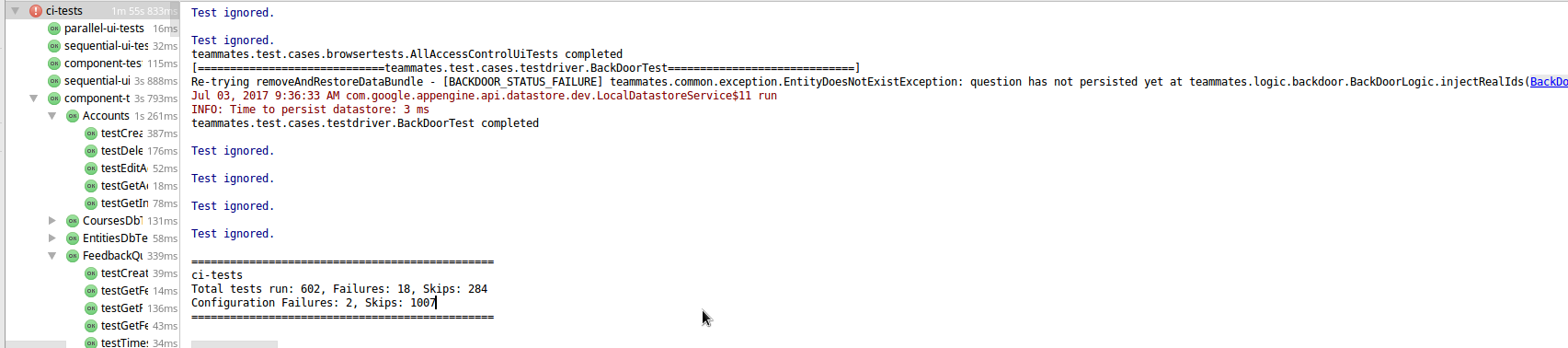
When I run the 'Unit tests' from the gradle tool window > Tasks > verification > test
I get 40 failed out of 607, with 211 ignored.
Here's the stacktrace:
 * content: typical page
 * link: view account details
 * link: view recent actions
 * action: delete instructor status
 * action: delete account

Unable to locate element: {"method":"class name","selector":"bootbox-close-button"}
Command duration or timeout: 357 milliseconds
For documentation on this error, please visit: http://seleniumhq.org/exceptions/no_such_element.html
Build info: version: '2.53.1', revision: 'a36b8b1cd5757287168e54b817830adce9b0158d', time: '2016-06-30 19:26:09'
System info: host: 'bc-carbon', ip: '127.0.1.1', os.name: 'Linux', os.arch: 'amd64', os.version: '4.4.0-83-generic', java.version: '1.7.0_80'
*** Element info: {Using=class name, value=bootbox-close-button}
Session ID: b1302eb9-49cd-4a6a-8230-5bcfa436ef8e
Driver info: org.openqa.selenium.firefox.FirefoxDriver
Capabilities [{platform=LINUX, acceptSslCerts=true, javascriptEnabled=true, cssSelectorsEnabled=true, databaseEnabled=true, browserName=firefox, handlesAlerts=true, nativeEvents=false, webStorageEnabled=true, rotatable=false, locationContextEnabled=true, applicationCacheEnabled=true, takesScreenshot=true, version=46.0.1}]
org.openqa.selenium.NoSuchElementException: Unable to locate element: {"method":"class name","selector":"bootbox-close-button"}
Command duration or timeout: 357 milliseconds
For documentation on this error, please visit: http://seleniumhq.org/exceptions/no_such_element.html
Build info: version: '2.53.1', revision: 'a36b8b1cd5757287168e54b817830adce9b0158d', time: '2016-06-30 19:26:09'
System info: host: 'bc-carbon', ip: '127.0.1.1', os.name: 'Linux', os.arch: 'amd64', os.version: '4.4.0-83-generic', java.version: '1.7.0_80'
*** Element info: {Using=class name, value=bootbox-close-button}
Session ID: b1302eb9-49cd-4a6a-8230-5bcfa436ef8e
Driver info: org.openqa.selenium.firefox.FirefoxDriver
Capabilities [{platform=LINUX, acceptSslCerts=true, javascriptEnabled=true, cssSelectorsEnabled=true, databaseEnabled=true, browserName=firefox, handlesAlerts=true, nativeEvents=false, webStorageEnabled=true, rotatable=false, locationContextEnabled=true, applicationCacheEnabled=true, takesScreenshot=true, version=46.0.1}]
    at sun.reflect.NativeConstructorAccessorImpl.newInstance0(Native Method)
    at sun.reflect.NativeConstructorAccessorImpl.newInstance(NativeConstructorAccessorImpl.java:57)
    at sun.reflect.DelegatingConstructorAccessorImpl.newInstance(DelegatingConstructorAccessorImpl.java:45)
    at java.lang.reflect.Constructor.newInstance(Constructor.java:526)
    at org.openqa.selenium.remote.ErrorHandler.createThrowable(ErrorHandler.java:206)
    at org.openqa.selenium.remote.ErrorHandler.throwIfResponseFailed(ErrorHandler.java:158)
    at org.openqa.selenium.remote.RemoteWebDriver.execute(RemoteWebDriver.java:678)
    at org.openqa.selenium.remote.RemoteWebDriver.findElement(RemoteWebDriver.java:363)
    at org.openqa.selenium.remote.RemoteWebDriver.findElementByClassName(RemoteWebDriver.java:477)
    at org.openqa.selenium.By$ByClassName.findElement(By.java:391)
    at org.openqa.selenium.remote.RemoteWebDriver.findElement(RemoteWebDriver.java:355)
    at teammates.test.pageobjects.AppPage.waitForModalPresence(AppPage.java:307)
    at teammates.test.pageobjects.AppPage.waitForConfirmationModalAndClickCancel(AppPage.java:299)
    at teammates.test.pageobjects.AppPage.clickAndCancel(AppPage.java:670)
    at teammates.test.pageobjects.AdminAccountManagementPage.clickAndCancelDeleteAccountLink(AdminAccountManagementPage.java:49)
    at teammates.test.cases.browsertests.AdminAccountManagementPageUiTest.testDeleteInstructorAccountAction(AdminAccountManagementPageUiTest.java:88)
    at teammates.test.cases.browsertests.AdminAccountManagementPageUiTest.testAll(AdminAccountManagementPageUiTest.java:34)
    at sun.reflect.NativeMethodAccessorImpl.invoke0(Native Method)
    at sun.reflect.NativeMethodAccessorImpl.invoke(NativeMethodAccessorImpl.java:57)
    at sun.reflect.DelegatingMethodAccessorImpl.invoke(DelegatingMethodAccessorImpl.java:43)
    at java.lang.reflect.Method.invoke(Method.java:606)
    at org.testng.internal.MethodInvocationHelper.invokeMethod(MethodInvocationHelper.java:85)
    at org.testng.internal.Invoker.invokeMethod(Invoker.java:659)
    at org.testng.internal.Invoker.invokeTestMethod(Invoker.java:845)
    at org.testng.internal.Invoker.invokeTestMethods(Invoker.java:1153)
    at org.testng.internal.TestMethodWorker.invokeTestMethods(TestMethodWorker.java:125)
    at org.testng.internal.TestMethodWorker.run(TestMethodWorker.java:108)
    at org.testng.TestRunner.privateRun(TestRunner.java:771)
    at org.testng.TestRunner.run(TestRunner.java:621)
    at org.testng.SuiteRunner.runTest(SuiteRunner.java:357)
    at org.testng.SuiteRunner.runSequentially(SuiteRunner.java:352)
    at org.testng.SuiteRunner.privateRun(SuiteRunner.java:310)
    at org.testng.SuiteRunner.run(SuiteRunner.java:259)
    at org.testng.SuiteRunnerWorker.runSuite(SuiteRunnerWorker.java:52)
    at org.testng.SuiteRunnerWorker.run(SuiteRunnerWorker.java:86)
    at org.testng.TestNG.runSuitesSequentially(TestNG.java:1199)
    at org.testng.TestNG.runSuitesLocally(TestNG.java:1124)
    at org.testng.TestNG.run(TestNG.java:1032)
    at org.gradle.api.internal.tasks.testing.testng.TestNGTestClassProcessor.runTests(TestNGTestClassProcessor.java:129)
    at org.gradle.api.internal.tasks.testing.testng.TestNGTestClassProcessor.stop(TestNGTestClassProcessor.java:88)
    at org.gradle.api.internal.tasks.testing.SuiteTestClassProcessor.stop(SuiteTestClassProcessor.java:61)
    at sun.reflect.NativeMethodAccessorImpl.invoke0(Native Method)
    at sun.reflect.NativeMethodAccessorImpl.invoke(NativeMethodAccessorImpl.java:57)
    at sun.reflect.DelegatingMethodAccessorImpl.invoke(DelegatingMethodAccessorImpl.java:43)
    at java.lang.reflect.Method.invoke(Method.java:606)
    at org.gradle.internal.dispatch.ReflectionDispatch.dispatch(ReflectionDispatch.java:35)
    at org.gradle.internal.dispatch.ReflectionDispatch.dispatch(ReflectionDispatch.java:24)
    at org.gradle.internal.dispatch.ContextClassLoaderDispatch.dispatch(ContextClassLoaderDispatch.java:32)
    at org.gradle.internal.dispatch.ProxyDispatchAdapter$DispatchingInvocationHandler.invoke(ProxyDispatchAdapter.java:93)
    at com.sun.proxy.$Proxy2.stop(Unknown Source)
    at org.gradle.api.internal.tasks.testing.worker.TestWorker.stop(TestWorker.java:120)
    at sun.reflect.NativeMethodAccessorImpl.invoke0(Native Method)
    at sun.reflect.NativeMethodAccessorImpl.invoke(NativeMethodAccessorImpl.java:57)
    at sun.reflect.DelegatingMethodAccessorImpl.invoke(DelegatingMethodAccessorImpl.java:43)
    at java.lang.reflect.Method.invoke(Method.java:606)
    at org.gradle.internal.dispatch.ReflectionDispatch.dispatch(ReflectionDispatch.java:35)
    at org.gradle.internal.dispatch.ReflectionDispatch.dispatch(ReflectionDispatch.java:24)
    at org.gradle.internal.remote.internal.hub.MessageHubBackedObjectConnection$DispatchWrapper.dispatch(MessageHubBackedObjectConnection.java:147)
    at org.gradle.internal.remote.internal.hub.MessageHubBackedObjectConnection$DispatchWrapper.dispatch(MessageHubBackedObjectConnection.java:129)
    at org.gradle.internal.remote.internal.hub.MessageHub$Handler.run(MessageHub.java:404)
    at org.gradle.internal.concurrent.ExecutorPolicy$CatchAndRecordFailures.onExecute(ExecutorPolicy.java:63)
    at org.gradle.internal.concurrent.StoppableExecutorImpl$1.run(StoppableExecutorImpl.java:46)
    at java.util.concurrent.ThreadPoolExecutor.runWorker(ThreadPoolExecutor.java:1145)
    at java.util.concurrent.ThreadPoolExecutor$Worker.run(ThreadPoolExecutor.java:615)
    at java.lang.Thread.run(Thread.java:745)
Caused by: org.openqa.selenium.NoSuchElementException: Unable to locate element: {"method":"class name","selector":"bootbox-close-button"}
For documentation on this error, please visit: http://seleniumhq.org/exceptions/no_such_element.html
Build info: version: '2.53.1', revision: 'a36b8b1cd5757287168e54b817830adce9b0158d', time: '2016-06-30 19:26:09'
System info: host: 'bc-carbon', ip: '127.0.1.1', os.name: 'Linux', os.arch: 'amd64', os.version: '4.4.0-83-generic', java.version: '1.7.0_80'
Driver info: driver.version: unknown
    at <anonymous class>.FirefoxDriver.prototype.findElementInternal_(file:///tmp/anonymous198023367846962851webdriver-profile/extensions/[email protected]/components/driver-component.js:10770)
    at <anonymous class>.FirefoxDriver.prototype.findElement(file:///tmp/anonymous198023367846962851webdriver-profile/extensions/[email protected]/components/driver-component.js:10779)
    at <anonymous class>.DelayedCommand.prototype.executeInternal_/h(file:///tmp/anonymous198023367846962851webdriver-profile/extensions/[email protected]/components/command-processor.js:12661)
    at <anonymous class>.DelayedCommand.prototype.executeInternal_(file:///tmp/anonymous198023367846962851webdriver-profile/extensions/[email protected]/components/command-processor.js:12666)
    at <anonymous class>.DelayedCommand.prototype.execute/<(file:///tmp/anonymous198023367846962851webdriver-profile/extensions/[email protected]/components/command-processor.js:12608)
 BrianCoveney
on 3 Jul 2017
BrianCoveney
on 3 Jul 2017
@josephinex @BrianCoveney Are you both able to run and login to the dev server as admin, add an instructor, and login as the instructor without errors?
whipermr5
on 4 Jul 2017
@whipermr5 - I can login on the dev server, but when i press the button 'Add Instructor', on http://localhost:8888/admin/adminHomePage, nothing happens. Neither is there any feedback in Intellij's run log.
Here's the run log (all output before button is clicked):
/usr/lib/jvm/java-7-oracle/bin/java -javaagent:/home/brian/.gradle/appengine-sdk/appengine-java-sdk-1.9.54/lib/agent/appengine-agent.jar -Xbootclasspath/p:/home/brian/.gradle/appengine-sdk/appengine-java-sdk-1.9.54/lib/override/appengine-dev-jdk-overrides.jar -javaagent:/opt/idea-IU-171.3780.107/lib/idea_rt.jar=36536:/opt/idea-IU-171.3780.107/bin -Ddatastore.backing_store=../../../../local_db.bin -Dfile.encoding=UTF-8 -classpath /home/brian/.gradle/appengine-sdk/appengine-java-sdk-1.9.54/lib/appengine-tools-api.jar:/usr/lib/jvm/java-7-oracle/lib/tools.jar com.google.appengine.tools.development.DevAppServerMain -p 8888 --disable_update_check /home/brian/workspace/teammates/buildIdea/libs/exploded/teammates.war
Jul 04, 2017 7:41:05 AM com.google.appengine.tools.development.SystemPropertiesManager setSystemProperties
INFO: Overwriting system property key 'java.util.logging.config.file', value '/home/brian/.gradle/appengine-sdk/appengine-java-sdk-1.9.54/config/sdk/logging.properties' with value 'WEB-INF/logging.properties' from '/home/brian/workspace/teammates/buildIdea/libs/exploded/teammates.war/WEB-INF/appengine-web.xml'
Jul 04, 2017 7:41:05 AM com.google.apphosting.utils.jetty.JettyLogger info
INFO: Logging to JettyLogger(null) via com.google.apphosting.utils.jetty.JettyLogger
Connected to server
Jul 04, 2017 6:41:06 AM com.google.apphosting.utils.jetty.JettyLogger info
INFO: jetty-6.1.x
Jul 04, 2017 6:41:08 AM com.google.apphosting.utils.jetty.JettyLogger info
INFO: Started SelectChannelConnector@localhost:8888
Jul 04, 2017 6:41:08 AM com.google.appengine.tools.development.AbstractModule startup
INFO: Module instance default is running at http://localhost:8888/
Jul 04, 2017 6:41:08 AM com.google.appengine.tools.development.AbstractModule startup
INFO: The admin console is running at http://localhost:8888/_ah/admin
Jul 04, 2017 7:41:08 AM com.google.appengine.tools.development.DevAppServerImpl doStart
INFO: Dev App Server is now running
Jul 04, 2017 7:41:15 AM com.google.appengine.tools.development.DevAppEngineWebAppContext disableTransportGuarantee
INFO: Ignoring <transport-guarantee> for /page/* as the SDK does not support HTTPS.  It will still be used when you upload your application.
Jul 04, 2017 7:41:15 AM com.google.appengine.tools.development.DevAppEngineWebAppContext disableTransportGuarantee
INFO: Ignoring <transport-guarantee> for /auto/* as the SDK does not support HTTPS.  It will still be used when you upload your application.
Jul 04, 2017 7:41:15 AM com.google.appengine.tools.development.DevAppEngineWebAppContext disableTransportGuarantee
INFO: Ignoring <transport-guarantee> for /jsp/* as the SDK does not support HTTPS.  It will still be used when you upload your application.
Jul 04, 2017 7:41:15 AM com.google.appengine.tools.development.DevAppEngineWebAppContext disableTransportGuarantee
INFO: Ignoring <transport-guarantee> for /admin/* as the SDK does not support HTTPS.  It will still be used when you upload your application.
Jul 04, 2017 7:41:15 AM com.google.appengine.tools.development.DevAppEngineWebAppContext disableTransportGuarantee
INFO: Ignoring <transport-guarantee> for /test/* as the SDK does not support HTTPS.  It will still be used when you upload your application.
Jul 04, 2017 7:41:27 AM com.google.apphosting.utils.jetty.AppEngineAuthentication$AppEngineAuthenticator authenticate
INFO: Got /admin/adminHomePage but no one was logged in, redirecting.
Jul 04, 2017 7:41:31 AM com.google.apphosting.utils.jetty.AppEngineAuthentication$AppEngineUserRealm isUserInRole
INFO: Checking if principal [email protected] is in role admin
Jul 04, 2017 7:41:31 AM com.google.appengine.api.datastore.dev.LocalDatastoreService init
INFO: Local Datastore initialized:
    Type: High Replication
    Storage: ../../../../local_db.bin
Jul 04, 2017 7:41:31 AM com.google.appengine.api.datastore.dev.LocalDatastoreService load
INFO: Time to load datastore: 98 ms
Jul 04, 2017 7:41:32 AM teammates.common.util.Logger info
INFO: Request received : [GET] http://localhost:8888/admin/adminHomePage:{}
Jul 04, 2017 7:41:32 AM teammates.common.util.Logger info
INFO: User agent : Mozilla/5.0 (X11; Linux x86_64) AppleWebKit/537.36 (KHTML, like Gecko) Chrome/59.0.3071.115 Safari/537.36
Jul 04, 2017 7:41:32 AM teammates.common.util.Logger info
INFO: URL received : [GET] http://localhost:8888/admin/adminHomePage
Jul 04, 2017 7:41:34 AM teammates.common.util.Logger info
INFO: TEAMMATESLOG|||adminHomePage|||adminHomePage|||true|||Admin|||Unknown|||[email protected]|||Unknown|||Admin Home Page Load|||/admin/adminHomePage|||[email protected]%20170704144134183|||1976
@BrianCoveney Sounds like a case of not running npm run build.
whipermr5
on 4 Jul 2017
@whipermr5 - I think you could be right. Unfortunately when I run npm run build
Tell the author that this fails on your system: npm run build:src && npm run build:test
I'll have a look at the files permissions
BrianCoveney
on 4 Jul 2017
@BrianCoveney You need to npm install first.
whipermr5
on 4 Jul 2017
No joy:
brian@bc-carbon ~/workspace/teammates $ sudo npm install
npm WARN package.json @ No repository field.
npm WARN package.json @ No license field.
brian@bc-carbon ~/workspace/teammates $ sudo npm run build

> @ build /home/brian/workspace/teammates
> npm run build:src && npm run build:test


> @ build:src /home/brian/workspace/teammates
> webpack --config webpack-main.config.js

sh: 1: webpack: not found

npm ERR! Linux 4.4.0-83-generic
npm ERR! argv "/usr/bin/nodejs" "/usr/bin/npm" "run" "build:src"
npm ERR! node v4.8.3
npm ERR! npm  v2.15.11
npm ERR! file sh
npm ERR! code ELIFECYCLE
npm ERR! errno ENOENT
npm ERR! syscall spawn
npm ERR! @ build:src: `webpack --config webpack-main.config.js`
npm ERR! spawn ENOENT
npm ERR!
npm ERR! Failed at the @ build:src script 'webpack --config webpack-main.config.js'.
npm ERR! This is most likely a problem with the  package,
npm ERR! not with npm itself.
npm ERR! Tell the author that this fails on your system:
npm ERR!     webpack --config webpack-main.config.js
npm ERR! You can get information on how to open an issue for this project with:
npm ERR!     npm bugs
npm ERR! Or if that isn't available, you can get their info via:
npm ERR!
npm ERR!     npm owner ls
npm ERR! There is likely additional logging output above.

npm ERR! Please include the following file with any support request:
npm ERR!     /home/brian/workspace/teammates/npm-debug.log

npm ERR! Linux 4.4.0-83-generic
npm ERR! argv "/usr/bin/nodejs" "/usr/bin/npm" "run" "build"
npm ERR! node v4.8.3
npm ERR! npm  v2.15.11
npm ERR! code ELIFECYCLE
npm ERR! @ build: `npm run build:src && npm run build:test`
npm ERR! Exit status 1
npm ERR!
npm ERR! Failed at the @ build script 'npm run build:src && npm run build:test'.
npm ERR! This is most likely a problem with the  package,
npm ERR! not with npm itself.
npm ERR! Tell the author that this fails on your system:
npm ERR!     npm run build:src && npm run build:test
npm ERR! You can get information on how to open an issue for this project with:
npm ERR!     npm bugs
npm ERR! Or if that isn't available, you can get their info via:
npm ERR!
npm ERR!     npm owner ls
npm ERR! There is likely additional logging output above.

npm ERR! Please include the following file with any support request:
npm ERR!     /home/brian/workspace/teammates/npm-debug.log
Drop the sudo.
whipermr5
on 4 Jul 2017
Tried that @whipermr5. Must be a permission issue. I'll look into it.
brian@bc-carbon ~/workspace/teammates $ npm install
npm WARN package.json @ No repository field.
npm WARN package.json @ No license field.
npm ERR! Linux 4.4.0-83-generic
npm ERR! argv "/usr/bin/nodejs" "/usr/bin/npm" "install"
npm ERR! node v4.8.3
npm ERR! npm  v2.15.11
npm ERR! path /home/brian/workspace/teammates/node_modules/.bin/babel-doctor
npm ERR! code EACCES
npm ERR! errno -13
npm ERR! syscall unlink

npm ERR! Error: EACCES: permission denied, unlink '/home/brian/workspace/teammates/node_modules/.bin/babel-doctor'
npm ERR!     at Error (native)
npm ERR!  { [Error: EACCES: permission denied, unlink '/home/brian/workspace/teammates/node_modules/.bin/babel-doctor']
npm ERR!   errno: -13,
npm ERR!   code: 'EACCES',
npm ERR!   syscall: 'unlink',
npm ERR!   path: '/home/brian/workspace/teammates/node_modules/.bin/babel-doctor' }
npm ERR!
npm ERR! Please try running this command again as root/Administrator.

npm ERR! Please include the following file with any support request:
npm ERR!     /home/brian/workspace/teammates/npm-debug.log
Yes; you need to first delete the node_modules folder that was created with root privileges when you ran sudo npm install.
whipermr5
on 4 Jul 2017
That did the trick @whipermr5, I can now create an Instructor. I'll run the CI tests now. Thanks!
BrianCoveney
on 4 Jul 2017
The CI failures are now down to 11 out of 602, with none skipped. Is this acceptable @whipermr5? I'll run the Run Failed Test in the TestNG tab.
BrianCoveney
on 4 Jul 2017
@BrianCoveney Yes; rerun the failed tests several times before reporting back the final number.
whipermr5
on 4 Jul 2017
@whipermr5 I selected Failed Tests from the run drop down options and no test were found:
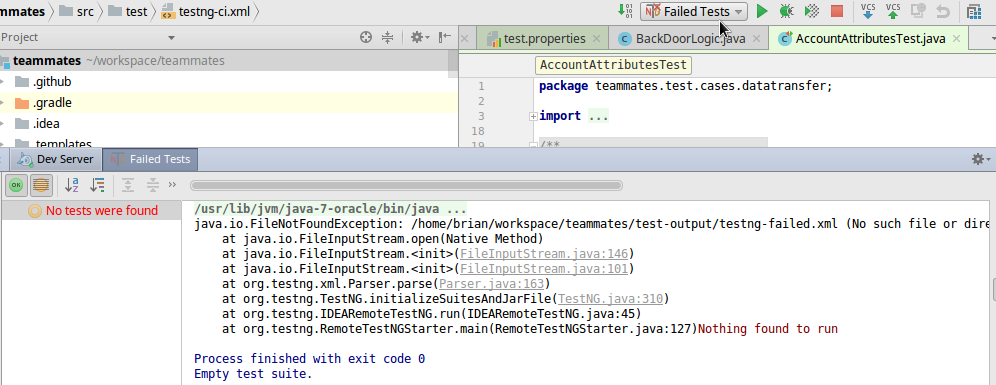
There is no test-output folder in my project
Should I locate the failed tests and run them manually?
BrianCoveney
on 4 Jul 2017
@BrianCoveney That run config is meant to rerun failed tests originally run from the command line (e.g. using ./gradlew ciTests). In future, use the IntelliJ-provided button instead:
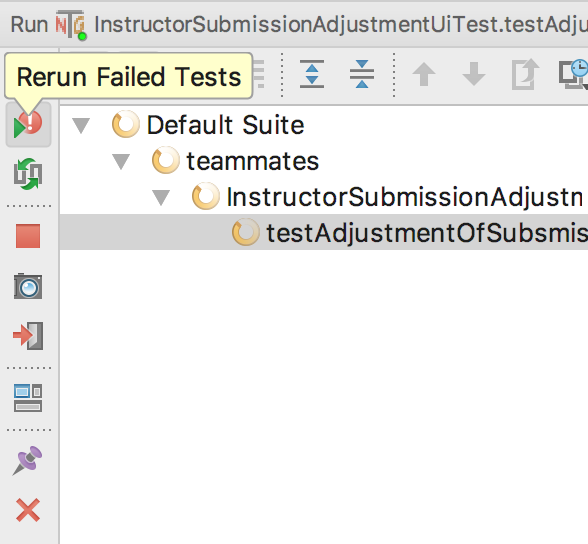
whipermr5
on 4 Jul 2017
@whipermr5 thanks for pointing that out.
I ran the CI tests again, 4 failed. Then Rerun Failed Tests and all tests have now passed.
Thanks for your help! My error stemmed from running sudo npm install, instead of npm install
BrianCoveney
on 4 Jul 2017
@josephinex Were there any problems when you ran npm run build?
whipermr5
on 4 Jul 2017
No problems with npm run build, but indeed I cannot create an Instructor. It fails.
josephinex
on 4 Jul 2017
What's the error?
whipermr5
on 4 Jul 2017
Well, actually it writes that it did create it (I created on the website) but status is failed.
Instructor Dorian Grey has been successfully created with join link:
https://teammates-john.appspot.com/page/instructorCourseJoin?key=10B463A2220C26C15D6E7031721F92EC38324BB88017679A58CBD5208A912F6195D298063208653CF3FE63F0C3F874DB3474F977C7CF09D22ED2932FA3B9CB3DC5B01594613AC8384F57C5528FF965C6&instructorinstitution=University+of+Singapore
josephinex
on 4 Jul 2017
This should work:
http://localhost:8888/page/instructorCourseJoin?key=10B463A2220C26C15D6E7031721F92EC38324BB88017679A58CBD5208A912F6195D298063208653CF3FE63F0C3F874DB3474F977C7CF09D22ED2932FA3B9CB3DC5B01594613AC8384F57C5528FF965C6&instructorinstitution=University+of+Singapore
BrianCoveney
on 4 Jul 2017
@josephinex That's fine. The erroneous status was fixed in #7484. Follow what @BrianCoveney said.
whipermr5
on 4 Jul 2017
Succeeded to login.
josephinex
on 4 Jul 2017
@josephinex 👍 Try re-running the CI tests again.
whipermr5
on 4 Jul 2017
494 tests completed, 41 failed, 453 skipped
:testTry4 FAILED
:killFirefox4
FAILURE: Build failed with an exception.
- What went wrong:
Execution failed for task ':testTry4'.
> There were failing tests
josephinex
on 4 Jul 2017
What are some errors other than those in your original post? Those are quite common, and are not revealing the real issue.
whipermr5
on 4 Jul 2017
java.lang.IllegalStateException:
Operation not allowed in a thread that is neither the original request thread nor a thread created by ThreadManager
also this
WARNING: TEAMMATESLOG|||instructorHomePage|||Servlet Action Failure|||true|||Unregistered|||Unknown|||teammates.unreg|||Unknown|||Servlet Action failure in instructorHomePage
class teammates.common.exception.UnauthorizedAccessException:
teammates.common.exception.UnauthorizedAccessException: Unregistered user for a page that needs registration
WARNING: TEAMMATESLOG|||instructorHomePage|||Servlet Action Failure|||true|||Unregistered|||Unknown|||teammates.unreg|||Unknown|||Servlet Action failure in instructorHomePage
class teammates.common.exception.UnauthorizedAccessException:
teammates.common.exception.UnauthorizedAccessException: User teammates.unreg is trying to masquerade as idOfInstructor1OfCourse2.access without admin permission.
at teammates.ui.controller.Action.authenticateAndGetNominalUser(Action.java:373)
the rest are assertion errors
josephinex
on 4 Jul 2017
Another thing I paid attention to today that no classes are enhanced now, although always there were 10.
josephinex
on 5 Jul 2017
@josephinex We have migrated to Objectify, and enhancement is no longer required. Have you followed the steps in #7644? Also, have you followed the steps in #7627 after we upgraded SDK version?
whipermr5
on 5 Jul 2017
Set up the project on another linux machine. It works fine here. All tests are passing. Thanks for the help.
josephinex
on 6 Jul 2017
Related issues
 joanneong
·
4Comments
joanneong
·
4Comments
 JosephineKwa
·
4Comments
JosephineKwa
·
4Comments
 xpdavid
·
3Comments
xpdavid
·
3Comments
 YongJieYongJie
·
3Comments
YongJieYongJie
·
3Comments
 amarlearning
·
4Comments
amarlearning
·
4Comments
Most helpful comment
@whipermr5 thanks for pointing that out.
I ran the CI tests again, 4 failed. Then
Rerun Failed Testsand all tests have now passed.Thanks for your help! My error stemmed from running
sudo npm install, instead ofnpm install