Teammates: Help Request: IntelliJ IDEA 'Cannot resolve symbol' error for standart Java classes
I succefully imported project using this instruction https://github.com/TEAMMATES/teammates/blob/master/docs/ide-setup.md#intellij-idea
but have had 'Cannot resolve symbol' errors for standart Java classes imports. Caches Invalidation didn't help.

 Artyom-Ganev
All 5 comments
@Artyom-Ganev
Try this: click on "gradle" on the right side of your intellij toolbar. After which, click on the refresh symbol.
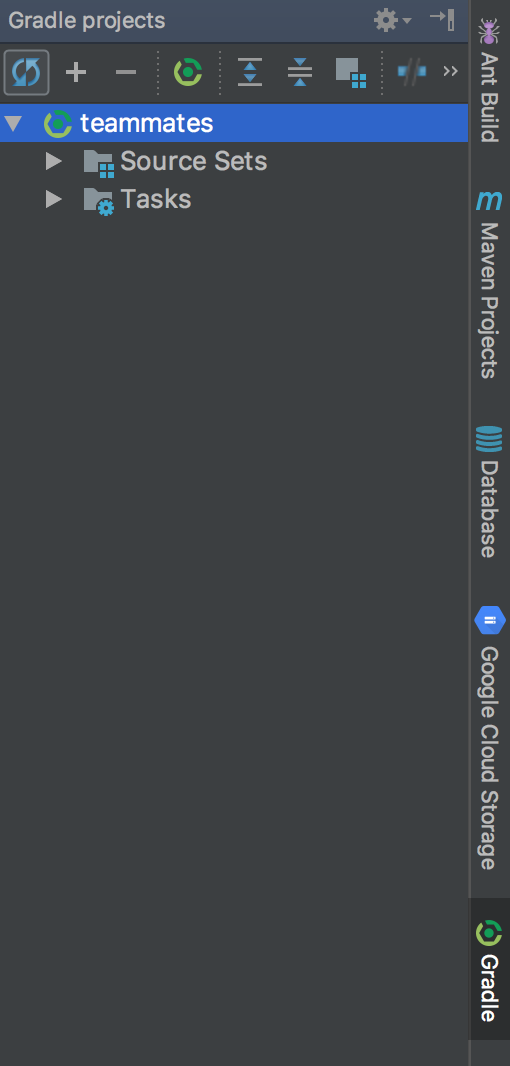
Let us know if it works for you!
 Haozhe321
on 13 Mar 2018
Haozhe321
on 13 Mar 2018
It didn't help. Are the settings correct?

Artyom-Ganev
on 17 Mar 2018
I tried to run tests and got Error:java: Fatal Error: Unable to find package java.lang in classpath or bootclasspath

Soulution is here
https://stackoverflow.com/questions/3049433/intellij-gives-fatal-error-unable-to-find-package-java-lang-in-classpath-or-boo
Somehow the JDK language jars were removed from the classpath. All I had to do was reapply the JSDK home path.
Goto: File -> Project Structure -> Platform Settings -> SDKs Re-apply the JSDK home path.
Doing this added about 15 jars to the classpath. Apparently these are important for compiling.
Artyom-Ganev
on 17 Mar 2018
Did you try the solution in the stackoverflow answer? Still doesn't work?
Haozhe321
on 17 Mar 2018
I tried and it worked
Artyom-Ganev
on 18 Mar 2018
Related issues
 niqiukun
·
18Comments
niqiukun
·
18Comments
 damithc
·
19Comments
damithc
·
32Comments
damithc
·
19Comments
damithc
·
32Comments
 nkshschdv
·
23Comments
nkshschdv
·
23Comments
 xpdavid
·
25Comments
xpdavid
·
25Comments
Most helpful comment
I tried and it worked