Teammates: Instructor session results page: better label for questions without specific recipients
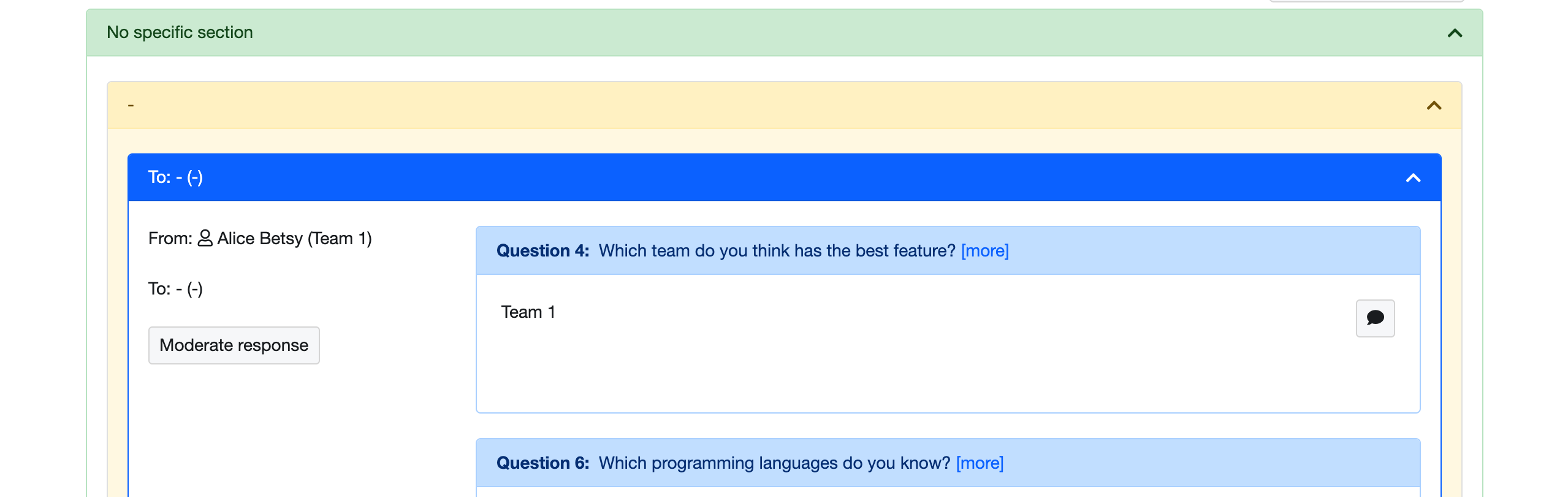
Currently recipients of questions that do not require specifc recipients are identified as "-". This may be a bit confusing especially when grouped by recipients. Can give it a better label (e.g. no specific recipients)
 niqiukun
All 18 comments
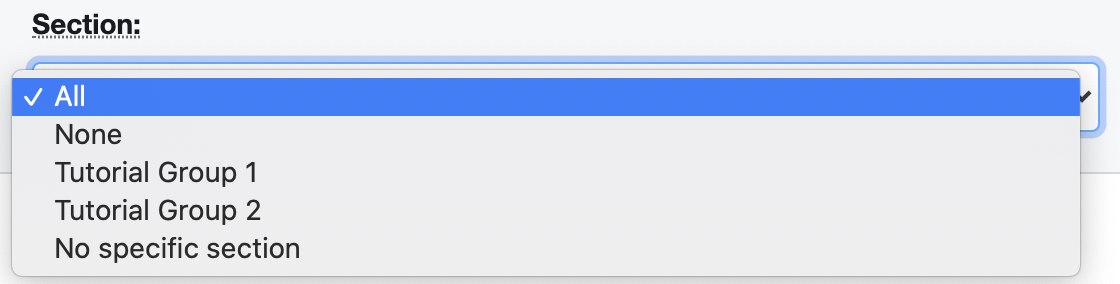
Actually, anyone knows what is the difference between "None" and "No specific section" for the section selection?
niqiukun
on 16 Aug 2020
Actually, anyone knows what is the difference between "None" and "No specific section" for the section selection?
I suspect None is the default section used internally to indicate someone is not in a section. At least that's how it used to be sometime back. Not a good practice to use a regular word None for a special purpose.
 damithc
on 16 Aug 2020
damithc
on 16 Aug 2020
Actually, anyone knows what is the difference between "None" and "No specific section" for the section selection?
They're supposed to mean the same thing, None is the default section name given if an instructor leaves it blank when enrolling students (because of some backend requirement that it cannot be null iirc). I think your screenshot might have been something that was missed out in #10209
 madanalogy
on 17 Aug 2020
madanalogy
on 17 Aug 2020
Is this issue open, if so I would like to work on it.
 EmberCS15
on 2 Oct 2020
EmberCS15
on 2 Oct 2020
Is this issue open, if so I would like to work on it.
Sure, please read our contributing guide and development guide, and send in a PR to fix this when you're ready.
madanalogy
on 3 Oct 2020
I wanted help regarding the following -
- What is the exact text to be displayed for the
Tosection in case no one is assigned there
- Is it
None - Is it
No Specific Recipients - Or something else
- Is it
- Is there any change required for the dropdown shown in the screenshot (correspondence 2) or is it a question.
EmberCS15
on 3 Oct 2020
I am having a bit of a problem navigating the website, when I login using the Admin mode on dev server and try masquerade mode to view instructor and student pages it shows an error message like the one in the screenshot
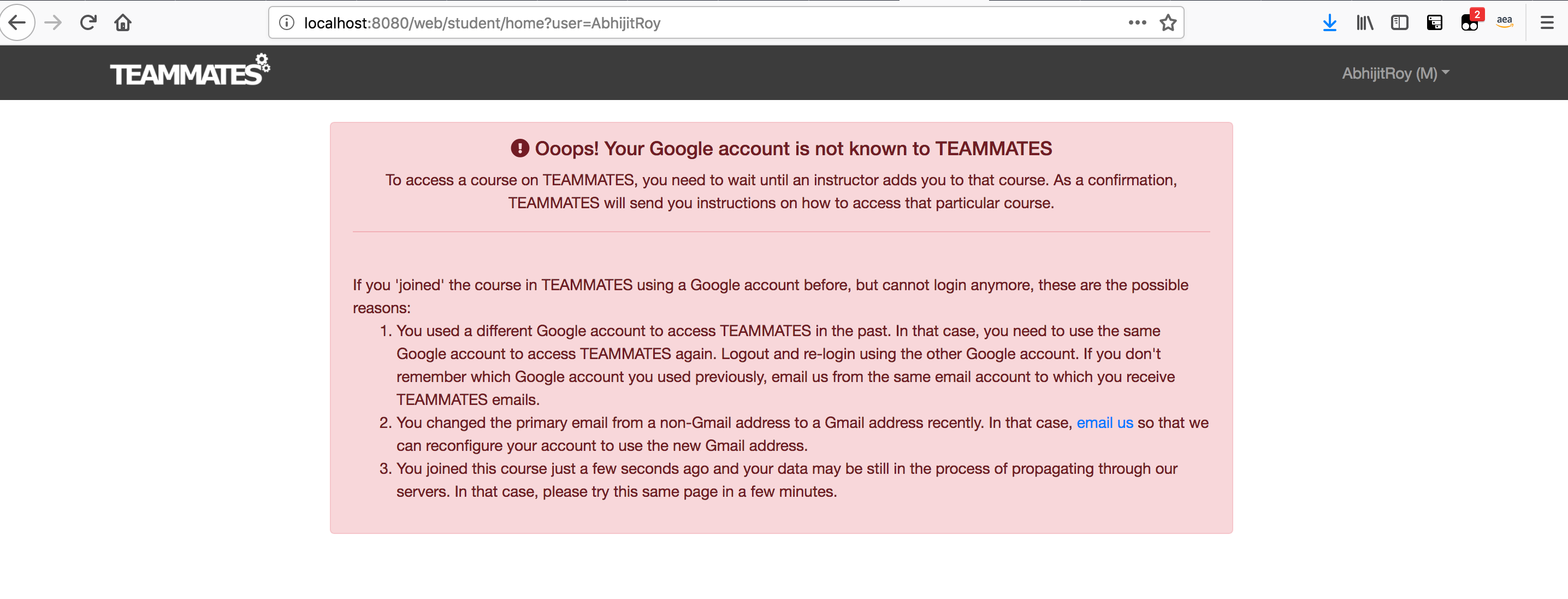
Any way to by pass this ? I am kind of new to this repo, would really appreciate some help
EmberCS15
on 3 Oct 2020
What is the exact text to be displayed for the
Tosection in case no one is assigned there
It should be "No specific recipients"
Is there any change required for the dropdown shown in the screenshot (correspondence 2) or is it a question.
It was a question, changing that should not be in the scope of a PR tackling this issue
Any way to by pass this ? I am kind of new to this repo, would really appreciate some help
You will first need to have the instructor you added join the course (with the join link you generated as an administrator). This requires that you're logged in with the corresponding account however. You can try the following series of steps:
- Add instructor, make sure you note down the instructor's email and copy the generated join link.
- Log out, then when you log in use the email of the instructor you just added.
- After successfully logging in as the instructor in the dev environment, paste the join link you copied earlier into the url bar and navigate there.
madanalogy
on 4 Oct 2020
I followed the steps -
- Added Instructor, join link is generated
- Logged out of the admin console
- Logged in as the instructor
- When I then paste the join link in the url bar, I see Unable to connect, Is there some other server that needs to be running ?
- I have the dev server running serving both frontend and backend files at 8080, but see no server in 4200
EmberCS15
on 4 Oct 2020
Actually just changing the port to 8080 did the trick. Thanks
EmberCS15
on 4 Oct 2020
Is there any discord/slack channel for discussion general questions ? Or are all correspondences held over the issue ?
EmberCS15
on 4 Oct 2020
Hi @niqiukun, what are the exact steps to reproduce the bug ? It would be helpful to know this information.
EmberCS15
on 4 Oct 2020
Np, I could reproduce the bug with the following steps -
- On the instructor tab go to
Sample Course 101collapsible dropdown - Go to the row with
Session with different question types-> SelectResults->View Results - For
View-> SelectGroup by > Receipient > Giver > Question - For
Section-> SelectAll - Under the
No Specific sectionthe bug can be seen
EmberCS15
on 4 Oct 2020
Is there any discord/slack channel for discussion general questions ? Or are all correspondences held over the issue ?
All correspondences are communicated via the issue tracker. I see you've managed to reproduce the issue, let us know if you need any help resolving it yea
madanalogy
on 4 Oct 2020
Hey @madanalogy
Couple of Observations -
- The Information from the server for the user is coming as -, - because of which it is being rendered as such.
- There is already a check on empty user here so the backend is returning "-" as team name and user name. Code Line
Based on this I have a question -
- Is this the expected behaviour of the data,
RGQ, No Specific Sectionmeans the server returns the user, team as-, -? - Would it be valid to have the following check
- if
!isGrq && !(sectionInfo.key === 'None')then renderNo Specific Recipient/Team
- if
Possible Places to change -
EmberCS15
on 4 Oct 2020
The Information from the server for the user is coming as -
Your observation is correct
Is this the expected behaviour of the data
Yes, there are question types that are not directed at any particular person / recipient, and it is currently represented as - via the server response
Would it be valid to have the following check
sectionInfo.key seems to imply that you're trying to check for a user's section. What you want to look at instead is the userInfo which would be populated with the intended name of the recipient / giver depending on which question view component is attempting to access the information.
Currently, the frontend system displays whatever value that was received from the server. So there are two approaches here, either you change the displayed content (i.e. if userInfo == '-') or change what is returned from the server. Since this is a first timer issue we are only expecting the former.
Another place you could look at is the per-question-view-responses.component. Great job with the clarifying questions, keep up the good work!
madanalogy
on 4 Oct 2020
Thanks, @madanalogy for the clarification
I will go with the proposed solution of adding check on if userInfo == '-'
For the student name
Since this is used in a lot of places why not add the check to the student-name-with-photo html ? This will ensure that for userInfo marked as '-' is given to the student-name-with-photo it will render No Specific User
For the team marker
Since there is no component for the team marker one, I will have to change that in all places
Let me know which will be more suitable for the student one, changing at all places or the student-name-with-photo
EmberCS15
on 4 Oct 2020
Since this is used in a lot of places why not add the check to the student-name-with-photo html
This sounds like a good suggestion. Give it a go and submit a PR. Include screenshots showing your manual verification of the display changes :)
madanalogy
on 4 Oct 2020
Related issues
 whipermr5
·
4Comments
whipermr5
·
4Comments
 sujeet14108
·
4Comments
sujeet14108
·
4Comments
 rchliu
·
3Comments
rchliu
·
3Comments
 Derek-Hardy
·
3Comments
whipermr5
·
4Comments
Derek-Hardy
·
3Comments
whipermr5
·
4Comments