Team-comtress-2: "Find a Game" HUD element limitation/bug
Description
Another bug found in custom HUDs due to limitations in the Engine. I'm not sure how exactly this could be worked over, but I'm sure something in the internal code is preventing HUD devs from extending this menu just a tad bit more to cover the bottom sliver. If not, please do correct me and close this (I'm looking at you, Yttrium.)
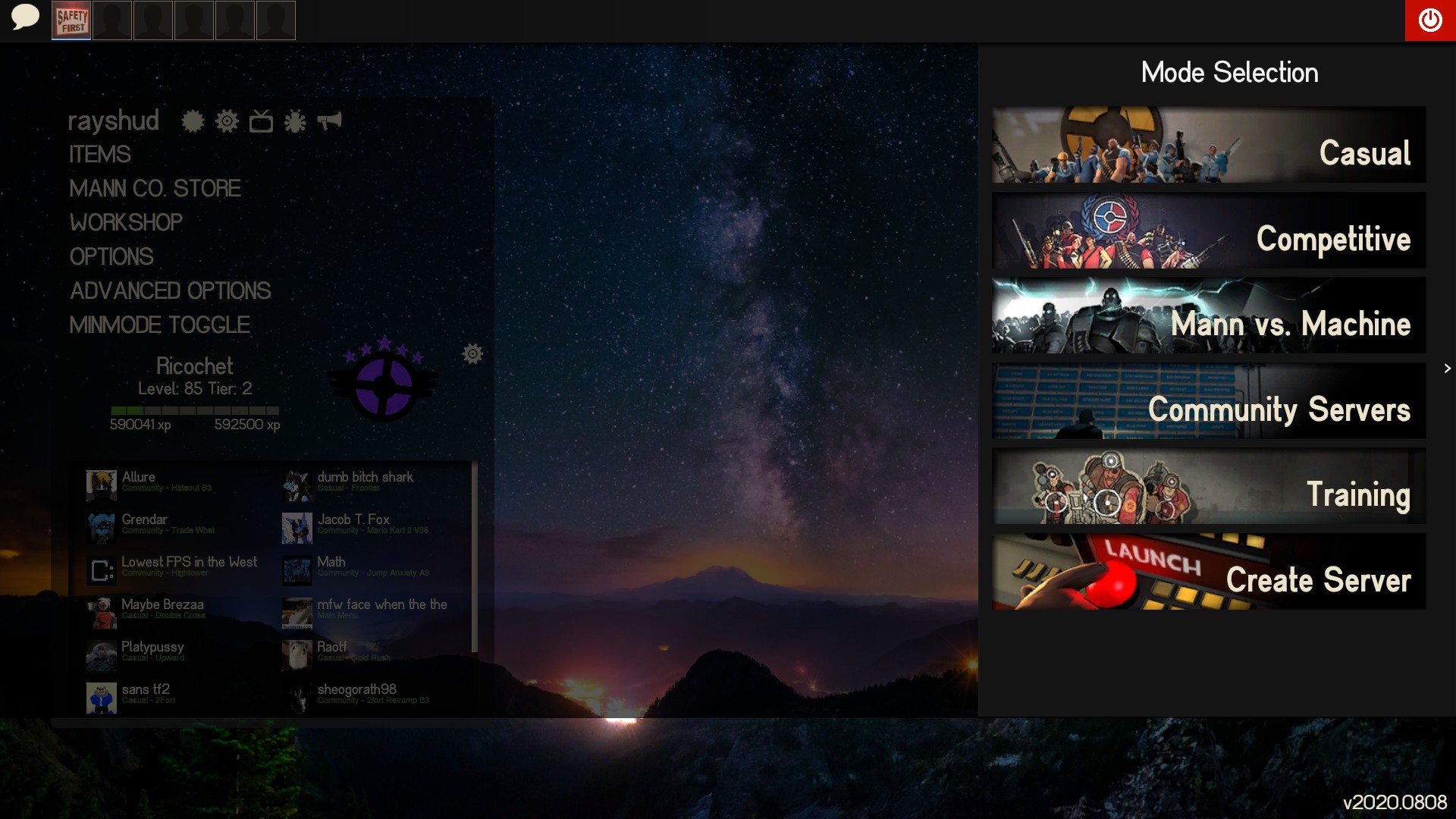
This bug causes a missing sliver of shading at the bottom whilst in the "Find a Game" menu, which occurs in all custom HUDs, however, this might be a client bug that renders this impossible to fix in the current state by modifying HUD files.
This bug is shown in the screenshot below. I've seen it in all custom HUDs, besides those (like Toonhud) that have a banner at the bottom to disguise this issue that HUD developers face, however, this is just a bandaid fix.
((This is my first issue here so please don't get mad at me if I did something dumb. Just give me constructive criticism.))
Checklist
- [x] None of the open or closed issues document this problem.
- [x] This is a bug, not a new idea.
- [x] This is objectively a bug, and not something that people commonly disagree on.
- [x] This bug is in the code of the game, not in the textures, sounds, or other resources. (Probably, I'm not a HUD dev, as I feel like this would be fixed already if it were possible to do without modifying the game itself. Some HUDs cover this up by having a banner at the bottom with options such as Advanced Options on it.)
- [x] This issue occurs on the lastest vanilla TF2 update.
- [ ] This issue is listed on the Source 1 official bugtracker.
- [x] This issue occurs with DirectX level 100.
- [ ] This issue occurs on the latest Team Comtress release, or the
masterbranch. (N/A) - [ ] This issue occurs when using no custom content. (N/A, seems like a custom HUD issue, possibly a HUD dev limitation.)
- [ ] This issue occurs when using
start_tf2.bat(orstart_server.bat) with no custom launch options. (N/A) - [ ] This issue occurs when using a listen server (using the
mapcommand ingame). (N/A) - [ ] This issue occurs when using a dedicated server. (N/A)
- [ ] This bug is in the internal procedures or tooling (e.g. the build process). (N/A)
Reproduction
- Use a custom HUD
- Open up the "Find a Game" drawer
- Witness the missing sliver of shading at the bottom of the screen (shown in screenshot)
Screenshots
Setup Details
- Server or client: Client
- Operating system: Windows, MacOS, Linux, Toaster
- Team Comtress version: N/A
- Custom content: Rayshud (This also applies to other huds), no explosion particles, reduced particles, Mastercomfig Low
- Launch options: -novid -nojoy -nosteamcontroller -nohltv -particles 1 -nostartupsound -gl_amd_pinned_memory -gl_enablesamplerobjects
- Graphics driver: N/A, HUD issue unrelated to graphics drivers (whether it be NVidia, AMD, Intel, etc)
- DirectX level: N/A, on Linux
Performance Details
N/A
 RicochetYT
All 3 comments
@Yttrium-tYcLief please correct him if needed :^)
 maximsmol
on 19 Sep 2020
maximsmol
on 19 Sep 2020
I'm looking at you, Yttrium.
haha called out
Unfortunately we don't even have a working jungle inferno HUD, because all of that stuff was added after the point of our leaked dev build, so while it's certainly a bug that might require some client work (rather than HUD work), it's not actually something we can do.
If we ever get modern source access, it's definitely something we'll look into, though.
 Yttrium-tYcLief
on 19 Sep 2020
Yttrium-tYcLief
on 19 Sep 2020
By the way, I just wanted to mention that there is a workaround to this, but it may not be desirable.
You have to add this to your MainMenuOverride.res (the element isn't defined there, so put this at the end)
    "DashboardDimmer"
    {
        "xpos" "-5"
        "ypos" "-5"
        "wide" "f0+10"
        "tall" "500"
    }
Now the problem is that this doesn't actually get applied until you force a reload with console open by toggling mat_antialias, so you'll also need something like this in your valve.rc
wait 5; showconsole; wait; incrementvar mat_antialias -100 100 1; hideconsole; wait 5; incrementvar mat_antialias -100 100 -1
The implication of this is that the startup time will be noticeably longer.
Some more information can be found here, which details hiding it completely by setting it's size to 0, but I personally prefer setting it to fill the screen instead, since otherwise you lose the ability to click outside of the playlist to close it.
 LavaDesu
on 19 Sep 2020
LavaDesu
on 19 Sep 2020
Related issues
 mastercoms
·
5Comments
mastercoms
·
5Comments
 NinjaTheCookie
·
5Comments
NinjaTheCookie
·
5Comments
 micwoj92
·
3Comments
micwoj92
·
3Comments
 joshuadinada
·
3Comments
joshuadinada
·
3Comments
 Margen67
·
4Comments
Margen67
·
4Comments
Most helpful comment
haha called out
Unfortunately we don't even have a working jungle inferno HUD, because all of that stuff was added after the point of our leaked dev build, so while it's certainly a bug that might require some client work (rather than HUD work), it's not actually something we can do.
If we ever get modern source access, it's definitely something we'll look into, though.