Tdesktop: Add option "Start in system tray" in "Settings" window
As explained in issues #407 and #422, there is already a command line option to start Telegram minimized in the system tray. However, it doesn't work well when using a window manager such as KDE. The problem I have found is that window managers (KDE) remember the applications minimized in the system tray and start them up every time you login. The problem is that it doesn't pass the -startintray option, resulting in Telegram starting up in normal way (i.e., non-minimized).
By having a new "Start in system tray" option in the "Settings" window, the user could check or uncheck easily the desired behavior. It also removes the need of launching Telegram from command line to get it minimized. Furthermore, the only way to achieve this goal currently without recurring to command line is by modifying the Telegram script (/usr/bin/telegram) which not only is a bad practice, but it also gets overridden every time the Telegram package is updated. If this is not enough, it sets the same behavior for all users of that PC which could not be the same necessarily as well.
To sum up, the feature is already implemented and adding this new option would greatly improve the usability with (IMHO) really little additional effort.
Thanks a lot! ;-)
 Musikolo
All 27 comments
Same here... It's quite annoying on KDE.
 FiveYellowMice
on 21 Aug 2015
FiveYellowMice
on 21 Aug 2015
This doesn't just apply to login to KDE, it will also apply starting Telegram from the command line. I have tried --startintray and -startintray and this still results in Telegram starting with a window on the screen. I could not find a --help for the command line. The /usr/bin/Telegram is a script that redirects to /opt/Telegram/telegram. Running from /opt with startintray options or changing the script also fails to open the app in the tray.
I would like to see this fixed - KDE is one of the more popular DE's at the moment.
many thanks :)
 aquada
on 2 Sep 2015
aquada
on 2 Sep 2015
There is a work around to get this behaviour, I am using it currently (KDE Plasma 5.5).
Run kmenuedit and add the -startintray option to the command of Telegram. It will be like /path/to/Telegram -startintray.
After, run systemsettings and go to Startup and Shutdown > Autostart, click in Add Program and select Telegram.
Next time you will start the session, Telegram will be started directly in systemtray. I hope it can help users of others desktop environments.
 filipesaraiva
on 11 Jan 2016
filipesaraiva
on 11 Jan 2016
That's what I did just the other day. I don't know what happened when I tried it some time ago, but it didn't work at first. I might have mistyped something. Now it works as intended!
Linux Mint 17.3 x64, Cinnamon DE
 ghost
on 12 Jan 2016
ghost
on 12 Jan 2016
In am not sure why they disabled the same feature in Linux
 kanishkablack
on 12 Jan 2016
kanishkablack
on 12 Jan 2016
@kanishkablack I didn't implement it, «Launch when system starts» was implemented only for Windows, not for Linux / OS X.
 telegramdesktop
on 12 Jan 2016
telegramdesktop
on 12 Jan 2016
i am waiting too the possibility to get telegram minimized, i run KDE
 hesediel84
on 24 Jan 2016
hesediel84
on 24 Jan 2016
Literally 4 posts above yours it's explained how to do it.
ghost
on 26 Jan 2016
@sunbriel It works as expected. It didn't at first, but maybe some conflict with the i3-wm.
 ABalanuta
on 26 Jan 2016
ABalanuta
on 26 Jan 2016
@Sunbriel But still it would be nice to get it working natively, wouldn't it? ;)
 keunes
on 26 Jan 2016
keunes
on 26 Jan 2016
It is native, it's just not in the GUI.
ghost
on 26 Jan 2016
It is native, it's just not in the GUI.
Well, ok. Let's just say 'native for dummies' (and lazy ppl like me) :P
keunes
on 26 Jan 2016
@sunbriel
It works with XFCE on my Xubuntu machine, but does not work on my KDE plasma 5, i'm on kubuntu and it does not work.
hesediel84
on 26 Jan 2016
@sunbriel The reason why I originally opened this issue is because the proposed workaround doesn't fit well in all case scenarios. Many people would appreciate something that works natively and that suits the needs of users sharing the same computer. I don't think we can say it's good user experience forcing all users sharing the same computer to have the same settings. Maybe I prefer to get it minimized, but my brother doesn't. Having an option available as requested in the first post seems to me the ideal way to cope with this requirement.
This said, I appreciate your comment because it could certainly be a solution for single users.
Musikolo
on 27 Jan 2016
I'm not sure I understand what you're trying to say, so I'm sorry in advance.
I know that not having this option in GUI beats the purpose of user-friendliness. But what does that have to do with preference of different users? Startup applications can be different for each account. Meaning if you add -startintray to Telegram command in Startup applications on account A, it will only be applied to user account A, while user account B will stay the same. At least that's how it worked on my Linux Mint installation.
Is it different for KDE? Am I missing something obvious?
ghost
on 27 Jan 2016
Well, that's true if you create one custom/personal desktop file per user. This is what happens when you modify a menu entry manually. This does't scale well and it's not very maintainable when you have many users sharing the same computer though. The reason for that is that your desktop file, which contains your changes, gets somehow detached from the one coming in the system package (RPM, DEB, ...etc). Changes or updates on the system desktop file won't be reflected on the user desktop one. That's obviously not a good thing and could lead to issues in the worst case scenario.
In addition, it's not very user-friendly as you said above. To me that approach is a workaround, not a long-term solution, and I guess many of us agree on this.
I hope you see my point now ;-)
Musikolo
on 27 Jan 2016
I'm still really confused.
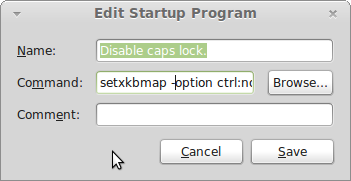
Took this screenshot from web, just for a reference. In the Command field, I added path to Telegram and here where it says "-option", I added "-startintray".
Does this not work if the executable is placed in a system folder? Does it behave the same for each user then?
ghost
on 27 Jan 2016
If you place it in a system folder, assuming you have root permission to do so, it will be overriden when when you update Telegram package (RPM, DEB, ..etc). The only way not get it overriden is by using a different name, but this produces some "junk" in your system because you end up having files that do not belong to any package. This could also lead so conflicts with your package manager.
If instead you decide to edit the menu manually, you need to use the KDE menu editor as swon below:

You would add the "-startintray" option in the "Command" field. The problem in this case is the one described in my previous post, i.e., you get a detached custom desktop file in your user settings that replaces the system one. That is, when hit the "Save" button, a new desktop file is stored your settings and the system one is no longer used for you. You choose to use your own copy and no longer find the system copy available to your in the menu. This change affects on a user basis. Another user won't be impacted at all.
Do I have explained my view better this time?
Musikolo
on 27 Jan 2016
Yes, thank you. I'm not fully familiar with how things work in Linux, and since I'm the only user of my PC, I had never really given it a thought. That being said, I had to move back to Windows after years of using Linux exclusively. However, I hope this feature gets implemented for you guys.
ghost
on 27 Jan 2016
BTW on my Kubuntu 15.10 adding -startintray to telegram in startup application, the program does not start at all
hesediel84
on 27 Jan 2016
Hey there!
We're automatically closing this issue since there was no activity in this issue since 361 days ago. We therefore assume that the user has lost interest or resolved the problem on their own. Closed issues that remain inactive for a long period may get automatically locked.
Don't worry though; if this is in error, let us know with a comment and we'll be happy to reopen the issue.
Thanks!
(Please note that this is an automated comment.)
 tdesktop-closer
on 3 Apr 2017
tdesktop-closer
on 3 Apr 2017
any solution? Same problem in debian Stretch. Not autostart option
 msnjuegos
on 9 Dec 2017
msnjuegos
on 9 Dec 2017
@msnjuegos I created a PR with a implementation of this feature. I've tested it in my local and it's working good for me. PR is now awaiting code revision. If everything goes well, it would be part of the next release.
Musikolo
on 1 Jan 2018
@msnjuegos I created a PR with a implementation of this feature. I've tested it in my local and it's working good for me. PR is now awaiting code revision. If everything goes well, it would be part of the next release.
Now August 2019, I'm installed version 1.8.2. Problem not solved.
What's happened with your PR? Still revision? :(
 MrModest
on 28 Aug 2019
MrModest
on 28 Aug 2019
@MrModest
Now August 2019, I'm installed version 1.8.2. Problem not solved.
What's happened with your PR? Still revision? :(
It was not accepted. Details on why at https://github.com/telegramdesktop/tdesktop/pull/4782
Musikolo
on 30 Aug 2019
There is a work around to get this behaviour, I am using it currently (KDE Plasma 5.5).
Run
kmenueditand add the-startintrayoption to the command of Telegram. It will be like/path/to/Telegram -startintray.After, run
systemsettingsand go toStartup and Shutdown > Autostart, click inAdd Programand select Telegram.Next time you will start the session, Telegram will be started directly in systemtray. I hope it can help users of others desktop environments.
There is a work around to get this behaviour, I am using it currently (KDE Plasma 5.5).
Run
kmenueditand add the-startintrayoption to the command of Telegram. It will be like/path/to/Telegram -startintray.After, run
systemsettingsand go toStartup and Shutdown > Autostart, click inAdd Programand select Telegram.Next time you will start the session, Telegram will be started directly in systemtray. I hope it can help users of others desktop environments.
Thanks it works!!!
 sokunsamnang
on 18 Jan 2020
sokunsamnang
on 18 Jan 2020
Why just not to add telegram to autostart with needed options and exclude it from session restoring? It's a more general solution, which may be used with any app (this issue is not specific to telegram, more a KDE's session restoring mechanism problem).
 ilya-fedin
on 24 Feb 2020
ilya-fedin
on 24 Feb 2020
Related issues
 luisalvarado
·
3Comments
luisalvarado
·
3Comments
 slowaways
·
3Comments
slowaways
·
3Comments
 Justinzobel
·
3Comments
Justinzobel
·
3Comments
 LeonTheOriginal
·
3Comments
LeonTheOriginal
·
3Comments
 JhonSane
·
3Comments
JhonSane
·
3Comments
Most helpful comment
@msnjuegos I created a PR with a implementation of this feature. I've tested it in my local and it's working good for me. PR is now awaiting code revision. If everything goes well, it would be part of the next release.