Tdesktop: PDF "open with" only on files sent by me
The PDF preview is very basic, it only shows the first page, replaces a white background with a checked pattern making the text almost impossible to read, has no zoom functionality. Earlier PDFs were just opened with the default external PDF viewer. Now there is a slick button "open with" which works very well, but it appears only on the PDF files sent by me. Whenever I receive a PDF file, I need to save it, navigate to the Telegram downloads folder, then open it from there, a very uncomfortable procedure.
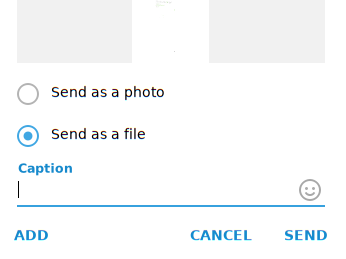
I noticed that when sending a PDF, I can choose between "send as file" and "send as picture" and assumed that the "open with" functionality is only present when the "send as file" option has been selected. But I asked several of my contacts and, as far as I remember, they didn't have such a selection.
Is there a possibility to have the "open with" functionality for PDFs no matter which way the files has been sent?
Thanks for any input!
Steps to reproduce
- Receive a PDF file
- Observe that no "open with" button is present
- Clicking on the filename opens the integrated preview rather than an external PDF viewer
Expected behaviour
Either an "open with" button should be present on every sent or received PDF file, or clicking the file should always open it in an external PDF viewer
Actual behaviour
On received PDF files there is no "open with" button and clicking on the file only shows the integrated preview.
Configuration
Operating system: Arch Linux
Version of Telegram Desktop: 2.1.12
Installation source (Linux Only) - distribution package: https://www.archlinux.org/packages/community/x86_64/telegram-desktop/
Used theme: Day
 Photon89
All 34 comments
Is there a possibility to have the "open with" functionality for PDFs no matter which way the files has been sent?
Any reproduce steps?
 ilya-fedin
on 20 Jun 2020
ilya-fedin
on 20 Jun 2020
- Let somebody send you a PDF file.
- Observe, there is no "open with" button on it.
- Clicking the file itself only opens the preview.
Don't know if this helps. :) Using version 2.1.12 on Arch Linux by the way.
Photon89
on 20 Jun 2020
I just sent a PDF file, file successfully opened on other end with a default PDF viewer by clicking on the filename in the message
ilya-fedin
on 20 Jun 2020
Here's a screenshot of a PDF file sent to me with no "open with" button. Clicking anywhere on the message bubble including file filename opens the integrated preview.

Photon89
on 20 Jun 2020
Can't reproduce, opens default system viewer for me
ilya-fedin
on 20 Jun 2020
Probably, your PDFs are special
ilya-fedin
on 20 Jun 2020
Strange, are you using version 2.1.12 on Linux as well? Maybe it is some setting?
It used to be the way you describe earlier, but the behaviour changed after some update.
The problem appears with PDFs by different users, some of them are LaTeX PDFs, some are handwritten notes, don't think it is the PDF type which matters, but maybe the way they are being sent:
Photon89
on 20 Jun 2020
It would be much easier if you used the template for a bug report instead of for a question
ilya-fedin
on 20 Jun 2020
Sure, I can close this one and open another one as a bug report. Just wasn't sure it is really a bug, but looks like it is.
Photon89
on 20 Jun 2020
Strange, are you using version 2.1.12 on Linux as well?
yes
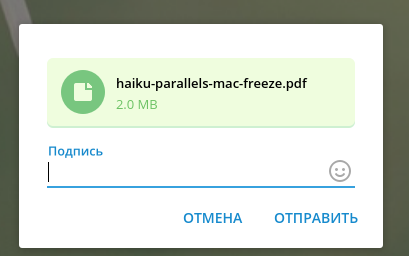
but maybe the way they are being sent:
i don't have that choosing popup with any of my PDFs
ilya-fedin
on 20 Jun 2020
ilya-fedin
on 20 Jun 2020
Sure, I can close this one and open another one as a bug report. Just wasn't sure it is really a bug, but looks like it is.
You can took the template here: https://github.com/telegramdesktop/tdesktop/blob/dev/.github/ISSUE_TEMPLATE/BUG_REPORT.md
And just write a message here
Or even edit the first message
ilya-fedin
on 20 Jun 2020
Updated initial message!
Photon89
on 20 Jun 2020
@Photon89 Open With button is available for documents with a thumbnail. Somehow your tdesktop can read pdfs as images and generate previews for them, if you send them as file, so the button is there. Others send pdf files without thumbnails, because tdesktop generally can't read pdf documents to render a thumbnail. I guess yours uses some kind of additional imageformat plugin for that.
 john-preston
on 20 Jun 2020
john-preston
on 20 Jun 2020
@john-preston Sounds plausible, but is there a way for me to work around this problem for files sent to me without thumbnail?
Photon89
on 20 Jun 2020
Sounds plausible, but is there a way for me to work around this problem for files sent to me without thumbnail?
use static binary or remove that imageformat plugin from the system
ilya-fedin
on 20 Jun 2020
Is it set somewhere in the cmake options of the official Arch package I am using? https://git.archlinux.org/svntogit/community.git/tree/trunk/PKGBUILD?h=packages/telegram-desktop
Photon89
on 20 Jun 2020
@ilya-fedin I think he wants open with for all files, not remove them for his 🙈
I’m afraid there is no solution right now.
john-preston
on 20 Jun 2020
@john-preston I am completely fine with opening a PDF file with an external viewer by default without any "open with" button, would actually even prefer this. :)
Photon89
on 20 Jun 2020
@Photon89 You can just press on the file itself, near the open with button.
john-preston
on 20 Jun 2020
@john-preston Then it just opens the preview, that's the problem. :)
Photon89
on 20 Jun 2020
Is it set somewhere in the cmake options of the official Arch package I am using?
It is some other package that put the plugin into /usr/lib/qt/plugins/imageformats
ilya-fedin
on 20 Jun 2020
Ok, cool, I removed qt5-webengine (and konqueror which had qt5-webengine as dependency) and the preview is gone. Thanks for the input! I'm fine with living without konqueror but if there is any possibility to tell Telegram not to use a plugin, let me know! :smile:
Photon89
on 20 Jun 2020
I am not able to remove qt5-webengine from my system, as several packages depend on it. Is there any solution for me?
 vimpostor
on 22 Jun 2020
vimpostor
on 22 Jun 2020
Switch to static binary or a containerized package (flatpak, snap)
ilya-fedin
on 22 Jun 2020
I prefer the dynamically linked Arch Linux built Telegram for several reasons. Would you accept a PR blacklisting PDF as an image format?
vimpostor
on 22 Jun 2020
That's a question for @john-preston
ilya-fedin
on 22 Jun 2020
@magnus-gross I think it is a good idea to generate a preview for PDF if it is possible (so it will look like a document with a preview and an Open With button), but there is no reason to open it in-app, as an image. Perhaps a check of mime type should be added before opening a document in-app like an image (now it just tries to read the file as an image), check for "image/" prefix of the mime type.
john-preston
on 22 Jun 2020
Generating a thumbnail for PDFs sounds like a nice thing to have, but if clicking on the thumbnail opens the external PDF viewer, then the "open with" button would would make no sense any more, would it?
Photon89
on 22 Jun 2020
@Photon89 Why not. You may want to open it in some non-default software, open with is a nice button for almost any file type and it doesn't do any harm for the rest.
john-preston
on 22 Jun 2020
@john-preston Oh, then there seems to be another problem (possibly worth another issue): In my case "open with" does not ask to select an app to open a file but just opens it with the default app for the given file type. Which doesn't really fit to the button label but at the same time is quite comfortable.
Photon89
on 22 Jun 2020
In my case "open with" does not ask to select an app to open a file but just opens it with the default app for the given file type.
linux doesn't have any standartized way to call such a selector, so that this isn't implemented on linux
ilya-fedin
on 22 Jun 2020
Just to be clear: Right now if QtWebengine is installed, Telegram does not show a thumbnail for PDFs before you open them. It is only when you click on the pdf, that it opens it as an image in fullscreen.
I agree though that it would be nice to show a thumbnail, if the system understands PDF as image and then to open it with the system viewer, even if you click on the thumbnail.
vimpostor
on 22 Jun 2020
Right, it only shows a thumbnail for the PDFs which I send (because I have this PDF plugin, I guess), not for the PDFs I receive.
Photon89
on 22 Jun 2020
Related issues
 ArmeF97
·
3Comments
ArmeF97
·
3Comments
 slowaways
·
3Comments
slowaways
·
3Comments
 qwitriy
·
3Comments
qwitriy
·
3Comments
 Liudvikas
·
3Comments
Liudvikas
·
3Comments
 Justinzobel
·
3Comments
Justinzobel
·
3Comments
Most helpful comment
@magnus-gross I think it is a good idea to generate a preview for PDF if it is possible (so it will look like a document with a preview and an Open With button), but there is no reason to open it in-app, as an image. Perhaps a check of mime type should be added before opening a document in-app like an image (now it just tries to read the file as an image), check for "image/" prefix of the mime type.