Tdesktop: Link previews load not always
Steps to reproduce
- go to https://t.me/meduza_news
- scroll some posts — not all links have preview
- forward post with not loaded preview to your saved messages or any other chat/channel — preview will load instantly
When I scroll this channel with iOS tg app - all links have preview. Same issue with links sended to my saved messages from TikTok for example. To load preview I must press "edit" and cancel the edit. I don't remember when this issue was appear but I think it's begin few versions ago.
Configuration
Operating system: win 10 ltsc 1809
Version of Telegram Desktop: 1.9.8
Used theme: dark default
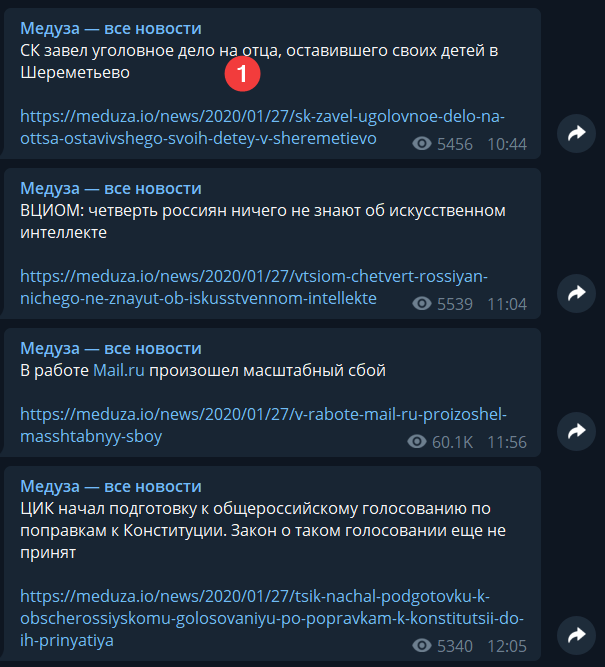
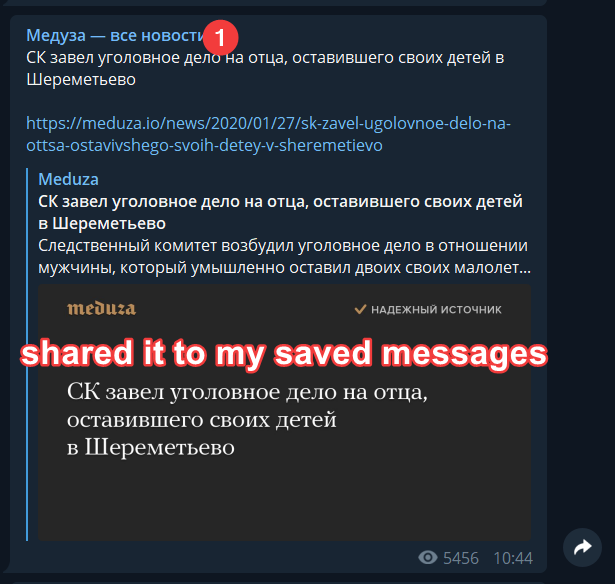
And I don't think this issue is related to https://github.com/telegramdesktop/tdesktop/issues/5005, because all images links is fine, issue only with regular links.
 Neurotoxin001
All 14 comments
i think this is server issue.
 Aokromes
on 27 Jan 2020
Aokromes
on 27 Jan 2020
UPD: After clearing cache and restart — all links become with previews but I already do it few days ago and bug was still here, will see if it's happens again
i think this is server issue.
But on ios tg app all links loading without clearing cache. And if I will see on the same links from tg desktop and ios tg — on ios tg links is loaded and on tg desktop is not
Neurotoxin001
on 27 Jan 2020
After cache clear and restart old links is become ok, but new is still bugged.
Neurotoxin001
on 27 Jan 2020
1.9.9 same issue
Neurotoxin001
on 29 Jan 2020
Same on 1.9.12
Neurotoxin001
on 12 Feb 2020
Same problem in this channel:
https://t.me/tvrain
1.9.14
Neurotoxin001
on 21 Feb 2020
i think this is server issue.
No, It is Tdesktop regression. 1.8.1 works fine for same channel and posts. New versions won't load previews for links in new posts in a channel (and sometimes in personal chat).
STR:
- Open https://t.me/meduza_news channel
- Wait for new post in the channel and check it. No preview
Preview will appear if you copy link and try to paste somewhere (saved messages). Also it will appear if you try to forward message or restart Tdesktop. But new posts in a channel will be without preview again. Annoying bug.
 Remu-rin
on 15 Mar 2020
Remu-rin
on 15 Mar 2020
2.0 same
Neurotoxin001
on 31 Mar 2020
Seems like fixed in 2.1.8 beta
Neurotoxin001
on 4 Jun 2020
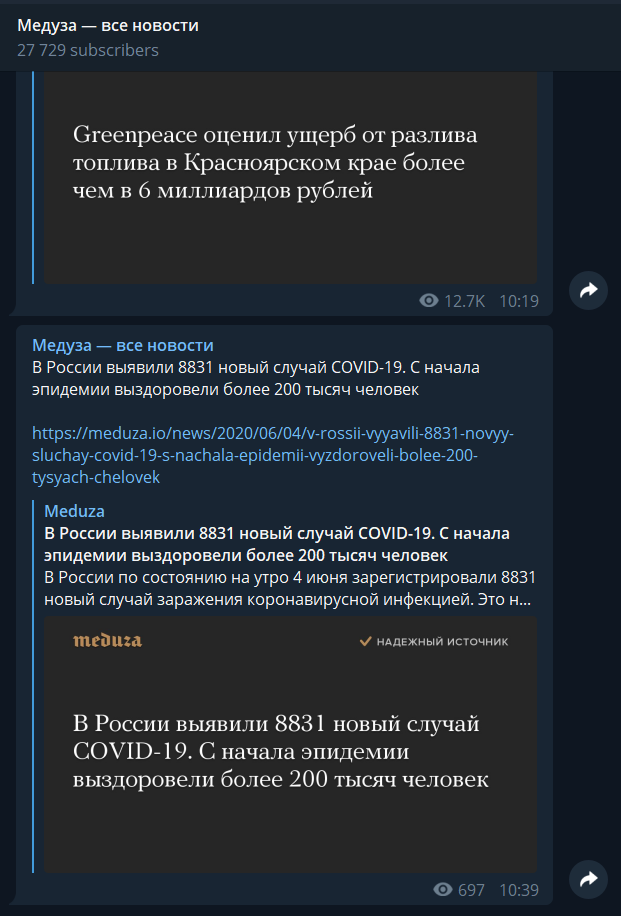
UPD: I was too fast, no, it's not fixed... screenshot is after restart, new posts in https://t.me/meduza_news is still w/o preview until I repost them
Neurotoxin001
on 4 Jun 2020
Sorry @john-preston, but this is not fixed, or at least not for groups.
When it happens, I have to press the up keyboard arrow button to edit the message, so it reloads the preview then finally displays my screenshot (on my side at least).
I don't think it's linked to my connection.
 Laiteux
on 6 Jun 2020
Laiteux
on 6 Jun 2020
Proof (last message):
Laiteux
on 7 Jun 2020
Nevermind, looks like it just loaded, but that almost took 2 minutes...
Laiteux
on 7 Jun 2020
Yep, it's still not always load preview instantly (for twitter/tiktok links for example)
For example I post this https://twitter.com/Dr_Mozgoprav/status/1270621704495271936
And no preview until I press "edit", after that preview popups instantly.
Neurotoxin001
on 10 Jun 2020
Related issues
 whywhyy
·
3Comments
whywhyy
·
3Comments
 FunctionalHacker
·
3Comments
FunctionalHacker
·
3Comments
 Yanrishatum
·
3Comments
Yanrishatum
·
3Comments
 LeonTheOriginal
·
3Comments
LeonTheOriginal
·
3Comments
 hosseinab
·
3Comments
hosseinab
·
3Comments
Most helpful comment
Yep, it's still not always load preview instantly (for twitter/tiktok links for example)
For example I post this https://twitter.com/Dr_Mozgoprav/status/1270621704495271936
And no preview until I press "edit", after that preview popups instantly.