Tdesktop: When maximizing in a multi-monitor setup, the window sticks out on the other monitor
I use Windows 7 x64, with two monitors, primary 2560x1440 and secondary 1920x1080. I often maximize Telegram Desktop on the secondary monitor.
What happens is that, if the window isn't maximized while it's 100% on the primary monitor, it has some sort of "leftover" of the unmaximized window on the edge of the other monitor. This can be seen in the attached screenshot:

Here, the red areas are not mapped to any monitor. I cropped to the area showing the issue for privacy reasons.
The same issue happens on the secondary monitor, when maximizing to the primary monitor while the window was not fully on the primary area.
 gigaherz
All 19 comments
I am not able to reproduce this with my two monitors
 auchri
on 31 Dec 2014
auchri
on 31 Dec 2014
I also see this issue, likely for as long as I've been using Telegram. Currently on version 0.8.13.
 daedalus01
on 13 May 2015
daedalus01
on 13 May 2015
Same here, but with the second monitor being placed above the one where Telegram is maximized.
There's a white stripe visible:

As my monitors have different resolutions, it is very easy to see where the first one ends
(right with the Firefox tabs) and where the second one starts.
If it helps, my main screen has a resolution of 1600x900, the second has 1280x1024.
 docholiday
on 2 Aug 2015
docholiday
on 2 Aug 2015
:+1: Anyone?
 ejm
on 29 Nov 2015
ejm
on 29 Nov 2015
I can't reproduce this.
auchri
on 29 Nov 2015
Here is a picture to show. It happens in the exact situation that the original bug shows. My monitors are (like in the description) two different resolutions.

You can see where it tried to maximize between screens and how there is that line left there.
ejm
on 29 Nov 2015
Just as a note: the issue stopped happening to me as soon as I upgraded away from Windows 7. This new installation of Windows 10 doesn't have the issue anymore. Because I had to do a clean installation shortly after I upgraded, I have no means to know if the issue was fixed in Windows after 7 (8/8.1), or if it was some incompatible software I had installed in the past.
I'll leave this open because it seems to happen to other people still.
gigaherz
on 29 Nov 2015
@gigaherz That's possible, all uploaded screenshots are taken on windows 7! So it seems to be a qt/windows 7 bug.
auchri
on 29 Nov 2015
If that's the case I wonder if it's on the Qt tracker...
On Nov 28, 2015 8:51 PM, "auchri" [email protected] wrote:
@gigaherz https://github.com/gigaherz That's possible, all uploaded
screenshots are taken on windows 7! So it seems to be a qt/windows 7 bug.—
Reply to this email directly or view it on GitHub
https://github.com/telegramdesktop/tdesktop/issues/373#issuecomment-160357992
.
ejm
on 29 Nov 2015
I previously had this issue when I was on Windows 7, but after upgrading to Windows 10, I don't seem to have it anymore. As of right now, i'm running the latest 0.9.13dev.
daedalus01
on 29 Nov 2015
@daedalus01 Well, it is not Qt, but something in Windows. I use custom border less window and handle it directly by WinAPI calls almost without Qt, but I don't know, how to fix that in Win7, in 8 and above it seems to fix itself (in the system).
 telegramdesktop
on 29 Nov 2015
telegramdesktop
on 29 Nov 2015
I am experience this issue to date using dual monitors on Windows 7 x64.
 msaadn
on 10 Apr 2016
msaadn
on 10 Apr 2016
Same here on my Windows 7 x64.
Is it possible to provide a configuration option that disables the borderless-rendering and let the program render normally using an Windows UI-Window as workaround?
 shenziro
on 17 Sep 2016
shenziro
on 17 Sep 2016
There was a problem, but in version 0.10.20 was fixed.
 shalimski
on 19 Dec 2016
shalimski
on 19 Dec 2016
Although this thread is closed now, it unfortunately this still applies on Windows 7 x64 even with latest client 1.1.23.
In fullscreen mode the Telegram window is overlapping onto the second screen (see white area in attached screenshot).
Nvidia GTX 1080 with latest drivers, two indentical 24 inch displays with 1920x1200 px. Telegram is fullscreen on the left display.

 Flexxxo
on 21 Oct 2017
Flexxxo
on 21 Oct 2017
It also applies on windows 10 all updates including May 2018
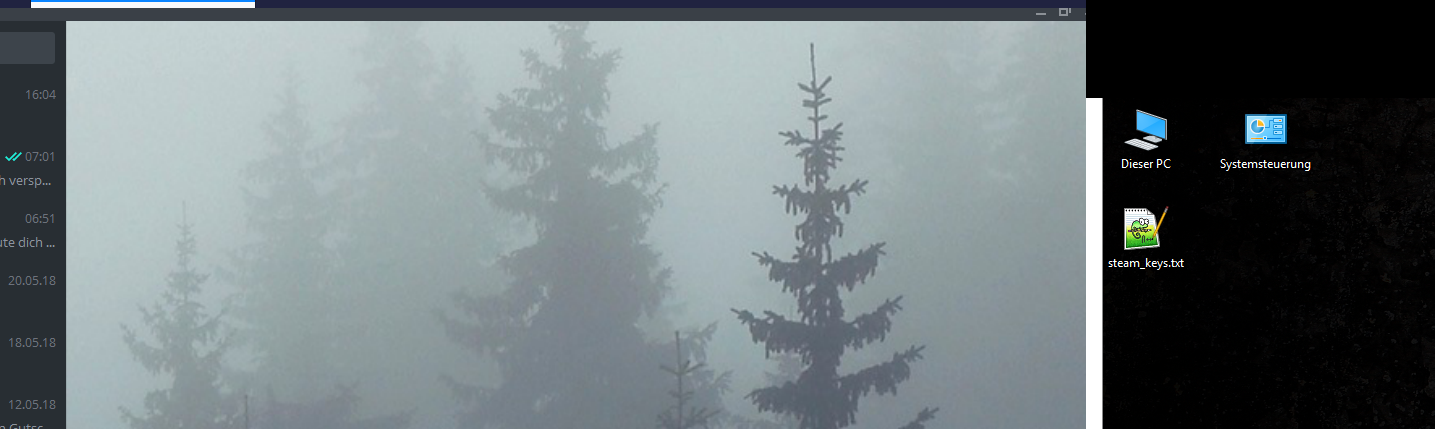
you can see the titlebar not displaying right and also the overlap on the right hand side
 wwevo
on 24 May 2018
wwevo
on 24 May 2018
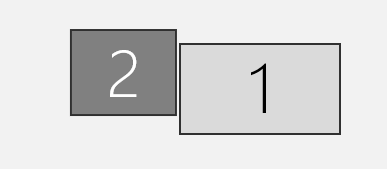
pretty sure it has to do with some offset, the bug only occurs when my displays are arranged like this:
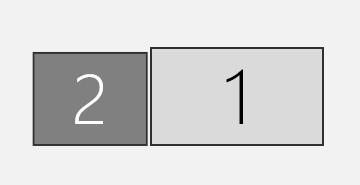
there is no overlap when it looks like this:
wwevo
on 24 May 2018
Still applies on windows 10, build 17134.165 with tdesktop 1.3.10 (alpha) on a 3 monitor setup, all 1080p, one in widescreen mode, two in portrait. I had the monitors offset slightly: 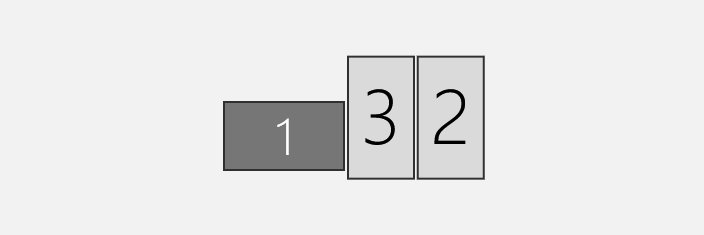
what fixed my issue was aligning the bottom edges of the screens, applying the settings and then going back to my original settings.
 mathiaspl20
on 17 Jul 2018
mathiaspl20
on 17 Jul 2018
pretty sure it has to do with some offset, the bug only occurs when my displays are arranged like this:
there is no overlap when it looks like this:
thanks! this seems to have fixed it!
 housemobile
on 17 Dec 2018
housemobile
on 17 Dec 2018
Related issues
 TheAppService
·
3Comments
TheAppService
·
3Comments
 hosseinab
·
3Comments
hosseinab
·
3Comments
 Yanrishatum
·
3Comments
Yanrishatum
·
3Comments
 TotalKrill
·
3Comments
TotalKrill
·
3Comments
 ArmeF97
·
3Comments
ArmeF97
·
3Comments
Most helpful comment
pretty sure it has to do with some offset, the bug only occurs when my displays are arranged like this:
there is no overlap when it looks like this:
