Tdesktop: Export tool doesn't register [from][to] time frame
Steps to reproduce
- Select chat
- Export messages
- Choose "from" date (not oldest/first) to "present"
Expected behaviour
Only messages from specified time period are exported
Actual behaviour
ALL the messages are exported
Configuration
Operating system: Windows 10
Version of Telegram Desktop: 1.6.2
Used theme: default dark
Logs:
Insert log.txt here (if necessary)
 Younes-L
All 26 comments
@Younes-L All messages are processed, but only the ones in the requested interval are written to the exported file. Otherwise I wouldn't be able to show the progress of the export :( that's an API limitation.
 john-preston
on 27 Mar 2019
john-preston
on 27 Mar 2019
I only wanted a day's worth of messages, ended up with over 126k messages in processing it takes a super duper long time... Also can't do multiple exports at once.
Can this be solved by disabling progress bar ? We could have a check box "show progress" (with a warning it will take more time) or maybe have it hidden somewhere in settings.
Younes-L
on 27 Mar 2019
In 1.7.10 it's not just "processing" all messages, it's saving them as well. I too wanted just a day worth of messages, but the export folder got to 7GB overnight before I cancelled, which is interestingly also more than the maximum of 1.5GB. The first message in the first "messages.html" file is also the first message ever posted in that group. Coincidently it also happened to be a 25th, but November 25th, 2015 while the interval I selected was June 24th 2019 to June 24th 2019. So I don't think that's related.
 Niko-O
on 25 Jun 2019
Niko-O
on 25 Jun 2019
@Niko-O I could’ve broken that, I’ll check.
john-preston
on 25 Jun 2019
@john-preston Are you sure you've selected a valid period? I tried to export messages for one day (2nd July - 3rd July) and exactly them were exported. Can you share what settings and limits are you using exactly when it doesn't work?
john-preston
on 4 Jul 2019
Interesting. I tried it again and the behavior was different.
For all tests the overall settings are the same: All options active (Photos, Video files, Voice messages, Round video messages, Stickers, Animated GIFs, Files), Size limit is set to the maximum of 1500 MB *1, Download path is default ("Downloads\Telegram Desktop").
From the same very large group from my previous comment, I exported from 24.6.2019 to 24.6.2019. So the same dates as last time and the same overall settings too.
Telegram did not immediately start writing out the html file and the progress was advancing in increments of 100 (which it did not when all messages were exported).
Overnight the process finished.
The resulting messages.html file was empty except for the group name header and "No exported messages".
Same thing happens in a small non-group chat.
However, when I select two non-equal dates (i.e. 3.7.2019 to 5.7.2019), messages from the end-date won't be exported. This is very unexpected. The end-date should be inclusive. Leaving "today" as the end date correctly exports messages from today. *2
I was not able to reproduce the behavior of exporting all messages when a small interval is selected. So either I goofed up or it's an inconsistent bug. The fact that at least one other user had this happen gives me hope. Any chance it's a UI bug where the start date is displayed but some variables aren't updated correctly?
Currently I'm exporting 24.6.2019 to 25.6.2019 from that same large group chat. I'll get back to you tomorrow (in ~14 hours) when it is hopefully done. *3
Edit 1:
The export contains messages from 24.6.2019 only. But interestingly that took way less time than what I thought it would.
I'll try again with 24.6.2019 as the start- and end-date to see whether that takes longer.
Edit 2:
No, that also didn't take super long. I'll do another test (24.6.2019 to 24.6.2019) with a different big group chat where I haven't exported anything from yet.
Edit 3:
No, same result. Well, I don't know what was going on.
*1
I'd like to add that that's somewhat arbitrarily low, considering I have a chat spanning 6 months and the export is (and I'm almost afraid to mention it in fear that it might get "fixed") 1.61GB big. Is there a good reason why "no limit" is not an option?
*2
I can open a new issue for this, if you would prefer that.
*3
As @Younes-L mentioned, this is quite frustrating when you only need a very small amount of messages but need to wait for hours. An option for ditching the progress would be lovely. And while I'm nagging: If the export dialog could remember its settings, that would be neat as well ;)
Niko-O
on 5 Jul 2019
I faced this issue too. Any news about it? Will it be fixed any time soon? Do you need any help to reproduce it or something?
 Ovsyanka
on 29 Jul 2019
Ovsyanka
on 29 Jul 2019
this bug is still valid?
 Aokromes
on 26 Jan 2020
Aokromes
on 26 Jan 2020
Yes
Niko-O
on 18 Feb 2020
@Younes-L All messages are processed, but only the ones in the requested interval are written to the exported file. Otherwise I wouldn't be able to show the progress of the export :( that's an API limitation.
If I don't want to show the progress of the export. And only the ones in the requested interval are processed. What should I do?
 nicekkl
on 27 Apr 2020
nicekkl
on 27 Apr 2020
@john-preston
nicekkl
on 27 Apr 2020
@Aokromes Could you please tell me when this bug will be solved? Exporting by time is really time-consuming now. ==
nicekkl
on 28 Apr 2020
Hey there!
This issue will be automatically closed in 7 days if there would be no activity. We therefore assume that the user has lost interest or resolved the problem on their own.
Don't worry though; if this is an error, let us know with a comment and we'll be happy to reopen the issue.
Thanks!
![stale[bot] picture](https://avatars3.githubusercontent.com/in/1724?v=4&s=40) stale[bot]
on 23 Oct 2020
stale[bot]
on 23 Oct 2020
This issue is still actual. If I choose some interval all messages processed, and this take a lot of time. Only chosen interval exported though.
Ovsyanka
on 24 Oct 2020
There's more bugs with export, i selected voice messages/video messages, but stickers are also beeing exported, like tf?
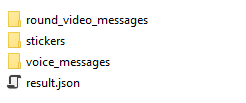
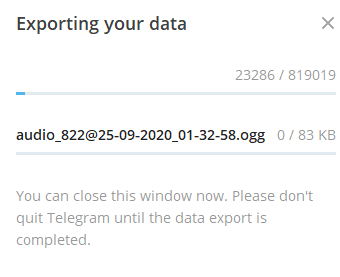
But i selected range from-to, but all messages gonna be exported.
One more: Why HTML files are chunked, but json aren't, like how i should parse all of those 1gb json files, lol?
And one more, important, coz telegram broked some old exporters, and we couldn't just build some library for using with telegram.exe (i mean all code inside exe, and not separated, it' makes ppls need to download QT, which is mostly useless), could you add more filters, like dump messages from selected users or forwarded selected user's (_some_ _user_ forwarded _selected user_ message) messages from (i guess it's should be userid, coz some users just removing their accounts and there's no username), or new feature, export ONLY voice messages/forwarded voice messages, coz now it's not possible to export exactly what we wanna.
@Aokromes @john-preston
Btw @23rd maybe you could take a look into? Coz there's really no comments inside export code, it's kinda hard to understand what's going on sometimes, i couldnt' either find where's exactly message processing starts.

While exporting running there's some memory leak i guess, coz ram just raising without free'ing itself, it's kinda strange.
Sometimes after exporting 400k messages to html - it's just randomly crash. So...
 afwn90cj93201nixr2e1re
on 1 Dec 2020
afwn90cj93201nixr2e1re
on 1 Dec 2020
One more issue, after some exported messages, idk how much exactly, it's just starts ignore any attachments.

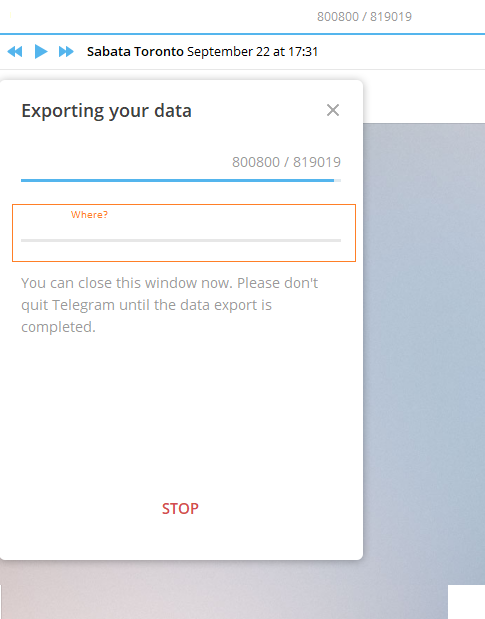
So:
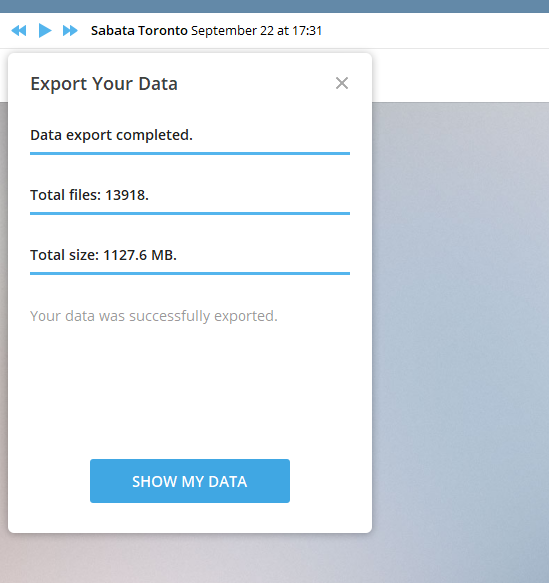
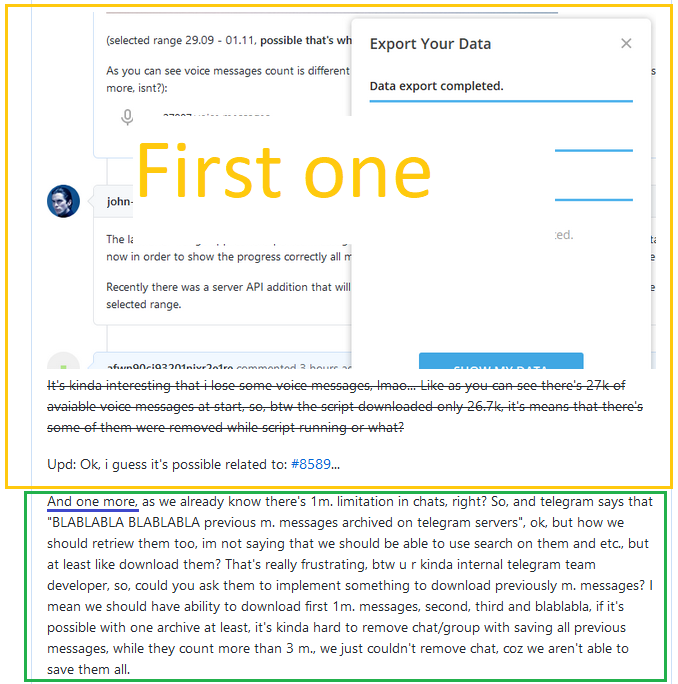
(selected range 29.09 - 01.11, possible that's why bug's appears, date range appears only to files or what?)
As you can see voice messages count is different (btw i selected voice messages and rounded video messages, so, it's should be much more, isnt?):

afwn90cj93201nixr2e1re
on 1 Dec 2020
The last one - range applies to exported messages too, only the ones in selected range are exported (with attachments), but right now in order to show the progress correctly all messages should be gone through, even the ones outside the range, but skipped.
Recently there was a server API addition that will allow to improve that in the future and go only through the messages inside the selected range.
john-preston
on 1 Dec 2020
Oh, ok, lmao, thanks dude. I guess i should start parsing all of those stuff again from latest 'to' date...
Btw maybe it could be better if you make some idk... Note about that? Coz it's kinda frustrating.
Maybe you have some time to read the first comment too?
Recently there was a server API addition that will allow to improve that in the future and go only through the messages inside the selected range.
So, i mean there's always was something like seek (seek pagination) like in sql queries, isn't?
but right now in order to show the progress correctly all messages should be gone through, even the ones outside the range, but skipped
temporary fix could be implemented as showing "Skipping unranged/unrelated messages" after reaching range limit? What do you think about it?
And what about separating telegram.exe and library to not download fully qt each time just to build telegram once, like, it would be better possible?
@john-preston
Upd: maybe it would be better to create generic issue about export issues/improvements?
For example i wanna to export voice mails with userid it their titles, to not parse 100mb json just to findout where's selected user voice mails are.
afwn90cj93201nixr2e1re
on 1 Dec 2020
@afwn90cj93201nixr2e1re No plans to extract any libraries right now, sorry.
john-preston
on 1 Dec 2020
Ok man.
afwn90cj93201nixr2e1re
on 1 Dec 2020

It's kinda interesting that i lose some voice messages, lmao... Like as you can see there's 27k of avaiable voice messages at start, so, btw the script downloaded only 26.7k, it's means that there's some of them were removed while script running or what?
Upd: Ok, i guess it's possible related to: https://github.com/telegramdesktop/tdesktop/issues/8589...
And one more, as we already know there's 1m. limitation in chats, right? So, and telegram says that "BLABLABLA BLABLABLA previous m. messages archived on telegram servers", ok, but how we should retriew them too, im not saying that we should be able to use search on them and etc., but at least like download them? That's really frustrating, btw u r kinda internal telegram team developer, so, could you ask them to implement something to download previously m. messages? I mean we should have ability to download first 1m. messages, second, third and blablabla, if it's possible with one archive at least, it's kinda hard to remove chat/group with saving all previous messages, while they count more than 3 m., we just couldn't remove chat, coz we aren't able to save them all.
afwn90cj93201nixr2e1re
on 1 Dec 2020
And one more, as we already know there's 1m. limitation in chats, right?
This is already not the case when exporting chats. The export will also include these "archived" messages
 RememberTheAir
on 1 Dec 2020
RememberTheAir
on 1 Dec 2020
Not the case when exporting chats? Wait what?
No, it's not, you should learn something about limitations and ctx of convo.
afwn90cj93201nixr2e1re
on 1 Dec 2020
@afwn90cj93201nixr2e1re yes it is:
This tool will be particularly useful for users who have millions of messages and can’t easily access the oldest parts of their messaging history.
This is taken from the official blog post introducing tdesktop's export tool: https://telegram.org/blog/export-and-more. Thanks for the additional salt though
Editing this message since I don't want to pollute this conversation even further with offtopics: I know this is irrelevant for the original problem described in the OP - I just wanted to point out that the famous "one million messages limit" has nothing to do with @afwn90cj93201nixr2e1re's voice messages issues, as he seemed to suggest in his previous comment
RememberTheAir
on 1 Dec 2020
Man, again, your messages makes no sense in this ctx. It's different. Not related to your topic at all. I don't wanna waste my time on explaining it, you should read about limitations.
Upd: i also don't understand how this guy can't recognize 2 different questions in same comment...
afwn90cj93201nixr2e1re
on 1 Dec 2020
@afwn90cj93201nixr2e1re Yes, it seems like @RememberTheAir got something mixed up. But your sodium levels are like 50 times higher than the ideal daily intake of any adult.
@john-preston To me it seems like the disadvantage of not having an overall progress is heavily outweighed by the ability to have quick exports. Having a checkbox to enable or disable the progress was also suggested. Could you elaborate on why it wasn't changed yet?
Niko-O
on 1 Dec 2020
Related issues
 TotalKrill
·
3Comments
TotalKrill
·
3Comments
 abhyrz
·
3Comments
abhyrz
·
3Comments
 qwitriy
·
3Comments
qwitriy
·
3Comments
 Liudvikas
·
3Comments
Liudvikas
·
3Comments
 ghost
·
3Comments
ghost
·
3Comments
Most helpful comment
@Aokromes Could you please tell me when this bug will be solved? Exporting by time is really time-consuming now. ==