Tdesktop: Twitter preview cut off
The twitter preview on Telegram desktop is always cut off, even if it doesn't have to be (try tweets with multiple lines). The app doesn't do it and even if there are a few line breaks a tweet with an image is probably still even larger. It's just an annoyance.
Edit: I don't know if this should be a separate issue, but it'd also be nice if the preview didn't pick the very last image from a tweet with multiple images, since that one is probably the punch line or something
 noiob
noiob
All 19 comments
@noiob what about other apps (Android, iOS, Webogram...)
 stek29
on 6 Oct 2016
stek29
on 6 Oct 2016
@stek29 Android and iOS don't cut off the preview. Webogram doesn't either. You can check it yourself, here's an example tweet: https://twitter.com/conradhackett/status/783029175791808512
noiob
on 6 Oct 2016
this is extremely annoying. tweets are guaranteed max 140 characters so imo they should never be cut off in the first place.
 erisdev
on 23 Jan 2017
erisdev
on 23 Jan 2017
Hey there!
We're automatically closing this issue since there was no activity in this issue since 493 days ago. We therefore assume that the user has lost interest or resolved the problem on their own. Closed issues that remain inactive for a long period may get automatically locked.
Don't worry though; if this is in error, let us know with a comment and we'll be happy to reopen the issue.
Thanks!
(Please note that this is an automated comment.)
 tdesktop-closer
on 1 Jun 2018
tdesktop-closer
on 1 Jun 2018
This is still an issue even for text-only tweets in single line. Seems like tdesktop wasn't updated for 280 characters in tweets, while Android client can show all 280 in preview.
 Remu-rin
on 6 Jun 2018
Remu-rin
on 6 Jun 2018
Something tells me it's a feature, but I don't understand its purpose.
I've made a sample link: https://stek29.rocks/test_tdesktop_preview
Here's what TDesktop shows:
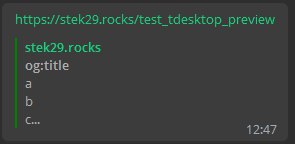
And here's what other clients (macOS native app in this case) show:

As you can see, server already does turn newlines into spaces when there are more than 9 lines, but TDesktop cuts preview on third line.
stek29
on 6 Jun 2018
(cc @john-preston)
stek29
on 6 Jun 2018
@stek29 It's not a feature, but an absence of one. My Text renderer doesn't allow to place a float picture and let text float around the picture (take less space, while the picture is at the right, and after that start taking all the width.
So the simple solution was to avoid situations (in link previews) where there could be an image at the right and text is still going after the image for many lines. So the text is just limited to the possible image height. 🙈
 john-preston
on 6 Jun 2018
john-preston
on 6 Jun 2018
@john-preston What if text just stays narrow and picture just stays on left?
stek29
on 6 Jun 2018
@stek29 You mean on the right?
john-preston
on 6 Jun 2018
@john-preston Yep, on the right, was a typo.
stek29
on 6 Jun 2018
@stek29 Not cool :( but perhaps it should be done that way for now..
john-preston
on 6 Jun 2018
Seconding the issue with it truncating tweets for no good reason after the Twitter 280 character change. Seems to cut them off at 175 characters, which is pretty arbitrary!
 atomicthumbs
on 7 Nov 2018
atomicthumbs
on 7 Nov 2018
@atomicthumbs I think it cuts them at four lines of text.
john-preston
on 7 Nov 2018
I there any way to avoid cut off of 280 char tweets?
 salnkv
on 20 Dec 2018
salnkv
on 20 Dec 2018
Adding the voices looking for 280 char limit and new line support,.
 sunscreem
on 12 Oct 2019
sunscreem
on 12 Oct 2019
it has been four years and telegram will still happily cut the last four characters off a tweet in the middle of a word
atomicthumbs
on 9 May 2020
Hey there!
This issue will be automatically closed in 7 days if there would be no activity. We therefore assume that the user has lost interest or resolved the problem on their own.
Don't worry though; if this is an error, let us know with a comment and we'll be happy to reopen the issue.
Thanks!
![stale[bot] picture](https://avatars3.githubusercontent.com/in/1724?v=4&s=40) stale[bot]
on 23 Oct 2020
stale[bot]
on 23 Oct 2020
Nope. Still an issue. Just because y'all haven't fixed the bug yet doesn't mean it's no longer a bug.
atomicthumbs
on 23 Oct 2020
Related issues
 DRSDavidSoft
·
3Comments
DRSDavidSoft
·
3Comments
 slowaways
·
3Comments
slowaways
·
3Comments
 qwitriy
·
3Comments
qwitriy
·
3Comments
 hosseinab
·
3Comments
hosseinab
·
3Comments
 FunctionalHacker
·
3Comments
FunctionalHacker
·
3Comments