Tdesktop: Minor problem: inexistent reply button
Steps to reproduce
- Highlight message
Expected behaviour
Buttons delete, forward and answer should appear (as when I right click), but answer doesn't appear.
Actual behaviour
Answer button doesn't appear.
Configuration
OS: Window 7, telegram version: 0.10.1
 cryptid11
All 13 comments
Answer is Reply, right?
And sometimes you see everything but Reply? Including Delete?
 stek29
on 20 Aug 2016
stek29
on 20 Aug 2016
Answer is Reply, right?
Sorry, yes.
If I right click on the message I see all 3 options in the pull down interface, but if I evidence a message only 2 buttons appear, this is for everybody not related to my PC.
cryptid11
on 20 Aug 2016
@cryptid11 Are you using third-party localization? If yes, could you check with English one?
 MasterGroosha
on 31 Aug 2016
MasterGroosha
on 31 Aug 2016
Same problem here using English 0.10.6 version.
 Akronix
on 17 Sep 2016
Akronix
on 17 Sep 2016
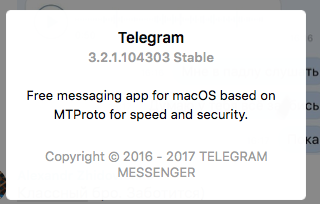
+1 Could not to reply for image\video\sticker. Could to reply only for the text message.
 YozhEzhi
on 9 Sep 2017
YozhEzhi
on 9 Sep 2017
@YozhEzhi That's not Telegram Desktop, that's different app. You can report issues for that app at https://t.me/macswift.
Or, you can get TDesktop from https://desktop.telegram.org.
stek29
on 9 Sep 2017
@stek29 Wow! Didn't know that.
Спасибос, бро!
YozhEzhi
on 9 Sep 2017
so, supposedly when I select just one message with the mouse, there should be a "REPLY" button as there are for FORWARD and DELETE ? I can't see it
Akronix
on 10 Sep 2017
@Akronix If you right-click on that message, you'll notice "Reply" button as well as "Forward", "Delete" and some others.
MasterGroosha
on 10 Sep 2017
This is still a usability issue: if I select a message and don't see the option, how am I going to know it's available via right click or anywhere else? It should be where the other options are.
 eldelacajita
on 12 Sep 2017
eldelacajita
on 12 Sep 2017
@eldelacajita other options are in right click menu too.
stek29
on 13 Sep 2017
@stek29 Yes, that part is consistent and totally fine.
The inconsistent part is where that 'reply' option is missing in the upper buttons. If the user selects a message and sees two buttons appear on top, he/she will assume that those buttons are the only actions related to that message. At least that is what has happended to me and others, and why this bug was reported in the first place.
This is also inconsistent with the mobile apps, where ALL options show up when selecting a message.
eldelacajita
on 15 Sep 2017
Hey there!
We're automatically closing this issue since there was no activity in this issue since 387 days ago. We therefore assume that the user has lost interest or resolved the problem on their own. Closed issues that remain inactive for a long period may get automatically locked.
Don't worry though; if this is in error, let us know with a comment and we'll be happy to reopen the issue.
Thanks!
(Please note that this is an automated comment.)
 tdesktop-closer
on 8 Oct 2018
tdesktop-closer
on 8 Oct 2018
Related issues
 LeonTheOriginal
·
3Comments
LeonTheOriginal
·
3Comments
 slowaways
·
3Comments
slowaways
·
3Comments
 JhonSane
·
3Comments
JhonSane
·
3Comments
 TheAppService
·
3Comments
TheAppService
·
3Comments
 Yanrishatum
·
3Comments
Yanrishatum
·
3Comments