Tampermonkey: GM_xmlhttpRequests do not show up in Network Tab of Chrome Inspector
GM_xmlhttpRequests do not show up in Network Tab of Chrome Inspector
Expected Behavior
Show all GM_xmlhttpRequests in Network Tab of Chrome Inspector
Actual Behavior
GM_xmlhttpRequests do not show up in Network Tab of Chrome Inspector
Specifications
- Chrome: 66.0.3359.181
- TM: v4.6
- OS: Windows NT 10.0; Win64; x64
Script
Applies to all user-scripts
 volkirik
All 6 comments
It's performed in the background page context.
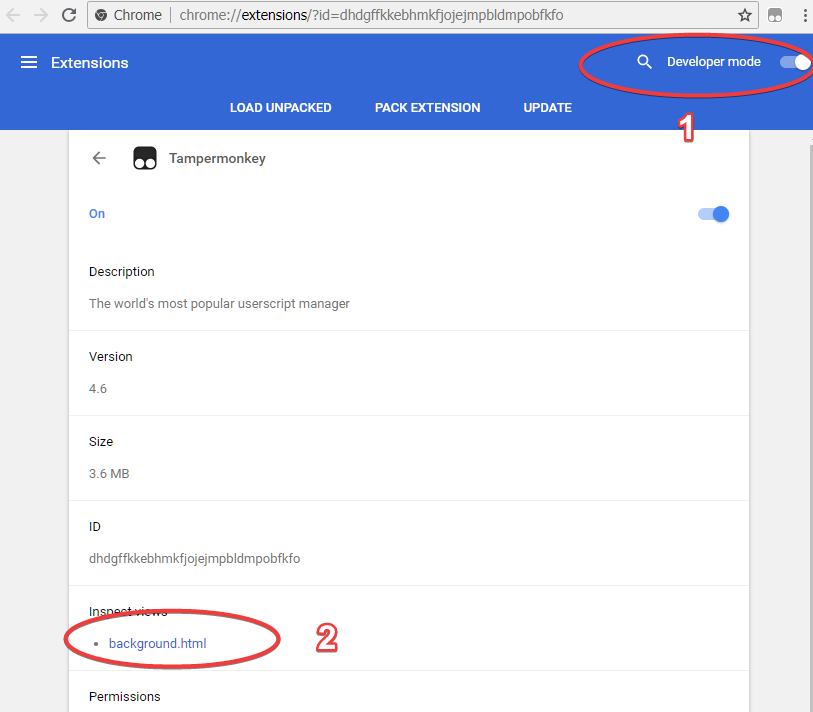
- open
chrome://extensionspage
(or right-click the extension icon in the browser toolbar, then click "Manage extensions") - enable
developer modeslider/checkbox - click
backgroundin Tampermonkey's entry.
(sometimes you'll need to opendetailsfirst - in case several pages are shown in the card).
 tophf
on 10 Jun 2018
tophf
on 10 Jun 2018
There is not developer mode slider/checkbox
Do I have to use Chromium instead of Chrome?
volkirik
on 10 Jun 2018
They have made userscripts appear at developer tools in version 4.5 (2017-12-30).
I was hoping to see similar change for GM_xmlhttpRequest
volkirik
on 10 Jun 2018
There is not developer mode slider/checkbox
Well, Google's designs were always bad, I know, but you can easily find a video or a tutorial that illustrates the procedure. I can show a screenshot:
They have made userscripts appear at developer tools in version
Userscripts runs inside the web page but GM_XHR runs inside a different page - the extension's background page, which is why it cannot be shown in web page's devtools.
tophf
on 10 Jun 2018
Thanks so much. Life saver!
volkirik
on 10 Jun 2018
@tophf Thanks! :)
 derjanb
on 11 Jun 2018
derjanb
on 11 Jun 2018
Related issues
 rslifka
·
4Comments
rslifka
·
4Comments
 darkred
·
7Comments
darkred
·
7Comments
darkred
·
7Comments
darkred
·
7Comments
 Mottie
·
4Comments
darkred
·
7Comments
Mottie
·
4Comments
darkred
·
7Comments
Most helpful comment
Well, Google's designs were always bad, I know, but you can easily find a video or a tutorial that illustrates the procedure. I can show a screenshot:
Userscripts runs inside the web page but GM_XHR runs inside a different page - the extension's background page, which is why it cannot be shown in web page's devtools.