Tampermonkey: (TM Beta 4.12.6121) if you set: Appearance | Layout | `Default - Darker` then for scripts that have a second row (menu command) both their lines appear truncated
Using TM beta 4.12.6121 in Chrome 86/Firefox 82 with Win10.
if you set Appearance|Layout|Default - Darker
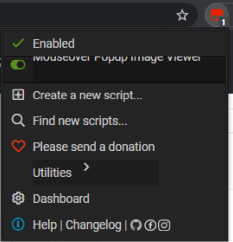
then for scripts that have a second row (menu command) both their lines appear truncated.
STR
In fresh TM beta installation, just install e.g. this script then reload any page.
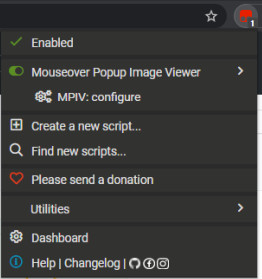
Here is screenshot comparison:
previous (4.11.6120) vs current (4.12.6121) version :
 darkred
All 7 comments
Having the same issue here as well. This bug also makes it so your unable to click the toggle button next to the script to enable/disable.
 93Akkord
on 13 Nov 2020
93Akkord
on 13 Nov 2020
Missed this issue when I was here recently. Darker theme is fixed here. I imagine it'll be included in the next beta.
If you guys run into issues before I see them in the future, ping me and I'll probably get around to it sooner.
 narcolepticinsomniac
on 20 Nov 2020
narcolepticinsomniac
on 20 Nov 2020
@narcolepticinsomniac
Thank you for the fix!
How may I apply the fixed CSS ?
I tried copy-pasting the code from https://raw.githubusercontent.com/Tampermonkey/tampermonkey-layout/master/default/darker.css
into the textbox: Appearance | Custom CSS
and changed the layout to Default - Darker
but the issue remains.
darkred
on 20 Nov 2020
I tried copy-pasting... to custom CSS.
That ain't gonna work, unfortunately. Too much conflicting code.
Other than waiting for the update, I could give you a zip of the version I side-load to work on. Side-loading only really works in Chromium, and even then, it might be a PITA to swap over, unless you're really impatient about it.
narcolepticinsomniac
on 20 Nov 2020
No, ok, I'll wait for the next TM beta version (I'll stick with the Default - Dark theme for now).
Thank you for the detailed reply.
darkred
on 20 Nov 2020
Should be fixed at the latest beta. @narcolepticinsomniac thanks for helping out here.
 derjanb
on 3 Dec 2020
derjanb
on 3 Dec 2020
I confirm it's fixed in new beta with Chrome/Firefox.
Thank you both!
darkred
on 3 Dec 2020
Related issues
 dotennin
·
3Comments
dotennin
·
3Comments
 PiotrSss
·
4Comments
PiotrSss
·
4Comments
 jacklul
·
6Comments
jacklul
·
6Comments
 AlfonsoML
·
4Comments
AlfonsoML
·
4Comments
 gituser823
·
4Comments
gituser823
·
4Comments