Tampermonkey: ESLint in the editor - many/most errors are not highlighted, without or with a custom config
The issue:
- without using a custom ESLint config in TM Settings|Editor|
Custom Linter Configtextarea,
many/most errors covered by ESLint's "recommended" rules are not highlighted in the editor, - when using a config file in 'Custom Linter Config' textarea,
many/most errors covered by your config file are not highlighted.
To reproduce the former, just copy/paste various incorrect code examples from almost any "recommended" rule from https://eslint.org/docs/rules/ to a new userscript tab.
Expected behavior:
- when not using some custom ESLint config file, the "recommended" rules to be enabled by default.
- when using a custom ESLint config file, it be fully applied.
As an introduction to ESLint I quote from its site:
ESLint is designed to be completely configurable, meaning you can turn off every rule and run only with basic syntax validation, or mix and match the bundled rules and your custom rules to make ESLint perfect for your project.
There are two primary ways to configure ESLint:
- configuration comments (inline)
- configuration files (JavaScript, JSON or YAML).
For reference, the list of ESLint rules is here: https://eslint.org/docs/rules/
A large group of them is "recommended", and lots of them are "fixable" (autom. by ESLint itself).
An example of custom config:
module.exports = {
    "env": {
        "browser": true,
        "es6": true,
        "greasemonkey": true,
        "jquery": true,
    },
    "extends": "eslint:recommended",
    // "extends": "eslint:all",
    "parserOptions": {
        "ecmaVersion": 11,
        "sourceType": "script",
        "ecmaFeatures": {
            "globalReturn ": true,
            "impliedStrict": true,
        },
    },
    "rules": {
        "eqeqeq": "warn",
        "indent": ["warn","tab", { "ignoreComments": true, "SwitchCase": 1 } ],
        "linebreak-style": ["warn","unix"],
        "no-alert": "error",
        "no-console": "warn",
    }
};
Some notes:
- The switch in Tampermonkey's editor from JSHint to ESLint has been done since TM 4.6 (2018-05-07) changelog. Thank you, @derjanb for that.
- I had initially reported this issue in the TM forum over 1.5 year ago, but because since the forum still offline, I thought of also reporting it here.
- If I recall correctly, @derjanb had suggested to me in the TM forum thread,
to make a config 'Custom Linter Config' in which I should manually all "recommended" rules.
But, that's difficult to keep, because there are a lot of rules to include, plus not all use the same syntax to enable. Additionally, the "recommended" rules are not some 'static' group - in fact more rules are added in every new ESLint version. - Using latest TM 4.10.6109 beta in Chrome 79.
 darkred
All 7 comments
This now should work as expected...
{
    "env": {
        "browser": true,
        "es6": true,
        "greasemonkey": true,
        "jquery": true
    },
    "extends": "eslint:recommended",
    "parserOptions": {
        "ecmaVersion": 11,
        "sourceType": "script",
        "ecmaFeatures": {
            "globalReturn ": true,
            "impliedStrict": true
        }
    },
    "rules": {
        "eqeqeq": "warn",
        "indent": ["warn","tab", { "ignoreComments": true, "SwitchCase": 1 } ],
        "linebreak-style": ["warn","unix"],
        "no-alert": "error",
        "no-console": "warn"
    }
}
 derjanb
on 22 Feb 2020
derjanb
on 22 Feb 2020
Thank you so much! I confirm it works great! Awesome!
Just some suggestions to consider, please:
- The tooltip as you mouseover an error, to contain the relevant ESLint rule name,
e.g. instead of plain
Unexpected console statement.
to become
eslint(no-console) Unexpected console statement. - Add an (optional) statusbar to display the ESLint errors/warnings count, and
- Add a collapsible panel to view all ESLint errors/warnings, i.e. ESLint's output.
Below are screenshots of SublimeLinter for reference:
tooltip with rule name:

statusbar:

panel/output:

Update 2/23: added a total count statusbar in feature suggestions, and inserted SL screenshots.
darkred
on 22 Feb 2020
Thanks a lot for adding tooltip with the related rule name!
I've noticed that many errors are not highlighted:
(using TM beta 4.10.6112 in Chrome 81)
e.g. in the following code example:
var a;       // eslint:no-unused-vars  'a' is defined but never used.
var a;       // eslint:no-redeclare    'a' is already defined.
b;           // eslint:no-undef        'b' is not defined.
using the config from your comment, only the 1st warning is highlighted, even though all 3 rules are 'recommended':

Also, that 1st highlight should be an error, not a warning, because that (recommended) rule is not explicitly defined in your config as such (there's no "no-unused-vars": "warn")
darkred
on 18 Apr 2020
Fixed at TM BETA 4.11.6116
derjanb
on 15 Jul 2020
@derjanb Thank you!
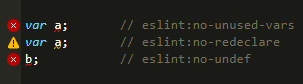
I've noticed the following with the new version:
if I add the ESLint config from your comment
and enter my test code from above,
then only the 1nd + 3rd issues appear as Errors (red) - the 2nd appears as Warning (yellow)
although the no-redeclare rule is not explicitly set as "Warn" in the config:
darkred
on 19 Jul 2020
This is because
no-unused-vars is a "problem"
https://github.com/eslint/eslint/blob/8108f49f9fa0c2de80b3b66c847551beff585951/lib/rules/no-unused-vars.js#L20
while no-redeclare is a "suggestion".
https://github.com/eslint/eslint/blob/8108f49f9fa0c2de80b3b66c847551beff585951/lib/rules/no-redeclare.js#L20
derjanb
on 20 Jul 2020
(I've deleted my last comment)
What I've noticed is that,
if I use in Tampermonkey a config with an "rules" key with an empty value {}:
config in TM
{
    "env": {
        "browser": true,
        "es6": true,
        "greasemonkey": true,
        "jquery": true
    },
    "extends": "eslint:recommended",
    "parserOptions": {
        "ecmaVersion": 11,
        "sourceType": "script",
        "ecmaFeatures": {
            "globalReturn ": true,
            "impliedStrict": true
        }
    },
    "rules": {}
}
then 2nd rule is highlighted as a warning:
but if I use the same config as a .eslintrc.js file in ESLint CLI (i.e. outside Tampermonkey) :
.eslintrc.js file in ESLint CLI
module.exports = {
    "env": {
        "browser": true,
        "es6": true,
        "greasemonkey": true,
        "jquery": true

    },
    "extends": "eslint:recommended",
    "parserOptions": {
        "ecmaVersion": 11,
        "sourceType": "script",
        "ecmaFeatures": {
            "globalReturn ": true,
            "impliedStrict": true
        }
    },
    "rules": {}
}
then the 2nd problem is an also listed as an error:

In other words, all problems in ESLint CLI are highlighted as errors (regardless of whether the relevant rule is a problem or a suggestion) unless set they are explicitly set as warnings.
What you are referring to as suggestion/problem distinguish has to do with --fix-type CLI option
which allows to specify the type of fixes to apply when using either --fix or --fix-dry-run,
and which is irrelevant to how the problems are highlighted (warning/error), i.e. how rules are configured (off/warn/error) link .
So, can we have the same behavior in Tampermonkey as in CLI ?
darkred
on 21 Jul 2020
Related issues
 Mottie
·
4Comments
Mottie
·
4Comments
 momocow
·
5Comments
momocow
·
5Comments
 RussiaVk
·
4Comments
RussiaVk
·
4Comments
 gituser823
·
4Comments
gituser823
·
4Comments
 rslifka
·
4Comments
rslifka
·
4Comments
Most helpful comment
This now should work as expected...