Sylius: 500 when applying promotion on 9999 item units
Sylius version affected: 1.x
Description
Maximum possible quantity value at sylius is 9999. So when setting this value on an item which is eligible for default Christmas promotion PromotionApplicator tries to distribute the discount for all 9999 item units which therefore generates 9999 new item unit adjustments. Persisting this many entities results in timeout and 500 server response. This place should be optimised.
Steps to reproduce
- ensure there is an eligible promotion for the item in the cart
- changing item quantity to 9999 in cart edit page
- click update
Suggestions
There could maybe be an option if adjustments are applied on item unit or items itself. Or some sort of different logic applied by promotion applicator on high quantity items.
 tautelis
All 21 comments
Hi everyone. Have found same problem. As I can see everything crushes at Sylius\Component\Order\Modifier\OrderItemQuantityModifier in increase/decreaseUntisNumber methods. First of all this place seems to be problematic for big quantity
    private function increaseUnitsNumber(OrderItemInterface $orderItem, int $increaseBy): void
    {
        for ($i = 0; $i < $increaseBy; ++$i) {
            $this->orderItemUnitFactory->createForItem($orderItem);
        }
    }
 kate-kate
on 8 Feb 2019
kate-kate
on 8 Feb 2019
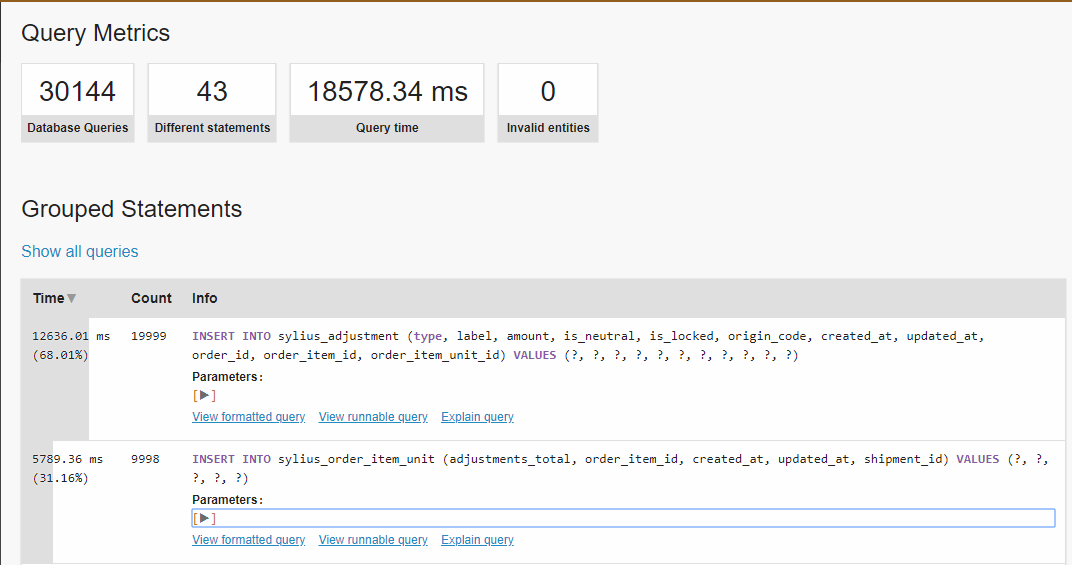
The error is most likely caused by a timeout, i.e. reaching max execution time, or reaching the memory limit.
I was able to update the quantity of a cart item from 1 to 1000, thus adding 9999 more order item units.
Here's a view from the profiler (dev env):

 vvasiloi
on 2 Aug 2019
vvasiloi
on 2 Aug 2019
Do we really need this OrderItemUnit? In my case there is a digital product that could cause orders of 1.000.000.000 pieces which will not be possible with such a loop.
For what is this used actually?
 itinance
on 7 Oct 2019
itinance
on 7 Oct 2019
@itinance promotions, tax calculation, shipments, etc.
It represents a single unit that is bought.
If you don't need it in your project, you could probably only create one OrderItemUnit per OrderItem, just like Sylius by default creates only one shipment.
Responsible for item generation is OrderItemQuantityModifier.
vvasiloi
on 7 Oct 2019
Thx for clarification @vvasiloi.
itinance
on 7 Oct 2019
It turns out, that we have a serious issue here. The total amount of items in an Order is reflected by the number of OrderItemUnits.
Overriding the internal OrderItemQuantityModifier like this:
    sylius.order_item_quantity_modifier:
        class: AppBundle\Component\Core\Cart\Modifier\MyOrderItemQuantityModifier
        public: true
        arguments:
            - "@sylius.factory.order_item_unit"
with a custom class, where we don't create 1 million of OrderItemUnit-Records when a Order was placed with 1 Million Items of digital goods, then either an Exception is thrown for Tax-calculation stuff because of "0" quantity or - if we create at least 1 OrderUnitItem, the final quantity is 100 instead of a million.
As we don't sell Milk or Clothes, but digital goods in a possible amount of millions of items, this kind of Order management is not suitable for us. Any ideas how to make this work with Sylius having not millions of records for a single order of 1 million items?
Any ideas @vvasiloi? Or is this a point were we have to skip the OrderBundle for our requirements now creating a custom one.
One approach could be to not create a single OrderUnitItem for each item, but add a "amount"-property into the UnitItem for reflecting a chunk of multiple items instead only one.
itinance
on 12 Oct 2019
One approach could be to not create a single OrderUnitItem for each item
Isn't that what I said?
If you don't need it in your project, you could probably only create one OrderItemUnit per OrderItem, just like Sylius by default creates only one shipment.
but add a "amount"-property into the UnitItem for reflecting a chunk of multiple items instead only one.
There's already a quantity field on the OrderItem, why do you need one more on the OrderItemUnit?
vvasiloi
on 12 Oct 2019
Hey @vvasiloi
There's already a
quantityfield on the OrderItem, why do you need one more on the OrderItemUnit?
As I see in the source code, addUnit() is required in order to increase the quantity of an OrderItem. OrderItem itself doesn't have a setQuantity-Method or any other thing to set the value manually. If it would have one, we could skip the OrderItemUnits.
Do you have any other suggestion instead of updating the sylius_order_item-table manually per SQL?
OrderItem.php:
    public function addUnit(OrderItemUnitInterface $unit): void
    {
        if ($this !== $unit->getOrderItem()) {
            throw new \LogicException('This order item unit is assigned to a different order item.');
        }

        if (!$this->hasUnit($unit)) {
            $this->units->add($unit);

            ++$this->quantity;
            $this->unitsTotal += $unit->getTotal();
            $this->recalculateTotal();
        }
    }
@itinance override the method, remove the statement that increase the quantity and add setter/getter for quantity?
vvasiloi
on 12 Oct 2019
Thanks for the hints, @vvasiloi , but apparently this is not enough. The total in the balance sheet / order sheet will be 0 at all after the order processing without any single OrderItemUnits.
What I did:
1. Override order_item_quantity_modifier:
    sylius.order_item_quantity_modifier:
        class: AppBundle\Component\Core\Cart\Modifier\MyOrderItemQuantityModifier
        public: true
        arguments:
            - "@sylius.factory.order_item_unit"
with this:
use AppBundle\Entity\OrderItem;

class MyOrderItemQuantityModifier implements OrderItemQuantityModifierInterface
{
    /** @var OrderItemUnitFactoryInterface */
    private $orderItemUnitFactory;

    public function __construct(OrderItemUnitFactoryInterface $orderItemUnitFactory)
    {
        $this->orderItemUnitFactory = $orderItemUnitFactory;
    }

    /**
     * {@inheritdoc}
     */
    public function modify(OrderItemInterface $orderItem, int $targetQuantity): void
    {
        if($orderItem instanceof OrderItem) {
            $orderItem->setQuantity($targetQuantity);
        }
    }
}
2. Override OrderItem:
sylius_order:
    resources:
        order_item:
            classes:
                model: AppBundle\Entity\OrderItem
Class:
<?php

namespace AppBundle\Entity;

use Sylius\Component\Core\Model\OrderItem as BaseOrderItem;
use Sylius\Component\Order\Model\OrderItemUnitInterface;

class OrderItem extends BaseOrderItem
{
    /**
     * @param int $quantity
     * @return BaseOrderItem
     */
    public function setQuantity(int $quantity) : void {
        $this->quantity += $quantity;
        $this->unitsTotal += $quantity;

        $this->recalculateTotal();
    }
}
Doctrine OrderItem.orm.yml:
AppBundle\Entity\OrderItem:
  type: entity
  table: sylius_order_item
After submitting a new order of lets say 5000 items, the following is happening at the end in sylius_order_item:
quantity: 5000
units_total: 0
total: 0
When I dump the order-item within the OrderItemQuantityModifier, everything seems to be okay having valid values on all the properties.
But after the order was processed, total and units_total tends to zero, which is shown in the order-overview also.
I miss something here.
itinance
on 12 Oct 2019
@itinance
- You need at least one order item unit, as mentioned before
$this->unitsTotalshould be$quantity * $unit->getTotal()or something like that, it's not the amount of units (that's quantity), but the units total price.
You might need to do more changes in the code, including theaddUnitmethod, to remove the old logic.
vvasiloi
on 12 Oct 2019
This issue has been automatically marked as stale because it has not had any recent activity. It will be closed in a week if no further activity occurs. Thank you for your contributions.
![stale[bot] picture](https://avatars.githubusercontent.com/in/1724?v=4&s=40) stale[bot]
on 30 May 2020
stale[bot]
on 30 May 2020
@Zales0123 any progress on this Sylius issue? anything in the roadmap?
tautelis
on 1 Jun 2020
Hi everyone.
Have you found a solution?
It's a big problem for me, in my case I have to add a lot of products to the cart and if the total is more than 1k or 2k it's really slow and 500 are thrown out.
 antiseptikk
on 23 Jun 2020
antiseptikk
on 23 Jun 2020
Hey, guys, this is really a huge problem for non-standard shops that deal with products like parts, paper, or anything that has to do with large amounts of products being sold @Zales0123 @pjedrzejewski , is there anything that can be done about this?
 einorler
on 17 Jul 2020
einorler
on 17 Jul 2020
Hey folks, unfortunately, we probably cannot deal with it before 1.8. We will try to prioritize it after nearest release
 lchrusciel
on 20 Jul 2020
lchrusciel
on 20 Jul 2020
Hey folks, unfortunately, we probably cannot deal with it before 1.8. We will try to prioritize it after nearest release
Did this by any chance get fixed in the 1.8 release?
 ddanninger
on 16 Sep 2020
ddanninger
on 16 Sep 2020
@ddanninger no.
vvasiloi
on 16 Sep 2020
sooo... Having in mind what Ichrusciel said on July the 20th, hows the prioritization going? :)
einorler
on 21 Sep 2020
This issue has been automatically marked as stale because it has not had any recent activity. It will be closed in a week if no further activity occurs. Thank you for your contributions.
stale[bot]
on 25 Dec 2020
How can we help you to find a solution for this?
ddanninger
on 25 Dec 2020
Related issues
 loic425
·
3Comments
loic425
·
3Comments
 eb22fbb4
·
3Comments
eb22fbb4
·
3Comments
 inssein
·
3Comments
inssein
·
3Comments
inssein
·
3Comments
inssein
·
3Comments
 bnd170
·
3Comments
bnd170
·
3Comments
Most helpful comment
Hi everyone. Have found same problem. As I can see everything crushes at
Sylius\Component\Order\Modifier\OrderItemQuantityModifierin increase/decreaseUntisNumber methods. First of all this place seems to be problematic for big quantity