Sylius: Products not show in backend and in categories on frontend
Sylius version affected: 1.3.6
Description
I do not see products in the admin panel. I can only add, but I do not see them in backend. In frontend I can see them in main page only but not in categories.
Example:
https://www.smakiafryki.pl/pl_PL/products/zielona-herbata-twig-rooibos-import-rpa
https://www.smakiafryki.pl/pl_PL/taxons/herbaty
 SkyAgency
All 7 comments
Hello @SkyAgency and welcome to the community! At first sight, it seems, that you have a pl_PL locale set as default in your container configuration, but products are defined in English locale only. This issue has thrown me into a brainstorm, should it really work like this? Especially in Admin panel all products should be always displayed, no matter do they have some specific translation defined or not (cc @CoderMaggie @pamil).
Nevertheless, as a quick fix, I would propose to change locale parameter to en_US, then you should have the access to products. Good luck :)
 Zales0123
on 16 Jan 2019
Zales0123
on 16 Jan 2019
Hello @Zales0123 for the answer. Products are defined in pl_PL.
I can not see products in the admin panel but if I paste a link, I can edit them /admin/products/3/edit
phpmyadmin to php array export:
$sylius_product = array(
  array('id' => '1','main_taxon_id' => '2','code' => '1','created_at' => '2019-01-06 21:06:58','updated_at' => '2019-01-06 21:06:58','enabled' => '1','variant_selection_method' => 'choice','average_rating' => '0'),
  array('id' => '2','main_taxon_id' => '2','code' => '2','created_at' => '2019-01-06 21:32:40','updated_at' => '2019-01-06 21:32:40','enabled' => '1','variant_selection_method' => 'choice','average_rating' => '0'),
  array('id' => '3','main_taxon_id' => '3','code' => 'test','created_at' => '2019-01-15 12:03:59','updated_at' => '2019-01-15 21:20:54','enabled' => '1','variant_selection_method' => 'choice','average_rating' => '0')
);
$sylius_product_translation = array(
  array('id' => '1','translatable_id' => '1','name' => 'Zielona herbata Twig Rooibos import RPA','slug' => 'zielona-herbata-twig-rooibos-import-rpa','description' => 'TWIG ROOIBOS GREEN- 20 saszetek. HIT na polskim rynku!...','meta_keywords' => NULL,'meta_description' => NULL,'short_description' => NULL,'locale' => 'pl_PL'),
  array('id' => '2','translatable_id' => '2','name' => 'Herbata Twig Rooibos Natural oryginalna import RPA','slug' => 'herbata-twig-rooibos-natural-oryginalna-import-rpa','description' => 'TWIG ROOIBOS NATURAL- 20 saszetek...','meta_keywords' => NULL,'meta_description' => NULL,'short_description' => NULL,'locale' => 'pl_PL'),
  array('id' => '3','translatable_id' => '3','name' => 'Test','slug' => 'test','description' => 'Test test','meta_keywords' => NULL,'meta_description' => NULL,'short_description' => NULL,'locale' => 'pl_PL')
);
SkyAgency
on 16 Jan 2019
I had the same problem. Unfortunally i got the response that i did not understand the category/taxons coz that is what i think you are talking about. You expect you set maincategory on a product, you can find it back on that but because sylius_product_taxon is not set (unless you check the checkbox which is useless) it will not show up. This, in my opinion bug, was introduced with the checkbox on the taxomy tab with product. I fixed this by adding a eventlistener on event sylius.product.post_create and sylius.product.post_update so it will work as expected.
`private function addProductTaxon(ProductInterface $product): void
{
$productsTaxons = $product->getProductTaxons();
if (!$productsTaxons->isEmpty()){
foreach ($productsTaxons->toArray() as $productTaxa){
$product->removeProductTaxon($productTaxa);
}
$this->manager->persist($product);
$this->manager->flush();
}
    $mainTaxon = $product->getMainTaxon();
    if ($mainTaxon && !$product->hasTaxon($mainTaxon)) {
        $factory = new Factory(ProductTaxon::class);
        $productTaxon = $factory->createNew();
        $productTaxon->setTaxon($mainTaxon);
        $productTaxon->setProduct($product);
        $product->addProductTaxon($productTaxon);

        $this->manager->persist($product);
        $this->manager->flush();
    }
}


public function onProductUpdate(GenericEvent $event) : void
{
    $product = $event->getSubject();

    Assert::isInstanceOf($product, ProductInterface::class);
    $this->addProductTaxon($product);
}`
 amavis442
on 28 Feb 2019
amavis442
on 28 Feb 2019
This issue has been automatically marked as stale because it has not had any recent activity. It will be closed in a week if no further activity occurs. Thank you for your contributions.
![stale[bot] picture](https://avatars.githubusercontent.com/in/1724?v=4&s=40) stale[bot]
on 29 May 2019
stale[bot]
on 29 May 2019
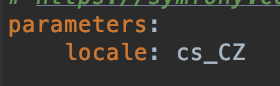
In services.yaml file set parameters:locale to your desired one.
 karelattl
on 20 Jun 2019
karelattl
on 20 Jun 2019
@karelattl +1 did the job
 aznoqmous
on 16 Jul 2019
aznoqmous
on 16 Jul 2019
Alongside to updating locale I've had to clear the cache too. Thanks
 vladimirdjuricic
on 17 Mar 2020
vladimirdjuricic
on 17 Mar 2020
Related issues
 eb22fbb4
·
3Comments
eb22fbb4
·
3Comments
 xleliberty
·
3Comments
xleliberty
·
3Comments
 crbelaus
·
3Comments
crbelaus
·
3Comments
 tchapi
·
3Comments
tchapi
·
3Comments
 stefandoorn
·
3Comments
stefandoorn
·
3Comments
Most helpful comment
In services.yaml file set parameters:locale to your desired one.