Surge: Using Surge as an audio effect
I've seen a number of issues open on this, or conversations on other issues make reference to this.
Using a synth as an effect is something that I personally find really interesting. I spent a couple hours reading about it on here, and trying different things in different DAWs, so I thought it might be a good idea to compile them along with my personal findings.
Windows "rename as Surge_fx.dll" trick
This works for some DAWs, but only in Windows. Currently Surge will not receive midi when renamed too Surge_fx.dll.
I noticed the nightly builds for mac now include a new Surge FX vst3 and AU plugin, which includes all the effects from the effects section. These work great! Unfortunately they don't include the midi controlled modulation capabilities and ability to send audio through the filter block.
Ardour / Harrison mixbus
Surge works fully as an effect or synth in Ardour. You can load it as an instrument and send it audio as a sidechain, or load it inline on an audio track and send it midi from another track.
Logic X and Ableton 10 (Windows and Mac):
Surge works as an audio effect when using these DAWS integrated methods for receiving a sidechain from another track. Midi and audio input are working as expected. (on both Windows and Mac OS in the case of Ableton)
These DAWS only allow instruments in instrument slots, and as such Surge can not be used as an "insert" effect, but with creative routing you can do anything you can imagine. These are the best most fully featured ways to use Surge (synth) as an effect currently.
Renoise (all platforms)
Renoise only allows instruments in instrument slots, but has no way to send audio to an instrument (without using a vst wrapper plugin such as Metaplugin). There is also isn't really a way to send midi to an audio effect. Surge can be used in latch mode on Windows with the "rename _fx" trick. There isn't really a proper way for anyone to support a "Synth Effect" in Renoise unless the developers update it (which seems unlikely).
REAPER (all platforms)
In REAPER all tracks can always host streams of multitrack audio and midi and don't have any kind of dedicated "instrument slots" or "sidechain menu". In REAPER if you put an instrument on an audio track the audio will just pass through it, and any audio from its outputs are mixed.
Because of this Surge VSTi, VST3i and AUi do not work properly as an effect in REAPER. You can process audio through them but the unaffected audio will still pass in parallel. The windows "rename _fx" trick works in latch mode. Currently Surge can't receive midi in this configuration, so it's only partially functional. (and only on windows)
There is a chance REAPER developers would add an option for for VSTi, AUi, VST3i to block audio, but it isn't super likely. All the other synths that I know of that work as an audio effect all provide a separate audio effect version, and I doubt they would add an option like this to support one plugin (though if any DAW developer would do something like that it's them)
Cakewalk Bandlab
Its been mentioned here that it does not work correctly. No personal experience.
Bitwig, Studio One, FL Studio, Cubase/Nuendo others......
no experience, maybe someone else can offer experiences if there is anything notable
So in summary:
Surge can be used as intended as a "Synth that can process incoming audio" on any DAW that support instrument slots and sending an external side-chain to that instrument.
There is a workaround for other daws in VST on Windows but at this time it isn't fully functional.
I've seen another thread mentioning that supporting a dedicated separate Surge_FX synth would be extremely cumbersome and annoying. Has it been decided that it's too annoying/time consuming and there isn't enough interest too support a dedicated "FX" version of Surge as a synth at this time?
 mortfell
All 66 comments
I really enjoy processing audio through a synth, being able to run things through filters, feedback, use audio as an FM source ETC all controlled by a powerful modulation system and midi is REALLY COOL. I've bee having a lot of fun with it using Surge in Ableton 10.1 in this way.
I would personally really love to see the synth version of Surge being supported on more DAWS as a fully featured "synth effect". It has some pretty unusual capabilities in this configuration that I can only imagine being achieved with commercial "modular" environments like Reaktor, or Cherry Audio Voltage Modular.
Really interested in hearing if this is something other people care about... or any thoughts/experiences that I am missing.
mortfell
on 8 Aug 2019
You are definitely not the only person who feels this way. Care quite a lot and some interesting work going on. There’s a few bits of goodness underway
The FX stage (the delay, vocoder, etc...) is available as a standalone AU and VST3 which is a pure play multi-effect unit. We did this so we could vocode sounds which didn’t come from surge using the vocoder chain. See #864. This unit is available right now. It ships by default in the Mac nightly installers but is also available for windows at https://github.com/surge-synthesizer/surge-fx
The entire of the surge block diagram are available as modules for VCV Rack except the filterbank. This project is a bit stalled because I’m still talking with the VCV Rack maintainers about why they have a hard time putting the code in their automated builds, but if you install rack 1..n you can get surge-rack as a set of modules.
The VST2 hack you mention is really gross and seems to work on windows in a way I find displeasing. Also it doesn’t work that well. But as you said, the sidechain and audio in works super well on hosts which support VST3 or AU and have good routing. Logic is one such host indeed! VST2 is pretty iffy on if ‘effects’ can receive midi. But VST2 is a pretty loose spec. And is also dead (except everyone uses it (and all the hosts do different things)).
Thank you for opening this issue! I should scan the rest of the open issues about surge as an effect and link them here.
 baconpaul
on 8 Aug 2019
baconpaul
on 8 Aug 2019
Oh I should add that I am thinking of either (1) adding the filter-block to surge-fx or (2) having the project make two plugins, surge-fx and surge-filter. But agree the modulation is missing. That’s on purpose.
baconpaul
on 8 Aug 2019
And finally: if we did decide to make a “dedicated FX” flavor I would probably do it as VST3 only. The VST2 is too hacky and the AU just isn’t needed (since the AU deploys to hosts which do the right thing or support VST3). You agree with that assessment?
baconpaul
on 8 Aug 2019
Yeah I totally agree with everything you said. It would be really nice to have an effect version of the synth to use in REAPER and other hosts that it isn't working with currently. VST3 is supported by pretty much everything now, so that seems like a good way to use resources.
My experience with programming is very limited but just from being an avid user of music technology and plugins, the VST vs VST3 thing seems very frustrating for developers.
The only plugin I know that does the "synth+effect" thing well in VST is the effect version of Serum. Its really excellent, if you have access to it, it's worth checking out. It opened my eyes to lots of cool possibilities for a synth+effect.
You can use it as a synth with audio input as FM source, midi triggered gate/compressor, midi triggered envelope follower/shaper, midi triggered filter, modular fx rack etc etc etc
I have tried the VCV-Rack plugins and also the FX versions, I really like them! The "patch loader" in VCV Rack is a really cool idea. I suppose a big benefit of those is that you aren't chained as much to the old GUI code and can redesign the interface easier?
mortfell
on 8 Aug 2019
The GUI is less why I did the rack stuff than the block diagram. I was wondering what would happen if we did things like, say, add a simple biquad behind every oscillator before the mixer (which was a request we got from one user). No way to experiment with that easily in surge.
I'm looking at VST3 now for how to make a mixed type. It is, of course, not easy. VST vs VST3 is frustrating, yes, because VST2 is old and steinberg revoked the license for any new code and it is missing 17 features, and VST3 is new, but doesn't add those 17 features, it also rewrites everything. And whether it rewrites it well or poorly (which you could debate), it definitely changes it a lot in a way which makes it not like other plugin libraries kinda. Although it is, of course, more subtle than that. Surge is disadvantaged in VST3 in that we are using the "SIngleComponentEffect" which means some things - like a multi-unit factory - are not really easy to do. Probably to get a VST3 FX working I would need to break that decision. Which is .... hard.
Unfortunately this one ends up being "quite a lot of work and only helping people who don't use the toolchain I use" so it doesn't quite make it to top of my list. But I agree - in logic it all works great and is really fun. Glad it works in live also. In fact, did you see #859? If you have it working in live perhaps you could help that user?
Thanks for all your feedback!!
baconpaul
on 8 Aug 2019
No problem at all!
Sure I'll take a look, and see if I can help.
mortfell
on 8 Aug 2019
Hello
I have tried to read everything. But there are some fundamental things that I don't understand. First: Just suppose that I have the perfect DAW (I don't have it, though): Regardless if I use Surge as a regular synth and try to route audio to it, or if I load it as fx and try to route audio to it, I will always have to press at least one key on my keyborad (the white and black ones) in order to hear something - won't I? (Oscillator set to audio in, in both cases.)
 per99
on 1 Sep 2019
per99
on 1 Sep 2019
Yes you are getting the concept of it!
But there is a way around that.
In the section of Surge beside the oscillators, where you pick if Surge is “poly” or “mono” (there is a few mono modes), the last entry in that list is called “latch”.
Selecting “latch” means Surge will always act as if a note is pressed and stays “sustained”.
What DAW are you using ? I can only test Surge on DAWs I own, or have read reports of, so that’s all I’ve put in my post above.
mortfell
on 1 Sep 2019
@mortfell I use an old version of Cubase (Essential 5). Anyway, I knew about the renaming trick (Surge_FX.dll). And yes - with the latch option it works :) I just tested the Surge Delay with my vocals. What I really wanted to do is to see what the vocoder is like. Will try to do that later today. (There should be 20 bands... (?) How can I control them all?)
per99
on 1 Sep 2019
Few comments on the vocoder
If you use a version of surge from the last week or two the band count, band frequencies, and separate modulator band frequencies are all exposed as parameters. These will be part of 1.6.2
We have a separate surge-fx module which is just the fx chain as a VST3 or an AU on windows and mac. With mac this ships with the installer. With windows you can download it at http://github.com/surge-synthesizer/surge-fx/releases. The primary reason we wrote this was so we could vocode a pair of sources neither of which were from surge
The vocoder works both in surge proper and in surge fx by using the side chain as the modulator. In surge proper the carrier is the synth; in surge-fx the side chain is the track. I don't know how to side chain in cubase 5 but in logic and so on it works exactly as you'd expect.
There's one crash bug with automation in surge-fx we are still looking at and will resolve before 1.6.2. That's all over on #864
baconpaul
on 1 Sep 2019
@baconpaul and @mortfell I really appreciate all your efforts and the work you do - all of you, involved.
When it comes to the separate fx module for windows - is it 64 bit, only (I use 32 bit)? I could try to download it and see what happens. Because: I just realized that you don't want the carrier signal to be playd back continously, do you? And in that case I still have a problem, since you cannot route midi signals to the Surge Synth when used as FX (?), and I don't think there is a way to route audio to the Surge when used as VSTi plugin. Not in Cubase anyway, and I'm almost certain someone else has stated this somewhere. Maybe the surge-fx mentioned under 2. above is the solution?
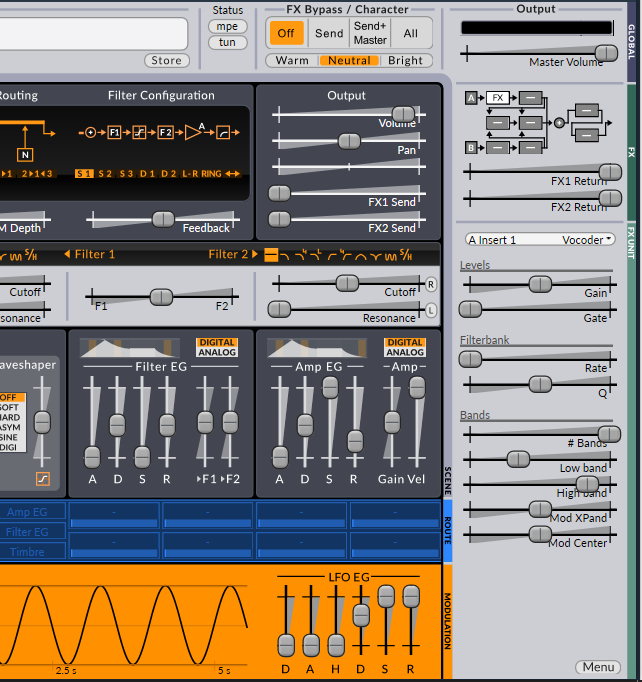
Yes, I downloaded my nightly version only two days ago. I can choose the number of vocoder bands I wanna use, but I can't really understand how to control _each one_ of them.
per99
on 1 Sep 2019
Right. So we will add documentation on the vocoder bands to the manual with 1.6.2 but the short version is:
- band count is obviouls
- low and high band are the low and high band; the frequency applied to the carrier is (high-low) / ( bands - 1 ) * band number + low as you 'd expect
- The mod expander basically "widens" the modulator range (so lowers the low and higher the high if positive); and the center moves the center point. So think of it as shifting around the modulator
Unfortunately - since I used juce to make the surge-fx - we are only going to support a 64 bit vst3 and au for that plugin. If you are a developer and know how to make 32 bit juce plugins from source and want to integrate it with our build pipeline I would happily take a pull request!
And yes you are correct. Cubase doesn't seem to support midi to FX or side-chaining to synths, I've been lead to understand. I don't use cubase so I can't confirm. But you definitely need either (1) to get midi to your fx or (2) to get a side chain to your component. I'm sorry I don't know how to help you with your particular setup :(
baconpaul
on 1 Sep 2019
One more thing: I downloaded and extracted the surge-fx-win.zip from GitHub. Inside there is one application and one .vst3-file. I moved the vst3 to the the correct folder. The funny thing is: in the plugin info list, inside Cubase, it's called surge_x86.vst3 (instead of surge-fx.vst3). Strange, isn't it? But I cannot load it into Cubase (probably 'cause it is 64 bit (?)).
per99
on 1 Sep 2019
And no - I'm not a programmer or developer - I just try to make music! (Maybe experiments of this kind an be useful, anyway.)
per99
on 1 Sep 2019
Yeah I am not sure why it got that name! Most likely because it couldn't load and find out the name but I'm not sure. It's really hard to debug since I don't have your environment :(
Do you have a 64 bit host you could try just to see if you can load it "at all"?
baconpaul
on 1 Sep 2019
And experiments are useful indeed - appreciate the clear description of what's going on. Good bug reports make good software! Thanks.
baconpaul
on 1 Sep 2019
I don't have a 64 bit host at the moment... I think I will try to read again, what has already been said about advantages and disadvantages in connection with different daws. (Reaper seems to be good and it isn't that expensive, but in this case i guess it wouldn't help anyway, so...) And no 64 bit computer, BTW
per99
on 1 Sep 2019
Ahh right. Well I'm happy we can get surge working on your system at all! (The 32 bit back-port was quite a bit of work originally) but the audio effect processing code with VST2 is really not super uniformly supported. I'll take a look this month and see if there's an easy flag to switch to make the surge-fx try a 32 bit build but again it would be a vst3. Does your host support 32 bit vst3s?
baconpaul
on 1 Sep 2019
Yes, it supports 32 bit vst3. BTW, maybe, just maybe, I have figured out a way to get around all limitations and make the Surge vocoder work, after all, in my system. I'm not sure yet, and I think I'd better not tell anyone my thoughts, at this stage. Have to try first, and then tomorrow or in a couple of days I'll post a message here...
per99
on 1 Sep 2019
Cool. And I'll take a peek at juce 32 bit vst3 to see if it is easy or not.
baconpaul
on 1 Sep 2019
I have no idea how many or how few music enthusiasts are following this thread. Anyway, I realized that you can use Surge both as synth and effect in the same project. So I recorded a silly Swedish nursery rhyme - I sang in the built in mic in my laptop. And then I had one of Surge's monosynths play the same notes. I panned one of the channel strips right and the other left, and then routed them to a group channel, where I loaded the Surge_Fx.dll (the renamed one).
I used both scene A and B, and probably you can guess the rest. Because I thought that this is how it usually works - the carrier on one side and the modulator on the other. But the only information in the manual regarding this is: "The audio-input of Surge is used to modulate the carrier signal at the input stage of this 20-band vocoder algorithm. The carrier channels are in stereo while the modulator use the mono sum of the input channels."
I don't understand this at all (and my experiment didn't work out too well). Some of you guys have already been kind enough to explain lots of things earlier today. So write an answer when you feel you have got the time.
per99
on 1 Sep 2019
Hey!
I'd definitely still like to help you get it working if I can!
If you can get it working we will know for sure if it works in 32 bit cubase.
With a Vocoder the Carrier refers to the sound who's "pitch" you want to hear. (in this case the synth)
The modulator is the sound you want to modify/modulate the carrier sound with (in your case the voice)
It's not TOTALLY correct, but the way I remember is:
Carrier=pitch/notes
Modulator=timbre/tone
If you are using the Vocoder inside Surge the synth, Surge's own synth sound MUST be the "Carrier"
the external track of your voice you are routing in will be the "Modulator".
There is no need to use two instances of Surge, but you need to be able to send BOTH midi and an external audio track to ONE instance of Surge. You can do it on one scene, and you don't need to set up any "audio in" oscillators!!
The problems people have been having relate to some hosts not being able to send BOTH audio and midi to one single instance of Surge. Ableton Live and Logic X are the only hosts I know which currently support this properly.
If you are able:
Setup a synth sound in Surge with the normal oscillators on one scene (using a saw sound with lots of unison works well for vocoding) and then just turn on the Vocoder effect in the fx rack, If audio is being routed properly into Surge, Surge will automatically use it's own synth sound as "Carrier" and your routed sound as "Modulator"
One question:
Are you able to send midi notes to the version of Surge you have renamed surge_fx.dll ??
mortfell
on 1 Sep 2019
Unfortunately I can't send midi to the FX version, and I cannot route audio to Surge if I use it as VSTi. Thats the problem (I and baconpaul went through all that).
Still: If no oscillator is set to 'audio in' I don't get it. The vocals, whether it's recorded beforehand or not, needs to be routed to the vocoder - right? And I still wonder about the left- / right-issue.
But maybe I'll check if there's a trialversion of Ableton Live. Have you tried it, and have you actually used the Surge vocoder so you can confirm that it works? EDIT: No, I'm notta gonna try Ableton, since it's only 64-bit... :(
per99
on 1 Sep 2019
Right so the whole trick is that there’s a sidecbain where plugins can get an extra audio input. This is daw specific but the problem is you can’t have two sidechains. So either surge makes the sound and you sidechain the modulator or you need a stand-alone Fox. This is exactly why I wrote surge fx btw - we wanted to vocoders two signals neither of which were surge
I took a quick look this morning and a 32 bit surge fix looks tractable. Then you could have a surge midi track which had surge fx as an effort with appropriate sidechaining
Will update this issue if I can get the 32 bit version built. Not today but this week sometime probably!
Best
baconpaul
on 1 Sep 2019
👍
per99
on 1 Sep 2019
Yes, it works perfectly Ableton! You send the signal into Surge using the DAWS routing.
The Vocoder effect in Surge automatically uses the audio input.
Ok, i just did a little googling:
Cubase Essentials doesn't have a side-chain routing ability, so there is definitely no way you will be able to get this to work, even if Surge supported it properly. Is a limitation of Cubase Essential.
You'll need to update your DAW unfortunately if you want this.
Definitely try REAPER! Trial period is very flexible so you can make sure it works for you before buying.
Abelton Live 9 is the last too support 32, you may be able to still find a download...
mortfell
on 1 Sep 2019
Yeah, I'm gonna check it out (tried Audacity vocoder in the meantime, wasn't too impressed...).
per99
on 1 Sep 2019
Just an FYI If you end up downloading REAPER i can send you a quick description on using another free Vocoder until Surge can work.
mortfell
on 1 Sep 2019
Thanks :)
per99
on 1 Sep 2019
No problem, I could just send you a REAPER project file actually, would only take me a couple minutes.
If @baconpaul gets 32-bit Surge-FX working you can just substitute that and make sure it works.
mortfell
on 1 Sep 2019
You mean so I can have a look at how it's configured - the vocoder and everything? I haven't downloaded Reaper yet, I have a feeling it's very different from Cubase and that it will take me at least a month before I understand how things work... I will probably stick to Cubase for a while (if I don't change my mind). I won't be able to use that project file in the nearest future, so maybe it's better to wait. But thanks anyway :)
per99
on 1 Sep 2019
sounds good, I might actually upload one somewhere anyway
mortfell
on 1 Sep 2019
So it seems you can't do this in cakewalk no matter what which is a bummer. But I agree there's other DAWs out there perhaps
As to 32 bit, it wasn't much work at all to get JUCE building 32 bit windows and get our pipeline uploading a zip.
https://github.com/surge-synthesizer/surge-fx/releases
if you go there the nightly release has a "surge-fx-32.zip" which contains a 32 bit standalone and vst3 of the fx section.
I basically have no good way to test this other than "it exists". The 32 bit standalone ran fine for me. But I only have 64 bit OSes and DAWs so loading it wasn't a good test that I got it right. (If it is accidentally 64 bit still it would work for me!).
So if you get a chance to download and test I'd love to know if that works for you.
baconpaul
on 2 Sep 2019
great
I have a 32-bit version of REAPER installed on my Windows computer so I'll check it out if @per99 can't. Seems like it still might not work because of cubase element limitations, seems like a surprising number of people are still in 32 bit world on Windows though.
I found out today that DDMF Metaplugin works perfectly with Surge as an effect!
It's one of those Plugins that can host other Plugins:
https://ddmf.eu/metaplugin-chainer-vst-au-rtas-aax-wrapper/
So that is an option for anyone potentially! It's not cheap though.
I also tried Bluecat audio Patchwork, and it doesn't work.
mortfell
on 2 Sep 2019
Thanks a lot, @baconpaul! I can see the fx unit (vst3) inside Cubase, alright. But I haven't had time to try it out yet. Now, I _think_ you have already described that in this case, maybe it works with two side chains? You don't have to explain everything once again, I think I should be able to understand this anyway :) Edit: And BTW, I downloaded FL Studio yesterday (trial). Noticed some funny things, but I deleted that post I wrote about it. I'll report again, when I think I know what I'm talking about.
per99
on 2 Sep 2019
Well cubase doesn’t do sidechain at all but the vocoder with surge-fx works by the carrier (the “tone” part - usually some synth with lots of harmonics or lush string or organ type sound) is the main sound where you insert the effect and the modulator (the “volume” part -usually a voice) is the sidechain.
baconpaul
on 2 Sep 2019
Is there an exact definition of "sidechain"? I guess it can mean lots of things?
You don't mention panning left or right.
This plugin had some strange behaviours in Cubase: once you have loaded it and pressed the delay-button, for example, you can't change your mind and pick reverb instead, because then the whole DAW crashes (I had to exit Cubase from the task manager twice). But the delay seems to behave like you'd expect. The reverb seems to be a mono reverb (?) But the vocoder - I didn't hear anything at all...
I'm getting a bit obsessed with this... I don't normally use a vocoder (but maybe I will in the future). I tried the free Tal Vocoder recently but didn't like it very much. I had a trial version of some 50$ vocoder a year ago, but their interface was insane. Surge seems to be high end stuff in many ways, and I don't wanna give up! Right now I'm trying to learn FL studio to see if it's possible to route audio to the synth.
per99
on 2 Sep 2019
Sure! This is pretty good
https://www.soundonsound.com/techniques/logic-using-sidechains
Which shows how they work in logic and what you use them for.
A quick google shows me this video about FL20
https://www.youtube.com/watch?v=Zl-uG5oIUdg
Basically most DAWs support them. It is a way to route a separate audio route into an effect. It’s most often used with compressors to do ducking (that is: you compress a pad, but the signal you use to drive the compression is a kick, so the pad drops out when the kick fires giving you space in your mix) or Vocoding. But anywhere you need to mix 2 audio signals in one effect, the DAW community has settled on sidechain.
baconpaul
on 2 Sep 2019
The way that ddmf metaplugin works is , it uses a plugin called “sendit” which you insert on tracks you’d like to receive audio from.
So it totally bypasses using a sidechain.
The demo can’t save your states, but I tested it yesterday as a vocoder with Surge and it works perfectly! It has a 32bit version as far as I can tell, it should work In Cubase.
@per99 It would be cheaper than buying a new daw, so if it’s down to that might be worth checking out the demo :)
Also let us know how you fair with fl studio, am working on a wiki now for using Surge as an effect so would be good to include whether it works!
mortfell
on 2 Sep 2019
That’s super clever. Wonder if that works with out-of-process hosts also or if it requires one process space.
It would be kinda easy to make a “surge proxy” plugin which just took that audio and sent it on a named location into the surge synth - at least on macOS in logic. I should ponder how you would do it in other architectures. Basically “are you doing cross process data communication or not” and if so “what’s the windows API for that again, since you can’t use the posix APIs there” :)
baconpaul
on 2 Sep 2019
Oooo woah yah that would solve all the silly Surge_fx.dll stuff
mortfell
on 2 Sep 2019
And create exactly 0 new problems, I’m sure. Ha ha ha ha. Anyway interesting thing to ponder.
The thing I can’t figure out is how the plugin would advertise its topology for multi-threaded engines. So the plugin has to process its block ‘before’ the synth to broadcast without a block size jitter. The DAW gives you that naturally because it knows the connectivity graph through the mixer but this special secret sidechain seems like it may not. I presume the authors have to detect thread id and block if in a multi threaded environment until predecessors finish. That’s a bit tricky.
Anyway definitely not a “Friday afternoon” project more like a “December” project. But useful to ponder.
baconpaul
on 2 Sep 2019
Ya I guess that will certainly create more problems then it solves. Sounds complicated.
Trying to think if there is any others plugins ive used that support something similar...
mortfell
on 2 Sep 2019
Just got around to testing Ardour with Surge. Happy to say we can add Ardour and Mixbus to the list of hosts that support Surge as an effect. It can be loaded on a midi track and sent a sidechain OR it can be loaded as an insert on an audio track.
I guess it's the DAW that supports Surge as an effect best as far as I've tested 🤔
More testing stuff I found today:
FL studio doesn't support sending audio sidechains to VST instruments. So no dice on that one.
Surge-FX vocoder works in FL-studio fine.
Surge-fx 32 bit works as a vocoder in REAPER-32 bit. I get a virus warning when I instantiate it the first time, works fine after.
mortfell
on 2 Sep 2019
@mortfell No, FL Studio doesn't seem to support audio to VST instruments. Interesting to hear about Ardour. But I can't really see why the Surge Fx 32 bit didn't work with Cubase. That is: the Surge delay worked. But the reverb seemed to be mono, only (but I didn't spend very much time checking this, because everything seemed a bit unstable). Anyway: The vocoder stayd completely silent. Once again: If I use the FX version of Surge (32 bit) - will I still have to sidechain?
I downloaded the ddmf. Unfortunately there is nowhere I can load the SendIt receiver; I'm pretty sure it isn't possible to load it directly into the synth...
So now I'm gonna examine whether I will manage to get the FX version work in FL... (Guess so called sidechaining is involved (I'm beginning to wonder if you can even drink a cup of coffee nowadays without sidechaining... :) ))
per99
on 3 Sep 2019
Yea, a side chain is necessary for surge-fx vocoder.
Its intended to be placed as an effect on the Carrier channel (synth) and have a Modulator (that is the voice or vocal) routed to it's sidechain.
You should be able to get around it using metaplugin!
From your comment above it seems like you might be a little unclear on what it does:
Metaplugin:
is a VST that can host other VST's, there are two versions, Metaplugin (for effects) and MetapluginSynth (for instruments).
SENDIT:
is a VST for sending audio in and out of Metaplugin from other places in your DAW.
I've started writing a wiki on using Surge as an effect. it's incomplete but the section on using Metaplugin and Sendit with Surge is more or less complete:
https://github.com/surge-synthesizer/surge-synthesizer.github.io/wiki/Using-Surge-as-an-effect-(and-vocoder)#metaplugin
"If sending audio to Surge from another track (such as using a vocoder):"
Is the part that will be of interest to you for using Surge as a vocoder. I got it working today in REAPER, so hopefully the same process will work for you in Cubase! There is a gif I made which shows how to do it, and also instructions
Some extra notes for you:
- Make sure to put SENDIT on the "modulator" track (the voice or vocal) with pass thru disabled.
- Load MetapluginSynth on a midi track. This Metaplugin will host Surge and surge will act as carrier /vocoder.
- unlike in my gif, you will have to show Metaplugin where Surge is located, after that it will remember. Inside MetapluginSynth, Select "load plugin from file...." and navigate to the Surge.dll on your hard drive.
- the Metaplugin demo doesn't save it's state when closing the DAW! just keep that in mind.
mortfell
on 3 Sep 2019
You are very helpful, mortfell! I thought that I would only need SendIt to fix everything. I will definitely have a new look at it, and Metaplugin. ($1 for Ardour wasn't to expensive, but Surge doesn't show up inside, on my computer (whereas other VSTi:s do).)
per99
on 3 Sep 2019
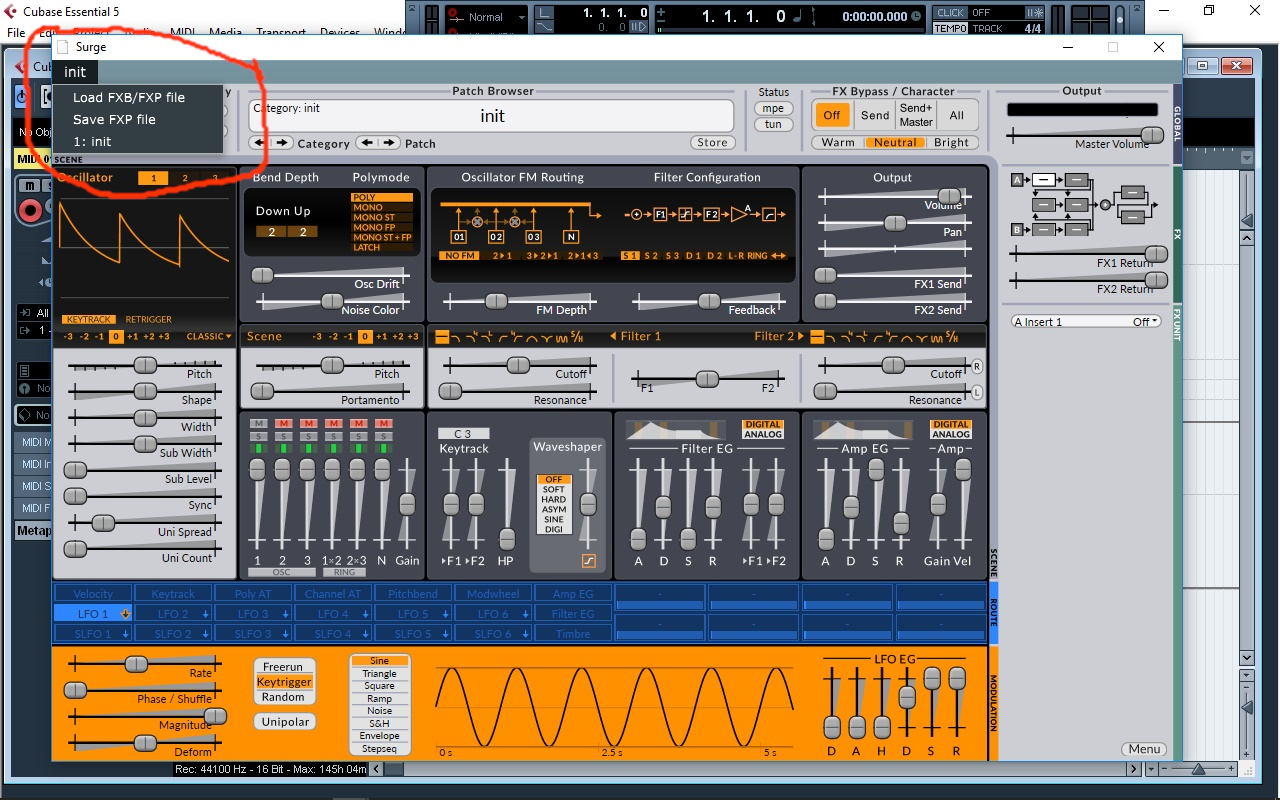
When I thougt I had finally made it, a new problem occured (I tried both Surge VST2 and VST3). I don't know if this is a bug... More likely it's probably due to some Cubase issue...
After having set up the Metaplugin synth etc the way you described, I wasn't able to pick a insert at all from the menu. I could see 'vocoder', 'delay' etc, but when I clicked on them, noting happened. Then I discovered that I wasn't able to choose a program/synth/preset for Surge either. A strange blue field popped up at the top of the GUI.
per99
on 3 Sep 2019
Ah I’m sorry that is so annoying.
The strange blue field is part of metaplugin. Since metaplugin is hosting Surge and not cubase.
are sliders still working? Does surge make sound and stuff? Or is it’s GUI frozen inside metaplugin?
mortfell
on 3 Sep 2019
Well, when I tried to do everything in a different order, I was able to load the vocoder as insert (I did that first). But everything was still completely silent, no Surge VU-meter signal. And when I then tried to change the Surge's settings, it wasn't possible (although the GUI wasn't completely frozen). Heavy CPU consumption, I noticed. Maybe it's time to take a break. But it's a little bit annoying that Surge won't show up as plugin inside Ardour. If you can load it, why can't I ? Vember audio Shortcircuit works together with Ardour... But as I said - time for break! :)
per99
on 3 Sep 2019
Hmmm yea interesting.
I was able to see it in windows and Mac.
I’m on 64 bit ardour not 32 bit so that could be the issue.
Are you 100% sure Surge is in the same folder as other VSTs?
mortfell
on 3 Sep 2019
@per99 if you do end up coming back to try this again.
I would highly recommend you try REAPER 32 bit. I have just tested using Surge-Fx as a vocoder in REAPER 32 bit and it works perfectly on Windows!
I made another instructional gif/wiki entry explaining how to do it:
https://github.com/surge-synthesizer/surge-synthesizer.github.io/wiki/Using-Surge-as-an-effect-(and-vocoder)#7-using-the-vocoder-in-surge-fx
Also if you are thinking of learning a new DAW for more capabilities and are probably gonna be sticking with 32-bit Windows for a while:
REAPER has a huge install base as a 32 bit Windows application. Its still updated and and bug fixed for that platform. It has an un-crippled trial version that allows you to save/load/render and test every feature.
REAPER also has a lot more in common with Cubase than FL Studio or Ardour do, so you might find it's not as hard to switch as you think. I don't work for them lol, but I just know it works really well on 32 bit Windows.
Just some thoughts as I know you have been trying a lot of things and I'm fairly confident this will work for you if you have time to try it.😎
mortfell
on 3 Sep 2019
@mortfell Thanks for the tip. Yeah, I guess REAPER will be my next DAW. But I'll have to buy a new computer sooner or later (probably sooner). This old laptop is falling apart. But until then, just let me know if you need a 32 bit Cubase test pilot :) You developers are doing a great job! And the Surge synth is of course first and foremost a synth. (And I have used it as such recently in a competition: soundcloud... /per.bellener. First track.)
per99
on 4 Sep 2019
@mortfell I installed REAPER 32. And I'm actually vocoding !!! 🎉 🎉 🎉 And from the 30 seconds experiment I've made so far, this vocoder seems to be far better than the ones I've tested before.
per99
on 4 Sep 2019
@mortfell At the bottom of the 'Using Surge as an effect-document' you have stated "CUBASE ELEMENTS: No support for sidechains." If your source would be me (?), my DAW is Cubase _Essential_ 5 (rather rare one; discontinued). And BTW: there is a Facebook 'Surge VST Synthesizer-group', but you probably already know that (?) Maybe it would be a good idea to have a link there, to the 'Using Surge as an effect-document'?
per99
on 4 Sep 2019
Fantastic!
As we approach 1.6.2 a couple of changes.
(1) we renamed surge-fx to SurgeEffectsBank
(2) the ranges on the vocoder can blow out the filters if you set the high too high and the low too low. I’m going to fix this but that fix will adjust frequencies on saved sessions
baconpaul
on 4 Sep 2019
@baconpaul "... that fix will adjust frequencies on saved sessions" ?
per99
on 4 Sep 2019
Awesome! Glad it’s working!
Yeah it’s just gonna adjust the frequency of the vocoder bands, not the actual notes being heard. (A vocoder is sorta a complex bank of filters)
mortfell
on 4 Sep 2019
Sorry. I mean
if right now you start a reaper session and pull in a vocoder and set the bands to, say, 300hz-6000hz
And then you upgrade and load that session
Those frequencies will be in a different spot.
Once we have a numbered release (1.6.2) we guarantee patch and session compatibility of course, but in the nightlies it has to break sometimes, and this alas is one of those times.
baconpaul
on 4 Sep 2019
What about the facebook group I mentioned?
per99
on 4 Sep 2019
Also regarding the wiki, and the cubase thing will change that !
The Facebook group, yup I'm on there!
The wiki is still a work in progress, and like @baconpaul said the names of some things, and functionality may change slightly so I didn’t want to post something that will become outdated and confuse people. I think I’d like to post it for feedback closer to the release of 1.6.2
(Near the end of the month)
mortfell
on 4 Sep 2019
@mortfell I think there is at least one DAW nobody thought of when we had this discussion, Music Maker from Magix (I just got a special offer). Do you know anytning about this one? They seem to keep their manuals a secret. https://letter.magix.net/optiext/optiextension.dll?ID=1xw1qqopypVMDygVcHfVR4phZYvgzNTS33U84OhjcDuPtmOf8xH1KamDwt42rE6FL85Aw7ntolc%2BLrjVgfRln03WaHNvq
per99
on 16 Oct 2019
Ah yes, I've heard of it, but No I don't know anything about it at all.
mortfell
on 16 Oct 2019
@mortfell with the changes we just made to the VST3, I think the VST3 and AU work perfectly as an sidechainer in all our environments, right? I am going to close this issue, and if there are any specific VST3 or AU problems left with audio in, lets open separate issues.
If there's audio processing problems with the VST2, the official answer is "move to VST3" from me! I think with 1.6.5 that's now a reasonable stance.
baconpaul
on 2 Feb 2020
everything I've tried is working ya!
mortfell
on 2 Feb 2020
Related issues
 jarkk0sakkinen
·
5Comments
baconpaul
·
5Comments
jarkk0sakkinen
·
5Comments
baconpaul
·
5Comments
 VincyZed
·
5Comments
baconpaul
·
8Comments
mortfell
·
8Comments
VincyZed
·
5Comments
baconpaul
·
8Comments
mortfell
·
8Comments
Most helpful comment
Also regarding the wiki, and the cubase thing will change that !
The Facebook group, yup I'm on there!
The wiki is still a work in progress, and like @baconpaul said the names of some things, and functionality may change slightly so I didn’t want to post something that will become outdated and confuse people. I think I’d like to post it for feedback closer to the release of 1.6.2
(Near the end of the month)