Supertux: SuperTux doesn't run in Windows 10 with OpenGL renderer
SuperTux version: 0.6.2 stable (64 bit), 0.6.2-448 nightly (64 bit), 0.6.2 stable (32-bit)
System information: (details about your kernel, operating system, or distribution)
Intel Core i7-3770
Intel HD graphics 4000
Windows 10 Pro 2004
Expected behavior
SuperTux should start and run normally.
Actual behavior
SuperTux crashes to desktop on every launch.
Steps to reproduce actual behavior
Run SuperTux 64 bit or 32 bit in any mode (compatibility, administrator or otherwise) when display driver is Intel HD graphics
Additional debugging information
console.err output is only one line:
[FATAL] C:\projects\supertux-o8t59\src\supertux\main.cpp:610 Unexpected exception: C:\projects\supertux-o8t59\src\video\gl\gl_texture.cpp:78: glGetError: INVALID_OPERATION: The specified operation is not allowed in the current state.
I tried the solutions posted in older issues, including the compatibility mode fix and administrator fix, but it didn't fix my problem. From the output, it seems like an OpenGL problem to me. Any help is appreciated.
 ghost
ghost
All 13 comments
Try running the game from the command line with:
supertux2.exe --renderer sdl
This will make SuperTux use the legacy renderer instead.
 Semphriss
on 20 Oct 2020
Semphriss
on 20 Oct 2020
This workaround works. Running using the --renderer option starts up SuperTux.
ghost
on 21 Oct 2020
@SSJKaran I'd say this has a workaround, but is not fixed
 papb
on 21 Oct 2020
papb
on 21 Oct 2020
So, shoiuld I reopen this, or submit a bug report?
ghost
on 23 Oct 2020
I think you should just reopen. The game should "just work" on Windows 10 (and anywhere).
papb
on 23 Oct 2020
Alright, reopening cause the new renderer doesn't work with Windows 10 on Intel HD graphics, with the above error. Only the old SDL renderer works.
ghost
on 23 Oct 2020
Can you run SuperTuxKart (or any OpenGL game) fine? Knowing that could help determining if the problem is SuperTux or OpenGL.
Semphriss
on 24 Oct 2020
@Semphriss I can run some OpenGL games, the ones with GL v <4. IORTCW, Darkplaces with OpenGL, GZDoom Open GL, and other source ports run on OpenGl without problems. Does the OpenGL renderer support only versions 4.2 and upward? I will try SuperTuxKart and get back to you.
ghost
on 27 Oct 2020
SuperTux normally uses OpenGL 3.3 by default, but there is an option to use OpenGL 2.0:
supertux2.exe --renderer opengl20
Does it work with that? At what point does the game crash? Does the window open? Does it have the time to render at least one frame, very briefly?
Semphriss
on 28 Oct 2020
@Semphriss When using OpenGL2.0, I didn't get any crash after playing for 2 hours. So, it works on OpenGL 2.0, not sure why 3.3 doesn't work.
ghost
on 29 Oct 2020
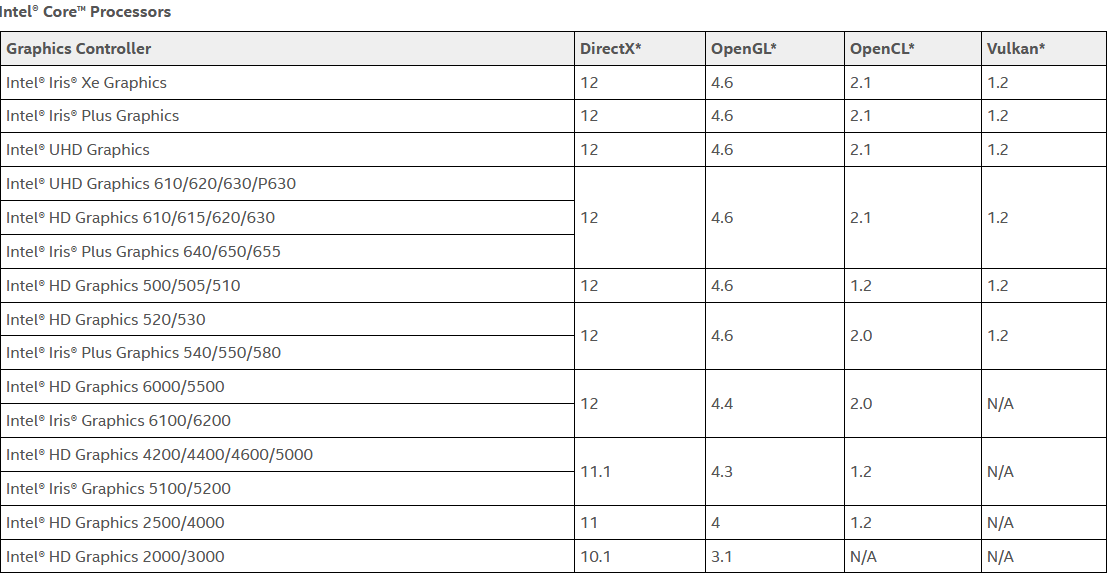
@semphriss I somehow solved it...? Kind of? I just found out Intel HD Graphics supports OpenGL till v3.1, and not v3.3 and upward. All the other source ports were running on v3.1 when OpenGL v4.0 was not found.
ghost
on 29 Oct 2020
Alright, thanks for letting me know :+1:
Is there anything else I can help you with?
Semphriss
on 29 Oct 2020
Maybe this should be documented somehow? Maybe the game should detect OpenGL version when launched and provide a explanatory error message for the user? Simply crashing is bad... I believe the vast majority of Supertux players will not find this issue on GitHub.
papb
on 29 Oct 2020
Related issues
 Rusty-Box
·
3Comments
Rusty-Box
·
3Comments
 maxteufel
·
5Comments
maxteufel
·
5Comments
 Ordoviz
·
3Comments
Ordoviz
·
3Comments
 Wuzzy2
·
6Comments
Wuzzy2
·
6Comments
 Karkus476
·
5Comments
Karkus476
·
5Comments
Most helpful comment
Alright, reopening cause the new renderer doesn't work with Windows 10 on Intel HD graphics, with the above error. Only the old SDL renderer works.