Suitecrm: Wrong User/admin Login Password After Upgrading to 7.9.8
After upgrading to version 7.9.8, all user (including admin) password bacome invalid, even after resetting the password, it become invalid again when login again later.
Issue
All passwords become invalid after upgrading to version 7.9.8.
Expected Behavior
The passwords should maintain as it is after upgrading.
Actual Behavior
Possible Fix
Steps to Reproduce
- Upgrade from 7.9.7 to 7.9.8
- Login and you will find that the password is invalid
- Resore to version 7.9.7, passwords are valid again.
4.
Context
Your Environment
- SuiteCRM Version used: 7.9.7
- Browser name and version (e.g. Chrome Version 51.0.2704.63 (64-bit)): Chrome
- Environment name and version (e.g. MySQL, PHP 7): MySQL
- Operating System and version (e.g Ubuntu 16.04): PHP7
 uvainternational
All 64 comments
Hi @uvainternational, I am having trouble replicating the issue.
Did you see anything in the logs, that could be related to this issue?
 daniel-samson
on 18 Dec 2017
daniel-samson
on 18 Dec 2017
Hi, I have experienced the same issue. Just rolled back to 797. The logfile after the upgrade has:
Mon Dec 18 09:38:12 2017 [27316][-none-][FATAL] FAILED LOGIN:attempts[1] - micsd
Mon Dec 18 09:38:23 2017 [28528][-none-][FATAL] FAILED LOGIN:attempts[1] - micsd
Mon Dec 18 09:54:46 2017 [27331][f0ed8bc2-3c4b-057c-d98b-59d5d264b907][ERROR] Unable to load related bean by id
Mon Dec 18 10:03:09 2017 [29753][f0ed8bc2-3c4b-057c-d98b-59d5d264b907][ERROR] Unable to load related bean by id
Mon Dec 18 12:10:37 2017 [6944][-none-][FATAL] FAILED LOGIN:attempts[1] - taalj
Mon Dec 18 12:10:51 2017 [31085][-none-][FATAL] FAILED LOGIN:attempts[1] - taalj
Mon Dec 18 13:02:21 2017 [30696][-none-][FATAL] FAILED LOGIN:attempts[1] - micsd
Mon Dec 18 14:17:25 2017 [7157][-none-][FATAL] FAILED LOGIN:attempts[1] - kalmanv
Mon Dec 18 14:44:28 2017 [31809][-none-][FATAL] FAILED LOGIN:attempts[1] - crmMaster
Mon Dec 18 14:44:33 2017 [6942][-none-][FATAL] FAILED LOGIN:attempts[1] - micsd
Mon Dec 18 14:44:34 2017 [31809][-none-][FATAL] FAILED LOGIN:attempts[1] - crmMaster
Mon Dec 18 14:44:48 2017 [17759][-none-][FATAL] FAILED LOGIN:attempts[1] - crmMaster
Mon Dec 18 14:44:50 2017 [17759][-none-][FATAL] FAILED LOGIN:attempts[2] - crmMaster
Mon Dec 18 14:45:05 2017 [29754][-none-][FATAL] FAILED LOGIN:attempts[1] - micsd
Mon Dec 18 14:50:12 2017 [1753][-none-][FATAL] FAILED LOGIN:attempts[1] - micsd
Mon Dec 18 14:50:57 2017 [1753][1][ERROR] Unable to find relationship emails_email_templates
Mon Dec 18 14:51:14 2017 [1203][-none-][FATAL] FAILED LOGIN:attempts[1] - micsd
Mon Dec 18 14:51:33 2017 [1755][-none-][FATAL] FAILED LOGIN:attempts[1] - micsd
Mon Dec 18 14:53:01 2017 [1755][-none-][FATAL] FAILED LOGIN:attempts[1] - crmMaster
Mon Dec 18 14:58:01 2017 [1201][-none-][FATAL] FAILED LOGIN:attempts[1] - crmMaster
Mon Dec 18 14:59:26 2017 [1192][1][FATAL] ERROR: rmdir_recursive(): argument cache/themes/SuiteP/modules is not a file or a dir.
Mon Dec 18 14:59:26 2017 [1192][1][FATAL] ERROR: rmdir_recursive(): argument cache/themes/SuitePImproved/modules is not a file or a dir.
Mon Dec 18 15:00:21 2017 [1192][-none-][FATAL] FAILED LOGIN:attempts[1] - crmMaster
Mon Dec 18 15:00:28 2017 [1192][-none-][FATAL] FAILED LOGIN:attempts[1] - crmMaster
Mon Dec 18 15:04:51 2017 [1963][-none-][FATAL] FAILED LOGIN:attempts[1] - crmMaster
 fenyorigo
on 18 Dec 2017
fenyorigo
on 18 Dec 2017
The log file ahows the following:
Sun Dec 17 22:18:13 2017 [685481][-none-][FATAL] FAILED LOGIN:attempts[1] - kelly
Sun Dec 17 22:18:37 2017 [686219][-none-][FATAL] FAILED LOGIN:attempts[1] - Kelly
Sun Dec 17 22:19:48 2017 [688523][-none-][FATAL] FAILED LOGIN:attempts[1] - kelly
Sun Dec 17 22:19:57 2017 [688859][-none-][FATAL] FAILED LOGIN:attempts[1] - kelly
Sun Dec 17 22:20:15 2017 [690040][-none-][FATAL] FAILED LOGIN:attempts[1] - admin
Sun Dec 17 22:20:27 2017 [690399][-none-][FATAL] FAILED LOGIN:attempts[1] - admin
Sun Dec 17 22:28:44 2017 [706166][-none-][FATAL] FAILED LOGIN:attempts[1] - Thea
Sun Dec 17 22:28:59 2017 [706629][-none-][FATAL] FAILED LOGIN:attempts[1] - Thea
Sun Dec 17 22:31:00 2017 [711075][-none-][FATAL] FAILED LOGIN:attempts[1] - Thea
Sun Dec 17 22:31:17 2017 [711626][-none-][FATAL] FAILED LOGIN:attempts[1] - thea
Sun Dec 17 22:31:27 2017 [711950][-none-][FATAL] FAILED LOGIN:attempts[1] - jeff
Sun Dec 17 22:31:42 2017 [712374][-none-][FATAL] FAILED LOGIN:attempts[1] - jeff
Sun Dec 17 23:03:44 2017 [778779][-none-][FATAL] FAILED LOGIN:attempts[1] - admin
uvainternational
on 18 Dec 2017
Seems to be affecting 7.8.9 LTS too :-(
 pgorod
on 19 Dec 2017
pgorod
on 19 Dec 2017
Same here, on cloudways VPS, what now? Restore?
 janbarendse
on 19 Dec 2017
janbarendse
on 19 Dec 2017
@janbarendse what version of PHP are you running?
what version of mysql?
also I would restore if you can.
daniel-samson
on 19 Dec 2017
@uvainternational are there any fatal errors in your apache error log?
daniel-samson
on 19 Dec 2017
@daniel-samson PHP 7.0 + MySQL 5.5
janbarendse
on 19 Dec 2017
For me no Problem here with login:
SuiteCRM 7.8.9
PHP 7.0.22
MariaDB 10.2.11
Admin user in SuiteCRM
Normal users over LDAP
Both work
 gunnicom
on 19 Dec 2017
gunnicom
on 19 Dec 2017
So far,
I have tested this on PHP 5.5.9 with MySQL 5.6, PHP 7.0.9 with MySQL 5.6.
Steps that I took:
- Install fresh installation of version 7.9.7
- Download the upgrade pack from suitecrm.com
- Run through the upgrade wizard
- Log out and log into a test user eg will, chris, sarah.
Is there a step, or a process which I am missing here?
I do not get any issues with the user accounts.
daniel-samson
on 19 Dec 2017
Is this the same as my issue #4639 with the Beta here? Please see my screenshot there. Do you people get into the system, and then get a dialog inside the system asking for a password change?
Another thing: could the problem be some characteristic of the passwords themselves? Long passwords? Passwords containing symbols? Are any of you enforcing such a policy that could explain this?
Final idea for investigation: encodings / language issues.
pgorod
on 19 Dec 2017
Hi @uvainternational,
I also had a look into this issue.
I did not encounter the same issue, mine seemed to allow all users to sign in.
Steps taken and environment used:
Php version: 7.1
SuiteCRM before upgrade: 7.9.7
I followed the steps in the documentation regarsing the upgrade wizard.
This was used to upgrade to 7.9.8.
I encountered no issues throughout the upgrade and while using the new version the software worked as expected.
This included logging in/out.
 e-reeley
on 19 Dec 2017
e-reeley
on 19 Dec 2017
Hi @pgorod
I believe that is a separate issue. We fixed it in the beta 3 release. That issue was due to the new password management rules we introduced. See #4573 which was merged into develop (current 7.10 branch).
The issue is from 7.9.7 to 7.9.8. Unless I am mistaken? we didn't add the password manager into 7.9.x or 7.8.x. So I am not sure what is causing the problem when users are upgrading to 7.9.8.
daniel-samson
on 19 Dec 2017
@daniel-samson yeah but I just upgraded to Beta3 and the issue persists... So ?...
pgorod
on 19 Dec 2017
OK @pgorod
Keep in mind we released 3 versions of SuiteCRM. The fixes for 7.8.x have also been added to the 7.9.x releases.
The new features are only for the 7.10. This should be treated separately, as a separate issue.
So we haven't added features to 7.8.x/7.9.x - it should just be fixes. The issue raised here is when a user upgrades to 7.9.8 and not 7.10.
Also can you please include the steps you took, and information such as what was the version you upgraded from?
@everyone can you confirm that you are following the same steps, which I have taken?
daniel-samson
on 19 Dec 2017
@daniel-samson ok, I will add more info on that other Issue so we keep things separate until we have sufficient reason to believe the issues are the same. Please make sure you subscribe to that issue too: #4639
pgorod
on 19 Dec 2017
@daniel-samson I tried to upgraded for the 2nd time but the login issue is still exist. The following are from the error_log:
[20-Dec-2017 14:39:00 Asia/Kuala_Lumpur] PHP Warning: exec() has been disabled for security reasons in /home/ultrav/public_html/xxx.com/crm/include/utils.php on line 417
[20-Dec-2017 14:39:00 Asia/Kuala_Lumpur] PHP Warning: posix_getpwuid() has been disabled for security reasons in /home/ultrav/public_html/xxx.com/crm/include/utils.php on line 424
uvainternational
on 20 Dec 2017
@uvainternational These messages usually should come from the cronjob running and should have nothing to do with password management.
gunnicom
on 20 Dec 2017
@gunnicom Then i don's see any other errors in the log file but I am sure all logins are becoming invalid right after upgrading, have to roll back to 7.9.7.
uvainternational
on 20 Dec 2017
Does not depend on php or db version. After upgrade 7.8.8 => 7.8.9 LTS same behavior on 2 machines
ubuntu 14.04
php 5.5.9
mysql 5.5.49
and
debian 8
php 7.0.26
MariaDB 10
Any workaround available?
 georgschuetz
on 20 Dec 2017
georgschuetz
on 20 Dec 2017
I have the same issue in beta 7.10.0-3. When you log out and then try to log back in with the current password it does not work. I then have to select "Forgot password" and go through the reset process to log back in.
linux
Php 7.0
mysql 5.5.49
I noticed that in the password security settings in password management that if you select "password should contain special character" it will not save this selection.
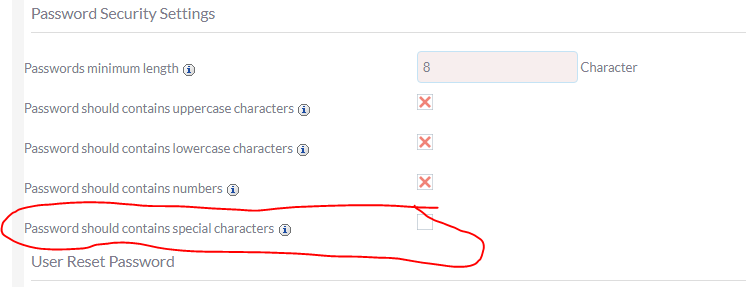
I tried using a password without a special character and this did NOT work either.
I had this problem with the beta-2 release and was able to overcome it by setting the password expiration date and saving it. This did NOT work for the beta-3 release.
 Glen206
on 21 Dec 2017
Glen206
on 21 Dec 2017
hi.
I've tried to update from 7.9.7 to 7.9.8. after that nobody can login again. Neither admin nor the Users with ldap integration.
In apache error.log i found:
[Thu Dec 21 16:21:38.382075 2017] [:error] [pid 5667] [client 10.11.223.58:52740] PHP Warning: Declaration of LDAPAuthenticateUser::loadUserOnLogin($name, $password) should be compatible with SugarAuthenticateUser::loadUserOnLogin($name, $password, $fallback = false, $PARAMS = Array) in /var/www/crm/modules/Users/authentication/LDAPAuthenticate/LDAPAuthenticateUser.php on line 52, referer: https://crm.test.at/index.php?module=Users&action=Login&login_language=de_DE
[Thu Dec 21 16:21:38.436678 2017] [:error] [pid 5667] [client 10.11.223.58:52740] PHP Warning: Declaration of LDAPAuthenticateUser::authenticateUser($name, $password) should be compatible with SugarAuthenticateUser::authenticateUser($name, $password, $fallback = false) in /var/www/crm/modules/Users/authentication/LDAPAuthenticate/LDAPAuthenticateUser.php on line 52, referer: https://crm.test.at/index.php?module=Users&action=Login&login_language=de_DE
 Lehnerr
on 21 Dec 2017
Lehnerr
on 21 Dec 2017
@Lehnerr try making this change and see if it changes anything:
https://github.com/salesagility/SuiteCRM/commit/cd103d54c3291dc4f3da6fde065db5fb920af303
pgorod
on 21 Dec 2017
We are new users, and before we can even dive into the application, we can't login! We have to reset password each time to get a login link.
Our setup:
nginx
php 7.0.26 (fpm)
mysql 5.5.58
straight login - no LDAP or external providers
even when we clear cache and php sessions
 ramezrafla
on 21 Dec 2017
ramezrafla
on 21 Dec 2017
@ramezrafla you are using an unsupported web server, careful with that... although I hear it mostly works.
Please open a thread in the forums so I can help you with your system. Problems on freshly installed systems are frequently caused by other things so I would say it's too early to conclude that you're getting this exact problem here.
I will help you out in the forums, ok?
pgorod
on 21 Dec 2017
Ok, thanks. We haven't had issues with nginx since we migrated over. Onto the forums ...
ramezrafla
on 21 Dec 2017
Posted on forum -- I may have posted twice, didn't see that it was moderated. Thanks
ramezrafla
on 21 Dec 2017
We have the same issue. We only have a couple of users who still have access to the system, yikes. Is there a way from within suitecrm that you can rollback to a previous version ie 7.9.7? If the other machines logout we are in trouble!
 LordFlasheart
on 21 Dec 2017
LordFlasheart
on 21 Dec 2017
@LordFlasheart I answered you in the forums.
@ramezrafla it is moderated only on the first post (it might take a few hours, I'm afraid...). After that one is approved, you're free to post immediately.
pgorod
on 21 Dec 2017
@pgorod no this doesn't help. I reverted back to 7.9.7
Lehnerr
on 21 Dec 2017
@Lehnerr ok, reverting is the way to go. That is probably only a warning message without impact, but since you mentioned it, it was worth a try.
pgorod
on 21 Dec 2017
I confirm that reverting to 7.9.7 resolves the issue. Thanks @pgorod for your courtesy (@Lehnerr for confirming it works)
ramezrafla
on 21 Dec 2017
Is anybody else here using that theme SuitePImproved, apart from @fenyorigo?
pgorod
on 21 Dec 2017
Yes
Sent from my Samsung Galaxy smartphone.
-------- Original message --------
From: pgorod notifications@github.com
Date: 21/12/2017 18:37 (GMT+00:00)
To: salesagility/SuiteCRM SuiteCRM@noreply.github.com
Cc: LordFlasheart jamieboland1@hotmail.com, Mention mention@noreply.github.com
Subject: Re: [salesagility/SuiteCRM] Wrong User/admin Login Password After Upgrading to 7.9.8 (#4722)
Is anybody else here using that theme SuitePImproved, apart from @fenyorigohttps://github.com/fenyorigo?
—
You are receiving this because you were mentioned.
Reply to this email directly, view it on GitHubhttps://github.com/salesagility/SuiteCRM/issues/4722#issuecomment-353424875, or mute the threadhttps://github.com/notifications/unsubscribe-auth/AhI3qIJF821vnOzP4c85LDaFlhtAxBrdks5tCqVfgaJpZM4RErmH.
LordFlasheart
on 21 Dec 2017
yes
pgorod notifications@github.com 21.12.2017 19:37 >>>
Is anybody else here using that theme SuitePImproved, apart from
@fenyorigo
( https://github.com/fenyorigo) ?
—
You are receiving this because you were mentioned.
Reply to this email directly, view it on GitHub
(
https://github.com/salesagility/SuiteCRM/issues/4722#issuecomment-353424875)
, or mute the thread
(
https://github.com/notifications/unsubscribe-auth/AQCNPmL5ryTWsImNV6zmJb0k9ld1-KpLks5tCqVfgaJpZM4RErmH)
.
Lehnerr
on 21 Dec 2017
Can you try removing it in Module Loader (delete the package completely, don't just uninstall it) and see if it makes any difference? It made in my test system.
pgorod
on 21 Dec 2017
Same here - SuiteP improved
ramezrafla
on 21 Dec 2017
Same here - SuitePimproved. Changing the default theme and deleting the package solved the login-problem
georgschuetz
on 21 Dec 2017
I think I might have found the problem that caused the login issue after upgrading to 7.9.8, the login issue resolve after I uninstall the SuiteCRM Custom Login Screen which used to be working all this time. I suggest those who having the login issue to use the default SuiteCRM login page, see if this will resolve your login issue as well.
uvainternational
on 22 Dec 2017
Maybe it is because of the name change of the password field from https://github.com/salesagility/SuiteCRM/commit/98fac2f403605c1f02071be3b7fc1a42fdb2d3ed
user_password => username_password
gunnicom
on 22 Dec 2017
its the suiteP improved theme that does it. If you switch to default then remove the package it springs back to life.
LordFlasheart
on 22 Dec 2017
Hello Guys, @fenyorigo @uvainternational @pgorod @Lehnerr @ramezrafla @georgschuetz @LordFlasheart
Seems you might have installed SuitePImproved theme on an unsupported version of SuiteCRM. The supported version for which SuitePImproved was designed are below
SuiteP Improved Theme package for Version 7.7.7
SuiteP Improved theme package for Version 7.7.8
SuiteP Improved theme package for Version 7.8.3
SuiteP Improved theme package for Version 7.8.4
SuiteP Improved theme package for Version 7.9.0
SuiteP Improved theme package for Version 7.9.4
We will look forward in near time to get the SuitePImproved to support the versions you are trying for. Till that time we advice you to switch to SuiteP Theme.
Thanks,
Team Urdhva Tech
 urdhvatech
on 22 Dec 2017
urdhvatech
on 22 Dec 2017
Hmmm.... @urdhvatech: i followed your advice by mail that a specific version would be suiteable for 7.8.8 too. Indeed it was until the upgrade to 7.8.9...
So: it would be nice to have support for that improved theme on the LTS-Versions. Of course i would pay a reasonable fee for that
Thanks
Georg
georgschuetz
on 22 Dec 2017
Thanks @urdhvatech I'm sure we can soon get to the bottom of this now that we know where to look.
I do believe there might be some work to be done on SuiteCRM also - it needs to fail more gracefully, if possible. Complain about an incompatible Theme or Module, or something like that, instead of this password reset loop.
@uvainternational your last post caught my attention: which add-on exaclty is that? This one?
And are you using SuitePImproved too? If you aren't, then it looks like several different packages can provoke this, and that needs to be analyzed also...
pgorod
on 22 Dec 2017
Actually we are using SuitePImproved794. I'll give a try to switch back to SuiteP. (The drawback is that it is very generous with display space, whereas the Improved packages can display more information. I would be disappointed to loose that functionality.)
Anyway, thanks: bp
fenyorigo
on 22 Dec 2017
@pgorod I do not use SuitePImproved, I am suing this one which compatible until 7.9.7 without any issues.
uvainternational
on 22 Dec 2017
Hi,
I have a test system. I set all user's themes to SuiteP, and deactivated SuitePImproved. So far so good.
Then I made a quick repair and rebuild, and tried the upgrade. The problem is, that SuiteCRM does not step over the upload. In spite of having uploaded the upgrade, it sticks. Screen grab attached:

As I have two files in 'custom/modules/Opportunities' (logic_hooks.php, and my custom mod), the only option that comes into my mind is:
- make a mysql backup from the live suitecrm
- backup the custom mods (above 2 files) from the live system
- set up 7.9.8 from scratch (including crm admin) as test system
- copy the mods into place on the test system
- clear the db from phpmyadmin and import the backup into the test system
- restart the test system
- make an exhaustive testing
regards
bp
fenyorigo
on 22 Dec 2017
OK, not so simple, as I have added some dropdowns and these are not transferred via the mysql backup. Either I have to recreate all dropdowns or can anybody suggest me a method of transferring modded dropdowns between systems?
Thx
bp
fenyorigo
on 22 Dec 2017
@fenyorigo I think it's better if you start a thread in the forums with this, since now it is not related to this Issue here, andthere are 14 people receiving email notifications everytime you post here... Thanks!
pgorod
on 22 Dec 2017
After uninstalling the dynamic login screen plugin by AppJetty. My login issues are gone on the 7.10.0 beta-3.
link to plugin:
https://store.suitecrm.com/addons/suitecrm-dynamic-login-screen/compatibility
Glen206
on 22 Dec 2017
SuitePimproved. Changing the default theme and disabling the package solved the login-problem
 roncherman
on 2 Jan 2018
roncherman
on 2 Jan 2018
SuitePimproved (V7.9.4) will be working If you change in all files (suitePimproved) user_password -> username_password.
 PatrykM2
on 11 Jan 2018
PatrykM2
on 11 Jan 2018
@urdhvatech I don't know if you're willing to make one last version of SuitePImproved for SuiteCRM 7.9.8 to address this change?
Anyway this is about to be solved in 7.10. And thank you for your work and making this available, it was a good help for many users.
pgorod
on 11 Jan 2018
@pgorod Yes, I am in a process to release with this fix asap.
urdhvatech
on 11 Jan 2018
It's LIVE now. You can download SuitePImproved for SuiteCRM 7.9.8 from here
urdhvatech
on 11 Jan 2018
A quicker fix that handles both password naming styles (it's a hack a not great code but it's very late and I've lost many hours):
In modules/Users/Authenticate.php around line 54
$password = isset($_REQUEST['username_password'])
? $_REQUEST['username_password'] : '';
if ($password=='')
{
$password = isset($_REQUEST['user_password'])
? $_REQUEST['user_password'] : '';
}
 nelem
on 25 Jan 2018
nelem
on 25 Jan 2018
the quickfix / hack posted by @nelem above solved the login issue for me after I had upgraded from 7.9.7 to 7.9.11. Thanks
 KevinGade
on 2 Feb 2018
KevinGade
on 2 Feb 2018
We just updated from 7.8.5 LTS to 7.8.18 LTS and at least admin user got locked out. nelem's quick fix helped us too, so thank you. But what caused this? Some DB schema update that wasn't run during the update or? We're using SuiteCRM on Debian jessie linux and with MySQL database. As we have several instances, we're not eager to update the rest until a proper fix is there.
 hannu78
on 12 Apr 2018
hannu78
on 12 Apr 2018
@hannu78 do you have the SuitePImproved Theme? Or any add-on affecting the login screen? That's normally the cause of this issues.
pgorod
on 12 Apr 2018
My recollection is that the change was made in SuiteP in 7.10.x line and not retro-fitted to any other themes of the 7.8.x line (or 7.9.x). It was a simple parameter name change that could be reversed.
nelem
on 12 Apr 2018
@pgorod I have Suite R theme, but yes, we have the custom login screen add-on in place. Didn't remember that.
hannu78
on 17 Apr 2018
Hi! We have several instances of SuiteCRM 7.8.5 that are being updated to 7.8.18 LTS. Most of them go ok with nelem's fix as disabling the custom login screen plugin, changing theme to Classic and Quick Repair & Reconfig still causes admin logins to fail. But we have one instance where admin still can't login after the fix, the system gives error that session has expired, even in a another browser, when trying to login after update. Other update failed to blank screen when trying to login, after applying the admin login fix. Had to revert these two from backups to get them working. Our instances are originally SugarCRM 6.5.X that have been updated couple of times (not every release).
hannu78
on 11 May 2018
@hannu78 please post about this in the Forums, I will help you out there.
pgorod
on 11 May 2018
Nevermind @pgorod , got the two also updated finally. I think there was a typo in fix for the smaller of these and in the bigger, we have this commercial custom login screen on and that has to be enabled again after update to avoid blank screen: https://store.suitecrm.com/addons/suitecrm-dynamic-login-screen
So all is good, hope that the admin login problem gets fixed to future LTS releases.
hannu78
on 18 May 2018
Related issues
 Mausino
·
3Comments
Mausino
·
3Comments
 likhobory
·
3Comments
likhobory
·
3Comments
 project-banana
·
3Comments
project-banana
·
3Comments
 ajprouty87
·
3Comments
ajprouty87
·
3Comments
 connorshea
·
3Comments
connorshea
·
3Comments
Most helpful comment
Hello Guys, @fenyorigo @uvainternational @pgorod @Lehnerr @ramezrafla @georgschuetz @LordFlasheart
Seems you might have installed SuitePImproved theme on an unsupported version of SuiteCRM. The supported version for which SuitePImproved was designed are below
SuiteP Improved Theme package for Version 7.7.7
SuiteP Improved theme package for Version 7.7.8
SuiteP Improved theme package for Version 7.8.3
SuiteP Improved theme package for Version 7.8.4
SuiteP Improved theme package for Version 7.9.0
SuiteP Improved theme package for Version 7.9.4
We will look forward in near time to get the SuitePImproved to support the versions you are trying for. Till that time we advice you to switch to SuiteP Theme.
Thanks,
Team Urdhva Tech