Suitecrm: When using filters date/time fields do not get restored after going back to list view
Issue
When doing a basic or advanced search, if your query includes a date/time column (for example "Date Created" or "Date Modified") the results returned are as expected,

however if you click on the results and then go back to the list view,

the filter no longer displays the value for the date/time field .. it gets lost or is not stored properly?
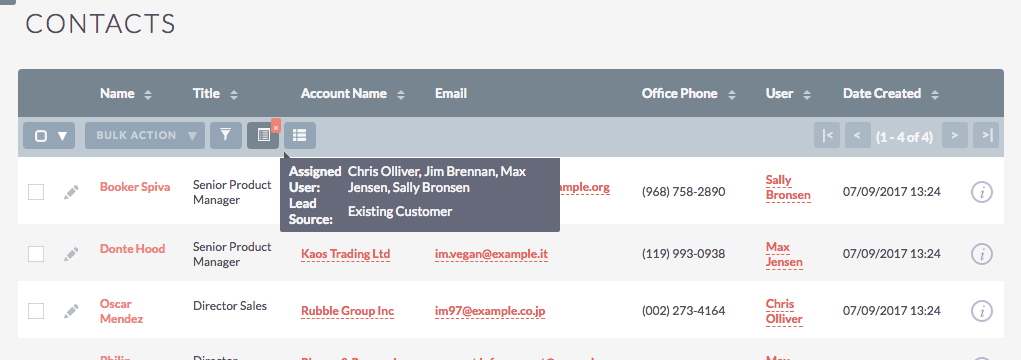
upon returning to list view, because the filter for date/time does not work, the result list will be larger:
(you can't really see it in the screenshot with demo data because "Date Created" is the same across all records)
if you searched for records created after July 9th and you got 25 results, when you go back to list view you will have results since the beginning of time because the filter is broken
I noticed that this only happens to date/time type fields, other fields like "Assigned user" or "Lead Status" will be restored properly;
It works as expected only when user's date format is set to '2010-11-23' but does not work with '11/23/2010' or other user date format
This bug is not present in 7.6.3 or in 7.7.9
the bug is present in 7.8.2, 7.8.5, 7.9.2
Expected Behavior
All query parameters should be restored upon returning to list view
Actual Behavior
Values for date/time fields are lost upon returning to list view
Possible Fix
Don't know, but I think it has to do with converting from the user set date format to mysql date format to run the query, and then restoring it back;
If you look at the first screenshot, notice how the columns have "Date Created" in 11/23/2010 format,
however the tooltip that is shown when you point at the filter button displays the "2010-11-23" format for mysql
Steps to Reproduce
- install latest 7.9.2 or LTS 7.8.5 with demo data
- in admin panel go to "developer tools", Studio > Contacts > Layouts > Filter > Quick Filter
- add "Date Entered" or "Date Modified" to default, click "Save and Deploy"
- go to the Contacts module, do a basic search/filter and set any a value to "Date Created" click on any result
- go back to Contacts module, click on filter button again... Date Created is now empty (but will still show condition Equals, Before, After, etc)
Context
our company has a custom date/time field to mark our client's requested service date,
it is important to us that we're able to efficiently search through our records
i think this is a low/medium priority type bug
Your Environment
- SuiteCRM Version used: 7.6.3, 7.7.9 (works as expected); 7.8.2, 7.8.5, 7.9.2 (does not work)
- Browser name and version: Chrome Version 59.0.3071.115 (Official Build) (64-bit)
- Environment name and version (e.g. MySQL, PHP 7): mysql 5.7.15
- Operating System and version (e.g Ubuntu 16.04): ubuntu 16.04 (server/crm), os x 10.10.5 (client)
 project-banana
All 3 comments
Update: managed to fix it,
the issue was in modules/MySettings/StoreQuery.php,
on line 74 there's a call to function 'to_db_format' which converts user's date format string to mysql format,
it seems like the function runs twice, first time it executes as expected and converts '11/23/2010' to '2010-11-23',
when it runs for second time the query already has the converted value '2010-11-23' but the function stills calls 'to_db_format' which returns an empty string, this is how the value gets overwritten/lost..
i added a preg_match check to see if value is already in mysql format, if it is then we don't need to run to_db_format,
this worked for me
original code:

modified code:

i hope someone finds this useful, line 74 in file modules/MySettings/StoreQuery.php
original line is:
$db_format = $timedate->to_db_date($value, false);
replace with:
if (preg_match('/^[0-9]{4}-[0-9]{2}-[0-9]{2}$/', $value)){
$db_format = $value;
} else {
$db_format = $timedate->to_db_date($value, false);
}
case closed
@gymad gymad
@mattlorimer mattlorimer
i'd like your feedback on this
project-banana
on 10 Jul 2017
@Dillon-Brown you know the drill :P
 connorshea
on 11 Oct 2019
connorshea
on 11 Oct 2019
@project-banana, it is work for me. Thanks
 loveorigami
on 2 Dec 2019
loveorigami
on 2 Dec 2019
Related issues
 likhobory
·
3Comments
likhobory
·
3Comments
 Mausino
·
3Comments
likhobory
·
3Comments
Mausino
·
3Comments
connorshea
·
3Comments
Mausino
·
3Comments
likhobory
·
3Comments
Mausino
·
3Comments
connorshea
·
3Comments
Most helpful comment
Update: managed to fix it,
the issue was in modules/MySettings/StoreQuery.php,
on line 74 there's a call to function 'to_db_format' which converts user's date format string to mysql format,
it seems like the function runs twice, first time it executes as expected and converts '11/23/2010' to '2010-11-23',
when it runs for second time the query already has the converted value '2010-11-23' but the function stills calls 'to_db_format' which returns an empty string, this is how the value gets overwritten/lost..
i added a preg_match check to see if value is already in mysql format, if it is then we don't need to run to_db_format,
this worked for me
original code:

modified code:

i hope someone finds this useful, line 74 in file modules/MySettings/StoreQuery.php
original line is:
$db_format = $timedate->to_db_date($value, false);
replace with:
if (preg_match('/^[0-9]{4}-[0-9]{2}-[0-9]{2}$/', $value)){
$db_format = $value;
} else {
$db_format = $timedate->to_db_date($value, false);
}
case closed
@gymad gymad
@mattlorimer mattlorimer
i'd like your feedback on this