Suitecrm: No localisation for dashlet edition popup's 'close' button
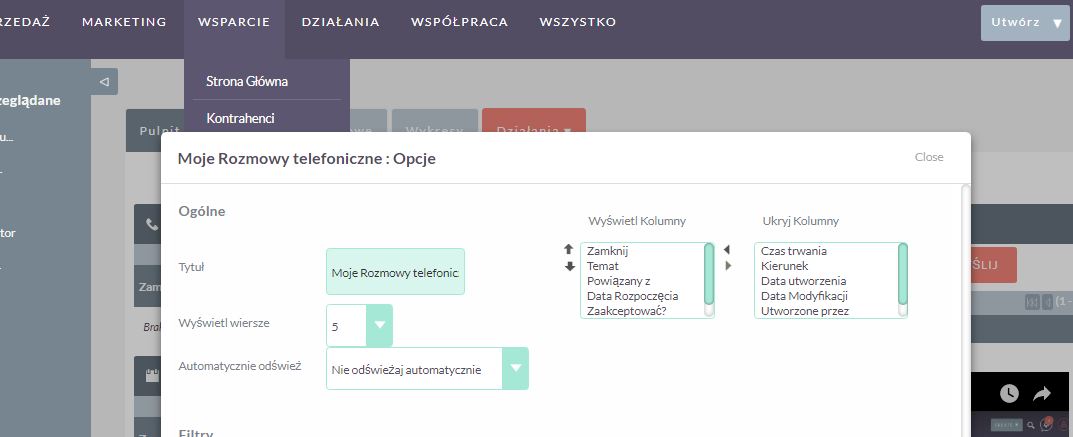
When you open dashlet edition popup the close button is not localised.
 maladrill
All 2 comments
Please take the time to fill in more of the Issue template... especially "steps to reproduce".
Which dashlet is this? Or the problem is for every dashlet?
Maybe we could just get rid of that text and use a simple "X" icon button.
 pgorod
on 22 Jun 2017
pgorod
on 22 Jun 2017
It seems to happen on all Dashlets. I think it's supposed to be an X icon, only for some reason the icon is not loading so we get a substitute default text. I searched Google images and there are old images from previous versions where there is an X icon there.
It has something to do with themes/SuiteP/include/MySugar/tpls/dashlet_page.tpl, class container-close. See here. When it reaches the browser, that has been filled with Close.
And then there's this file, include/javascript/yui/build/container/container.js that seems to be doing that work. All the variable names mention Icon...
But I can't progress any further, I don't understand where that icon is (or isn't) coming from... can anybody find out?
pgorod
on 23 Jun 2017
Related issues
 Mausino
·
3Comments
pgorod
·
3Comments
Mausino
·
3Comments
pgorod
·
3Comments
 ArturoBurela
·
3Comments
ArturoBurela
·
3Comments
 Vhex
·
3Comments
Mausino
·
3Comments
Vhex
·
3Comments
Mausino
·
3Comments
Most helpful comment
Please take the time to fill in more of the Issue template... especially "steps to reproduce".
Which dashlet is this? Or the problem is for every dashlet?
Maybe we could just get rid of that text and use a simple "X" icon button.