Subtitleedit: Original subtitles in video player
Hello.
I'd like to have original subtitles visible in video player while translating.
I can't find such option in SE. I'm using mpv.

 m0ck69
All 7 comments
There isn't an option to show both subtitles.
It's either or…
 OmrSi
on 1 Oct 2020
OmrSi
on 1 Oct 2020
@OmrSi OK, can you make such option please?
That would be extremely helpful when doing QC but also when working on translation.
m0ck69
on 1 Oct 2020
That would be for Nikolaj.
I would assume it needs changes in many places, meaning I don't think I can do it.
OmrSi
on 1 Oct 2020
I understand, hopefully @niksedk can handle it.
m0ck69
on 1 Oct 2020
Hi
You can achieve what you want if you use "direct-show" for the video player under 'settings'. (You may have to install it from k-lite package or similar)
Have both original and translation in folder with the video and name the original file so it comes first, for example myvideo.a.srt for original and myvideo.b.srt for the translation, or more commonly: myvideo.eng.srt and myvideo.iw.srt.
Now when loading your file the player will show the original.
You can get the original subs to appear at the top by loading it, then selecting all lines, then under alignment chose "top center" and save.
Hope this helps.
 Monovox
on 9 Oct 2020
Monovox
on 9 Oct 2020
@Monovox thanks for the tip, this is a workabout for sure, however, I think mpv is smoother than "direct-show" and works better as a video player.
@niksedk can you express your opinion on this? Are you planning to add such option? Just say yes or no, I will understand.
m0ck69
on 9 Oct 2020
I don't think this is very important as you can already see the text in the list view, but it's not a bad idea.
I've made it possible to load a second subtitle in the video player in latest beta:
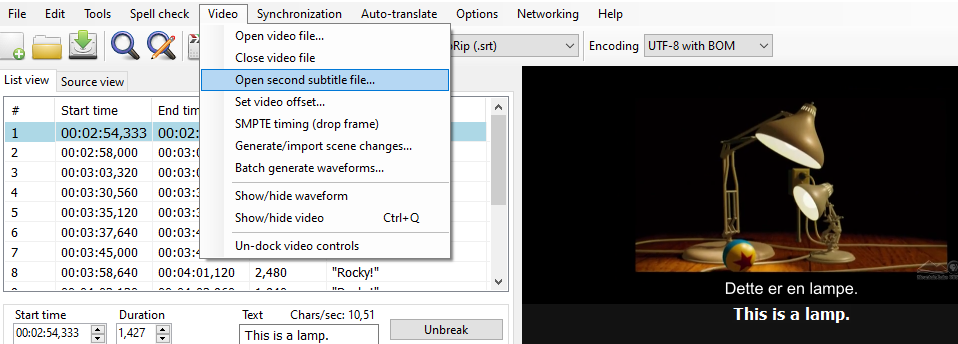
Note that it requires mpv with "mpv handles preview text" disabled or VLC.
https://github.com/SubtitleEdit/subtitleedit/releases/download/3.5.17/SubtitleEditBeta.zip
 niksedk
on 18 Oct 2020
niksedk
on 18 Oct 2020
Related issues
 PannenkoekenNL
·
3Comments
PannenkoekenNL
·
3Comments
 LeonCheung
·
5Comments
LeonCheung
·
5Comments
 amiremami
·
4Comments
amiremami
·
4Comments
 ivandrofly
·
5Comments
OmrSi
·
6Comments
ivandrofly
·
5Comments
OmrSi
·
6Comments