Subtitleedit: Release 3.5.12
We better get version 3.5.12 out soon :)
After 10 years on my to-do list, SE can now read teletext from .ts files:
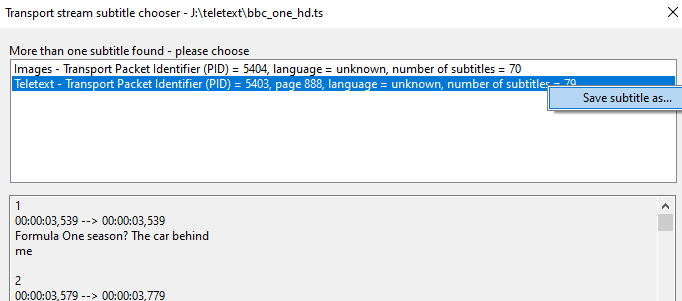
( thx VS code for the suggestion to debug https://github.com/debackerl/telxcc )
Auto br of lines is now much more configurable
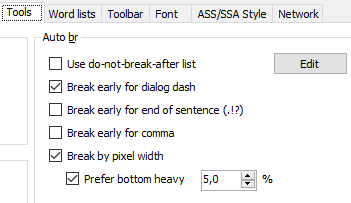
Read more here: https://nikse.dk/Home/Details/637078432060000000
Also, fixes and new convert options for "Batch convert"

TODO:
- [x] Test import of subs from .ts files
- [x] Test line break
- [x] Test "Batch convert"
- [x] Test SE on Kubuntu
- [x] General testing (+ fixing bugs)
 niksedk
All 40 comments
Please give the beta a test run: https://github.com/SubtitleEdit/subtitleedit/releases/download/3.5.11/SubtitleEditBeta.zip
niksedk
on 31 Dec 2019
Well, here are a couple of things. (Maybe more xD)
These two are the same and both of them are closed https://github.com/SubtitleEdit/subtitleedit/issues/3891 https://github.com/SubtitleEdit/subtitleedit/issues/3784~~
You should take a look at this and decide if this is something you plan to do, I don't think it's needed https://github.com/SubtitleEdit/subtitleedit/issues/3885~~
This should be solved by the new auto break configs https://github.com/SubtitleEdit/subtitleedit/issues/3531~~
This is probably closed as well https://github.com/SubtitleEdit/subtitleedit/issues/3505~~
This is a windows thing as I mentioned in there, not related to SE https://github.com/SubtitleEdit/subtitleedit/issues/3886~~
And finally, two issues that are similar that I hope you can fix, you started fixing one a while back: https://github.com/SubtitleEdit/subtitleedit/issues/3075 https://github.com/SubtitleEdit/subtitleedit/issues/3458~~
 OmrSi
on 31 Dec 2019
OmrSi
on 31 Dec 2019
I wouldn't mind a batch OCR.
 uckthis
on 1 Jan 2020
uckthis
on 1 Jan 2020
Could you add UnBreak lines (remove <br/>) function to batch conversion...
I couldn't find if any.
 xmrea
on 2 Jan 2020
xmrea
on 2 Jan 2020
@xmrea <br/> isn't actually there, it's just a way of indicating a newline character in SE.
You can just use Multiple Replace in Batch and regex replace \n with nothing if you wanna unbreak all lines.
OmrSi
on 2 Jan 2020
@OmrSi: thx for the info :)
About #3505, I guess SE should prompt for new waveform when changing audio-track, right? (in a future version)
About #3075 #3458, SE uses an average duration.
@uckthis; Does that not work already?
@xmrea/OmrSi: I've seen this request a few times before, so it's now available in the latest beta (even though it's already possible via Multiple replace).
niksedk
on 2 Jan 2020
@niksedk Yeah, I guess when you change it the waveform should change as well.
About #3075 #3458, if it is the normal behavior, you should close both of them.
And here is another one that I think is closed: https://github.com/SubtitleEdit/subtitleedit/issues/2759 And this: ~~https://github.com/SubtitleEdit/subtitleedit/issues/3349~~ Also this: https://github.com/SubtitleEdit/subtitleedit/issues/3228
And I hope you can check these two out: https://github.com/SubtitleEdit/subtitleedit/issues/3201~~ and this https://github.com/SubtitleEdit/subtitleedit/issues/3274
OmrSi
on 2 Jan 2020
Wow, this new beta has some seriously nice new features! Teletext and batch support for "Merge lines with same text" are very much appreciated.
I've given it a try on some UK satellite transport streams and it works beautifully. I like that the colour formatting is kept which I seem to lose with my current TS sub ripping solution (ProjectX).
Ideally, I want to be able to batch process TS files, extracting and fixing the teletext subs but I don't see a way of doing this. Dragging multiple TS files into the batch converter adds them to the list but nothing happens when trying to apply any operations. Could it be because all my TS recordings contain a dvb sub as well as the teletext? Or does batch not support TS input? Opening individual TS files prompts me for which subtitle I'd like to use, batch converter does not.
 beeeeswax
on 3 Jan 2020
beeeeswax
on 3 Jan 2020
@niksedk Thanks a lot.
Will you look at that?
https://github.com/SubtitleEdit/subtitleedit/issues/3598
😔
xmrea
on 3 Jan 2020
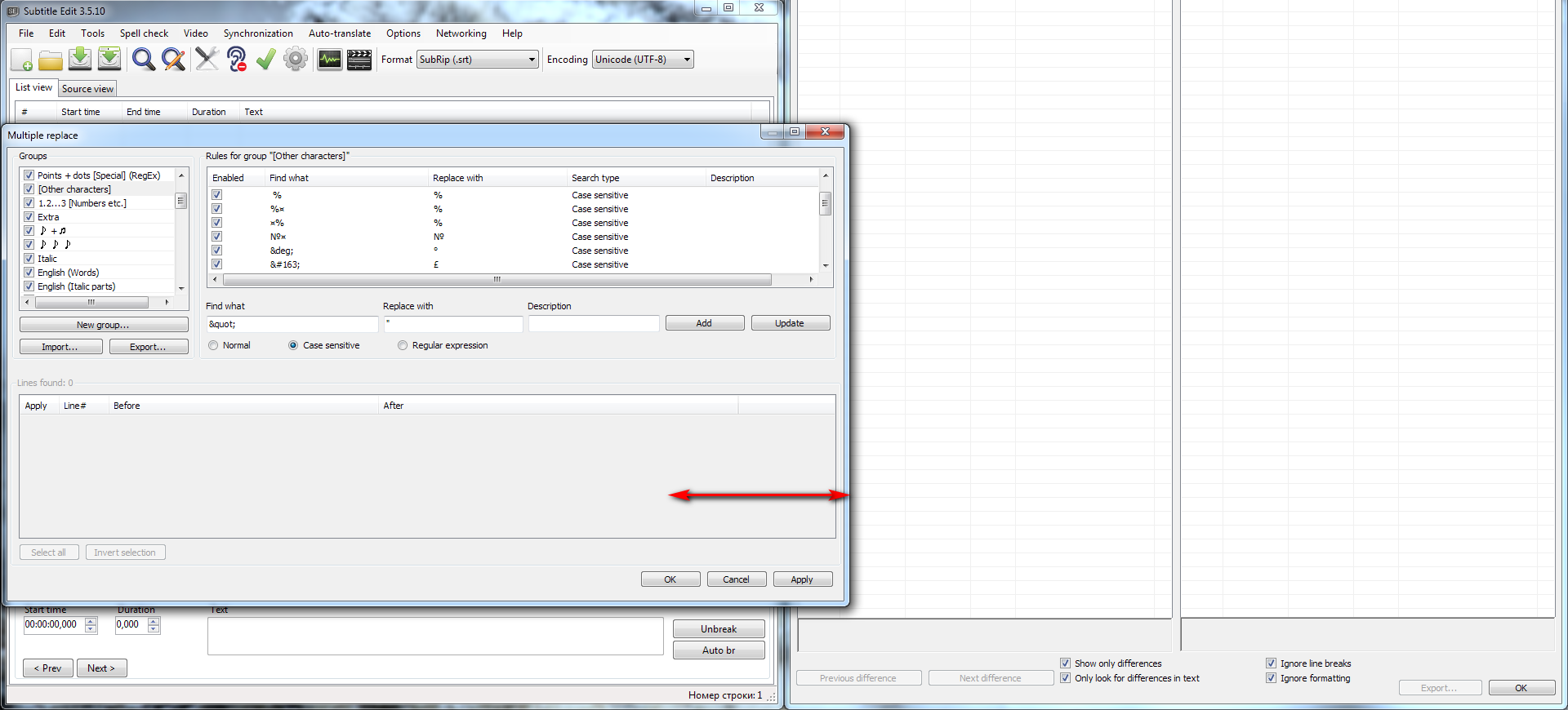
My suggestion concerns the simultaneous use of two SE copies with each copy taking up half of the FullHD resolution. It would be great to be able to downscale the Multiple replace (MR) window even further, which is not an option at the moment. This would help deal with the overlap of two SE windows. Also, it would be really nice if SE could remember the last MR window size and position.
 Elheym
on 3 Jan 2020
Elheym
on 3 Jan 2020
Beta updated: https://github.com/SubtitleEdit/subtitleedit/releases/download/3.5.11/SubtitleEditBeta.zip
(Fixed a few bugs in batch-convert mostly regarding "Apply duration limits")
@beeeeswax: thx - batch convert of teletext is on my TODO list...
@xmrea: Will have to look at #3598 later...
@Elheym: Made the min width smaller at least.
niksedk
on 4 Jan 2020
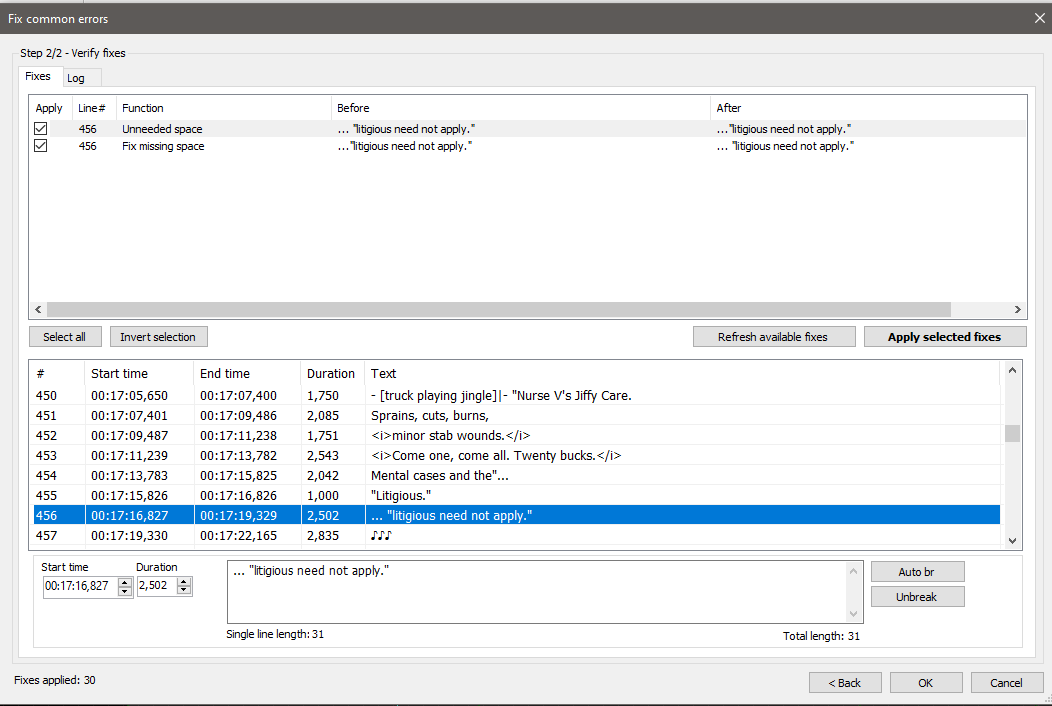
In general use of this beta above, fix has been on loop with ellipsis on that line:
 btsix
on 5 Jan 2020
btsix
on 5 Jan 2020
@xmrea: OK, hopefully #3598 is fixed now via 66977330e5201592adc4411880a40b5e9aaec3b2
@btsix: thx, should be fixed via 058a4a997b0da15bf7beb6969c9a57bf6f806515
Beta updated: https://github.com/SubtitleEdit/subtitleedit/releases/download/3.5.11/SubtitleEditBeta.zip
As SE seems to run pretty well on Linux, I'll give that some more testing too :)
@beeeeswax: I also used ProjectX for teletext - nice program but not too intuitive ;)
niksedk
on 6 Jan 2020
@niksedk It's doing the same.
When it's: "...litigious need not apply." It doesn't trigger.
but in this case: ..."litigious need not apply." It causes the loop.
btsix
on 7 Jan 2020
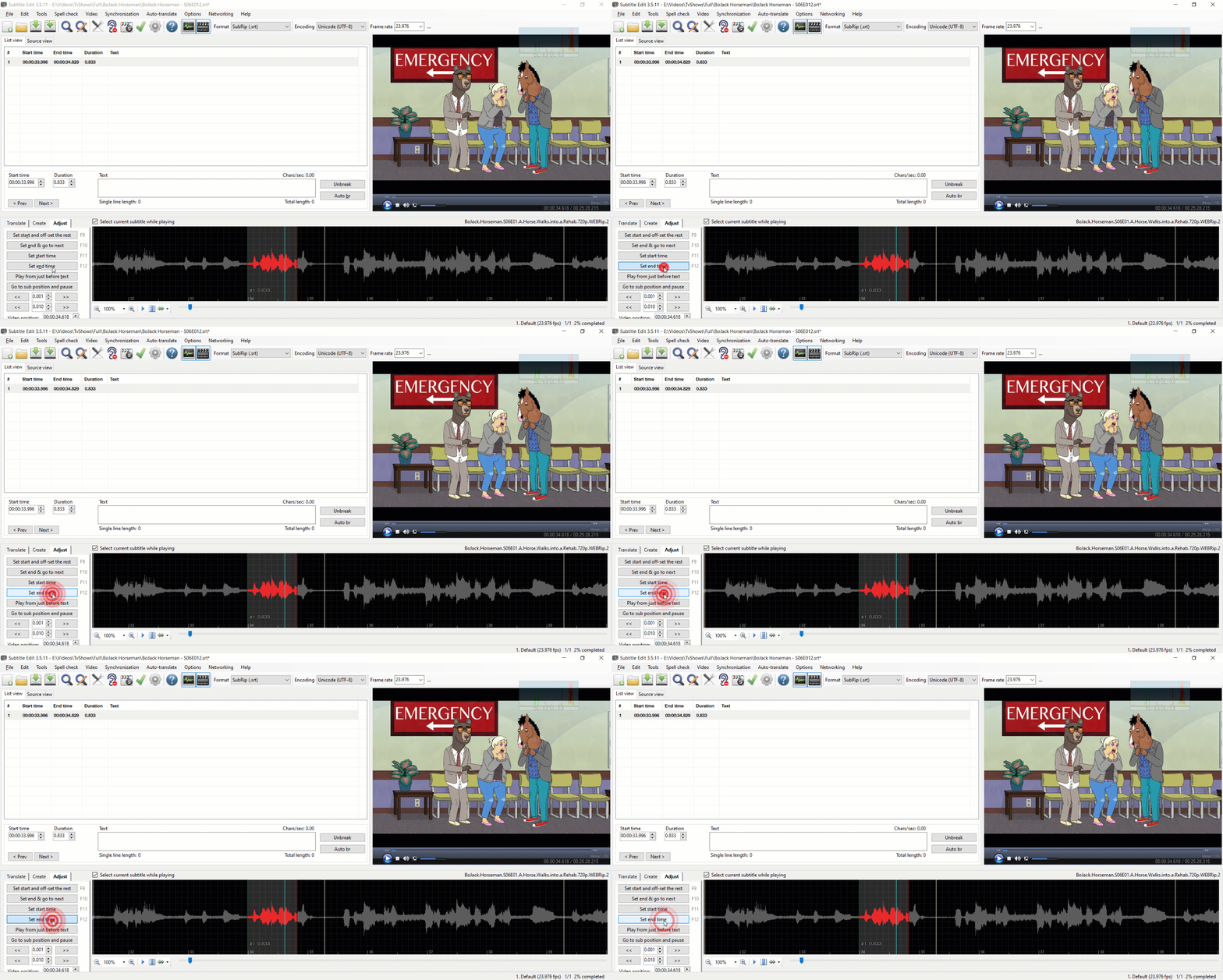
@niksedk There is a Bug in the latest beta. I think it has to be fixed before the new version.
If you have a line with minimum display time and you try to set end to reduce its duration, set end doesn't work.
OmrSi
on 7 Jan 2020
@btsix: thx - beta updated again: https://github.com/SubtitleEdit/subtitleedit/releases/download/3.5.11/SubtitleEditBeta.zip
@OmrSi: thx - was actually meant to be this way and was just not working due to a bug. But this is allowed other places (time up/down + drag waveform border) so the functionality is back again.
niksedk
on 7 Jan 2020
Yeah, also you could set the start time, only end time wasn't working, so it's better this way.
OmrSi
on 7 Jan 2020
@niksedk can you please merge in #3873 for this release? I'm working on packaging subtitle edit for Linux to make it very easy to run without effort and this is the only thing holding me back right now
 NickZ
on 8 Jan 2020
NickZ
on 8 Jan 2020
Hey Nik, can you please update Tesseract OCR 4.1.0 to:
https://github.com/tesseract-ocr/tesseract/releases/tag/4.1.1
Thanks =)
 wtester7
on 10 Jan 2020
wtester7
on 10 Jan 2020
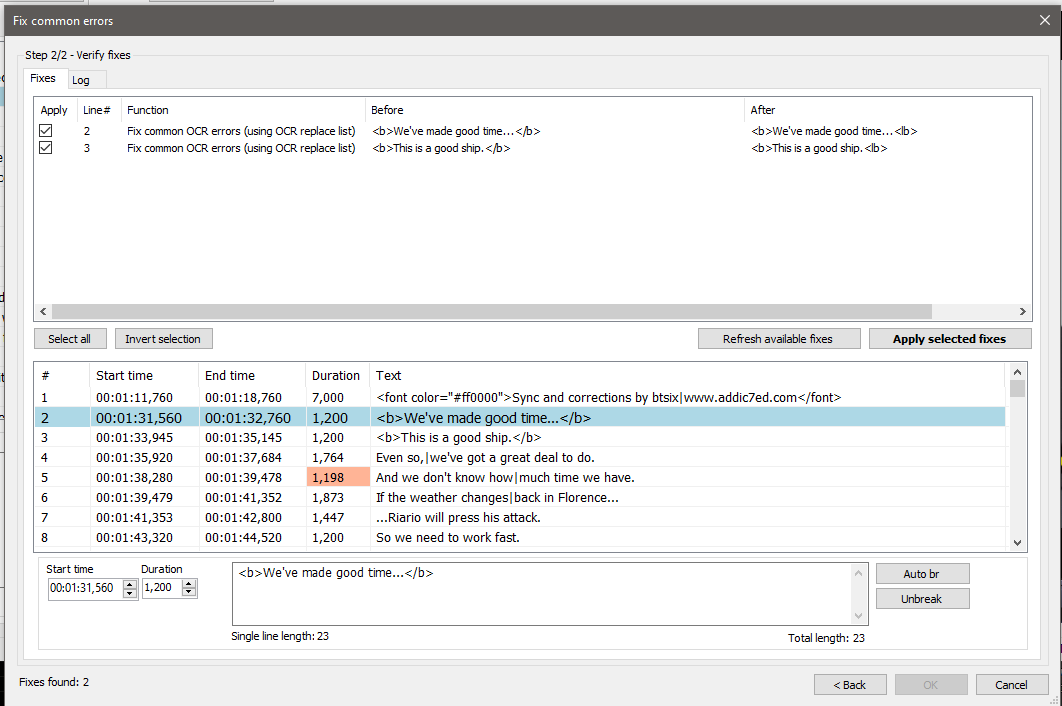
@niksedk another general use bug: Fix OCR list is catching the closing tag for bold </b> as a fix.
btsix
on 11 Jan 2020
@wtester7: I cannot build Tesseract OCR 4.1.1 atm via vcpkg as I just get 4.1.0 - if someone knows how to build Tesseract OCR 4.1.1 32-bit static let me know - see more here: https://github.com/tesseract-ocr/tesseract/wiki/Compiling#windows
@btsix; thx - beta updated: https://github.com/SubtitleEdit/subtitleedit/releases/download/3.5.11/SubtitleEditBeta.zip
niksedk
on 11 Jan 2020
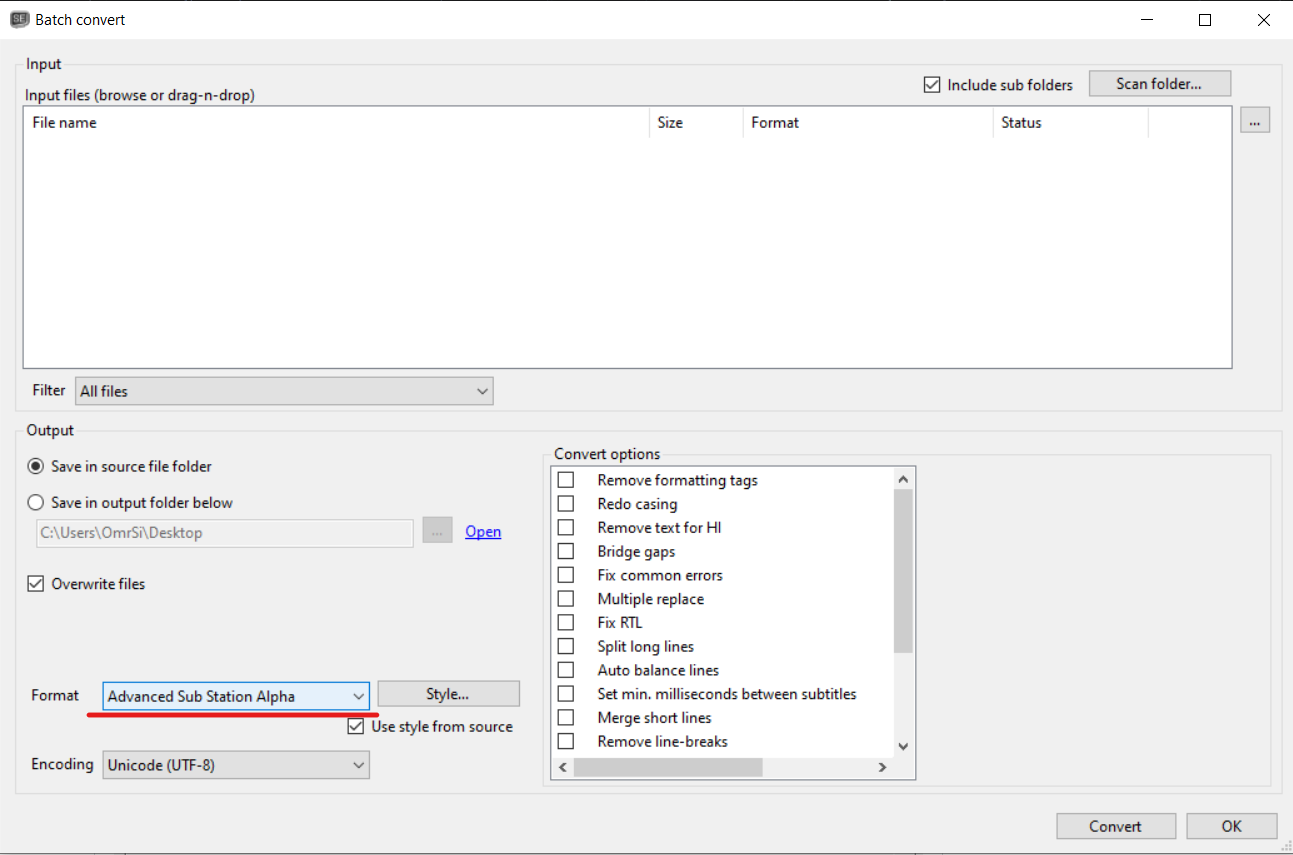
Shouldn't this be "SubStation" and not "Sub Station"?
OmrSi
on 11 Jan 2020
@OmrSi: I think Sub Station Alpha is correct, as the original program had this logo:
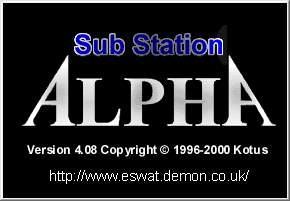
Both are probably okay...
niksedk
on 11 Jan 2020
Good to know.
I said that because it's what showed up when I searched for "Sub Station Alpha".
OmrSi
on 11 Jan 2020
@wtester7: A PR has been made for a Tesseract 4.1.1 update in the vcpkg repository :)
https://github.com/microsoft/vcpkg/pull/9629
niksedk
on 11 Jan 2020
@niksedk If you have a line like this in the original:

And you split it:

Shouldn't the - be deleted?
It works fine for the normal text, it's just not working on the original.
OmrSi
on 12 Jan 2020
@OmrSi: How did you "split"?
niksedk
on 12 Jan 2020
I tested with all of the ways.
Split at cursor/video position.
Split at cursor position.
Waveform split.
Using shortcuts and context menu.
They all give the same result if there isn't a punctuation mark at the end of the second line.
Again, this is only happening with the Original Text.
EDIT: You did some work on them here https://github.com/SubtitleEdit/subtitleedit/issues/3464
OmrSi
on 12 Jan 2020
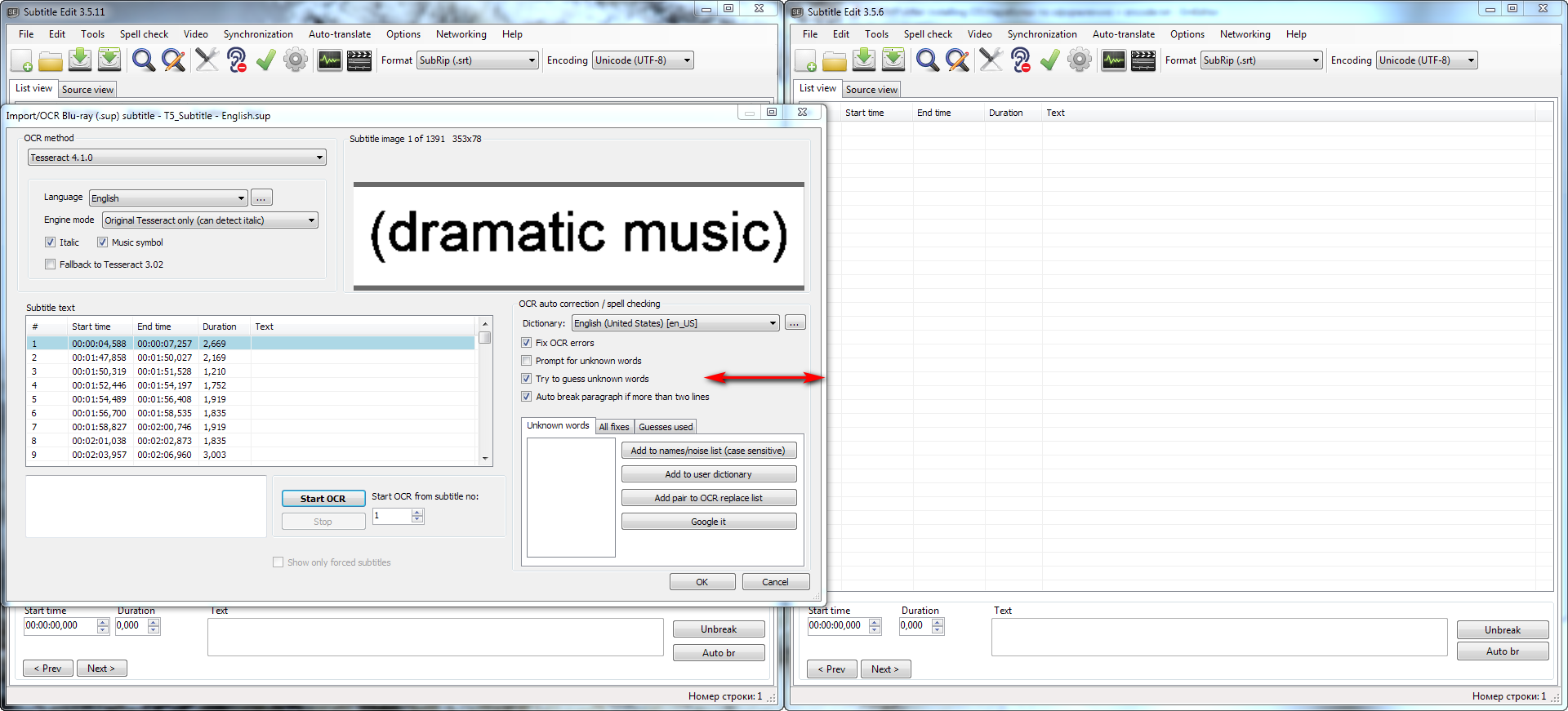
@niksedk: Could you do the same thing that you did earlier for MR in the same way for "Import/OCR Blu-Ray (.sup)" window? I mean downscale the size of the window OCR mode too. It will be also useful.
Elheym
on 17 Jan 2020
@OmrSi: Split for original fixed in e991db76c0448493429d8cc5ef1a2e96572f061c
@Elheym: Smaller size allowed for OCR window via 8b6e809f349e367b2675c5974eb1998735d02c77
@aaaxx @mgutt : Fix issue #2384 / #3922 / #2477
No tesseract 4.1.1 as I still cannot compile it...
Beta updated: https://github.com/SubtitleEdit/subtitleedit/releases/download/3.5.11/SubtitleEditBeta.zip
Hopefully very close to SE 3.5.12 :)
Just needs a quick run-through on Wndows + 3 x Linux
niksedk
on 18 Jan 2020
Now it looks completely awesome. Thank you very much, Nikolaj! :+1:
Elheym
on 18 Jan 2020
@wtester7 @Elheym : Latest beta can now use Tesseract 4.1.1: https://github.com/SubtitleEdit/subtitleedit/releases/download/3.5.11/SubtitleEditBeta.zip
Let me know how it works for you - seems faster :)
niksedk
on 18 Jan 2020
@niksedk
can you fix this #3927 please.
 moob158
on 18 Jan 2020
moob158
on 18 Jan 2020
@niksedk
I believe,
https://github.com/SubtitleEdit/subtitleedit/blob/4aef0f70a26d91c149ef83e84f3914233f055b88/src/Logic/Ocr/OcrFixEngine.cs#L1327
should read if (word.Length >= minLength).
 xylographe
on 19 Jan 2020
xylographe
on 19 Jan 2020
@xylographe: It's due to Hunspell allowing (probably) all single letters... trying to improve it a bit here: 1e467be92158e7bf50e9c642b5b9dac8d25d8d8e
niksedk
on 19 Jan 2020
@moob158: #3927 should be fixed in latest beta: https://github.com/SubtitleEdit/subtitleedit/releases/download/3.5.11/SubtitleEditBeta.zip
niksedk
on 19 Jan 2020
Released: https://github.com/SubtitleEdit/subtitleedit/releases/tag/3.5.12 :)
thx for feedback/help/testing :)
niksedk
on 19 Jan 2020
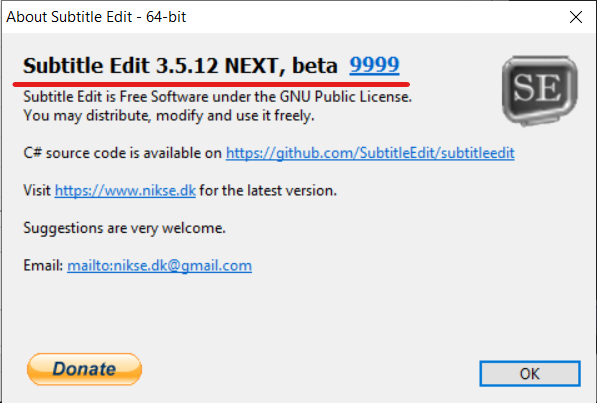
@niksedk Wait, what?
OmrSi
on 19 Jan 2020
Dough, I forgot to do a "git pull" more compiling...
niksedk
on 19 Jan 2020
SE 3.5.13 coming up due to problems with frame based formats + the above version number
niksedk
on 20 Jan 2020
Related issues
 frozenspider
·
5Comments
OmrSi
·
6Comments
frozenspider
·
5Comments
OmrSi
·
6Comments
 taxen
·
6Comments
taxen
·
6Comments
 ivandrofly
·
5Comments
ivandrofly
·
5Comments
 m0ck69
·
5Comments
m0ck69
·
5Comments
Most helpful comment
Released: https://github.com/SubtitleEdit/subtitleedit/releases/tag/3.5.12 :)
thx for feedback/help/testing :)