Subtitleedit: Why Copy/Paste change?
Hello,
Sometimes it happens that video that you've captioned, client decides to edit it and removes speech or changes the time a particular segment is shown. Before, it was really easy. I'd open the original file in SE, then start another copy of SE and work on new file there. I'd select the captions, Copy, and Paste to new file. The timestamp info changed by doing that. For example, in the original file, a segment is from 00:05:00:00 to 00:07:00:00, but in new file that same segment is from 00:03:00:00 to 00:05:00:00, what used to happen was, when I hit Ctrl+V, new subtitles were pasted at the time of last caption. Say, if last caption was 00:01:00:00, new captions would start from that point on... so 00:01:00:00 to 00:03:00:00. I would generally put the last caption at exact the new start time and so it'd sync perfectly. Now, it's shit. Now when I paste, it does paste at the end of new subtitle, but new subtitles bring the start and end time with them. So new captions will be 00:05:00:00 to 00:07:00:00. Why the change? Sometimes you could be in minute 40 of the video and segment could be from minute 10, and when you paste it, it just messes up real bad. I don't know whay you chose to make this change.
Example: I copied these captions from a file:
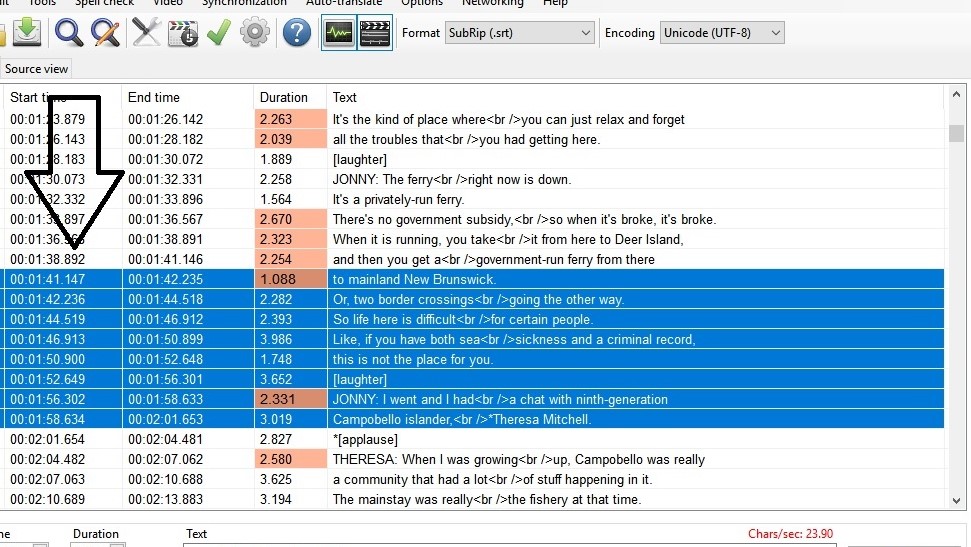
and tired to paste in a random file. Result:
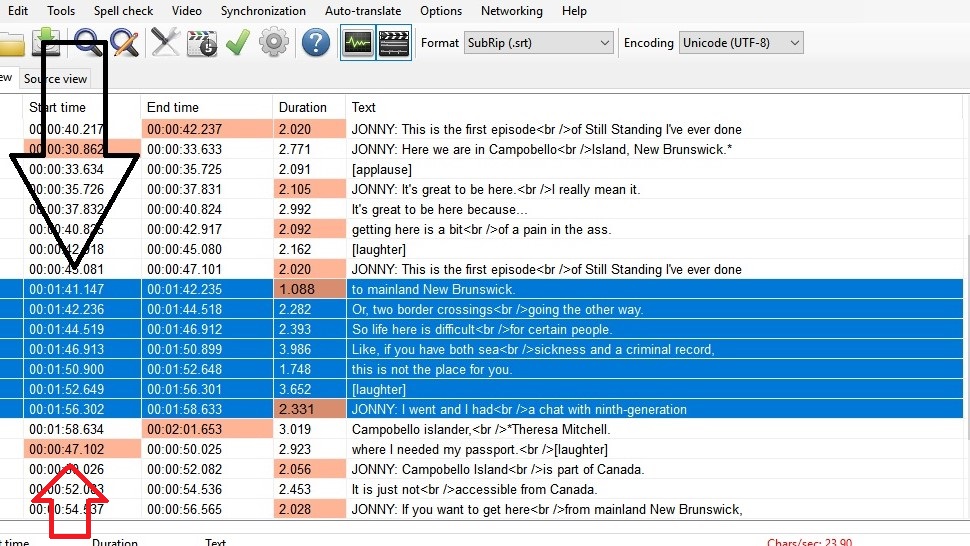
See in image 2, the time stamp info got pasted too. Normally the start of new timecode should have been 00:00:47:101. I miss the old one :(. Probably someone asked for this new feature. Is it possible to have a choice to turn it off.
Thank you.
 uckthis
All 19 comments
Yes, it was changed here https://github.com/SubtitleEdit/subtitleedit/issues/3168
Now it keeps the times if it doesn't overlap with something before it.
I don't know if I understand you correctly, but if you don't wanna keep the original time codes, you can delay them by showing them all one hour earlier then copy and paste, it could work as will see that the time is before the current time and therefore, changes the times...
 OmrSi
on 19 Dec 2018
OmrSi
on 19 Dec 2018
I think we need new option "copy text only"
 marb99
on 19 Dec 2018
marb99
on 19 Dec 2018
@marb99 There already is, copy text to clipboard in the shortcuts.
OmrSi
on 19 Dec 2018
@OmrSi I think I'll switch to older version when I got such jobs. If the commit was made upon someone's request, it'd be stupid to revert the changes.
uckthis
on 19 Dec 2018
It was, because if there is no cause to change the time, it shouldn't be changed.
And like I said, just show all lines 1 hour earlier and it should work, I tried it here and it worked for me.
No need to go back to an older version.
OmrSi
on 19 Dec 2018
@OmrSi I don't know how to explain it but it was really frustrating to work on this version. it generally takes me about an hour to re-sync a file for the show that was cut down from 70 minutes to 40 minutes, yesterday it took two hours. I guess I'm too used to the old way of doing it. It was particularly bad when I had to paste captions between two lines. All of the captions were overlapping and as I have "Select current subtitle while playing" always on, new time codes would take me to that duration on the video and I had to skip back and do.... it was awful.
uckthis
on 19 Dec 2018
As I said, the change was made because it was the rational thing.
The common thing when you copy some lines from a file to another, you want to keep the timing if it is copied to its proper time location.
Now, when you copy lines to their proper time location, time isn't changed.
But if you copy some lines which have a timing that doesn't fit the location you're copying it to, SE does what it used to do.
That's why I told you, Just shift the original file's timing 1 hour or less, then when you copy the lines and paste them, it will find that the timing doesn't fit in the new place, so it will do what it used to do.
And if you shift a file that a duration of less then 01:00:00, you'll see the timing like you didn't do anything. So, 00:40:00.000 would become 01:40:00.000, and that won't be a problem if you're not using a video file with the original file which you are copying from, but even if you are using a video, you can use "set video offset" to manage that.
OmrSi
on 19 Dec 2018
Okay, thanks. I'm sure I'll be able to make it work now. Thank, man, you're awesome.
uckthis
on 19 Dec 2018
@OmrSi You're right, I forgot that. ;)
marb99
on 19 Dec 2018
You got it!
If the method worked, you should close this, if else, mention Nikolaj. :D
OmrSi
on 19 Dec 2018
Nope, I couldn't make it work. I have decided to use the older version for this job.
I probably sound dumb, so lemme explain. You said that this change was common sense. Suppose I have an edited video and I'm on minute-5 of the video and video cuts to minute-10, I'll select the subtitles between 5 - 10, delete them and sync from min-10. Video runs for ten more minutes without requiring sync and suddenly cuts back to min-7 (subtitles that I already deleted). I'll open the original file, copy the subtitles from min-7 and paste after min-15. Now, at 00:15:00:000 if the pasted subtitles start at 00:07:00:000, then that's not common sense. How can 7 follow 15? Similarly, suppose at min-15 video cuts to min-35 and I copy from there and paste between min-15 and min-16, it's not common sense if new time code is 00:35:00:000. How can 35 be in the middle of 15 and 16? What you're calling common sense doesn't look common to me.
uckthis
on 19 Dec 2018
I said it makes sense that if you copy some lines and paste them in their right place on a video, they would maintain their timing. Like if you copied some lines from min-7 and paste them in min-7, which happens when translating between two languages and you wanted to copy some lines from a file to another.
In the current state, if you copy a line from min-7 and paste it at min-15, SE should do the usual behavior, which is adding the lines after the current with min gap between them, and it does.
But it seems like if you copy lines the other way around, from min-15 to min-7, it doesn't, and maybe that should be fixed. :D
OmrSi
on 19 Dec 2018
@niksedk Here is the bug after the change:
Now, if you paste something in the right time place, like from min-7 in a file to min-7 to another, it keeps the time codes which is the expected behavior, and if you copy some lines with time codes from, let's say min-7 to min-15, it changes the time codes by adding min gap then pasting the lines which is also the expected behavior, but the problem is when paste from min-15 to min-7, it keeps the time codes and that's not the expected behavior, it should add min gap and insert the lines like the second case because it's not its proper place in time.
OmrSi
on 5 Jan 2019
How many issues are left in latest beta?
https://github.com/SubtitleEdit/subtitleedit/releases/download/3.5.8/SubtitleEditBeta.zip
 niksedk
on 5 Jan 2019
niksedk
on 5 Jan 2019
I just tested, all cases work now, but I encountered something very strange.
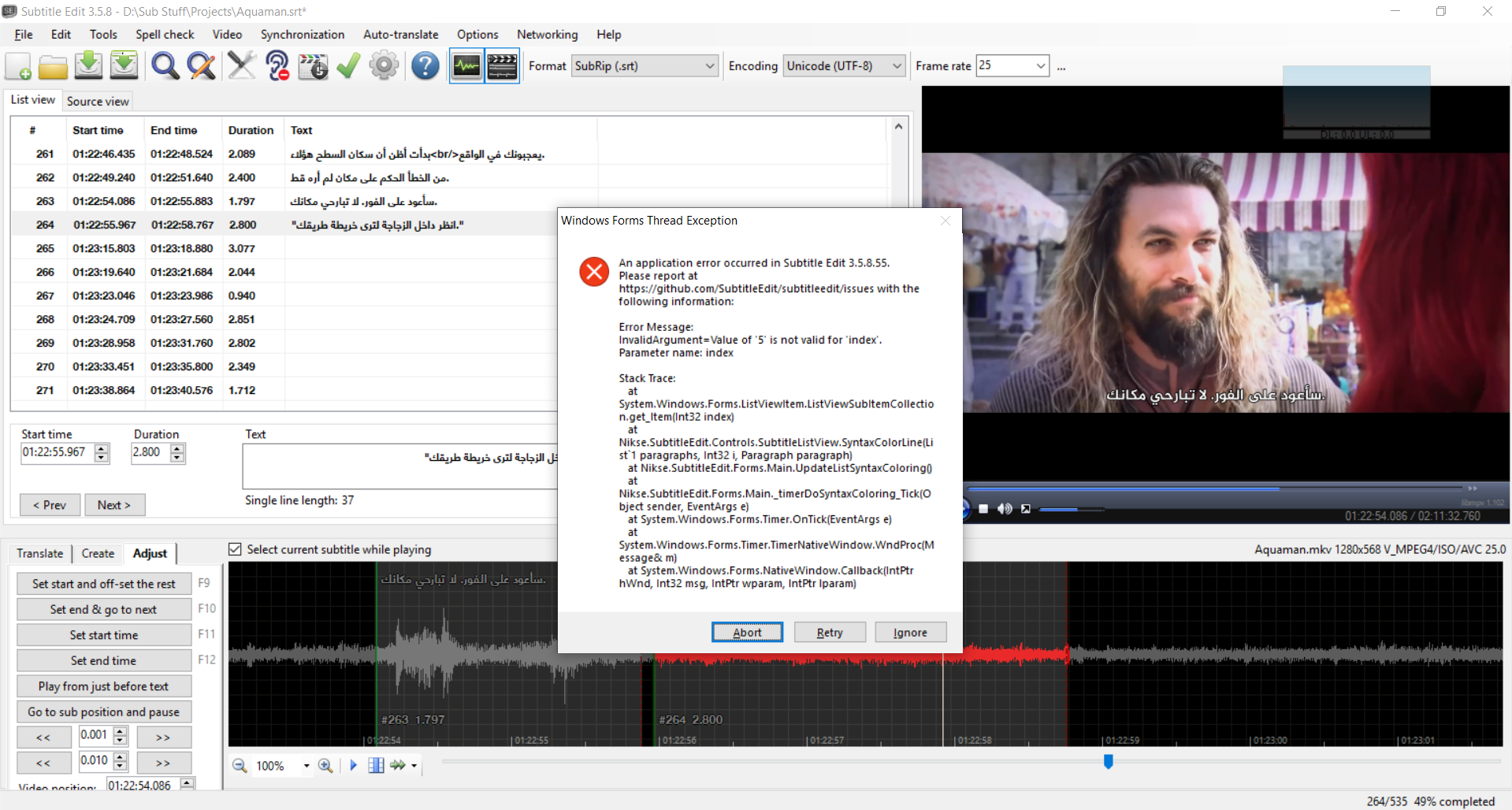
Here is how to re-create this:
- open subtitle with translator's mode on.
- close translator's mode.
- copy a line from min-X, paste it in min-X+Y or from X+Y and paste it in min-X, So, not in its proper place in time.
OmrSi
on 5 Jan 2019
@OmrSi: thx for reminding me... forgot about that, but should hopefully now be fixed in latest beta: https://github.com/SubtitleEdit/subtitleedit/releases/download/3.5.8/SubtitleEditBeta.zip
niksedk
on 11 Jan 2019
@niksedk You got it. 😄
It is fixed. :)
OmrSi
on 11 Jan 2019
@niksedk This is closed, it has no more issues.
Also, this https://github.com/SubtitleEdit/subtitleedit/issues/3249 and this https://github.com/SubtitleEdit/subtitleedit/issues/3105 and this https://github.com/SubtitleEdit/subtitleedit/issues/3111
These two are the same so one of them is closed https://github.com/SubtitleEdit/subtitleedit/issues/3124 https://github.com/SubtitleEdit/subtitleedit/issues/3233
OmrSi
on 19 Jan 2019
@uckthis: I'll close this... let me know if have any issues.
(It also possible to paste in the waveform which will start first subtitle at video position in waveform.)
niksedk
on 19 Jan 2019
Related issues
 Ouroboros1995
·
5Comments
Ouroboros1995
·
5Comments
 teodargent
·
5Comments
teodargent
·
5Comments
 m0ck69
·
5Comments
m0ck69
·
5Comments
 depeo
·
5Comments
depeo
·
5Comments
 SubEdict
·
3Comments
SubEdict
·
3Comments