Subtitleedit: [Feature request] Different project/settings profiles
Hi guys,
This is my first post here, and after doing some research I’d like to ask if it may be possible to save different settings "profiles" to be able to switch quickly between projects.
For example, I work with different projects and they require a different font, CPS, CPL, frame rate, etc, so it would be nice if I had to just save the needed settings in a profile and select this when I start to work with the corresponding file. Changing all the settings manually can lead to (human) mistakes and takes a lot of time.
Do you think there is a different way of solving this issue, like saving and loading different setting files for each project or something like that?
Thank you very much in advance for your comments and ideas!
Best regards,
Philipp
 philippwr
All 15 comments
I'm in favor! For the time being, at the risk of stating the obvious, all the settings are stored in settings.xml, so you could prepare several copies with different profiles, and swap them out as needed (when SE isn't running, of course).
 darnn
on 14 Nov 2018
darnn
on 14 Nov 2018
Thanks for the tip, darnn! At least to me it wasn’t obvious, so I’ll give that a try. :)
philippwr
on 14 Nov 2018
@darnn That's what I do! I have one for work and one for other projects on the side and an Original one with all the main settings uploaded on my Dropbox, just in case.
But I support @philippwr Idea as sometimes I work on two projects together and one might be 24 fps and the other is 30, so one needs 84 min gap and the other is 66, that's besides some other settings.
 OmrSi
on 14 Nov 2018
OmrSi
on 14 Nov 2018
What about something like this:

https://github.com/SubtitleEdit/subtitleedit/releases/download/3.5.9/SubtitleEditBeta.zip
 niksedk
on 11 Mar 2019
niksedk
on 11 Mar 2019
@niksedk The Default style should store the old values when opening SE after this, I think.
OmrSi
on 11 Mar 2019
@OmrSi: yes, thx :)
Beta updated: https://github.com/SubtitleEdit/subtitleedit/releases/download/3.5.9/SubtitleEditBeta.zip
Is the "Default" profile alone okay? I guess we could also add a "Netflix English" profile or ?
niksedk
on 12 Mar 2019
Oh, yes.
It's the one I'd use.
You have 42 max line length, 20.0 Optimal, and I think 26.0 Max. According to their online platform that I worked on. It's 26 for Arabic, could be 24 for English, not sure.
Min. duration is 833 ms, max is 7000 ms.
Min. gap is 2 frames, which is 84 for 23.97 videos.
Max. number of lines is 2, unbreak shorter than 42.
And you might have already known this. :)
The thing is, I've already set the default to that and added a couple more for other frame rates, so what will happen if I open the beta that has those two "Default" styles?
OmrSi
on 12 Mar 2019
thx :)
Beta updated: https://github.com/SubtitleEdit/subtitleedit/releases/download/3.5.9/SubtitleEditBeta.zip
niksedk
on 12 Mar 2019
@niksedk I see one Default profile when I open the beta with no settings file.
What did you add?
OmrSi
on 12 Mar 2019
@OmrSi: thx for testing - beta updated: https://github.com/SubtitleEdit/subtitleedit/releases/download/3.5.9/SubtitleEditBeta.zip
Should have "Netflix english" when starting with no Settings.xml or SE 3.5.9 Settings.xml.
niksedk
on 13 Mar 2019
@niksedk Yep, I see it. Nice.
But you forgot activating "Chars/sec includes spaces", I think.
OmrSi
on 13 Mar 2019
Yes, good catch!
niksedk
on 13 Mar 2019
Beta updated with language tags + tab stops, so "Profiles" should be close to ready now: Beta updated: https://github.com/SubtitleEdit/subtitleedit/releases/download/3.5.9/SubtitleEditBeta.zip
niksedk
on 14 Mar 2019
Cool. All is good as far as I can tell. :)
OmrSi
on 14 Mar 2019
It's possible to add a shortcut for changing profile:

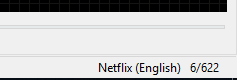
Also, in the main windows, in the lower right corner, you can see the current (non default) profile name (you can also click to change it):
niksedk
on 20 Aug 2019
Related issues
 m0ck69
·
5Comments
m0ck69
·
5Comments
 SubEdict
·
3Comments
OmrSi
·
6Comments
OmrSi
·
6Comments
SubEdict
·
3Comments
OmrSi
·
6Comments
OmrSi
·
6Comments
 ivandrofly
·
5Comments
ivandrofly
·
5Comments
Most helpful comment
It's possible to add a shortcut for changing profile:

Also, in the main windows, in the lower right corner, you can see the current (non default) profile name (you can also click to change it):
