Subtitleedit: Respective Line Merging Feature
If I may, please consider adding an operation / shortcut to do things like below, and imagine how many seconds and clicks can't be saved without it when working with bilingual subtitles like this:
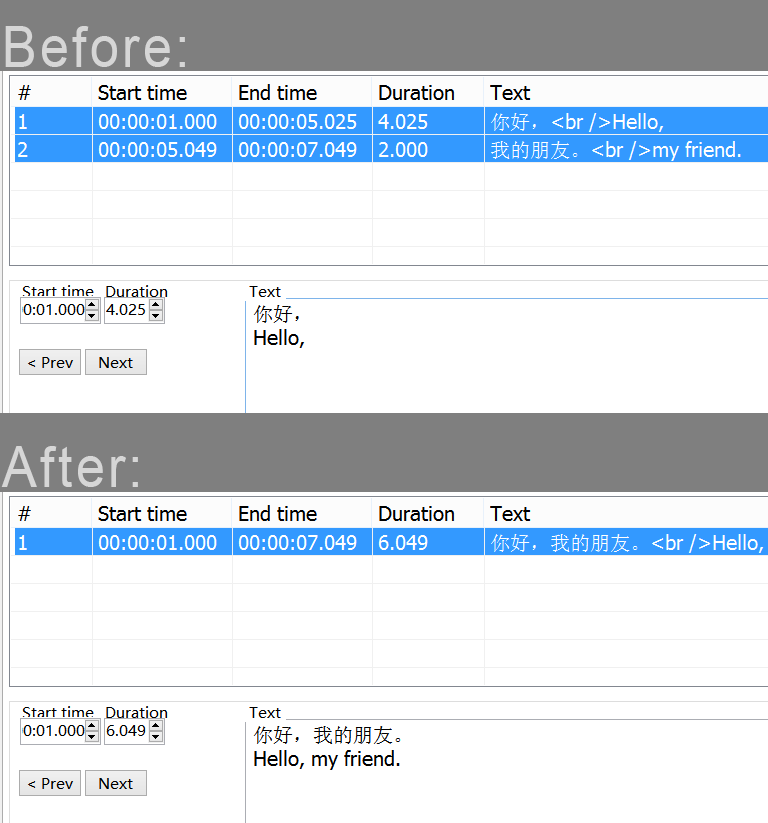
 LeonCheung
All 28 comments
Out of curiosity, where are those Chinese and English subtitles used and why? The first time I saw them, I thought they were for language learners, but since then I've also seen them on some retail Blu-rays.
 aaaxx
on 1 Aug 2018
aaaxx
on 1 Aug 2018
@aaaxx I assume you mean such bilingual style? There are countless subtitles here are requested to be made like this, for TV series and online movies, etc. It's very popular nowadays in China for some reason. I really don't know why, to be honest...
Personally, I almost handle them everyday. So you can imagine how it would be nice for us to have. I mean, merging two monolingual lines is easy, but not that easy for the case here.
LeonCheung
on 2 Aug 2018
@LeonCheung but merging these two lines would result in this:
你好, Hello, 我的朋友. my friend.
Then you would still have to fix the sentence. Is that what you want to achieve?
 chriszo111
on 2 Aug 2018
chriszo111
on 2 Aug 2018
@chriszo111 Bingo. So far, it would usually cost 10+ steps to make it right for each merge like this, so...
LeonCheung
on 2 Aug 2018
@LeonCheung Wouldn't it be even more handy to add two or more languages for each subtitle line and you can show them simultaneously instead of merging lines?
I assume that you want the solution to recognize when a chinese sentence ends and when an english sentence ended and merge them at the right position. I don't think that is a solution to aim at, because it is very specific (what about other languages etc.)
chriszo111
on 2 Aug 2018
Sounds to me like he just wants a different merge function that turns
AB
CD
EF
GH
into
AB EF
CD GH
rather than into
AB CD
EF GH
 darnn
on 2 Aug 2018
darnn
on 2 Aug 2018
@chriszo111 Sorry I don't quite follow your suggestion, could you elaborate a bit more?
Certainly that it is not of any help to single language subs. So I should emphasis that this is typically a big big time saver only when handling with multilanguage subs of such style, especially when you have to clean the mess left by the transcriber and translator, who usually care nothing about the proper duration, length, and break for long sentences.
LeonCheung
on 2 Aug 2018
@darnn Exactly. You got the full point, bet it's not that hard to implement though.
LeonCheung
on 2 Aug 2018
I'd stick to it is a very specific case and hence functionality, that you only need for your personal (or business) use case. It is certainly not hard to implement.
I'd suggest just using a simple javascript app where you copy/paste the whole Source view code into a simple HTML form and on button click you do your text serialization which transforms the subtitle source code like you want it. You only have to split the strings after the <br /> tag and concatenate them.
chriszo111
on 2 Aug 2018
But the whole point, if I may butt in again, is to do it in the process of working on the subtitles. You don't want to have to go to source view, copy, paste in a different program, fix one line, copy, paste to source code, find the line you were on again...
The reason I'm even saying anything is that here in Israel we also have dual-language subtitles, so I'd like to see this added too. I just haven't had to work on them very often, and when I did I had an English file and a Hebrew file, both with one line, and I only joined them (in an outside text exitor) after I finished editing both files.
darnn
on 2 Aug 2018
Sorry @darnn to not be more clear. I thought you would just copy the whole source code, proceed with your text changes with the tool, paste it back. Or implement file upload to do so with the source code files.
Any way, it seems more people have this issue, it would be very specific (i.e. it has to match this specific pattern where you have <language1> <br /> <language2>), but sure is not that big of a deal in C#
chriszo111
on 2 Aug 2018
@chriszo111 No offense but shall I assume that it's "very specific" to you because you don't think it's a very popular feature?
Allow me to share a bit of my story. For me and the people I ever know, we never use OCR for even once, however I believe Nikolaj developed it for a reason, and there gotta be somebody who can benefit from it. Again, please believe me, there are hundreds of thounsands of bilingual subtitles are made like that, at least in my region, not just about me myself personally, but maybe I'm the one who discussed it here first. This issue report is discussing the solution for merging. I'm about to discuss the solution for splitting separately as well.
I kept promoting SE locally for years. Perhaps there haven't been that many ppl know about SE in China, yet I've been trying to find ways in helping improving it, giving ppl more reasons to use and enjoy it, and support by donating possibly if they find it's really handy.
Thanks for your kind idea. I mean it. :) But the simple script doesn't look simple to me. I'm realy not a coder.
LeonCheung
on 2 Aug 2018
@LeonCheung no, I meant specific in the sense of that you program something that does a very specific task and nothing less and nothing more. When developing, you try to program as generic as possible so most use cases are covered.
But while clicking through the tool I realized that there are more features like this already implemented, so I guess your request doesn't have to be more generic :)
chriszo111
on 7 Aug 2018
@chriszo111 So you still think working with multilanguage subtitles is kind of specific task. That's the point, isn't it.
LeonCheung
on 7 Aug 2018
@LeonCheung no, I am sorry to not be as clear so you could understand me. The task, going from
CD
EF
GH
to
AB EF
CD GH
means that you concatenate the string exactly this way and no other way. That is a very specific task for a program to do. Nothing more and nothing less is what I was trying to say. And it has nothing to do with subtitles or the way they are written or published.
chriszo111
on 7 Aug 2018
If you are merging two subs with dual language, it has to be like that, since that's exactly the expected result. Otherwise? I can well understand if you never make multilanguage subs like this.
LeonCheung
on 7 Aug 2018
I already suggested a possible solution but we are just turning around in a circle and I don't see any productive outcome of this discussion. I wish you the best luck with your request and hope that the dev can implement your feature :)
chriszo111
on 7 Aug 2018
I know you are trying to help here. But as I said, your suggestion means that I have to learn a programming language from scratch to solve a "not hard to implement" method, which definitely is not the option. Thank you sincerely all the same.
LeonCheung
on 7 Aug 2018
Added shortcut for this - Options -> Settings -> General -> Merge selected lines bilingual
How does it work?
 niksedk
on 20 Aug 2018
niksedk
on 20 Aug 2018
Like magic! Thank you so much.
LeonCheung
on 20 Aug 2018
Is it ready to close?
LeonCheung
on 21 Aug 2018
@niksedk I think this feature broke in latest build, would you pls give it check?
LeonCheung
on 1 Sep 2018
@LeonCheung: Seems to work here... could be failing in some cases I guess. Do you have a sample where it fails?
niksedk
on 2 Sep 2018
Hmm, it seems problematic when I use Ctrl Shift B as shortcut, even though I cleared the old existed one.
LeonCheung
on 2 Sep 2018
Try using a clean Settings file maybe?
See if the shortcut itself is causing the issue or just because you cleared the old one.
 OmrSi
on 2 Sep 2018
OmrSi
on 2 Sep 2018
No difference. Try this.
LeonCheung
on 2 Sep 2018
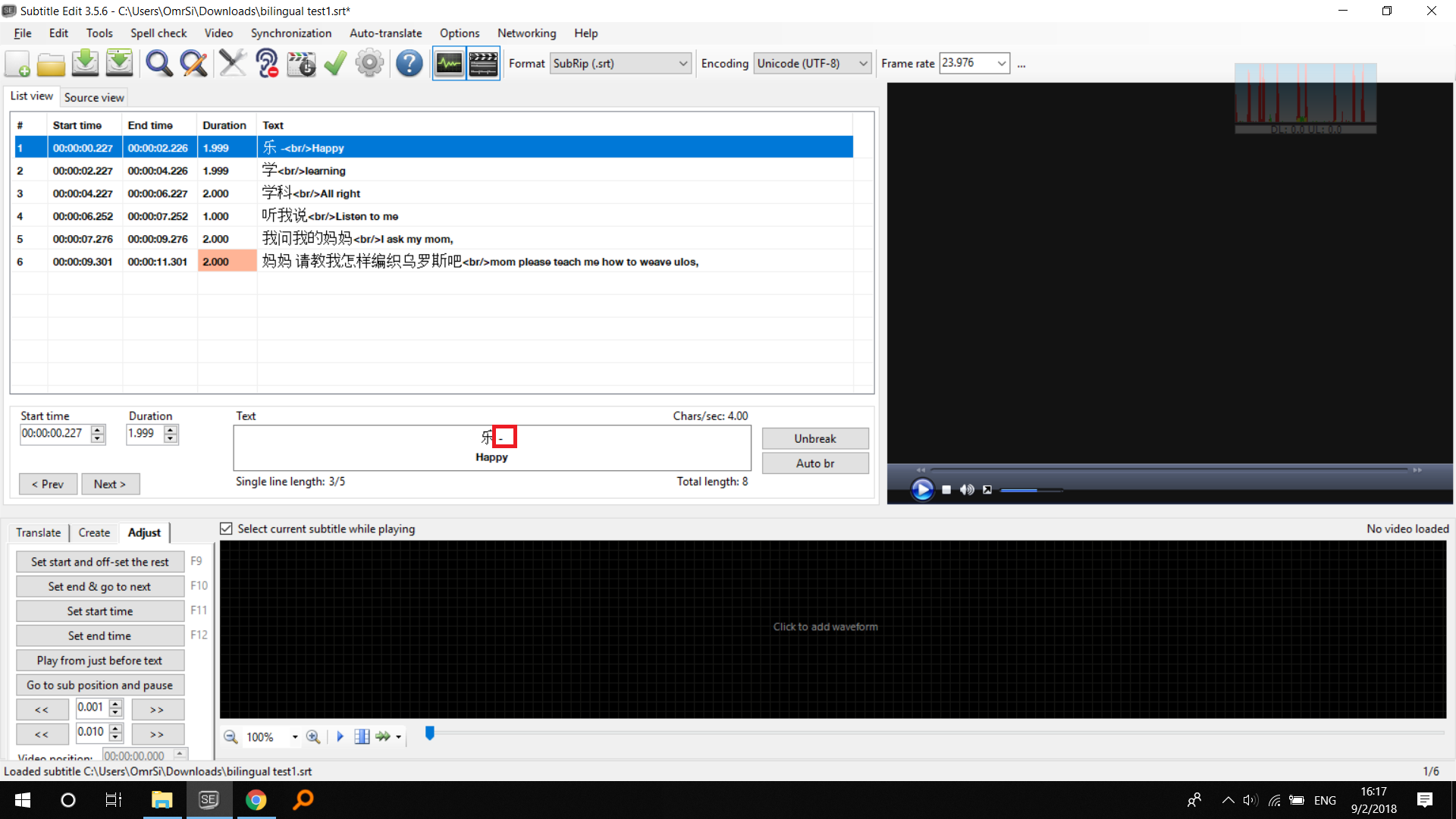
Yeah, Only Ctrl+Shift+B isn't working.
Other shortcuts are, also, try using Ctrl+Shift+B on one line after setting it, and something weird happens.
OmrSi
on 2 Sep 2018
Yeah, it's a bit naughty... :P
LeonCheung
on 2 Sep 2018
Related issues
 depeo
·
5Comments
OmrSi
·
6Comments
LeonCheung
·
5Comments
depeo
·
5Comments
OmrSi
·
6Comments
LeonCheung
·
5Comments
 teodargent
·
5Comments
teodargent
·
5Comments
 m0ck69
·
5Comments
m0ck69
·
5Comments
Most helpful comment
Added shortcut for this - Options -> Settings -> General -> Merge selected lines bilingual
How does it work?