Subtitleedit: Feature Request: google voice recognition
Hi All.
I think is good feature the voice recognition for "clean-voice" type video production (studio talking etc.)
THX
 njozsef
>All comments
I also voted to add that option to Subtitle Edit. I think it would be relatively easy.
AutoSub
Provisionally Autosub can be used to translate video files or audio via a single click (EASY).
Depending on the language, sound quality, accuracy can vary from 100% to 0%.
I tried it with English and Spanish, 80% and 100%
Japanese only 0-10%.
https://github.com/agermanidis/autosub
Install Step by Step for Windows 32 or 64 bits.
https://github.com/agermanidis/autosub/issues/31

Speech Recognition,
Another option also is:
https://github.com/Uberi/speech_recognition,
This gives you the advantage of using multiple Speech recognition engine / API support
CMU Sphinx (works offline)
Google Speech Recognition
Wit.ai
Microsoft Bing Voice Recognition
api.ai
Houndify API
IBM Speech to Text
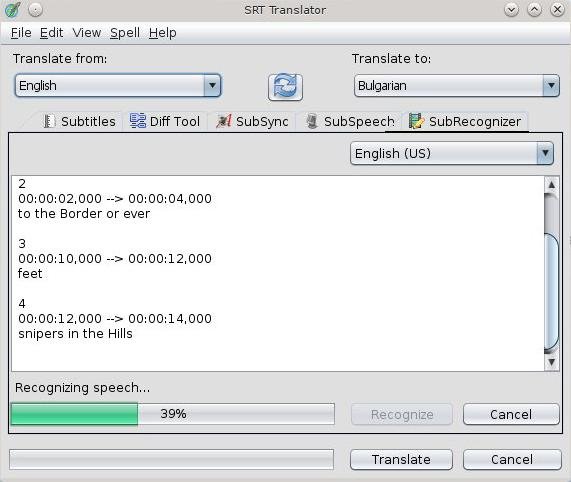
SRT Translator
 JeanDown123
on 12 Aug 2016
JeanDown123
on 12 Aug 2016
Related issues
 m0ck69
·
5Comments
m0ck69
·
5Comments
 darkred
·
4Comments
darkred
·
4Comments
 07416
·
5Comments
07416
·
5Comments
 OmrSi
·
6Comments
OmrSi
·
6Comments
 LeonCheung
·
5Comments
LeonCheung
·
5Comments
Most helpful comment
I also voted to add that option to Subtitle Edit. I think it would be relatively easy.
AutoSub
Provisionally Autosub can be used to translate video files or audio via a single click (EASY).
Depending on the language, sound quality, accuracy can vary from 100% to 0%.
I tried it with English and Spanish, 80% and 100%
Japanese only 0-10%.
https://github.com/agermanidis/autosub

Install Step by Step for Windows 32 or 64 bits.
https://github.com/agermanidis/autosub/issues/31
Speech Recognition,
Another option also is:
https://github.com/Uberi/speech_recognition,
This gives you the advantage of using multiple Speech recognition engine / API support
CMU Sphinx (works offline)
Google Speech Recognition
Wit.ai
Microsoft Bing Voice Recognition
api.ai
Houndify API
IBM Speech to Text
SRT Translator
https://sourceforge.net/projects/srt-tran/

Alpha: