Stylus: Stylus RegExp cannot perfect/consistency matching `#.*`
fixed: use (#.*)? to fix: see at https://github.com/openstyles/stylus/issues/1134#issuecomment-734420665
In actual use, sometimes we just want to match a specific/accurate url/page with RegExp, and we hope it also can match the #.* part, obviously url#.* belongs to the exact page/url, I found it difficult or impossible to do with Stylus.
RegExp matching URL#hash , no problem for before, but now matching scroll-to-text-fragment , encountered a problem.
- About scroll-to-text-fragment , i.e.
#:~:text=xxxor#xxx:~:text=xxxof URL,
Start at Chrome81+, see documentation/API :
https://developers.google.com/web/updates/2020/02/nic80?hl=tr#more
https://github.com/WICG/scroll-to-text-fragment
https://wicg.github.io/scroll-to-text-fragment/
https://web.dev/text-fragments/#text-fragments
- 3
url#....pages to testing :#hash#:~:text=...#...:~:text=...
https://github.com/openstyles/stylus/wiki/Writing-styles#multiple-sites
https://github.com/openstyles/stylus/wiki/Writing-styles#:~:text=powerful,environments
https://github.com/openstyles/stylus/wiki/Writing-styles#HereCustom:~:text=powerful,environments
- RegExp matching 3 above to testing :
.*github.*Writing-styles$or.*github.*Writing-styles#.*or.*github.*Writing-styles.*
@-moz-document regexp(".*github.*Writing-styles$") {
body    {background:#c95ad873!important}  }
Current bugged behavior/problem for Stylus RegExp matching
#.*Even if the style can works, and there is
 "Number of styles active for the current site", but all cannot show in the Stylus-Popup style list.
Some can show "Number of styles active for the current site", but css-style doesn't working actually.
.*github.*Writing-styles$can _only_ matching/css-working...#:~:text=...not matching...#xxx:~:text=...and...#hash
The built-in RegExp test
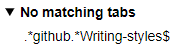
.*github.*Writing-styles#.*can _not_ matching/css-working...#:~:text=...page.
The built-in RegExp test in Stylus is no problem, but the style cannot be all valid.
The built-in RegExp test

- For Tampermonkey RegExp matching is perfect, that's good for consistency.
// @include /.*github.*Writing-styles$/able to automatically match the 3 URLs above, i.e. include.*Writing-stylesor.*Writing-styles#.*
// ==UserScript==
// @name        Tampermonkey RegExp
// @description TM RegExp-matching URL#.*  is very perfect!
// @version      0.1
// @include       /.*github.*Writing-styles$/
// note  if  /.*github.*Writing-styles#.*/  will cannot matching any #.* part
// @grant       GM_addStyle
// ==/UserScript==

(function() {
    'use strict';
GM_addStyle(' body  {background:#c95ad873!important}');
})();
- ## Expected/fixed behavior:
So do we need to improve the RegExp-matching url#.* (best to use the same RegExp-matching logic as Tampermonkey) ?
and the styles of working (obviously matched) can appear in the list of Stylus-Popup ?
 dnknn
dnknn
All 6 comments
That's because Chrome lies to us and to the page itself when the text fragment is used. This is either a bug or this feature (text fragment) was poorly designed. I'll see what we can do about it. Probably not much.
Meanwhile, you should use a more reliable pattern e.g. .*github.*Writing-styles(#.*)?. Your current pattern works in Tampermonkey only because it ignores the # part due to the way how JavaScript is injected. Stylus, on the other hand, dynamically changes styles when # changes.
 tophf
on 26 Nov 2020
tophf
on 26 Nov 2020
Note that when we'll fix the inconsistencies .*github.*Writing-styles$ will never match those URLs in Stylus because we apply the pattern to the entire URL with #.
You can already see the new correct behavior if you enable instant inject in Stylus options.
When I add a workaround for the browser bug/blunder in the default injection mode, it'll be the same.
tophf
on 26 Nov 2020
Sorry, I did not expect (#.*)? , since .*github.*Writing-styles(#.*)? is beautiful/handsome!
It has solved all problems perfectly, not only for #.* part, and also can appears in the Stylus-Popup list.
So, can no need to do anything and it's fine, and can also close this issue directly.
Thank you very much~~!
dnknn
on 26 Nov 2020
The workaround I mentioned will be added in https://github.com/openstyles/stylus/pull/1116/commits/54da008a657429192c2b510ccb8d2d6432c69801
tophf
on 26 Nov 2020
The workaround I mentioned will be added in 54da008
@tophf Thanks! but I can't understand the javascript code and the workaround you mentioned.
- So I want to ask you whether the new logic workaround will affect the specific
#hashthat is intentionally ?
Because the two extensions SingleFile(save the page as a single file) and Stylus cannot communicate, and SingleFile cannot automatically apply specific CSS styles before saving, So I thought of a workaround, i.e. .*#SingleFileSaveCss$ with Stylus.
@-moz-document regexp(".*#SingleFileSaveCss") {
    /* Customized CSS styles just to saved the page (e.g. auto remove redundant elements) */
  ..... }
when open url#SingleFileSaveCss page, specific CSS will be applied, finally use SingleFile to save this page.
Script code provided by the author of SingleFile to press Ctrl+S to auto open #SingleFileSaveCss page.
Script code
// ==UserScript==
// @name     Autosave script
// @version  0.1
// @match    https://*/*
// @match    http://*/*
// @run-at   document-start
// ==/UserScript==

if (location.hash == "#SingleFileSaveCss") {
  let title;
  dispatchEvent(new CustomEvent("single-file-user-script-init"));
  addEventListener("single-file-on-before-capture-request", async event => {
    title = document.title;
    const newTitle = prompt("Enter a title", title);
    if (newTitle != null) {
      document.title = newTitle;
    }
  });
  addEventListener("single-file-on-after-capture-request", () => {
    if (title != null) {
      document.title = title;
    }
  });
} else {
  addEventListener("keydown", () => {
    if (event.key.toLowerCase() == "s" && event.ctrlKey) {
      event.preventDefault();
      window.open(location.href + "#SingleFileSaveCss");
    }
  });
}
I don't know. You can test it yourself in Chrome:
You can already see the new correct behavior if you enable instant inject in Stylus options.
tophf
on 26 Nov 2020
Related issues
 kristofferR
·
24Comments
kristofferR
·
24Comments
 eight04
·
30Comments
eight04
·
30Comments
 catcat520
·
26Comments
catcat520
·
26Comments
 AmpliDude
·
26Comments
AmpliDude
·
26Comments
 HoLLy-HaCKeR
·
74Comments
HoLLy-HaCKeR
·
74Comments
Most helpful comment
That's because Chrome lies to us and to the page itself when the text fragment is used. This is either a bug or this feature (text fragment) was poorly designed. I'll see what we can do about it. Probably not much.
Meanwhile, you should use a more reliable pattern e.g.
.*github.*Writing-styles(#.*)?. Your current pattern works in Tampermonkey only because it ignores the#part due to the way how JavaScript is injected. Stylus, on the other hand, dynamically changes styles when#changes.