Styled-components: Server Side Rendering: First paint missing some styles (FOUC)
Environment
System:
- OS: macOS High Sierra 10.13.5
- CPU: x64 Intel(R) Core(TM) i5-4308U CPU @ 2.80GHz
- Memory: 82.71 MB / 8.00 GB
Shell: 3.2.57 - /bin/bash
Binaries:
Node: 8.9.4 - ~/.nvm/versions/node/v8.9.4/bin/node
- npm: 6.1.0 - ~/temp/Martin/metrics-dashboard/node_modules/.bin/npm
Watchman: 4.7.0 - /usr/local/bin/watchman
npmPackages:
babel-plugin-styled-components: ^1.5.1 => 1.5.1
- styled-components: ^3.2.6 => 3.2.6
Reproduction
The chunk of server side rendering code used:
        const sheet = new ServerStyleSheet()
        let html = ReactDOMServer.renderToString(sheet.collectStyles(
          <Provider store={store}>
            {<RouterContext {...renderProps} />}
          </Provider>
        ))
        const styleTags = sheet.getStyleTags() // or sheet.getStyleElement()
My index template (index.ejs) as such:
<!DOCTYPE html>
<html>

<head>
  <%- styleTags %>
</head>
<body style="margin: 0; font-family: 'PT Sans', Arial;">
  <div id="root" style="height: 100%;">
    <%- html %>
  </div>
  <script type="text/javascript" charset="utf-8">
    window.__REDUX_STATE__ = '<%= reduxState %>';
  </script>

</body>
</html>
And just in case some styled-component code, though I don't expect this to be the issue (possibly because of using extend?).
//   H1.js file

import styled from 'styled-components';

const H1 = styled.h1.attrs({ className: 'h1' })`
    font-size: 4rem;
`;

export default H1;

//   end of H1.js file

//   WidgetTitle.js file
import NormalH1 from "components/H1";

const WidgetTitle = NormalH1.extend.attrs({ className: 'widget__title' })``;

export default WidgetTitle;

//   end of WidgetTitle.js file
Steps to reproduce
- Server side rendering set up as shown above, following closely the steps here: https://www.styled-components.com/docs/advanced#server-side-rendering.
Expected Behavior
For all styles to be applied during first paint (like so below).

Actual Behavior
Only some styles being applied on first paint, while some rules (specifically font-size) seems to be applied only after the JS bundle is parsed and executed.

Remarks
As you can see in the two screenshots, I get a flash of content where the font-size rule isn't respected. I had this same issue with font-family actually, but dealt with it by putting it as an inline style on my <body> tag. Possibly this is a Flash of Unstyled Text (FOUT), but I'm honestly quite lost as to why these specific rules are being ignored on the first paint.
I state that the rules seem to be applied only after the main JS bundle is loaded/parsed/executed because of examining the request for app.js closely in the Chrome Network panel. Is this possible a webpack issue where I need to optimize the bundle further?
 Nemsae
All 65 comments
Out of curiosity, do you see the same issue with this code instead?
const WidgetTitle = styled(NormalH1).attrs({ className: 'widget__title' })``;
 probablyup
on 27 Jul 2018
probablyup
on 27 Jul 2018
@probablyup thanks for the suggestion - the issue still persists.
Nemsae
on 31 Jul 2018
Hmm I'm curious what it could be. Zocdoc has a pretty robust SSR setup with styled components and many types of components in use, haven't seen this sort of thing.
Any chance you could put together a lightweight reproduction, ideally in a codesandbox?
probablyup
on 1 Aug 2018
Can you compare the rules you get in html with the rules you get after first render? Should be helpful to know exactly which rules are missing.
Ideally, you don't run data fetching, so client and server should be identical.
 wmertens
on 1 Aug 2018
wmertens
on 1 Aug 2018
@wmertens Just to be clear you want to me compare the rules from the style tags (with the long string of sc-classes)
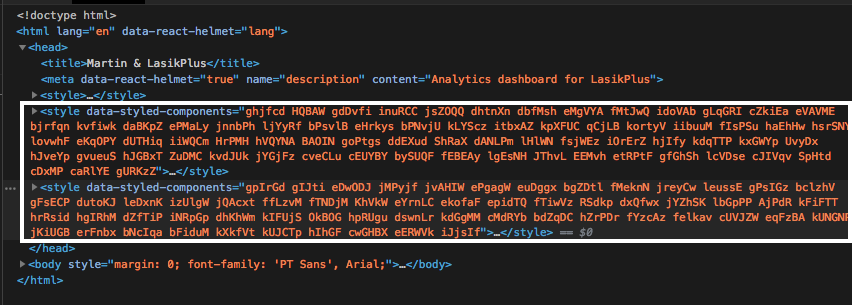
with the rules from the style tags received after first render,
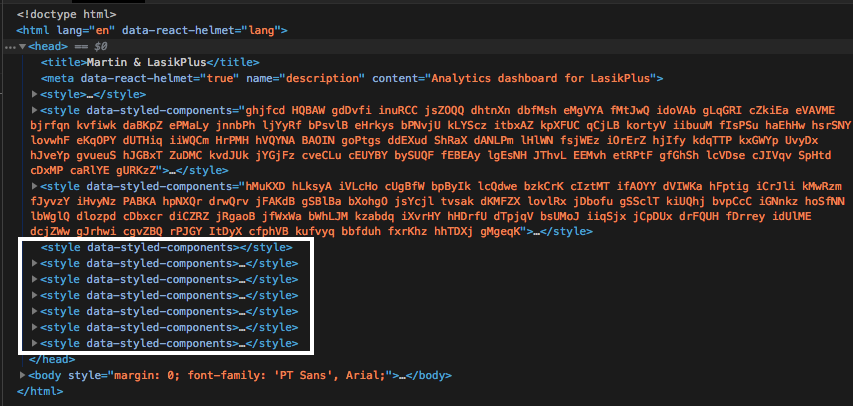
The FOUT does disappear after receiving the second set of styles, after first render.
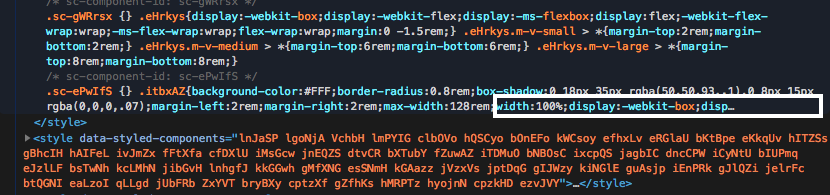
I've taken a quick look at the content of both sets of the initial style tags and immediately noticed that the styles are clipped, the disp... (unless chrome is clipping the content?).
Nemsae
on 1 Aug 2018
@probablyup I'll work on getting a sandbox up soon, hopefully before next week.
Nemsae
on 1 Aug 2018
Yes, correct. You can read the first set in your HTML file under the
sources tab, and the second you can double-click in Elements to see the
entire contents. Probably best to copy to an editor for easy comparison.
I'm suspecting some parsing or minifying issue. Did you try turning off the
Babel plugin minification/preprocessing?
On Wed, Aug 1, 2018, 11:47 PM John Son notifications@github.com wrote:
@wmertens https://github.com/wmertens Just to be clear you want to me
compare the rules from the style tags (with the long string of sc-classes)
[image: so_sc-fout_1]
https://user-images.githubusercontent.com/20247504/43550566-000e3b20-95b2-11e8-91a8-88c17479066b.pngwith the rules from the style tags received after first render,
[image: so_sc-fout_2]
https://user-images.githubusercontent.com/20247504/43550573-0753ee66-95b2-11e8-877b-b7c1df7d97a4.pngThe FOUT does disappear after receiving the second set of styles, after
first render.I've taken a quick look at the content of both sets of the initial style
tags and immediately noticed that the styles are clipped, the disp...
(unless chrome is clipping the content?).[image: so_sc-fout_3]
https://user-images.githubusercontent.com/20247504/43550807-cafc773e-95b2-11e8-9459-738de067a62e.png—
You are receiving this because you were mentioned.Reply to this email directly, view it on GitHub
https://github.com/styled-components/styled-components/issues/1860#issuecomment-409735221,
or mute the thread
https://github.com/notifications/unsubscribe-auth/AADWlk--o6Eo4Kv8FfcUd--tabT2Dn2Lks5uMiH6gaJpZM4Vbm7m
.
wmertens
on 2 Aug 2018
I've compared the first set of tags (from the sources tab) with the second set of tags (from the elements tab).
Sources Style Tags
Sources only has one style tag that corresponds to the first style tag from the elements style tag set.
I've done a diff check of the two files, which can be seen here: Diff check of sc-source.css and sc-elements-1.css. They are the same set of rules.
Elements Style Tags
Elements has three style tags, the first one which is part of the diff check from above. The second and third are the ones missing from sources. Notably, the third one contains my injectGlobal styles.
I've attached a zip file containing the files for all four style tags.
styled-components-sources-and-elements-css-files.zip
@wmertens I've checked my babel and webpack configuration for my development environment. No minification is being done.
Here's my .babelrc file:
{
  "presets": ["es2015", "stage-2", "react"],
  "env": {
    "test": {
      "plugins": [ "babel-plugin-rewire" ]
    },
    "development": {
      "plugins": [
        [
          "styled-components",
          {
            "ssr": true,
            "minify": false
          }
        ]
      ]
    },
    "production": {
      "plugins": [
        [
          "styled-components"
        ]
      ]
    }
  }
}
And here is my webpack configuration:
var path = require('path')
var webpack = require('webpack')
var AssetsPlugin = require('assets-webpack-plugin')

var DEBUG = !(process.env.NODE_ENV === 'production')

if (DEBUG) {
  require('dotenv').config()
}

var config = {
  devtool: DEBUG ? 'cheap-module-eval-source-map' : false,
  entry: {
    app: ['./app/app'],
    vendor: [
      'react',
      'react-router',
      'redux',
      'react-dom',
      'lodash',
      'bluebird',
      'history'
    ]
  },
  resolve: {
    modules: [ path.join(__dirname, 'app'), 'node_modules' ]
  },
  output: {
    path: path.join(__dirname, 'dist'),
    filename: '[name].js'
  },
  plugins: [
    new webpack.EnvironmentPlugin(['NODE_ENV', 'API_BASE_URL'])
  ],
  module: {
    rules: [
      {
        test: /\.js$/,
        loader: 'babel-loader',
        exclude: /node_modules/,
        include: __dirname
      },
      {
        test: /\.(css|less)$/,
        use: [{
          loader: "style-loader" // creates style nodes from JS strings
        }, {
          loader: "css-loader" // translates CSS into CommonJS
        }, {
          loader: "less-loader" // compiles Less to CSS
        }]
      },
      {
          test: /\.(woff(2)?|ttf|eot|svg)(\?v=\d+\.\d+\.\d+)?$/,
          use: [{
              loader: 'file-loader',
              options: {
                  name: '[name].[ext]',
                  outputPath: 'fonts/'
              }
          }]
      },
      {
        test: /\.json$/,
        use: 'json-loader'
      }
    ]
  }
}


if (DEBUG) {
  config.entry.app.push('webpack-hot-middleware/client?path=/__webpack_hmr')

  config.plugins = config.plugins.concat([
    new webpack.HotModuleReplacementPlugin(),
    new webpack.optimize.CommonsChunkPlugin({
      name: 'vendor',
      filname: 'vendor.js'
    })
  ])
  config.output.publicPath = '/'
  config.module.rules.unshift({
    test: /\.js$/,
    loader: 'react-hot-loader',
    exclude: /node_modules/,
    include: __dirname
  })
} else {
  config.plugins = config.plugins.concat([
    new webpack.optimize.CommonsChunkPlugin({
      name: 'vendor',
      filname: '[name].[chunkhash].js'
    }),
    new webpack.optimize.UglifyJsPlugin(),
  ])
}

module.exports = config
Unless I've overlooked other possible minification/parsing settings, I suspect the issue arises from the second and third set of rules from elements not being supplied with the first trip back from SSR.
Nemsae
on 13 Aug 2018
Why aren’t you doing ssr: true for production as well?
probablyup
on 14 Aug 2018
Yeah you need to do ssr: true for production. If you don't want the inferred display names, you can do displayName: false in production though!
 mxstbr
on 14 Aug 2018
mxstbr
on 14 Aug 2018
I've only been attempting to debug this issue on my dev environment, expecting that once I find a solution in my dev I could replicate the code in production. As per your instruction I've run the app in the production environment with the ssr flag on and still have the same issue.
Since the issue is closed @mxstbr and @probablyup if you could help me understand, my understanding from the docs is that the ssr: true option only avoids the checksum mismatch. How would a checksum mismatch prevent a portion of the style rules being delivered?
Nemsae
on 14 Aug 2018
Just trying to rule things out! Okay, another question... do you have React
code that’s like:
if(window) this
else that
Basically any code that happens during render that depends on server vs
client. It’s very important to render the same thing in both places and
then do whatever extra browser stuff you want in componentDidMount.
On Tue, Aug 14, 2018 at 8:34 AM Max Stoiber notifications@github.com
wrote:
Reopened #1860
https://github.com/styled-components/styled-components/issues/1860.—
You are receiving this because you were mentioned.
Reply to this email directly, view it on GitHub
https://github.com/styled-components/styled-components/issues/1860#event-1787792295,
or mute the thread
https://github.com/notifications/unsubscribe-auth/AAiy1l4fFLgqNt2tV2RlmEb05vMGKrA0ks5uQtHZgaJpZM4Vbm7m
.
probablyup
on 14 Aug 2018
I'm experiencing this same problem I think, except making a minimal repro is going to be a bit complicated due to the size of our codebase.
How we do SSR
I imagine this is what most people are doing, but for each request we initialize our Redux store, get matching components for a route, trigger a static method on the class (which potentially kicks off some sagas), then when all sagas have completed we start actually rendering. This is basically gathering a renderStream into an accumulator and then res.sending them over.
Actual behavior
- There are components that never get styled, and some that get styled to varying degrees. I'll focus on the footer, which never gets styled.
- If I disable SSR (send empty string in root), everything works correctly.
- Some of our pages don't have a footer. If I disable the footer on client, and then reenable it, styles get applied correctly
Some further notes
- We only use
injectGlobalfor injecting font-face rules. It works correctly - We don't use
.extend - I synchronized the babel plugin configuration & order between environments 100% while I'm working on this spike.
ssrflag istruefor all configurations, minimize etc have all been disabled. - I've tried both 3.4.2 and 3.2.3, and am using v 1.5.1 of the babel plugin.
- The problem became apparent when refactoring synchronous to stream-based rendering
 StevenLangbroek
on 14 Aug 2018
StevenLangbroek
on 14 Aug 2018
I'm having the same issue.
I'm using NextJS, the following screen is in production environment (it's empty):

While the same code in development environment (if you expand it, it contains the styles):

If I print the content of sheet.getStyleElement() bein sheet a ServerStyleSheet inside getInitialProps it contains the data I want to have in my tag, but it is not added.
Edit: It only load the styles in each component for the first paint that are shown, but doesn't charge all the styles, so media query are not there. I'm using a library that contains styled-components and MaterialUI integration, that styles are working fine.
 MFCo
on 14 Aug 2018
MFCo
on 14 Aug 2018
@MFCo the style tag will appear empty in production because we use the CSSOM APIs there which for whatever reason do not appear in devtools. They are there though if you use the appropriate API to check the object model of the style tag.
probablyup
on 14 Aug 2018
@StevenLangbroek Hmm why accumulate rather than pipe to res? That defeats the purpose of streaming.
probablyup
on 14 Aug 2018
That defeats the purpose of streaming.
@probablyup it defeats a purpose, but we still get the benefit of freeing up the event loop.
StevenLangbroek
on 14 Aug 2018
Hey @probablyup , appreciate the help.
If I understood you correctly, all React code that is concerned with the window object is used explicitly after component is mounted. If this weren't the case my SSR code would crash the app, as the window object isn't accessible in node.js
It's very important to render the same thing in both places
Are you referring to checksum invalid errors? I have not gotten those errors. If that's what you're referring to I'm not sure I quite understand how checksum errors would lead to styles not being grabbed.
From the direction received by @wmertens , I believe the issue is that const styleTags = sheet.getStyleTags() is not grabbing all the style tags. I've compared the style tag from the sources panel with the output from my server with console.log(styleTags), they match of course. And it is this same <style> tag which is missing a lot of the styles which cause my FOUC, as detailed in a previous comment above.
Nemsae
on 14 Aug 2018
@probablyup Thanks! But it doesn't explain why in smaller projects the tag is not empty. I'll continue looking for a solution to my issue.
It only loads the base style of each component, without media queries, but if I reload with the new component in the view port it loads correctly with the right media query but not other media queries or base style is applied at all.
EDIT: you are right, they are in the response if I just curl my page, but they are not being applied in the browser, there is probably something that I'm missing, it's like they don't exist in the DOM but they are included in my response from server.
MFCo
on 15 Aug 2018
I'm getting the same problem.
I'm using the babel plugin with babel 7.
My injectGlobal is not being applied to our styles, resulting in FOUC (fonts and reset). Some doesn't get styles from SSR.
I don't know what I am missing.
 nandosangenetto
on 23 Aug 2018
nandosangenetto
on 23 Aug 2018
We might not be B7 compatible yet? https://github.com/styled-components/babel-plugin-styled-components/pull/134
probablyup
on 23 Aug 2018
@probablyup could be, I've updated this package and the problem persists.
nandosangenetto
on 23 Aug 2018
@nandosangenetto I'm curious what your SSR setup is like. Could you provide some code including the sheet.collectStyles and sheet.getStyleTags methods?
Correct me if I'm wrong, but it seems that we're both having the issue where const styleTags = sheet.getStyleTags() isn't grabbing all of the styles (including injectGlobal), and therefore our server rendered app is missing those styles.
Nemsae
on 24 Aug 2018
Some things here we’ll need to understand what’s going on is:
- output of SSR (the html without JS modifications) which is easy to get with curl / httpie / devtools’ sources tabs
- code of SSR generator
- are you using unstable features like the stylesheetmanager during runtime?
- are you using streamed SSR?
- do you do anything unusual with StyledComponents global StyleSheet or it’s methods?
It might also be that several people are seeing several issues. One might be dealing with an invalid usage while another has some invalid CSS in their output.
So please bear with us and post some info please :) otherwise we’ll have to close this issue and ask everyone to create individual reproductions. Sorry 😅
 kitten
on 24 Aug 2018
kitten
on 24 Aug 2018
@kitten Here's a repl with both files of my SSR code and the html from the output of the SSR.
- Not using StyleSheetManager.
- Not using streamed SSR.
- Not using any StyleSheet methods outside of my SSR file.
Do let me know if you need anything else.
Nemsae
on 25 Aug 2018
Am I correct in thinking you only do one render pass? Don't you have
asynchronous data loading? Won't that change the mounted components?
I do two passes, and i wait for data to load in between. I only collect
styles for the second pass.
On Sat, Aug 25, 2018, 12:05 AM John Son notifications@github.com wrote:
@kitten https://github.com/kitten Here's a repl
https://repl.it/@jsson77/KindTintedWireframe with both files of my SSR
code and the html from the output of the SSR.
- Not using StyleSheetManager.
- Not using streamed SSR.
- Not using any StyleSheet methods outside of my SSR file.
Do let me know if you need anything else.
—
You are receiving this because you were mentioned.
Reply to this email directly, view it on GitHub
https://github.com/styled-components/styled-components/issues/1860#issuecomment-415894333,
or mute the thread
https://github.com/notifications/unsubscribe-auth/AADWlor22o6UdqCIYOiq2T8H77q7Hc8iks5uUHi-gaJpZM4Vbm7m
.
wmertens
on 25 Aug 2018
@wmertens I do have asynchronous data loading.
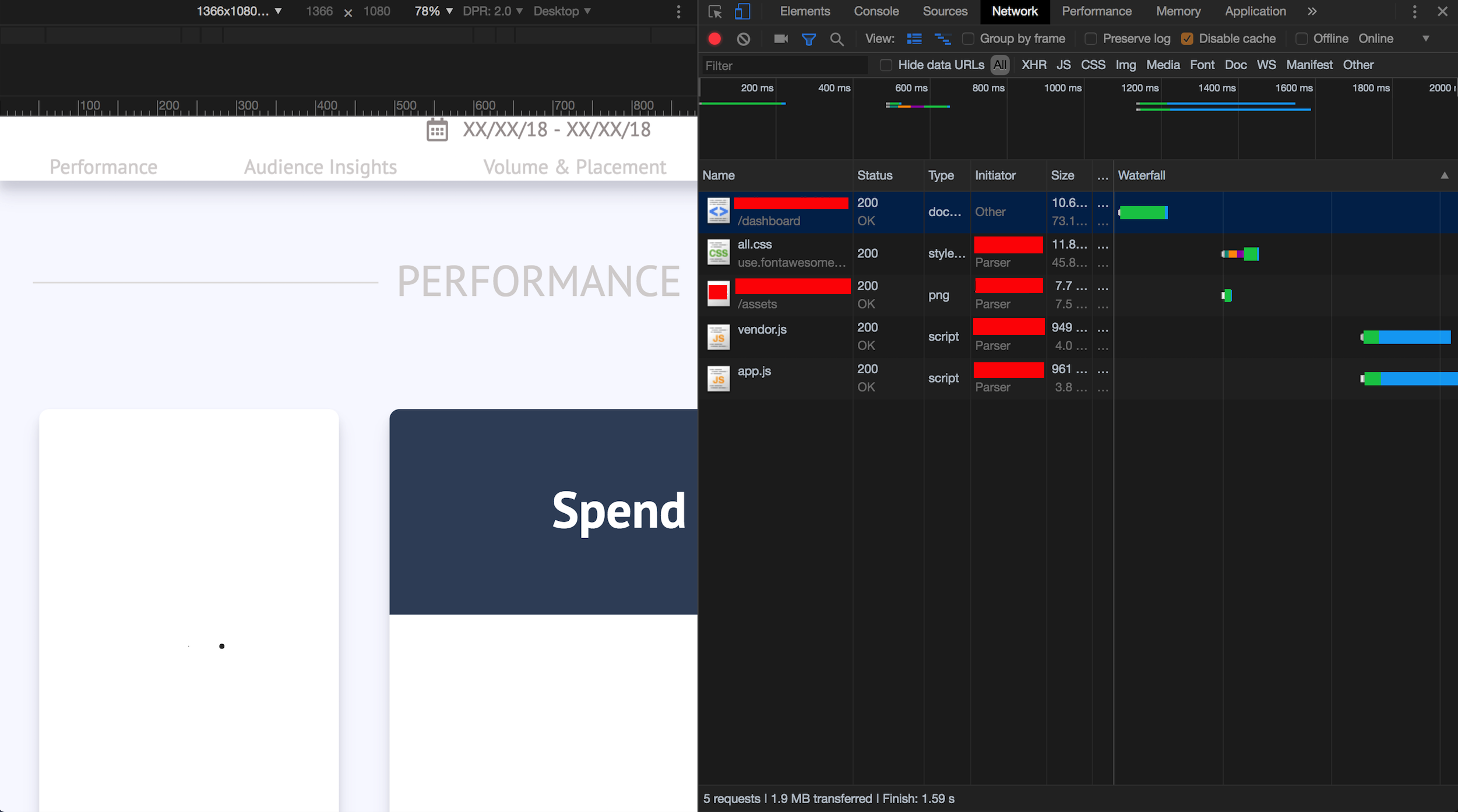
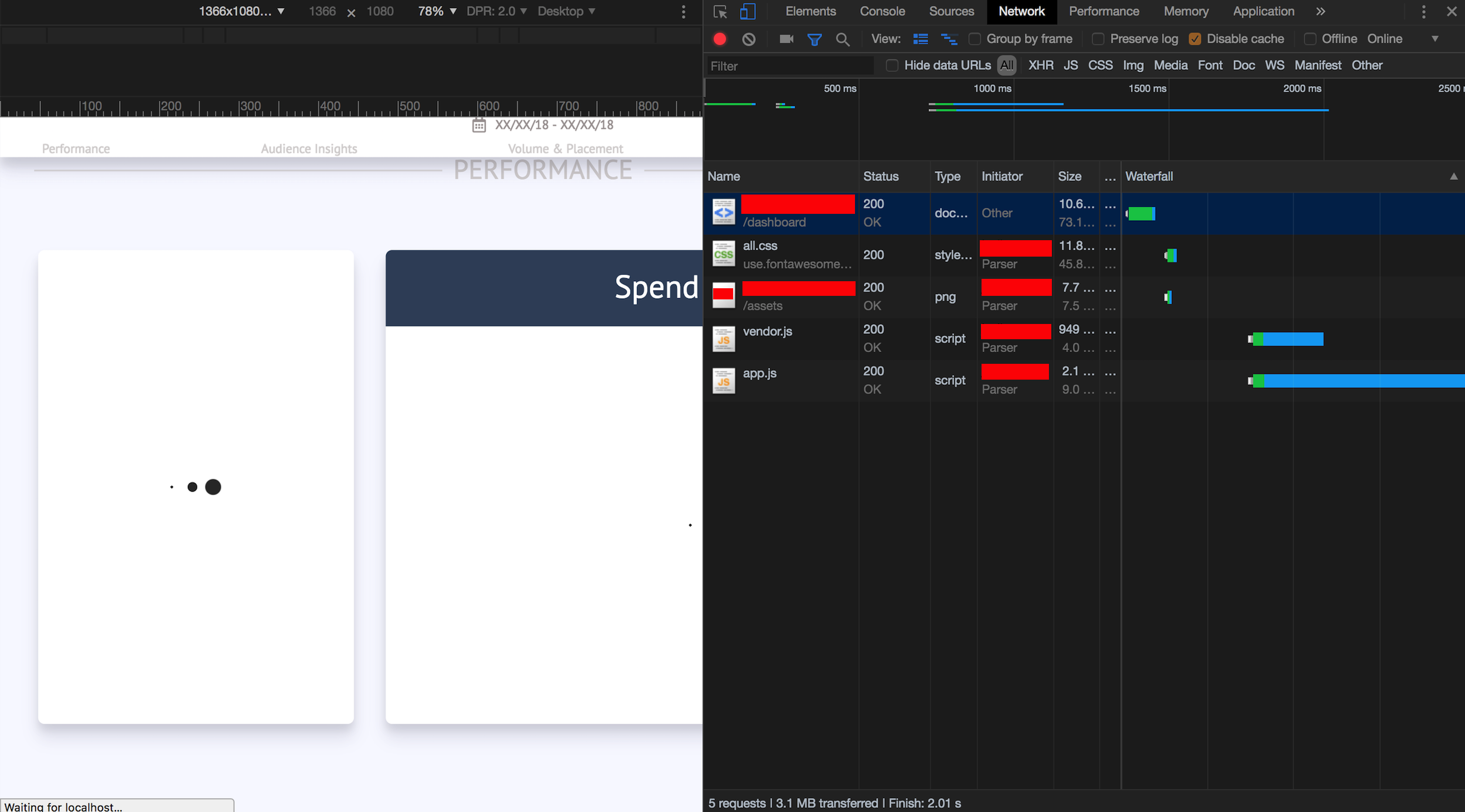
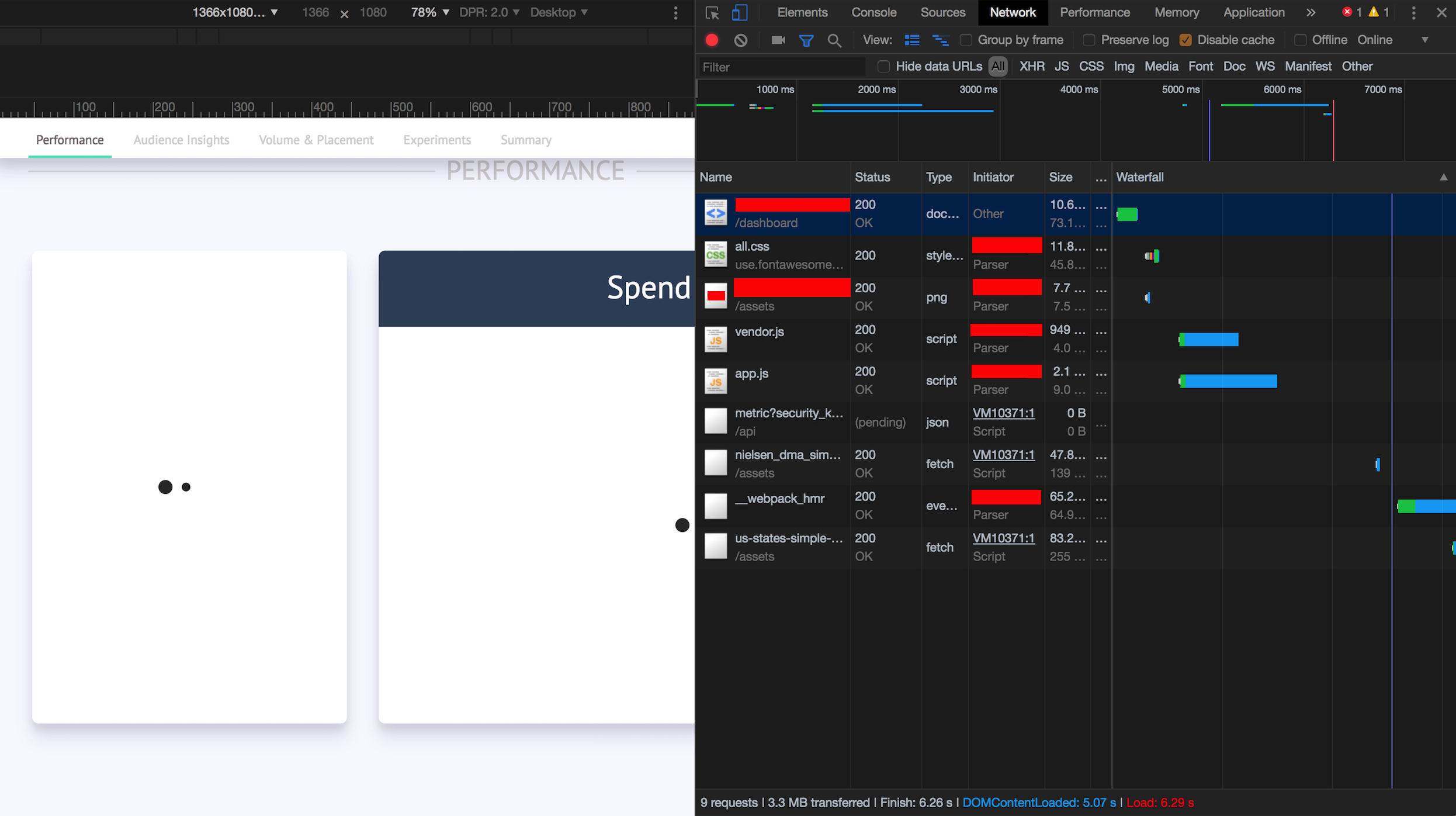
But the data loading lifecyle happens after the FOUC disappears. I've taken some screenshots in Chrome Network panel to illustrate this.
FOUC screen - which seems to happen while
app.jsbundle is being loaded/parsed.
NO FOUC screen - all styles are now loaded, which happens after
app.jsis parsed.
DATA LOAD screen - all styles already loaded, app now makes the
metric?security_k...call to load the data.
Hopefully that answers your question.
Could you help me understand how you are collecting the styles for the second pass? Are you showing a loading component with inline styles first, then rendering the data bound components (with SC styles) once loading is done?
Nemsae
on 26 Aug 2018
@Nemsae could you check out 3.4.6 and let me know if it resolves the issue?
probablyup
on 10 Sep 2018
/bump @Nemsae
probablyup
on 18 Sep 2018
@probablyup i'm upgrading now across our codebase, I'll merge my streaming spike back in and see if it fixes things.
StevenLangbroek
on 18 Sep 2018
Apologies for the late reply.
@probablyup I upgraded to 3.4.9 and the issue still remains.
I strongly believe the issue is with my injectGlobal file. The rules that are missing in first paint are rules specified in my injectGlobal. I haven't done a line by line comparison of the set of rules missing, but am fairly certain that this is the case.
I am currently circumventing the FOUC by inlining the missing styles into my <html /> and <body /> tags. No more FOUC with this approach.
Could this a timing/race issue with my injectGlobal?
Nemsae
on 21 Sep 2018
This is my app.js with the ReactDOM.render:
import "regenerator-runtime/runtime";
import 'babel-polyfill'

import React from 'react'
import ReactDOM from 'react-dom'
import { browserHistory } from 'react-router'

import configureStore from './configureStore'
import createRoutes from 'routes/index'
import { Provider } from 'react-redux'
import _ from 'lodash'

// Import CSS reset and Global Styles
import './global-styles'
import rootSaga from './rootSaga'

let reduxState = {}
if (window.__REDUX_STATE__) {
  try {
    let plain = JSON.parse(unescape(__REDUX_STATE__))
    _.each(plain, (val, key)=> {
      reduxState[key] = val;
    })
  } catch (e) {
  }
}

const store = configureStore(reduxState)
store.runSaga(rootSaga)

ReactDOM.render((
// hydrate((
  <Provider store={store}>
    { createRoutes(browserHistory) }
  </Provider>
), document.getElementById('root'))
@Nemsae out of curiosity, are you using webpack 4 with sideEffects: false? injectGlobal is a side effect, so I'm wondering if it's getting pruned out of the bundle.
probablyup
on 2 Oct 2018
@probablyup Interesting, the project is using "webpack": "^2.2.0", and I can't find an equivalent option that can be set for that.
Nemsae
on 2 Oct 2018
Okay that isn’t it then. This is really weird. Any chance you could post a
minimal reproduction repo?
On Tue, Oct 2, 2018 at 9:46 AM John Son notifications@github.com wrote:
@probablyup https://github.com/probablyup Interesting, the project is
using "webpack": "^2.2.0", and I can't find an equivalent option that can
be set for that.—
You are receiving this because you were mentioned.
Reply to this email directly, view it on GitHub
https://github.com/styled-components/styled-components/issues/1860#issuecomment-426301428,
or mute the thread
https://github.com/notifications/unsubscribe-auth/AAiy1kTd-je1jrnez4CPgLycYtBsYknbks5ug3w8gaJpZM4Vbm7m
.
probablyup
on 2 Oct 2018
With NextJS and Static deployment I get FOUC also: https://staging.tailwise.com/
Just posting this in case it helps inspect anything that should not rely on the SSR setup.
 iwarner
on 9 Oct 2018
iwarner
on 9 Oct 2018
@iwarner can you open a separate ticket with the environment info and reproduction case? Unless you have the exact same setup as the OP I probably can’t help you without more information
probablyup
on 9 Oct 2018
@iwarner can you open a separate ticket with the environment info and reproduction case? Unless you have the exact same setup as the OP I probably can’t help you without more information
Yeah no worries - it was more just a real life example that you may be able to cream some info from.
I will try and get round to minifying a shorter example to see if any dependancies or code methods are causing my issue outside next or SC
many thanks appreciate the work
iwarner
on 9 Oct 2018
I can verify this is happening in react-static's v6 branch. You can see our plugin here: https://github.com/nozzle/react-static/blob/v6/packages/react-static-plugin-styled-components/src/node.api.js#L7-L19
Component styles are extracted properly, but injectGlobal styles are nowhere to be found 😢
 tannerlinsley
on 9 Oct 2018
tannerlinsley
on 9 Oct 2018
Component styles are extracted properly, but injectGlobal styles are nowhere to be found 😢
Can you try styled-components@beta with the new createGlobalStyle API?
mxstbr
on 9 Oct 2018
Yes I'll give that a try. Either way I'd still be concerned for users on
existing sites using the non beta api
On Tue, Oct 9, 2018 at 2:01 PM Max Stoiber notifications@github.com wrote:
Component styles are extracted properly, but injectGlobal styles are
nowhere to be found 😢Can you try styled-components@beta with the new createGlobalStyle API?
—
You are receiving this because you commented.
Reply to this email directly, view it on GitHub
https://github.com/styled-components/styled-components/issues/1860#issuecomment-428330512,
or mute the thread
https://github.com/notifications/unsubscribe-auth/AFUmCZaODGxN_49a4irrePB-jOKXRsSNks5ujQCBgaJpZM4Vbm7m
.
tannerlinsley
on 9 Oct 2018
I'm not concerned. I've used it on several large projects and it works fine, so I'm guessing it's something with your setup.
probablyup
on 9 Oct 2018
That link I sent you is the extent of the ssr usage. Are there any quirks
in asynchronous ssr environments I should know about?
On Tue, Oct 9, 2018 at 2:14 PM Evan Jacobs notifications@github.com wrote:
I'm not concerned. I've used it on several large projects and it works
fine, so I'm guessing it's something with your setup.—
You are receiving this because you commented.
Reply to this email directly, view it on GitHub
https://github.com/styled-components/styled-components/issues/1860#issuecomment-428334881,
or mute the thread
https://github.com/notifications/unsubscribe-auth/AFUmCZfq5uqKx6Jg3ErwkEo0bij3QsBjks5ujQO2gaJpZM4Vbm7m
.
tannerlinsley
on 9 Oct 2018
If you're using anything like react-apollo's getDataFromTree API, etc those should be called prior to wrapping the final JSX with collectStyles. I'd also recommend simplifying your implementation to something closer to how next does it: https://github.com/zeit/next.js/blob/d141b95603014b26ffd5c8512779580bce138d85/examples/with-styled-components/pages/_document.js#L6-L8
probablyup
on 9 Oct 2018
I wish it were as simple as replicating Next's style, but like Gatsby (https://github.com/gatsbyjs/gatsby/blob/master/packages/gatsby-plugin-styled-components/src/gatsby-ssr.js), the jsx => element and the `element => renderToHtml) processes are detached (to be pluggable).
Did you happen to test this scenario in a multi-threaded environment? The extraction and rendering are happening on the same thread, so I don't suspect it, but it's worth asking.
tannerlinsley
on 9 Oct 2018
Given that JS is single threaded, no testing has been done on it, no.
probablyup
on 9 Oct 2018
I think you're assuming I was referring to parallelism, of which JS threads are not capable. However, concurrency is commonplace in Node (despite its poor tooling 😜). But I digress.
On a more related note, I do believe I have found the solution to my problem.
TL;DR; - Don't use two instances of styled-components (usually inadvertently done via webpack bundling)
It's easy to forget that injectGlobal by design cannot utilize context in react (which I'm sure was one of the motivations for the createGlobalStyle factory). Because of this, whenever you import/require a module that uses injectGlobal, it's safe to assume it is executing immediately most of the time and thus attempting to register the styles with internally imported Stylesheet model. This becomes immediately problematic when working with multiple instances of styled-components being used throughout a static export process.
Normally styled-component's internal Stylesheet import (import Stylesheet from 'models/Stylesheet') would return the same model that theServerStyleSheetandStyleSheetManager` require as well. But in the case of React-Static and many other multi-step-export webpack configurations, it's possible to bundle your application with styled-components as a bundled dependency, and then attempt to extract styles using a different non-bundled instance of styled-component (eg. using a plugin or external API that uses styled-components).
If that's the case (like it was for most react-static, the simple fix is to flag styled-components as an webpack external:
const webpackConfig = {
  externals: ['styled-components']
}
Doing this will ensure that webpack does NOT bundle the styled-components dependency, but instead use a require('styled-components') during runtime. This will ensure that your injectGlobal calls and ServerStylesheet components are coming from the same required instance of style-components.
tannerlinsley
on 10 Oct 2018
Ah yeah, that'd do it. The issue is somewhat mitigated with the v4 beta by the way since createGlobalStyle does consume context.
probablyup
on 10 Oct 2018
Now that the TS typings are merged for v4 we'll be releasing the final version soon.
probablyup
on 10 Oct 2018
Yeah, I understand most of the team has mentally (and possibly literally) checked out of v3 and are focusing on moving forward with the better designed API in v4. With a project like React-Static, however, we don't have that luxury when hundreds of our users sites use styled-components v3.
Good luck on v4!
tannerlinsley
on 10 Oct 2018
I have this issue as well, using styled-components v4 on top of Next.js 7.0.2.
Global styles created with createGlobalStyles are not included on the very first SSR request received by the server. Subsequent requests for SSR include the global styles correctly.
I have a demo repository here:
https://github.com/franky47/styled-components-ssr-fouc-test
To replay the problem, restart the server (kill and relaunch, HMR does not cut it) and hit refresh.
 franky47
on 16 Oct 2018
franky47
on 16 Oct 2018
@franky47 would you mind actually making a new issue for this so your reproduction doesn't get buried?
probablyup
on 16 Oct 2018
@franky47 I think your issue is actually a next.js usage issue. Afaik the rendered elements in _document.js generate static markup, which might cause issues, since that's not meant to be concurrency safe and it'll also mess with our context-driven global styles.
If you instead include the global style component in _app.js it should work correctly: https://github.com/zeit/next.js/#custom-app
kitten
on 16 Oct 2018
@kitten the official example also uses _document.js though: https://github.com/zeit/next.js/blob/canary/examples/with-styled-components/pages/_document.js /cc @timneutkens
mxstbr
on 16 Oct 2018
Uses it yeah but global styles can't go in there or they won't be present client-side. AFAIK _document is only stuff that is in the SSR payload
probablyup
on 16 Oct 2018
Oh yeah I just double checked, I also put it in _app.js in my website, which works: https://github.com/mxstbr/mxstbr.com/blob/master/pages/_app.js You're right!
mxstbr
on 17 Oct 2018
I seem to be having the same issue when trying to bump ReactQL to SC v4.
Here's how SSR is currently wired up (with SC v3). Pertinent lines highlighted.
Note the call to Apollo's getDataFromTree().
In SC v4, I _do_ get a render of global styles (via createGlobalStyle) but I _don't_ get any styles that would applied to async data, even though my call to sheet.getStyleElement() is happening _after_ the call to getDataFromTree() and thus should be considered part of the initial style dump.
Logging out the sheet object seems to hold a clue:
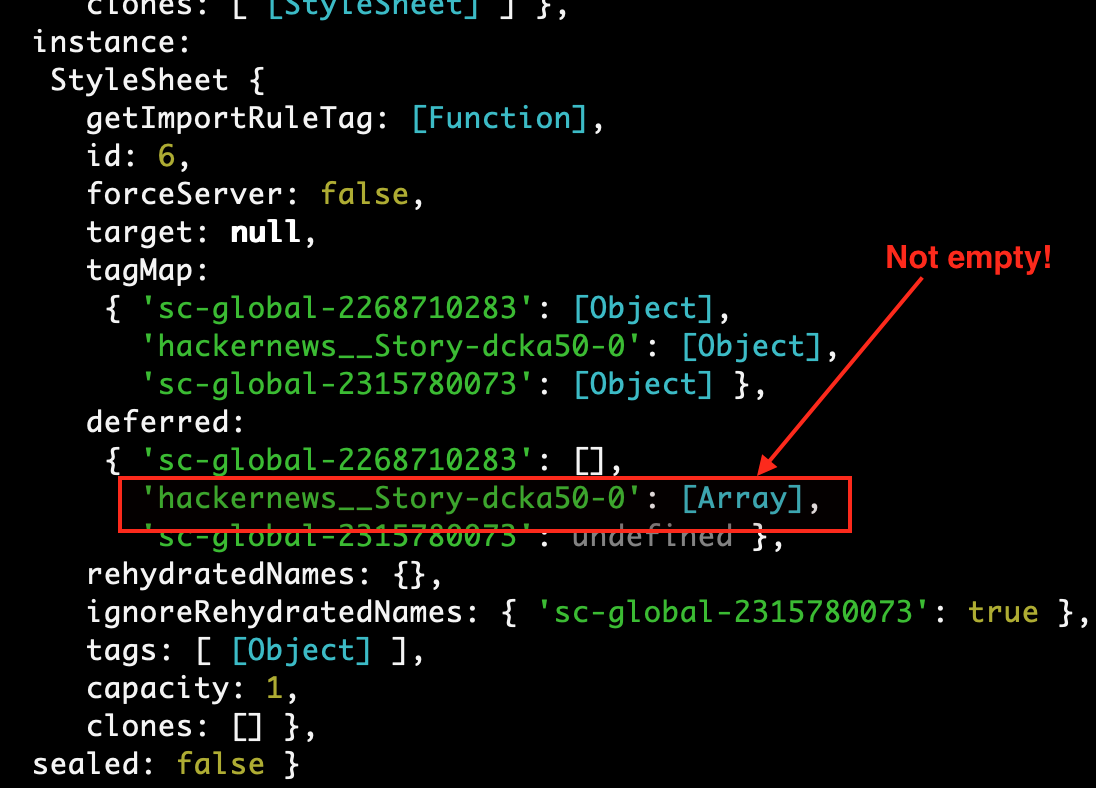
At first glance, there seems to be a difference between SC v3 and v4 in determining what is considered 'deferred'.
 leebenson
on 17 Oct 2018
leebenson
on 17 Oct 2018
Ah yes, can you do the stylesheet manager wrapper _after_ running getDataFromTree?
probablyup
on 17 Oct 2018
@probablyup - moving the <StyleSheetManager> to a separate block _after_ getDataFromTree yielded the same effect, strangely.
The only fix I can think of, whilst also rendering out a separate <Html> React component and passing sheet.getStyleElement() to it, is to run renderToString on _both_ parts, i.e.:
// ...

// Create a new styled-components instance
const sheet = new ServerStyleSheet();

const components = (
  <StyleSheetManager sheet={sheet.instance}>
    <ThemeProvider theme={defaultTheme}>
      <ApolloProvider client={client}>
        <StaticRouter location={ctx.request.url} context={routerContext}>
          <Root />
        </StaticRouter>
      </ApolloProvider>
    </ThemeProvider>
  </StyleSheetManager>
);

// Render the Apollo tree
await getDataFromTree(components);

// ...

// Create response HTML
const html = ReactDOMServer.renderToString(components);

// Pass in the rendered props to a final React wrapper
const reactRender = ReactDOMServer.renderToString(
  <Html
    css={output.client.main("css")!}
    helmet={Helmet.renderStatic()}
    html={html}
    js={output.client.main("js")!}
    styles={sheet.getStyleElement()}
    window={{
      __APOLLO_STATE__: client.extract(),
    }} />,
);

// Set the return type to `text/html`, and stream the response back to
// the client
ctx.type = "text/html";
ctx.body = `<!DOCTYPE html>${reactRender}`;
.. which seems to work fine.
My main point is that this is a material change vs. SC v3. In the previous version, it wasn't necessary to call renderToString twice. I could pass in sheet.getStyleElement() to the component that got rendered out and it worked fine.
Just curious whether this change was intentionally part of the new API? Maybe a performance thing?
leebenson
on 17 Oct 2018
@leebenson are you using react-apollo latest? Supposedly there are some issues with earlier versions and new context etc
probablyup
on 12 Nov 2018
@probablyup - this the Apollo stack + versions used in ReactQL:
"apollo-cache-inmemory": "^1.3.5",
"apollo-client": "^2.4.2",
"apollo-link": "^1.2.3",
"apollo-link-error": "^1.1.1",
"apollo-link-http": "^1.5.5",
"apollo-link-state": "^0.4.2",
"apollo-link-ws": "^1.0.9",
"apollo-utilities": "^1.0.21",
"react-apollo": "^2.2.4",
leebenson
on 12 Nov 2018
Yes try react apollo 2.3+ if it isn’t already installed
On Mon, Nov 12, 2018 at 3:26 AM Lee Benson notifications@github.com wrote:
@probablyup https://github.com/probablyup - this the Apollo stack +
versions used in ReactQL:"apollo-cache-inmemory": "^1.3.5",
"apollo-client": "^2.4.2",
"apollo-link": "^1.2.3",
"apollo-link-error": "^1.1.1",
"apollo-link-http": "^1.5.5",
"apollo-link-state": "^0.4.2",
"apollo-link-ws": "^1.0.9",
"apollo-utilities": "^1.0.21",
"react-apollo": "^2.2.4",—
You are receiving this because you were mentioned.
Reply to this email directly, view it on GitHub
https://github.com/styled-components/styled-components/issues/1860#issuecomment-437811894,
or mute the thread
https://github.com/notifications/unsubscribe-auth/AAiy1iyhEJ4vRDrzXwqmlNSC61FCGRvgks5uuT6xgaJpZM4Vbm7m
.
probablyup
on 12 Nov 2018
Certain styles not working / acting funny can be caused by circular dependencies.
I use circular-dependency-plugin when webpacking my app for the frontend - but didn't have anything looking for these warnings on the server, so it's easy to miss!
 good-idea
on 26 Jan 2019
good-idea
on 26 Jan 2019
I had the same issue (with v4).
Turned out I was collecting styles before some store hydration happened, which changed the react tree. I moved the collection after the hydration, and no longer having the first render of unstyled components.
 elado
on 10 May 2019
elado
on 10 May 2019
@elado you could try out v5 if you don't mind where this shouldn't be an issue anymore 🤔
I'll close this issue for now as all SSR ordering and rendering issues should be solved in v5, which will be released soon, or have been unrelated to the underlying issues.
kitten
on 10 May 2019
Related issues
 brad-decker
·
66Comments
brad-decker
·
66Comments
 JamieDixon
·
42Comments
JamieDixon
·
42Comments
 exogen
·
60Comments
exogen
·
60Comments
 rtymchyk
·
42Comments
rtymchyk
·
42Comments
 nkbt
·
48Comments
nkbt
·
48Comments
Most helpful comment
@franky47 I think your issue is actually a next.js usage issue. Afaik the rendered elements in
_document.jsgenerate static markup, which might cause issues, since that's not meant to be concurrency safe and it'll also mess with our context-driven global styles.If you instead include the global style component in
_app.jsit should work correctly: https://github.com/zeit/next.js/#custom-app