Styled-components: WebStorm/IntelliJ IDEA support
EDIT(@mxstbr): There is an official WebStorm plugin in the plugins repository! Download it from here: https://plugins.jetbrains.com/plugin/9997-styled-components (also see the source on GitHub: https://github.com/styled-components/webstorm-styled-components)
Original issue text

It is probably possible to do something with language injections, but I could not figure out how to do it yet.
Would appreciate any help, since without proper CSS syntax support with completion/code formatting aso - it is a major blocker for us to use styled components (instead of CSS Modules)
 nkbt
nkbt
All 48 comments
With help of "Intentions" menu I managed to set language as CSS, but then webstorm appears to expect proper CSS there with selectors and everything is parsed as error

The other potential solution could be a TextMate bundle. Temporary tho, since it only gives syntax highlighting but you cannot use any of webstorm code intelligence on that bit. It is treated as just a plain text.
nkbt
on 8 Nov 2016
Example of language support plugin, just in case anyone is interested (vue-js) https://github.com/henjue/vue-for-idea
nkbt
on 8 Nov 2016
Please, also vote for this ticket: https://youtrack.jetbrains.com/issue/WEB-22106
Edit: On second thought, that issue does not represent well what is necessary for styled-components' templates to function properly in WebStorm, created another one: https://youtrack.jetbrains.com/issue/WEB-24148.
 Dattaya
on 12 Nov 2016
Dattaya
on 12 Nov 2016
@nkbt , is it not possible to define the language as being stylus or scss? I guess the &:hover is valid syntax for both these css-parsers?
 smeijer
on 22 Nov 2016
smeijer
on 22 Nov 2016
@smeijer sure, but properties without selector are not valid for either, and that is the actual problem
nkbt
on 22 Nov 2016
I think I've found a temporary workaround:

I used SCSS language injection:

Dattaya
on 22 Nov 2016
Sick! 💯
nkbt
on 22 Nov 2016
WebStorm 2016.3 EAP, 163.4830 recently released and support styleLint, and then I do the same step as mentioned on the homepage styleLint processor, but it is not working, here's the error:
SyntaxError: Block-scoped declarations (let, const, function, class) not yet supported outside strict mode
    at exports.runInThisContext (vm.js:53:16)
    at Module._compile (module.js:374:25)
    at Object.Module._extensions..js (module.js:417:10)
    at Module.load (module.js:344:32)
    at Function.Module._load (module.js:301:12)
    at Module.require (module.js:354:17)
    at require (internal/module.js:12:17)
    at C:\WebstormProjects\webroot\node_modules\stylelint\dist\augmentConfig.js:300:23
    at Array.forEach (native)
    at addProcessorFunctions (C:\WebstormProjects\webroot\node_modules\stylelint\dist\augmentConfig.js:290:58)
So, is someone has the same error as mine or the styled component for webstorm linting still not supported yet? any idea?
 davidctj
on 24 Nov 2016
davidctj
on 24 Nov 2016
Is someone working on a plugin for WebStorm/PhpStorm? If not, I'll have a stab at it.
 danieldunderfelt
on 29 Nov 2016
danieldunderfelt
on 29 Nov 2016
I don't know anyone, that would be fantastic!
On Tue., 29 Nov. 2016 at 18:29, Daniel Dunderfelt notifications@github.com
wrote:
Is someone working on a plugin for WebStorm/PhpStorm? If not, I'll have a
stab at it.—
You are receiving this because you were mentioned.
Reply to this email directly, view it on GitHub
https://github.com/styled-components/styled-components/issues/176#issuecomment-263496724,
or mute the thread
https://github.com/notifications/unsubscribe-auth/AAKsoP7AivPb_K_XLZ0Ow4A47wDU9mtUks5rC9RNgaJpZM4Ks5DS
.
nkbt
on 29 Nov 2016
@danieldunderfelt please do 🙌
 kitze
on 2 Dec 2016
kitze
on 2 Dec 2016
Heya @danieldunderfelt, did you already have a chance to look into it? If not I'd give it a shot.
 Gregoor
on 19 Dec 2016
Gregoor
on 19 Dec 2016
@Gregoor I did look into it, but it required a bit too much Java knowledge for me. I had planned to fork the SCSS language, but that wasn't readily available as a base plugin. As far as I know, I'd have to re-implement 90% of the SCSS stuff and figure out how to use language injection.
It would be awesome if you could take a look! Good luck!
danieldunderfelt
on 19 Dec 2016
For the person that is able to get this thing done; the graphql project can be of help. It add's support for the gql template tag.
The plugin is activated as soon as you view or edit GraphQL in the editor. This includes GraphQL inside
Relay.QLandgqltemplates in JavaScript and TypeScript. You can also use .graphql physical files and scratch files. These files allow you to query your endpoint directly from your IDE.
smeijer
on 19 Dec 2016
Yaiks, I forgot how much Java pains me.
Fortunately I stumbled over Language Injections, also mentioned in the styled-components Webstorm issue. The fight between my dislike for Java vs my dislike for Regex was won by the former, hence I regexed a language injection, that's good enough for me for now:

As one can see, the only thing not working is JS string interpolation. There might just be a way to exclude it via regex, but haven't yet found out how.
Also the injected language is actually SCSS, to enable pseudo classes support.
Here is my current version, it's just a zipped XML, can be imported in the "Language Injection" Setting.
styled-components-injection.zip
Gregoor
on 21 Dec 2016
@Gregoor Java pain is understandable :D
Thanks for the injection, it works well. The interpolation is weird, as it kind of notices that we're back to Javascript but the highlighting still throws tantrums. Still, it's much better than we webstormers have had until now!
danieldunderfelt
on 23 Dec 2016
@Gregoor cool, getting somewhere! 👍
I think it should also inject css for the keyframes function from styled-components:
const floatAnimation = keyframes`
  from {
    scale: 1;
  }
  to {
    scale: 1.1;
  }
`;
Ah right, forgot about that, here we go: styled-components-injection-v2.zip
Also, if someone else wants to tinker, after importing, you can see that all it is this:
Language
ID: SCSS
Prefix; dummy {
Suffix: }
Places Pattern
+ jsLiteralExpression().withText(string().matchesBrics("styled\\..*?\\`(.*?)\\`"))
+ jsLiteralExpression().withText(string().matchesBrics("styled\\(.*?\\)\\`(.*?)\\`"))
+ jsLiteralExpression().withText(string().matchesBrics("keyframes\\`(.*?)\\`"))
There is also the input "Value pattern" which says:
Enter a regular expression that selects the parts of the tag's or attribute's value the language should be injected into.
The pattern should contain exactly one capturing group.
So, the way I understand it, a regex is needed that matches everything into one group, except for \$\{.*\}. So far I didn't succeed with that though.
Gregoor
on 24 Dec 2016
I gave this an hour, but now my brain hurts. I'm pretty sure it's not possible to capture multiple groups, ignoring intermediary parts, in java.
 erikras
on 30 Dec 2016
erikras
on 30 Dec 2016
Here is a great example of tagged literals plugin for intellij
https://plugins.jetbrains.com/plugin/8097-js-graphql
source: https://github.com/jimkyndemeyer/js-graphql-intellij-plugin/
nkbt
on 15 Mar 2017
yes @nkbt I'm using it and I can confirm that it works flawlessly. There's still hope for 💅 in WS 😞
kitze
on 15 Mar 2017
@Gregoor:s styled-components-injection-v2.zip was great and was working with Webstorm 2016. Has anyone got this working with Webstorm 2017? I have injected but it's not working...
 HejdesGit
on 23 Mar 2017
HejdesGit
on 23 Mar 2017
Would love to see this working / supported as a plugin for Webstorm. If I was confident in Java I would attempt myself but alas...
 Alex-Mann
on 25 Mar 2017
Alex-Mann
on 25 Mar 2017
Just found this thread.
Also interested, and it seems that the suggestion of @nkbt to take examples of the intelligj plugins supporting tagged template literals would be the way to go. Currently in the middle of a crunch on a project, so my time is limited, but if no one else has taken a stab at it in a week or two I'll give it a go.
 gr4yscale
on 28 Mar 2017
gr4yscale
on 28 Mar 2017
@Gregoor @HejdesGit can confirm, no longer works in webstorm 2017. Can it be updated?
 Geczy
on 19 Apr 2017
Geczy
on 19 Apr 2017
Haven't tested this just yet but I'd imagine this would work: // language=SCSS

 StrikeForceZero
on 24 Apr 2017
StrikeForceZero
on 24 Apr 2017
@gr4yscale that would be super awesome 🚀
 zaunermax
on 25 Apr 2017
zaunermax
on 25 Apr 2017
@StrikeForceZero Ya but that kinda sucks because you need to add the braces and the & sign
It would be really nice to have this feature in the IDE. Hopefully someone is out there that can save us! :)
 csprance
on 28 Apr 2017
csprance
on 28 Apr 2017
I'm guessing something broke in WebStorm 2017 that prevents this from working properly:
+ jsLiteralExpression().withText(string().matchesBrics("styled\\..*?\\`(.*?)\\`"))
@csprance Until we get a fix for the issue in IntelliJ/Webstorm 2017 that prevents the language injection from working, you can add prefix and suffix args to the language-injection comment to avoid having to add the braces and ampersand:
// language=SCSS prefix=dummy{ suffix=}

Unfortunately it's still very hacky.
 hadfieldn
on 8 May 2017
hadfieldn
on 8 May 2017
This solution looks reasonably ok
https://medium.com/@iamssen/webstorm-intellij-%EB%93%B1%EC%9D%98-jetbrains-ide%EC%97%90%EC%84%9C-styled-components-%EC%82%AC%EC%9A%A9%ED%95%98%EA%B8%B0-b0bc79418e1f
nkbt
on 25 May 2017
@nkbt that's the solution i've been using. either that or @hadfieldn 's solution will work
Geczy
on 25 May 2017
That medium post is awesome, it totally works... except for indentation and interpolations :(
So close though!!
 geelen
on 26 May 2017
geelen
on 26 May 2017
While not a complete solution yet, I've managed to get something together that works for me (after poking around in undocumented APIs :hammer_and_pick: ) Hopefully this helps some others too :)

Import the styled-components.xml language injection here :
https://github.com/cdharris/styled-components-intellij-syntax
 cdharris
on 7 Jun 2017
cdharris
on 7 Jun 2017
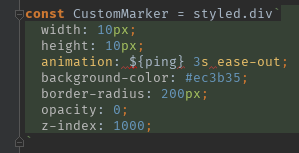
@cdharris this is great but it still does not solve the problem correctly parsing JavaScript interpolations
zaunermax
on 7 Jun 2017
And style lint doesn't work inside :(
 kusmierz
on 8 Jun 2017
kusmierz
on 8 Jun 2017
@cdharris thank you! At least with your injection we don't have to add the language comment -- back to the functionality we had before it was broken with WS 2017.
hadfieldn
on 8 Jun 2017
I hop an official plugin is released for styled components. I really need them.
 ImanMh
on 9 Jul 2017
ImanMh
on 9 Jul 2017
@cdharris seems language=PostCSS would be a bit better than language=SCSS: it supports injection like margin: ${props => props.margin};
(but not ${"margin: 0;"})
 lixiaoyan
on 9 Jul 2017
lixiaoyan
on 9 Jul 2017
added support for injectGlobal and extend:
+ jsLiteralExpression().and(jsArgument("styled", 0))
+ jsLiteralExpression().withParent(psiElement().withParent(psiElement().withText(string().startsWith("Styled"))))
+ jsLiteralExpression().withParent(psiElement().withText(string().contains(".extend")))
+ jsLiteralExpression().withParent(psiElement().withText(string().startsWith("injectGlobal")))
+ jsLiteralExpression().withParent(psiElement().withText(string().startsWith("styled")))
 danikenan
on 14 Aug 2017
danikenan
on 14 Aug 2017
I will implement this if I get enough upvotes :P
 daedlock
on 29 Aug 2017
daedlock
on 29 Aug 2017
Please, not a notification-storm of "+1" posts, upvote with the thumb on @daedlock post.
 MathieuLorber
on 29 Aug 2017
MathieuLorber
on 29 Aug 2017
I feel like the 107 upvotes on the OP speak for themselves :wink:
 mxstbr
on 29 Aug 2017
mxstbr
on 29 Aug 2017
I’m locking this issue — Just in case — Since there is not a lot to be discussed here anymore. However, if someone decides to implement this and push a repo on GitHub, we’re happy to move it into our org of course. :smile:
Edit just for @geelen :heart: You got to hustle hard for them to hear y'all's wishes 😆

 kitten
on 29 Aug 2017
kitten
on 29 Aug 2017
Us webstorm users:

geelen
on 29 Aug 2017
@daedlock has started working on a Webstorm plugin and is already quite far based on previous suggestions in this thread: https://github.com/styled-components/webstorm-styled-components :tada:
Please try it out and contribute to it, it'd be awesome to finally have an officially recommended solution for Webstorm users.
mxstbr
on 30 Aug 2017
There's finally an official WebStorm plugin, partly built by @daedlock and partly built by JetBrains employees!!
Go use it, star it, recommend it: https://plugins.jetbrains.com/plugin/9997-styled-components
Also give the repo a star on GitHub while you're at it: https://github.com/styled-components/webstorm-styled-components
I'm going to unlock and close this issue, feels so great :tada:
mxstbr
on 8 Sep 2017
Plugin worked for me! Now on to the next part: support for Stylelint.
I've tried to set this up with the native Stylelint package but I can't select files .js files as the files to lint.
Anyone has any ideas on this? 😄
 daviddelusenet
on 12 Jan 2018
daviddelusenet
on 12 Jan 2018
Please submit a new issue, no need to notify everybody who participated in this one of your individual troubles.
mxstbr
on 12 Jan 2018
Related issues
mxstbr
·
67Comments
 siddharthkp
·
48Comments
siddharthkp
·
48Comments
 JrmKrb
·
43Comments
JrmKrb
·
43Comments
 wmdmark
·
43Comments
wmdmark
·
43Comments
 ticky
·
56Comments
ticky
·
56Comments
Most helpful comment
Is someone working on a plugin for WebStorm/PhpStorm? If not, I'll have a stab at it.