Styled-components: Dynamic style change causes custom fonts to be re-requested from the server
I couldn't tell if this has anything to do with #1576, but it seems like potentially its own issue. I don't have @media rules, but I do have @font-face rules.
System:
- OS: macOS High Sierra 10.13.3
- CPU: x64 Intel(R) Core(TM) i5-4278U CPU @ 2.60GHz
- Free Memory: 220.39 MB
- Total Memory: 8.00 GB
Shell: /bin/bash - 3.2.57
Binaries:
Node: 6.10.3
- Yarn: 1.5.1
- npm: 5.7.1
- Watchman: 4.9.0
npmPackages:
styled-components:
- wanted: ^3.2.1
- installed: 3.2.1
Reproduction
I have a style that includes:
background: ${props => (props.checked ? '#000' : 'transparent')};
and my global styles look like:
injectGlobal`
  @font-face {
    /* Normal font-face declaration... */
  }
  body {
    font-face: 'Sofia Pro', sans-serif;
  }
`
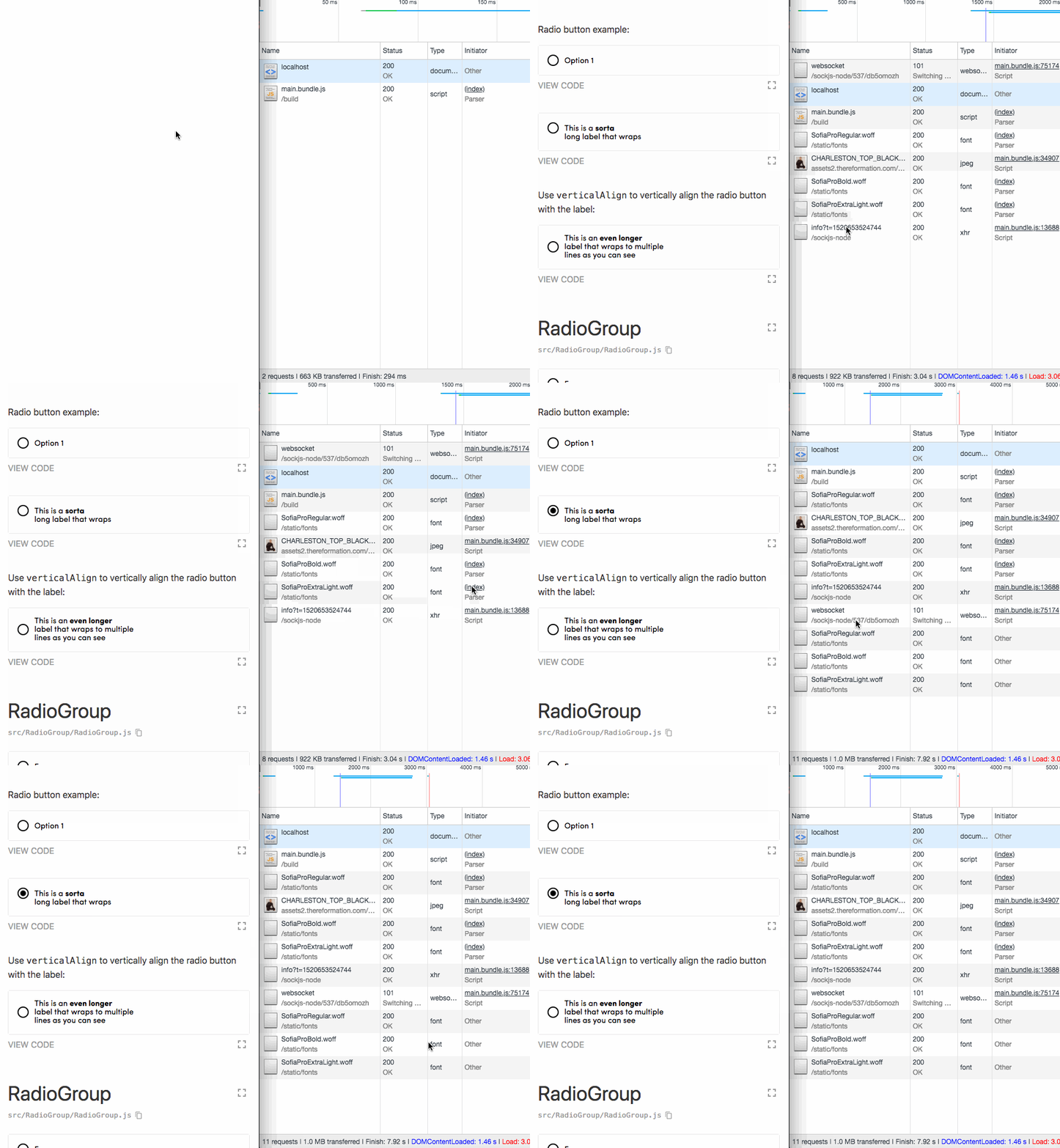
When the checked prop changes, it causes the fonts in question to be re-requested unnecessarily. I assume something about the selector dynamically changing is causing the browser to touch/replace the injectGlobal rules for some reason.
I confirmed this doesn't happen with styled-components 3.1.x.
(Nothing about the dynamic style references fonts or anything like that, so it's not that a previously-unused :focus or :active or :checked rule is suddently applying.)
Here's a GIF:
 exogen
All 60 comments
@exogen Hiya Brian 😁
It actually might totally be related. I'll have to check whether stylis' fix helps here. That is on the way for another patch btw.
Can you add some code snippets to our codesandbox sample (or another sample / template / site that you prefer), so I can take a quick look and check it against the CSS that it generates and potential fixes regarding #1576 please?
 kitten
on 10 Mar 2018
kitten
on 10 Mar 2018
Here's a repro (using @import instead of @font-face, same thing happens.)
https://codesandbox.io/s/7kqvxrp410
Open the Network tab, then click the black Bar. You should see the Karma font get requested again. Doesn't seem to happen every single time, just most of the time.
exogen
on 10 Mar 2018
@exogen I do indeed see the bug, but I can't reproduce it with 3.2.1, so I suspect it's a problem of the stylesheet being reevaluated in development because of the global styles not being extracted.
In 3.2.1 we are now separating the @import rules into separate style tags, so it should never occur there.
But overall, this shouldn't happen in production mode with speedy, as using insertRule the stylesheet is not completely reevaluated. It might also be a problem with Chrome, since a cached CSS/font should never be downloaded again.
Can you confirm that 3.2.1 doesn't trigger problems in the CodeSandbox please? And can you check whether this is a problem in dev-mode only?
Regarding, font-face, worst case we'll have to extract those rules as well, but I'd like to keep things as is for now, if we can.
kitten
on 10 Mar 2018
@kitten OK, I changed it to use @font-face and 3.2.1 (didn't realize the sandbox I forked was using 3.2.0).
Same URL: https://codesandbox.io/s/7kqvxrp410
Still see it there in both FF and Chrome. You may need to reload the little sandbox browser before it kicks in, I have no idea why it sometimes doesn't trigger on first load.
I'm not seeing it when using a production build.
exogen
on 10 Mar 2018
I should note that the reason I originally noticed this wasn't the network request directly, but rather the FOIT caused by the font reloading, which caused everything to disappear for a second. This made me think I had a bug/was doing something very wrong (like causing a component to unmount or something).
exogen
on 11 Mar 2018
@exogen For me it seems to disappear with @import, which makes a lot of sense; Like I said, since 3.2.1 we're moving @import rules to a separate style tag / stylesheet. This means that it won't be affected by changing sheets at all and can always appear at the beginning of a stylesheet.
It seems that @font-face needs a similar workaround to prevent reloading fonts accidentally in dev. The problem is that we still have to enforce it to come after @import rules. So it won't be as simple as moving font-face-rules to that separate style tag as well. 😞
I'll have to think about how to solve this well for a while, but it's definitely not something I'll break my back over as it doesn't occur in production mode 😅
Edit: For reference https://github.com/styled-components/styled-components/pull/1577
kitten
on 11 Mar 2018
In my case, i am not using @import but met same issue.
while I've set my @font-face rules with injectGlobal, some non-global styles used from components are combined into same <style data-styled-components> tags.
So when i changed first time on some props like <OtherStyledComponent show={true}>
some conditional styles are loaded into <style> tag, and re-calculate whole styles in that tag, including @font-face.
 FourwingsY
on 20 Mar 2018
FourwingsY
on 20 Mar 2018
Issue still happening to me on 3.2.5, its rather annoying to dev with a flickering screen. When I touch inputs, tabs etc it blinks. Any component that changes state/style on focus really.
 MrOpperman
on 11 Apr 2018
MrOpperman
on 11 Apr 2018
@MrOpperman the best solution right now is to just use at-import or a style/link tag separate from styled-components unfortunately
kitten
on 11 Apr 2018
injectGlobal is the way. I’m curious why it isn’t working for you...
perhaps an issue with the path to the font file? I use it at work and it
functions as expected. Would it help if I show some code?
 probablyup
on 12 May 2018
probablyup
on 12 May 2018
@exogen is this still an issue for you in latest styled-components?
probablyup
on 21 Jun 2018
@probablyup I've upgraded the codesandbox test case and it still appears to be happening w/ [email protected]: https://codesandbox.io/s/7ynrwxk8p6
(when clicking on the black bar, much of the time I see it flash and the font re-requested)
exogen
on 21 Jun 2018
This is happening to me too, version 3.3.3. Can confirm via the network tab that fonts are being loaded a second time. Removing the custom ${props => ... } stops the behavior.
 RyanWarner
on 26 Jun 2018
RyanWarner
on 26 Jun 2018
Same here. Temporarily moved fonts code into css file.
 vadimshvetsov
on 29 Jun 2018
vadimshvetsov
on 29 Jun 2018
same here on 3.3.2
 bhellman1
on 10 Jul 2018
bhellman1
on 10 Jul 2018
While annoying, does this end up mattering? Since the fonts are cached by the browser after the first request, I'm not sure this matters.
probablyup
on 10 Jul 2018
It does matter since the browser will discard the fonts for a split second resulting in a font flicker. Depending on the amount of "styled lines / components" the flicker takes longer.
In a very bad case I noticed the flicker even messes with the position of some elements since their height/width are dependent on the font it's size.
 DJWassink
on 10 Jul 2018
DJWassink
on 10 Jul 2018
For now , just put font-face import in a css file and import it at the to of the app.
 yyynnn
on 18 Jul 2018
yyynnn
on 18 Jul 2018
Can confirm with v3.3.3 on OSX Chrome, Safari, Safari Technology Preview, not Firefox or Firefox Nightly.
My fix was to append a new stylesheet containing the font-face rules (this was easy as my font-face rules were already modularized and importable as a string) into the header while removing the rules from my injectGlobal. This solution works for me because my application does not make use of externally-dependent (.css, .scss, .sass) stylesheets.
import { FONTFACE_CIRCULAR } from 'app/styles/fonts';
const loadFonts = () => {
  const head = document.getElementsByTagName('head')[0];
  const style = document.createElement('style');
  style.innerHTML = FONTFACE_CIRCULAR;
  head.appendChild(style);
};

ReactDOM.render(<App />, document.getElementById('app'), loadFonts);
 will-holley
on 30 Jul 2018
will-holley
on 30 Jul 2018
I don't see this happening with the v4 beta: https://codesandbox.io/s/kk1y6k54jr
Going to close. If someone can come up with a v4 reproduction feel free to start a new ticket.
probablyup
on 18 Sep 2018
Seems like this is wrongly closed, im still seeing this issue in V4. @probablyup your example is using a url import, which seems to fix the problem, however if your font is local the problem, at least - for me persists.
 sami616
on 21 Oct 2018
sami616
on 21 Oct 2018
Try using font-display: fallback; in the font face rule. I've found it
helps.
On Sun, Oct 21, 2018, 1:58 PM Sami notifications@github.com wrote:
Seems like this is wrongly closed, im still seeing this issue in V4.
@probablyup https://github.com/probablyup your example is using a url
import, which seems to fix the problem, however if your font is local the
problem, at least - for me persists.—
You are receiving this because you were mentioned.
Reply to this email directly, view it on GitHub
https://github.com/styled-components/styled-components/issues/1593#issuecomment-431694526,
or mute the thread
https://github.com/notifications/unsubscribe-auth/AAiy1hKPTXs85cDDMaHMEqCxL_fimRJ4ks5unMPqgaJpZM4SlIaO
.
probablyup
on 21 Oct 2018
I can confirm that I still also see this exact issue in v4 after updating from v3, and font-display: fallback; does nothing for me. The workaround I'm using for now is putting the @font-face rules outside of styled-components entirely.
 Protectator
on 22 Oct 2018
Protectator
on 22 Oct 2018
I can confirm it's still an issue in the V4. The only way working for me is to import them from an external css file but not from styled-component. I'm using local fonts in my app like @sami616.
 DonovanCharpin
on 30 Oct 2018
DonovanCharpin
on 30 Oct 2018
Yes, it is still an issue in v4. font-display: fallback does not work. See also #400. /cc @probablyup
 danielbayerlein
on 31 Oct 2018
danielbayerlein
on 31 Oct 2018
Also having the issue (v3).
a separate import of fonts.css with font-face declarations fixed it for me.
 bel0v
on 31 Oct 2018
bel0v
on 31 Oct 2018
v4, still, fonts are re-requested inside createGlobalStyle e.g. when routes change
yyynnn
on 1 Nov 2018
This issue is still relevant, even with v4 createGlobalStyle.
 benhancockco
on 8 Nov 2018
benhancockco
on 8 Nov 2018
changing component state also re-rendering the font which is causing flicker in screen.
 jitenderchand1
on 13 Nov 2018
jitenderchand1
on 13 Nov 2018
Here (v4.0.3) the problem only seems to happen for fonts which are in a local folder. Fonts loaded from external resources do not load again. Furthermore it doesn't happen in dev mode, only on production mode.
 kpoelhekke
on 13 Nov 2018
kpoelhekke
on 13 Nov 2018
@kpoelhekke im also seeing this in dev mode.
sami616
on 13 Nov 2018
Hmm maybe the external fonts are getting something etag or cache control
set so the browser knows it doesn’t need to do anything.
On Tue, Nov 13, 2018 at 2:41 AM Sami notifications@github.com wrote:
@kpoelhekke https://github.com/kpoelhekke im also seeing this in dev
mode.—
You are receiving this because you modified the open/close state.Reply to this email directly, view it on GitHub
https://github.com/styled-components/styled-components/issues/1593#issuecomment-438182234,
or mute the thread
https://github.com/notifications/unsubscribe-auth/AAiy1t2pp3Pw2YqiRFkjaMKGbYscsCBiks5uuoWggaJpZM4SlIaO
.
probablyup
on 13 Nov 2018
is there any solution to this issue currently? use a css/scss file to import the font ?
 richardhsueh
on 26 Nov 2018
richardhsueh
on 26 Nov 2018
Yes @richardhsueh this is a work around
sami616
on 26 Nov 2018
has anyone checked to make sure the fonts are served with appropriate caching headers?
probablyup
on 28 Nov 2018
@probablyup I checked. Having actually cacheable headers (max-age>0) resolves this issue 💃
Is this problem only related to fonts? If yes then I guess it's not so important as it's rather natural to cache them (because why would you like to refresh them often anyway?) But if it also affects other css loading mechanisms (background-image: url()?) then this might be serious 😄
 sarneeh
on 11 Jan 2019
sarneeh
on 11 Jan 2019
@sarneeh This issue is affecting background-image: url() for me, weirdly only in Safari though...
 piersolenski
on 12 Jan 2019
piersolenski
on 12 Jan 2019
@superfunkminister I guess that if you'll set some cache headers on the background-image resources the issue will go away also. But still, this issue is kinda confusing 😕
sarneeh
on 12 Jan 2019
The reality is when the GlobalStyles component gets rerendered, the browser reparses the sheet and if the items being accessed in the styles rely on external files the caching headers are checked and redownloaded if outside the range. It's standard for how browsers work, just in typical CSS you aren't ever updating the styles since they're hardcoded.
probablyup
on 14 Jan 2019
@probablyup True. I guess the confusion is mostly caused by incomprehension about how styled-components work under the hood.
sarneeh
on 15 Jan 2019
I resorted to doing this in the end https://github.com/gatsbyjs/gatsby/issues/9826#issuecomment-442303407
piersolenski
on 15 Jan 2019
Maybe, we should make something like createStaticStyle for things that never change like global fonts? I know that pure CSS is static enough, but if you use webpack you have to install style-loader for a couple of fonts
 Fxlr8
on 28 Mar 2019
Fxlr8
on 28 Mar 2019
I'm running into this issue and something like createStaticStyle would be really useful for me
 lewisflude
on 29 Mar 2019
lewisflude
on 29 Mar 2019
Here (
v4.0.3) the problem only seems to happen for fonts which are in a local folder. Fonts loaded from external resources do not load again. Furthermore it doesn't happen in dev mode, only on production mode.
No, it is actual for development mode too
 WebTravel
on 12 Apr 2019
WebTravel
on 12 Apr 2019
@probablyup and @sarneeh are right, it has more to do with caching headers than with styled-components. I'm working with server-side rendering and noticed the Cache-Control header for static files was set to no-cache, which caused fonts to be downloaded again when the GlobalStyle component was re-rendered.
In express, this is what did the trick for me
server
-  .use(express.static(PUBLIC_DIR))
+  .use(express.static(PUBLIC_DIR, { maxage: '356d' }))
and voilà, no more font flickering even when transitioning between routes
 vspedr
on 24 Apr 2019
vspedr
on 24 Apr 2019
@vspedr how would you do this in something like Gatsby?
 joebentaylor
on 29 Apr 2019
joebentaylor
on 29 Apr 2019

Here's a CodeSandbox demo 👀
 peduarte
on 29 Apr 2019
peduarte
on 29 Apr 2019
@joebentaylor It's nothing to do with Gatsby. You may experience in during gatsby develop due to the dev server having cache headers having cache disabled. If you want to change that you need to change the config of the webpack dev server being used.
If you do gatsby build and then gatsby serve it will serve production version which does have cache enabled. Otherwise serve the site via any webserver, such as Netlify, nginx, etc.
 polarathene
on 29 Apr 2019
polarathene
on 29 Apr 2019
Have the same issue in background-image: url() mechanism in route change(nested routes A,B with same parent layout, this layout have the background). But the background-image second request is only in the first navigation from A->B or viceverse; in the second navigation the re-request is not made.
 jvarahuayta
on 22 May 2019
jvarahuayta
on 22 May 2019
Im having the same issue. Im using nextjs with styled components and I have set background-image and font in body using
This is all in production env. When in dev env everything works as it should.
 PTBKoo
on 22 May 2019
PTBKoo
on 22 May 2019
Going to close this as the solution has been identified several times in this thread. Set your caching headers appropriately.
probablyup
on 23 May 2019
I found that this issues caused by appending style dynamically.
Could we use a new style tag for appending dynamic styles?
 uptown
on 29 May 2019
uptown
on 29 May 2019
For developers who are suffering from this, this snippet solved my problem.
export const SomeComponent= styled.div.attrs({
  style: {
    backgroundImage: `url(${imageUrl})`,
  },
})`
// css
`;
For developers who are suffering from this, this snippet solved my problem.
export const SomeComponent= styled.div.attrs({
  style: {
    backgroundImage: `url(${imageUrl})`,
  },
})`
// css
`;
Same. When I apply the style for inmediate child the re-request is not made.
jvarahuayta
on 29 May 2019
@uptown @jvarahuayta When using dynamic props, the related CSS is duplicated to represent the new variation, this creates a new CSS class and is appended to the DOM. The browser will notice that and request the URL.
If the URL has not changed, the only reason for a request to go through and download again is if you have not set the appropriate cache headers, this is common when developing as you want immediate updates to content that changes, if you don't want that, you can configure your server(like webpack-devserver) to set cache headers for your requests responses, but if your content is cached for a long time, you might think you have a bug when the same request does not return the new version of your content, you'll need to invalidate/clear the cache as a result. You'll still see a request made when you have cache headers, but the request is cached, so no extra bandwidth by downloading again(good for production deploy).
The snippet you have shared, has moved the URL to an inline style directly on the element. So as long as it does not change, no new request will be made. The remaining CSS will create a class and append a new style tag in the head. If you have other dynamic props there, they will still do as described and duplicate the CSS, just not the inline styles.
You should still experience the "problem" if the URL changes, and then changes back to what it was before, or anything else that'd reapply the URL. The actual issue you're likely experiencing is as mentioned above, you don't have cache headers during development setup, it's not going to be a problem in production.
polarathene
on 29 May 2019
@polarathene
First of all, our server already has cache header for static files and the files are supplied with CDN. So in our real env, we don't suffer with refreshing images even though the browser attempts getting the images from its hard disk or memory (or 304 response)
However, the cause of this problem is styled-component continuously appends new rules in the same <style> tag that already contains a lot of css defines of other components. It means the browser may calculate style tag's contents again and again.
Therefore, I suggest that appending new rules to new style tags OR giving a new style tags for each component with dynamic rules.
You can say we can bypass the problem with setting cache header, but still the cause is not solved and there is a possibility that this problem causes other problem in the future.
uptown
on 30 May 2019
@uptown that's unfortunately not the whole picture of the problem. CSSOM is inherently a little quirky but it is fast because the browser doesn't reparse all CSS in the tag. Now, this doesn't apply to development since there we fall back to using TextNodes. But since we regard this as a fallback, this is acceptable because the performance and experience is already degraded.
Now, with insertRule there's a specific quirk where inserting any rule can retrigger some assets to be reloaded even when an entirely unrelated rule hasn't changed.
The problem is that this can apply to all assets. So even if we work around this for font-face and import at-rules, which should maybe even be handled in actual CSS files in the first place, there are still other assets that might be affected.
So in summary, this looks like a bigger issue than it is in development, and in production it only happens rarely, especially with cache headers and requires an unreasonable amount of complexity to be fixed for all edge cases.
Edit: Reading through some comments here and some of this is also related to the use of GlobalStyle. It's worth saying that GlobalStyle is an escape hatch and that keeping global styles outside of styled-components or CSS-in-JS is often desirable, especially for caching in general.
kitten
on 30 May 2019
@uptown I said cache headers prevents some of the issue, if you were concerned about additional requests, which is what this issue is citing. When assets are properly cached, any additional requests for it will use that. So no extra request to the server or bandwidth used.
Regarding the other point you make about appending style tags, I touched on that too in my last comment. Any dynamic prop change (at least one that result in a prior combination), duplicates the CSS with the prop(s) changed and assigned to a new class for that variation of dynamic props.
I already raised an issue about wanting a way to reduce this overhead, but the maintainers are against it. For me, 5 images containing 20 icons each and a boolean state toggle prop results in 200 classes(lot of CSS duplicated).
If your style is changing frequently, move those frequent props into attrs() as inline styles, here's a related issue that shows how a colour picker component has performance issues by adjusting the colour prop via a slider. No issues once they move that colour prop to an inline style.
polarathene
on 31 May 2019
why this issue is closed if the problem still exists with the latest version of styled-components? There are to many comments and people I guess who are struggling with this issue so it should be re-opened. What is the official statement of styled-components' contributors to this thread? Do they want to fix it or know what is causing this problem, because more people who encountered this issue want to find a solution rather than contributors imo.
 karolinakuzniewicz
on 5 Jul 2019
karolinakuzniewicz
on 5 Jul 2019
@karolinakuzniewicz this issue specifically is a trade-off between maintaining a lot of complexity and multiple style tags on our end, or creating some documentation on the issue and making people aware of it. That’s it on the technical level.
Now, the decision so far has been to not pursue the former, technical solution (anymore)
There’s a couple of statements from me and @probablyup here on this already. Unfortunately on a scale of this repository, the amount of comments doesn’t always amount to a necessity to address an issue. In this case, there’s a clear fix outside of our control, which are caching headers, and potentially, browser behaviour. The fix on our end involves an unreasonable feature that extracts font and import rules into a different style tag completely.
This doesn’t even solve the issue. Instead it works around this. Even if we extract these two types of at rules it’ll still cause this behaviour if the user doesn’t have any caching headers set up. This also seems to happen for any resource, even images. Those kinds of rules we just can’t extract at all.
This all lead us to the conclusion that we should drop any kind of special behaviour and just make people aware of it.
Now, as far as I know, there’s no documentation for this yet, but I’m happy to review some PRs for those, as I don’t have time unfortunately to write such a section myself.
So I hope this makes sense and clarifies this issue. I’d be happy to talk about this more on DMs on Twitter, or anything else. New issues can also be opened if anyone needs some specific help on fixing this in their projects.
I’ll lock this issue for now, as this is related to browser behaviour and has known workarounds now. Please open new issues or reach out on Spectrum or Twitter for specific questions :) always happy to help!
kitten
on 5 Jul 2019
Related issues
 JrmKrb
·
43Comments
JrmKrb
·
43Comments
 cloud-walker
·
44Comments
cloud-walker
·
44Comments
 brad-decker
·
66Comments
brad-decker
·
66Comments
 rtymchyk
·
42Comments
rtymchyk
·
42Comments
 mxstbr
·
67Comments
mxstbr
·
67Comments
Most helpful comment
It does matter since the browser will discard the fonts for a split second resulting in a font flicker. Depending on the amount of "styled lines / components" the flicker takes longer.
In a very bad case I noticed the flicker even messes with the position of some elements since their height/width are dependent on the font it's size.