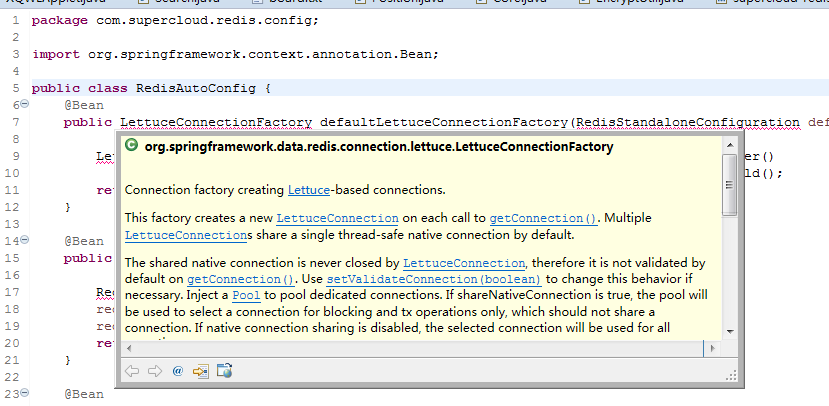
Checked Preferences -> Java -> Editor -> Hovers -> Combined Hover, but not show the problem description.
STS Version: 4.6.2.RELEASE

 stephenlam520
All 10 comments
Hey @stephenlam520, I tried a sample code snippet with an error and hovering over the error shows the error description just fine in my STS 4.6.2 install, so I am not exactly sure what is not working on your end (and why). Can you provide a sample project and a few steps how to reproduce this?
 martinlippert
on 29 May 2020
martinlippert
on 29 May 2020
Hey @stephenlam520, I tried a sample code snippet with an error and hovering over the error shows the error description just fine in my STS 4.6.2 install, so I am not exactly sure what is not working on your end (and why). Can you provide a sample project and a few steps how to reproduce this?
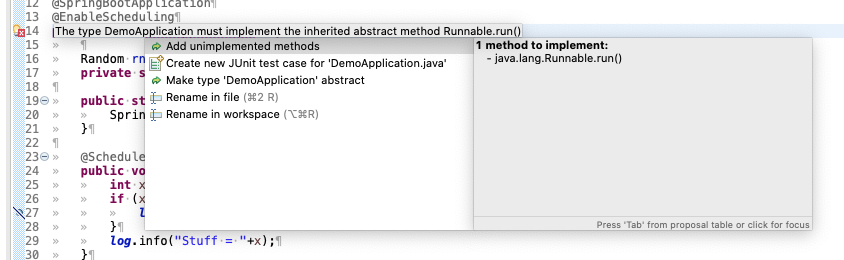
@martinlippert I am seeing this exact issue too. In 4.6.2, "Combined Hover" is checked and Problem Description is unchecked. If I hover over an error as shown in the screenshot, the quick fixes are not available and it doesn't let me check the problem description without setting a modifier key. If I uncheck Combined Hover and check Problem Description, then the quick fixes are shown, but then it disables a bunch of other hover stuff.
I rolled back to 4.6.1 and that fixed the issue, so some issue with 4.6.2. I am on Windows 10 Pro x64 (build 2004). I tried installing 4.6.2 both through Software Updates as well as wiping my STS folder and downloading a fresh copy.
It's not related to anything in the workspace or project, as a brand new project has the same issue.
 SledgeHammer01
on 31 May 2020
SledgeHammer01
on 31 May 2020
Hi, having same issue as @stephenlam520 and @SledgeHammer01. STS 4.6.2 broke Eclipse hover as quick fix for errors is not showed. I have the exact same configuration, but running Eclipse under Ubuntu 2020-04. Tested on two different machines, with same result. Removing STS 4.6.2 fixed the issue.
 cmagroup
on 1 Jun 2020
cmagroup
on 1 Jun 2020
@martinlippert Is there a temporary solution?
stephenlam520
on 1 Jun 2020
Yes, indeed something is broken as quickfixes not shown in the hover.
The workaround would be click the error marker in the gutter ruler area and it'd show the quick fixes:
 BoykoAlex
on 1 Jun 2020
BoykoAlex
on 1 Jun 2020
Looks like LS Hover provider overrides the JDT hover providers as downstream hover providers take precedence over up stream ones.
Therefore instead of the ProblemHover the LSJavaHoverProvider is showing its stuff...
Looks like previously if LS hover content is empty an empty hover was returned and hence other JDT hover provider would return something thus the problem wasn't as visible.
Maybe try removing org.eclipse.lsp4e.jdt plugin from the plugins folder or disable it somehow for now until we fix this...
BoykoAlex
on 1 Jun 2020
Here is Eclipse side issue: https://bugs.eclipse.org/bugs/show_bug.cgi?id=563802
BoykoAlex
on 1 Jun 2020
@BoykoAlex Thanks.
stephenlam520
on 2 Jun 2020
Alex worked on a fix for this, which is already committed to the Eclipse project. Now we are waiting for the various CI builds to finish. Then you could use the nightly CI update site for Spring Tools 4 for Eclipse to get that fix asap (in case you don't want to wait for the next release, which ships late in June).
martinlippert
on 2 Jun 2020
Just in case here is the STS4 nightly update site: https://dist.springsource.com/snapshot/TOOLS/sts4-language-server-integrations/nightly
(just tried to install STS4 LS Integration for Eclipse and it works now)
BoykoAlex
on 2 Jun 2020
Related issues
 imod
·
11Comments
imod
·
11Comments
 Samet-MohamedAmin
·
6Comments
Samet-MohamedAmin
·
6Comments
 drnic
·
8Comments
drnic
·
8Comments
 shua
·
6Comments
shua
·
6Comments
 tkupka
·
11Comments
tkupka
·
11Comments
Most helpful comment
@martinlippert I am seeing this exact issue too. In 4.6.2, "Combined Hover" is checked and Problem Description is unchecked. If I hover over an error as shown in the screenshot, the quick fixes are not available and it doesn't let me check the problem description without setting a modifier key. If I uncheck Combined Hover and check Problem Description, then the quick fixes are shown, but then it disables a bunch of other hover stuff.
I rolled back to 4.6.1 and that fixed the issue, so some issue with 4.6.2. I am on Windows 10 Pro x64 (build 2004). I tried installing 4.6.2 both through Software Updates as well as wiping my STS folder and downloading a fresh copy.
It's not related to anything in the workspace or project, as a brand new project has the same issue.