Sts4: codeassit/autocompletion not working
I migrated workspace with about 30 projects and 4 SpringBoot apps to sts4. The build runs fine and the apps also start without any issue.
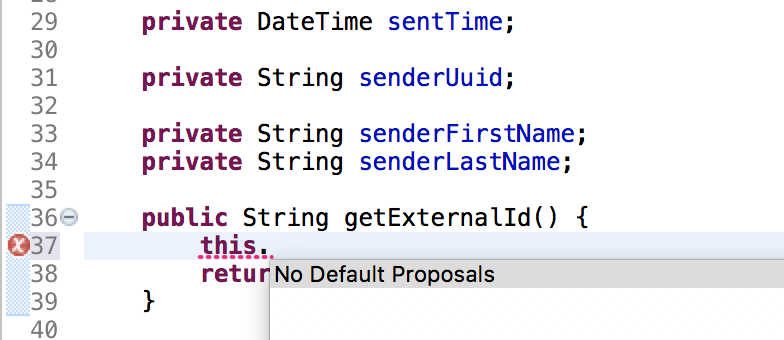
But unfortunate the is no code assist in any of the classes, please see this screenshot:
 imod
imod
All 11 comments
That looks bad indeed. Did you check the preferences for content-assist to see if maybe something got disabled (for whatever strange reason)?
If everything looks fine on the preferences side for content-assist, than it would be nice if you could attach a sample project (if possible) that reproduces the issue. Did you try a fresh simple Java project, too? Does content-assist work there?
 martinlippert
on 26 Sep 2018
martinlippert
on 26 Sep 2018
I got this problem also. Download STS 3 and it works very well.
 huyng1147
on 26 Sep 2018
huyng1147
on 26 Sep 2018
@huyng1147 can you take a look at my previous comment and provide more details? I would love to hear about the preference settings, for example.
martinlippert
on 26 Sep 2018
Same here, settings are the default ones:
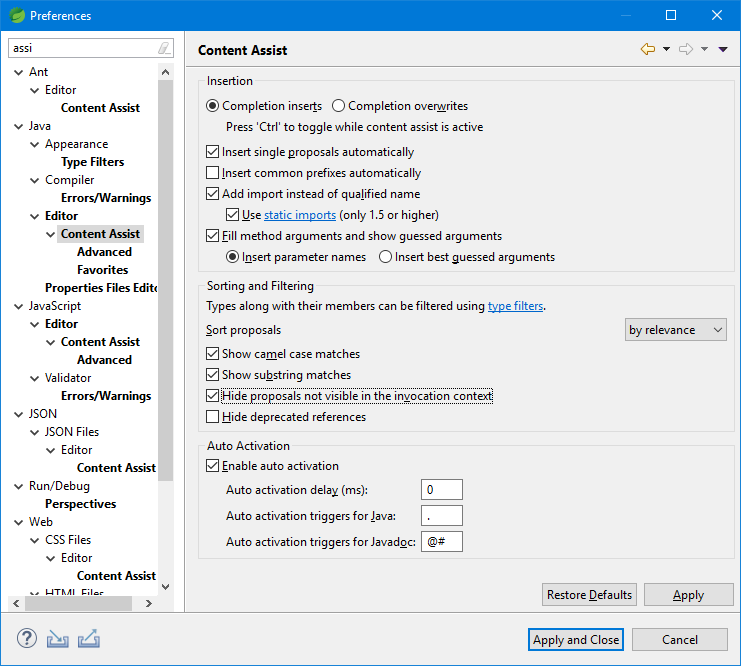
In my case, workspace was imported from STS 3.9.4.
 ncarnevali
on 26 Sep 2018
ncarnevali
on 26 Sep 2018
Update on my previous comment.
I tried to delete .metadata and .recommenders from workspace's folder and then I restarted STS.
Now it works, content assist is back, so maybe it's related to the migration of the workspace from previous versions of STS
ncarnevali
on 26 Sep 2018
I did use workspace of sts 3.9.6 for sts 4.0. Maybe that is the reason.
huyng1147
on 26 Sep 2018
Now it works, content assist is back, so maybe it's related to the migration of the workspace from previous versions of STS
Yes, that is most likely. I would guess this is a problem caused by Eclipse platform workspace metadata migration from Eclipe < 4.9 to Eclipse 4.9.
Deleting the right bits of metadata as @ncarnevali suggested can force Eclipse to reset the settings to their defaults. You could also try to do this from the preference pages. Besides the page in @ncarnevali 's screenshot above, also visit the 'Advanced' page below that (that is where individual completion providers are listed, configured and enabled/disabled). Reset these to default.
I'd be a little careful about deleting metadata from the filesystem as its possible to damage your workspace, so I'd try resetting from the preference page first and see if that works.
If all else fails, I'd recommend you simply start with a fresh clean workspace and re-import your old projects into the new workspace (its a bit of a drag if you have many projects, but it is really the only surefire way to make sure you aren't dragging along old / broken workspace settings from older version of Eclipse platform.)
 kdvolder
on 26 Sep 2018
kdvolder
on 26 Sep 2018
Same problem here.
Scenario: Spring Tools 4 with a workspace migrated from Eclipse Photon
Tried ./SpringToolSuite4 -clean and the problem remained.
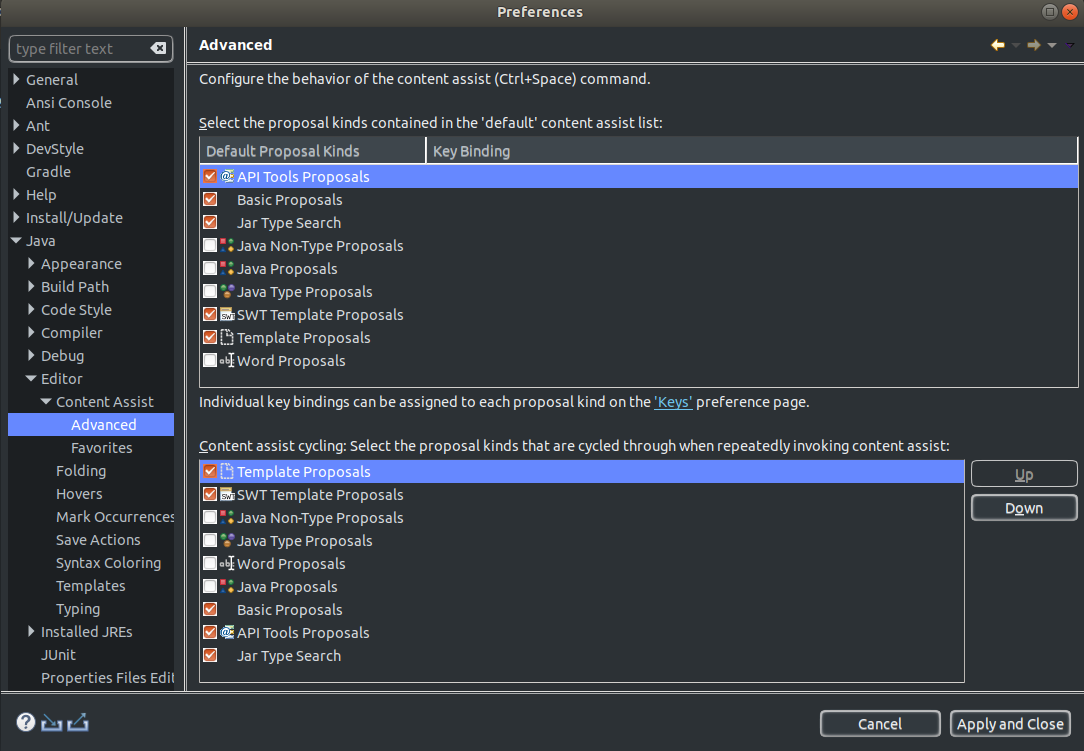
Fix: Using @kdvolder and @ncarnevali advices, went to Preferences -> Java -> Editor -> Content Assist -> Advanced, and enabled:
- Java Proposals
- Java Type Proposals
Then hit Apply... and it worked.
Thanks a lot @kdvolder
 vvalencia-cl
on 26 Sep 2018
vvalencia-cl
on 26 Sep 2018
enabling
- Java Proposals
- Java Type Proposals
fixed it for me too - thanks @vvalencia-cl
not sure you want to keep this issue open or document it (or just point people here)...
imod
on 28 Sep 2018
For the record - I had this same issue after migrating from STS 3.something to 4.
Checked the settings and sure enough Java Proposals and Java Type Proposals had mysteriously been deselected. Thanks @vvalencia-cl.
 matthewlowry
on 27 Mar 2019
matthewlowry
on 27 Mar 2019
I think we found the reason for that a while ago (and forgot to mention it here): The Eclipse Code Recommenders feature was installed by default in the STS3 distributions. This feature replaced the regular Java content-assist processors with other ones. To be more exact, the feature disabled the regular Java content-assist processors and installed/enabled others.
STS4 (and newer versions of STS3) come without the Eclipse Code Recommenders feature. That means when you open an old workspace, this workspace still has the regular Java content-assist processors disabled (in the settings), but the other ones, the new ones from Code Recommenders, are not there. Therefore, no Java content-assist is showing up.
When invoking Java content-assist for the first time after you opened the workspace with a newer version, there is an error message from the Java tooling showing up, telling the user that the regular Java content-assist is disabled without any replacement and that the user can re-enable that by going to the preferences and resetting those for the content-assist processors. There is a direct link to that preference page included in that error message.
In case you missed that error message dialog or you didn't yet reset the preferences, you can do that by going to the preferences for content-assist and reset those or re-enable the JDT content-assist processors.
martinlippert
on 27 Mar 2019
Related issues
 Samet-MohamedAmin
·
6Comments
Samet-MohamedAmin
·
6Comments
 khe817
·
11Comments
khe817
·
11Comments
 dsyer
·
7Comments
dsyer
·
7Comments
 evowilliamson
·
14Comments
evowilliamson
·
14Comments
 tjstuart
·
10Comments
tjstuart
·
10Comments
Most helpful comment
Same problem here.
Scenario: Spring Tools 4 with a workspace migrated from Eclipse Photon
Tried
./SpringToolSuite4 -cleanand the problem remained.Fix: Using @kdvolder and @ncarnevali advices, went to Preferences -> Java -> Editor -> Content Assist -> Advanced, and enabled:
Then hit Apply... and it worked.
Thanks a lot @kdvolder