Sts4: [Bug,Help] java-code-completion conflicts to vs code code suggestion,maybe a bug
Since few days ago(2019-01-25),vs code intellicode does not work nomarlly in java files,i must trigger it using keyboard shorcut.
Finally, find that Spring Boot Tools java-code-completion causes that, it works well after i disabled Spring Boot Tools or remove the config (activationEvents : onLanguage:java) in package.json.
How could i disable java-code-completion or there is other ways.
My English is not good!
Thanks!
 ghost
ghost
All 25 comments
Same here.
- Spring extension version: 1.3.0
- VSCode Version: 1.30.2
- OS Version: Win 10 Ent.
Steps to Reproduce:
- Open a Java project, input "S"
- Completion items are supposed to appear, but not.
- If I press ctrl + space to manually trigger suggest, the completion items appear.
- backspace sometimes can also trigger the suggest.
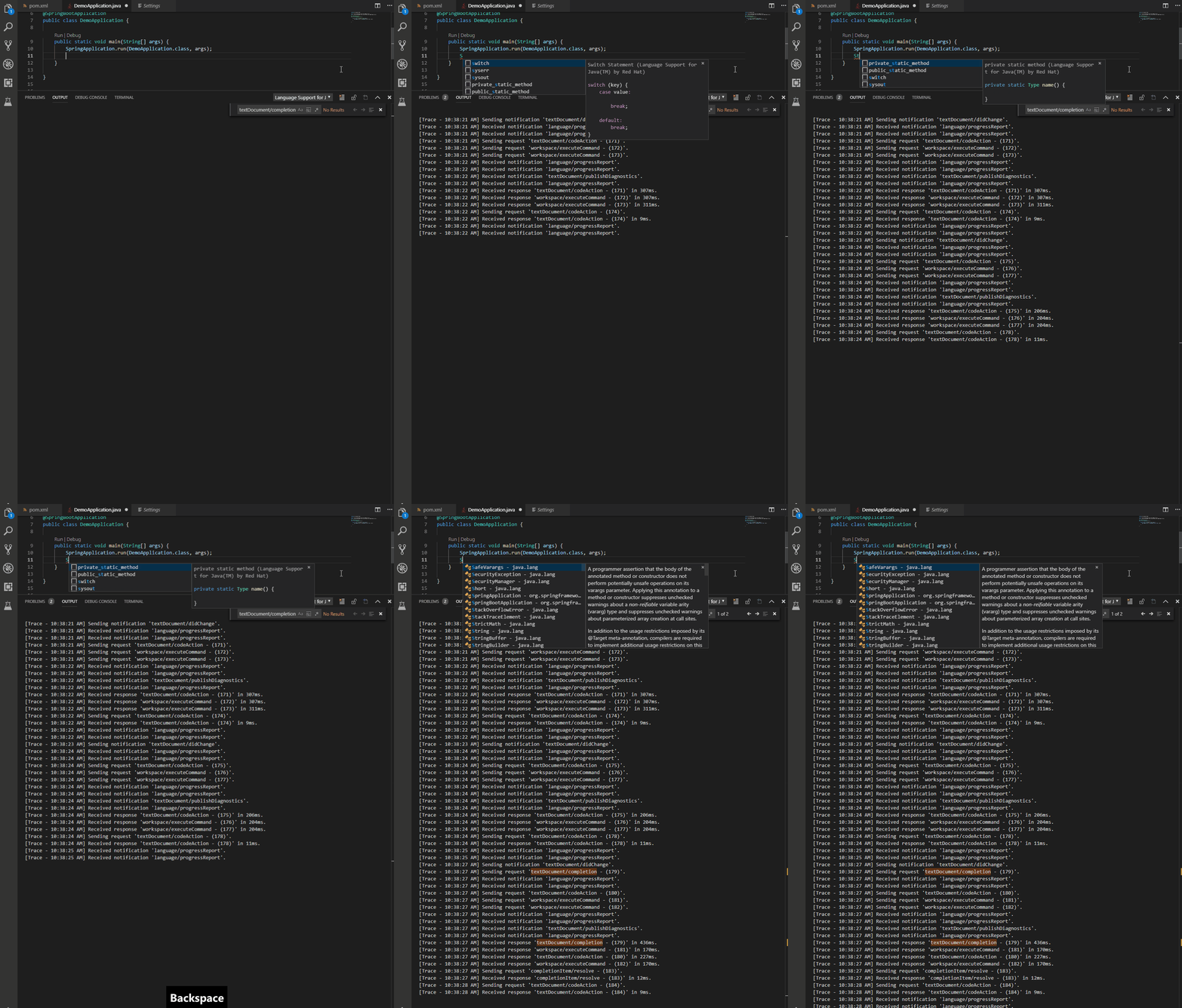
See the GIF for details:
- Input "S", no completion request sent.
- Input "t", no completion request sent.
- Backspace, a completion request is sent.
Note
- VS Code Insider also works well, following is a comparison of the LSP request/response, left side is 1.30.2, right side is 1.31.0-insider. You can see 1.30.2 doesn't send
textDocument/completionrequest.

 Eskibear
on 31 Jan 2019
Eskibear
on 31 Jan 2019
When I install 1.2.0 back, it works. So I believe it should be introduced in 1.3.0
Eskibear
on 31 Jan 2019
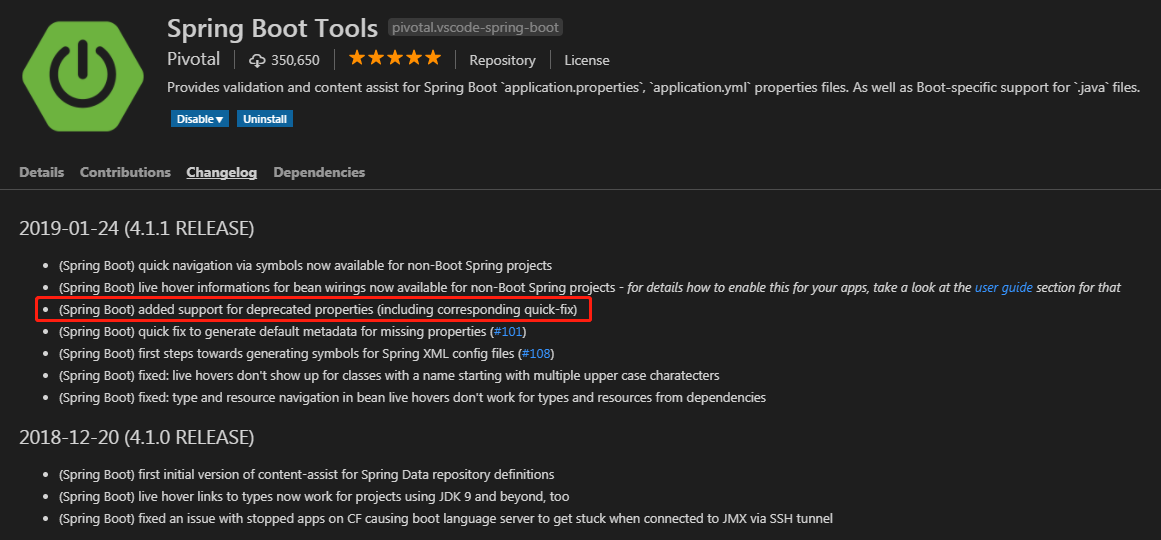
It occurs because of the new version "(Spring Boot) added support for deprecated properties (including corresponding quick-fix)"
I have temporarily handled it by modifying the config in "extensions\pivotal.vscode-spring-boot-1.3.0\packge.json" : remove
"activationEvents" : [ "onLanguage:java" ]
See the changelog:
ghost
on 31 Jan 2019
It occurs because of the new version "(Spring Boot) added support for deprecated properties (including corresponding quick-fix)"
I have temporarily handled it by modifying the config in "extensions\pivotal.vscode-spring-boot-1.3.0\packge.json" : remove
"activationEvents" : [ "onLanguage:java" ]See the changelog:
it works bro,this bug bothered me allday,THX.
 CodingWasaby
on 31 Jan 2019
CodingWasaby
on 31 Jan 2019
and this bug still reappeared after u open .properties or .yml once -_-!
CodingWasaby
on 31 Jan 2019
and this bug still reappeared after u open .properties or .yml once -_-!
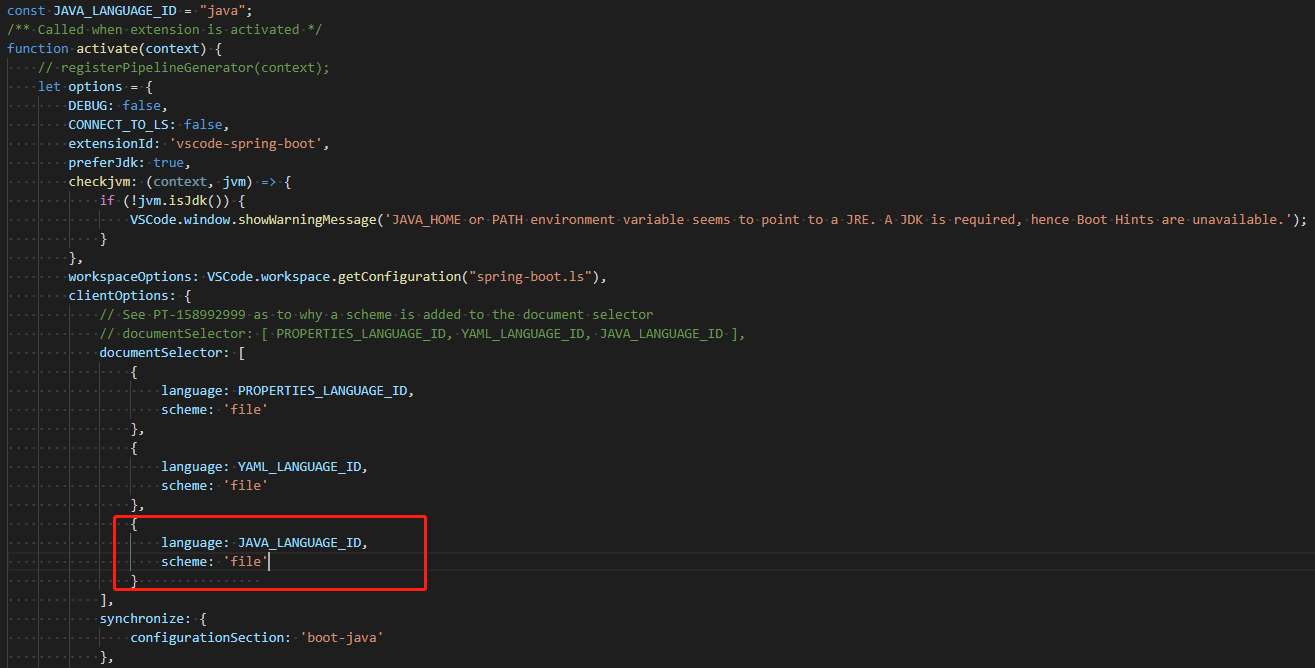
I removed java documentSelector in out/lib/main.js,it seems to work.
See and like this:
ghost
on 31 Jan 2019
I think it's rather because of the completion trigger characters being set for JAVA docs and Boot properties docs... we should find a way to set them for Boot Properties docs only.
 BoykoAlex
on 31 Jan 2019
BoykoAlex
on 31 Jan 2019
we should find a way to set them for Boot Properties docs only.
I fear it is not possible, or at least not easy, because this is configured via server capabilities and it is a single setting that applies for the language server as a whole. It isn't possible to configure this on a per-language basis for a server that handles multiple languages, at least not as the LSP protocol is currently designed. I could be wrong about this, but that's what I remember.
That being said, the trigger characters we set are all of the alphabet in upper and lower case and the '.' character. See: https://github.com/spring-projects/sts4/blob/9039a54b2f8e421192d60b0eb3a6d3cca2f92d08/headless-services/spring-boot-language-server/src/main/resources/application.yml#L3
So logically speaking this shouldn't cause a problem for Java. It should trigger completions on typing letters like 'S' or 't' if the trigger characters we configured are being obeyed.
 kdvolder
on 31 Jan 2019
kdvolder
on 31 Jan 2019
Maybe I'm wrong indeed... perhaps it's something else...
BoykoAlex
on 31 Jan 2019
@BoykoAlex I didn't say you are wrong. It does seem plausible to me that the change in trigger characters (we didn't specify these before) somehow has something to do with it. But perhaps its a bug in how the trigger characters are being interpreted by vscode, or vscode language server client. The trigger characters seem to work fine in the context of application.yml file. But in the Java case I guess there are two language servers contributing completions (RedHat's and ours), so maybe that has something to do with it too.
kdvolder
on 31 Jan 2019
Yeah, I agree with both statements... specified trigger chars shouldn't (ideally, logically) break the pre-1.3.0 behaviour. Something wrong in the JDT LS + Boot LS combination...
BoykoAlex
on 31 Jan 2019
For folks who are bothered by this issue. You can download this snapshot build: http://s3-test.spring.io/sts4/vscode-extensions/snapshots/vscode-spring-boot-1.4.0-201901311740.vsix
In this I have disabled the trigger characters. It seems to make the Java completions work again as before.
Still seems to me that the bug really doesn't lie with us though. The way these trigger characters are being handled seems totally nonsensical. Anyhow... in the interest of avoiding frustration while we try to sort this out, please use that snapshot build.
Note: This build makes Java completions work normally again, but it seems the flip-side of not setting trigger characters on our LS means that completions no longer auto trigger on application.properties and application.yml. You can still get completions there by pressing 'CTRL-space' of course.
kdvolder
on 31 Jan 2019
I've tweaked the workaround a bit. It now only disables trigger characters when the lsp client is vscode. Since trigger chars seem to work as intended on Eclipse, but not on vscode.
I'm leaving this ticket open since it seems the actual bug is somewhere else and we need to follow up by filing a bug with vscode / vscode-language-server-client.
Also it would be desirable if we could leave trigger characters enabled for vscode since the current 'solution' trades triggering completions automatically for Java, for not triggering them automatically in .properties and .yml files.
kdvolder
on 31 Jan 2019
I'm leaving this ticket open since it seems the actual bug is somewhere else and we need to follow up by filing a bug with vscode / vscode-language-server-client.
Possible.
VS Code Insider also works well, following is a comparison of the LSP request/response, left side is 1.30.2, right side is 1.31.0-insider.
Just to recap that vscode 1.31.0-insider works well with spring boot tools v1.3.0 (for me), and the stable version is supposed to be released soon. Maybe they've fixed something, and I suggest you give 1.31.0-insider a try first.
Eskibear
on 1 Feb 2019
Thanks @Eskibear. I tried vscode insiders and it also works fine for me with Boot 1.3. Completions trigger as I type with application.properties, application.yml as well as .java.
So we probably don't need to raise bug with vscode as it seems the problem has already been addressed.
I'll keep our workaround in place in the snapshot build, and on next release of vscode we can confirm one more time it works properly without the workaround and remove it. I'm keeping this ticket open until then.
kdvolder
on 1 Feb 2019
This ticket should remain open until we have removed our 'workaround' and confirmed it works with the latest vscode release. So re-opening the ticket since the workaround has not yet been removed.
kdvolder
on 15 Feb 2019
Workaround is removed now. Seems to work fine without it. Closing ticket.
kdvolder
on 15 Feb 2019
It's not working fine for me. It's not as worse as it used to be, but autocomplete is still unreliable and slow when the extension is enabled. Disabling it fixes all the issues. I was using the CI build and it was fine, but then it got updated to 1.4.0 from the Marketplace and the issue is back.
VSCode 1.31.1
Autocomplete is only working properly if I type super sloooowly. And in some instances, it isn't even working at all until triggered by ctrl+space. Like when adding an annotation.
 veluria
on 25 Feb 2019
veluria
on 25 Feb 2019
The workaround was removed because the trigger characters seemed to work. I am used to pressing CTRL-space to get completions so how 'snappy' the auto-trigger is, is not something that I have a good reference point for. Maybe it doesn't work as well as you'd expect but I'd have no way of telling this.
So I restored the trigger characters. Not setting them was a bit of hack really, and has the bad side-effect of disabling auto-complete triggers in .properties in and .java. So basically we sacrifice the 'auto-trigger' on .properties and .yml so that it would work on .java. It's not a good tradeoff.
It is very strange that whether or not our language server sets trigger characters should make auto completes for Java slow. To my mind this is a bug in vscode and how it handles the trigger characters.
I'll re-open the ticket. It seems we will have to file a bug with vscode and/or vscode lsp client to address this issue. In the mean time we will put the workaround back in.
kdvolder
on 25 Feb 2019
@veluria Can you try latest snapshot build. Please confirm whether that fixes it for you.
kdvolder
on 25 Feb 2019
@kdvolder Yup, thanks! Working fine.
veluria
on 25 Feb 2019
(comment in Pivotal Tracker added by Kris De Volder:)
Taking another look at this. First thing I want to do is check whether or not the speed with which our completion provider responds has anything to do with this.
 spring-projects-issues
on 13 Mar 2019
spring-projects-issues
on 13 Mar 2019
I've tried enabling trigger characters again and must say it is quite hard for me to see a noticable difference in how it works with or without them. But I think it does seem to work slightly better with trigger characters disabled.
I have also tried replacing our completion provider with one that immediately returns an empty list of completions. This didn't seem to make a difference in the responsiveness of the completions in Java. So I guess the problem is not caused by our completions being too slow.
Next steps:
- ensure we are on the latest version of vscode language server client.
- use vscode insiders and test again to see if problem is solved by this.
If still problem, then I think it is time to log an issue against vscode / vscode-language-server-client.
kdvolder
on 14 Mar 2019
I found a solution. I updated the textmate grammars for properties and yaml so that it clasifies the parts of the file where you type property names as 'identifier'. Vscode will auto-trigger completions in those context automatically. And so we can get away with not setting explitcit trigger characters. Everything then seems to works fine.
kdvolder
on 25 Mar 2019
(comment in Pivotal Tracker added by Martin Lippert:)
I tried VSCode again, using the latest versions of all (VSCode, Java language tooling, Spring Boot extension) and I don't see any conflicts. The content-assist while editing java code is pretty quick, more or less instant, the content-assist in the property editors is just fine, too.
spring-projects-issues
on 27 Mar 2019
Related issues
 imod
·
11Comments
imod
·
11Comments
 MahatmaFatalError
·
8Comments
MahatmaFatalError
·
8Comments
 ingogriebsch
·
12Comments
ingogriebsch
·
12Comments
 arayariquelmes
·
4Comments
arayariquelmes
·
4Comments
 Samet-MohamedAmin
·
6Comments
Samet-MohamedAmin
·
6Comments