Stride: Remove Xenko from Visual Studio
Release Type: Official Release/GitHub (please choose appropriate option)
Official
Version: Version number and/or git branch
3.0.0.4
Platform(s): Does the problem occur on Windows, Android...?
Windows 10
Describe the bug
After uninstalled Xenko by Windows application uninstaller, I get an error message in Visual Studio.
Cannot find the file or assembly "Xenko.VisualStudio.Commands" or a dependency. (translated in english)
To Reproduce
Install Xenko, uninstall Xenko.
Expected behavior
Xenko should completely removed from the system. Including the VS extension.
Screenshots

A screenshot of the error log of a Non-Xenko project. (Unf. in german. I've to check how to set this in english. In my opinion the erros should depend on the IDE setting which is in english. Whatever... I have to check this out.)
Log and callstacks
see. description of the bug.
 Domvel
All 4 comments
Likely the fix would be around https://github.com/xenko3d/xenko/blob/releases/3.0.0.5/sources/launcher/Xenko.Launcher/Launcher.cs#L222
Right now it only tries to uninstall MainPackageIds (which is only Xenko), but it doesn't do anything for Xenko.VisualStudio.Package.
UninstallPackage on Xenko.VisualStudio.Package should properly uninstall VSIX plugin, but it would be good to double check this actually happens.
 xen2
on 25 Sep 2018
xen2
on 25 Sep 2018
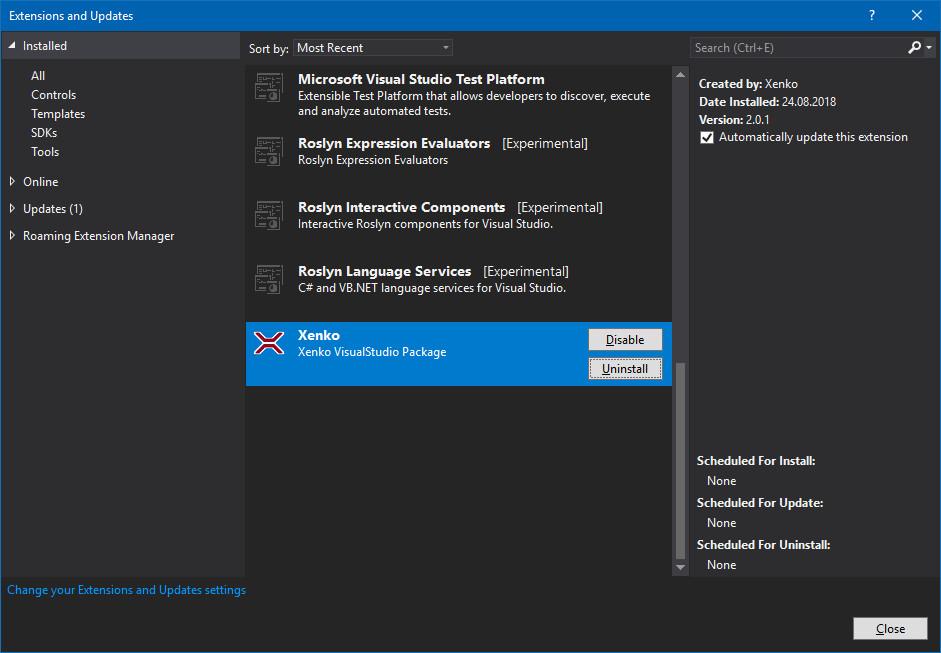
One solution, remove it manually:
Go to Tools > Extensions and Updates and uninstall the Xenko Package. Close VS completely and wait for a uninstall dialog and follow the instructions.
Domvel
on 25 Sep 2018
I'll give this a go.
 daveNewcastle
on 17 Oct 2018
daveNewcastle
on 17 Oct 2018
@daveNewcastle Have you stopped working on that?
 fdrobidoux
on 23 Aug 2019
fdrobidoux
on 23 Aug 2019
Related issues
 CharlesWoodhill
·
3Comments
CharlesWoodhill
·
3Comments
 WhitePhoera
·
3Comments
WhitePhoera
·
3Comments
 aunpyz
·
5Comments
aunpyz
·
5Comments
 domske
·
4Comments
domske
·
4Comments
 meriaizen86
·
5Comments
meriaizen86
·
5Comments